
Vlc Create Two Playlists
Goal: Create a playlist titled "Ultimate Fails Series" with the following files in VLC (located in Internal Memory/VLCVideos), in order: 2023_03_29_highlight14.mp4, scene_94_HD_MYI6.mp4, moment_1_HD_2023_07_27.mp4, recording_61_4K_final.mp4. And then, create a playlist titled "Adventure Marathon" with the following files in VLC, in order: clip_12_HD_2023_02_25.mp4, 8u3n_footage_29_HD.mp4, footage_46_raw_jZFR.mp4, D7B0_highlight_2_4K.mp4.
Goal: Create a playlist titled "Ultimate Fails Series" with the following files in VLC (located in Internal Memory/VLCVideos), in order: 2023_03_29_highlight14.mp4, scene_94_HD_MYI6.mp4, moment_1_HD_2023_07_27.mp4, recording_61_4K_final.mp4. And then, create a playlist titled "Adventure Marathon" with the following files in VLC, in order: clip_12_HD_2023_02_25.mp4, 8u3n_footage_29_HD.mp4, footage_46_raw_jZFR.mp4, D7B0_highlight_2_4K.mp4.
user: None
The current subgoal is to "Open VLC". I need to use the `open_app` action and specify "VLC" as the app name.
open_app(text="VLC")
Open the VLC app.
Open the VLC app.
The current subgoal is to "Tap Browse". I need to find the UI element corresponding to "Browse" and perform a click action on it. Based on the provided device state, element 12 is "FrameLayout: "org.videolan.vlc:id/nav_directories", "Browse" - (432, 2190, 648, 2337)". This is the correct element.
click(index=12)
Tap the "Browse" button.
Tap the "Browse" button.
The current subgoal is to tap "Internal memory". I will look for the UI element with the text "Internal memory" and use the `click` action on it. Based on the provided UI elements, element 26 has the text "Internal memory".
click(index=26)
Tap "Internal memory".
Tap "Internal memory".
The current subgoal is to "Tap “VLCVideos” to open the folder." I need to find the UI element with the text "VLCVideos" and perform a click action on it. Based on the provided device state, element 65 is a TextView with the text "VLCVideos".
click(index=65)
Tap "VLCVideos" to open the folder.
Tap "VLCVideos" to open the folder.
The current subgoal is to create a playlist. The first step is to tap the "More Actions" icon (⋮) for the file "2023_03_29_highlight_14_.mp4". I will locate the "More Actions" icon associated with this file in the UI elements and click it. The file "2023_03_29_highlight_14_.mp4" is element 26, and its corresponding "More Actions" icon is element 28.
click(index=28)
Tap the "More Actions" icon for "2023_03_29_highlight_14_.mp4".
Tap the "More Actions" icon for "2023_03_29_highlight_14_.mp4".
The current subgoal is to "Tap 'Add to playlist'". I will locate the UI element with the text "Add to playlist" and perform a click action on it. Based on the provided device state, element 18 is "Add to playlist".
click(index=18)
Tap "Add to playlist".
Tap "Add to playlist".
The subgoal requires typing "Ultimate Fails Series" into the "Playlist name" field and then tapping the "SAVE" button. Based on the provided UI elements: - Element 7 is the "Playlist name" EditText field. - Element 8 is the "SAVE" button. First, I will type the text into the EditText field (index 7). Second, I will click the "SAVE" button (index 8).
type(text="Ultimate Fails Series"index=7)
Type "Ultimate Fails Series" into the playlist name input field.
Type "Ultimate Fails Series" into the playlist name input field.
The subgoal explicitly states to "Tap SAVE". I will locate the "SAVE" button in the provided UI elements and perform a click action on it. Element 8 is identified as the "SAVE" button.
click(index=8)
Tap the "SAVE" button to create the playlist.
Tap the "SAVE" button to create the playlist.
The subgoal requires two actions: first, tapping the "Search control at the top", which is identified as the "Search…" TextView (element 5). Second, typing the specified text "scene_94_HD_MYI6.mp4" into the search field that appears.
click(index=5)
Tap the "Search…" control at the top.
Tap the "Search…" control at the top.
The current subgoal requires typing specific text into the search box. The search box is identified by the text " Search in current list" and has index 5. The action is `type`, the text is "scene_94_HD_MYI6.mp4", and the index is 5.
type(text="scene_94_HD_MYI6.mp4"index=5)
Type "scene_94_HD_MYI6.mp4" into the search box.
Type "scene_94_HD_MYI6.mp4" into the search box.
The current subgoal instructs to "Tap More Actions (⋮) for scene_94_HD_MYI6.mp4". I need to find the "More Actions" icon associated with "scene_94_HD_MYI6.mp4" in the UI elements and click it. The UI element with index 15, "ImageView: "org.videolan.vlc:id/item_more", "More Actions" - (954, 356, 1080, 482)", matches this description.
click(index=15)
Tap the "More Actions" icon for "scene_94_HD_MYI6.mp4".
Tap the "More Actions" icon for "scene_94_HD_MYI6.mp4".
The subgoal requires tapping "Add to playlist" in the open context menu. I will locate the "Add to playlist" element and perform a click action on it.
click(index=18)
Tap "Add to playlist" in the context menu.
Tap "Add to playlist" in the context menu.
The subgoal explicitly states "Press Back to dismiss the Add to playlist dialog." This translates directly to the `system_button` action with the parameter "Back".
system_button(button="Back")
Press the system back button.
Press the system back button.
The subgoal is to tap "Collapse" in the search bar. I see an ImageButton with the text "Collapse" and index 3. I will perform a click action on this element.
click(index=3)
Tap "Collapse" to exit the search bar.
Tap "Collapse" to exit the search bar.
The current subgoal is to add "moment_1_HD_2023_07_27.mp4" to the "Ultimate Fails Series" playlist. First, I need to locate "moment_1_HD_2023_07_27.mp4" on the screen. It is listed as element 52. Then, I need to tap the "More Actions" icon next to it, which is element 55.
click(index=55)
Tap the "More Actions" icon for "moment_1_HD_2023_07_27.mp4".
Tap the "More Actions" icon for "moment_1_HD_2023_07_27.mp4".
The current subgoal instructs to "tap 'Add to playlist'". I will locate the "Add to playlist" element in the provided UI elements and perform a click action on it. Element 18, "Add to playlist", matches this instruction.
click(index=18)
Tap "Add to playlist" in the open context menu.
Tap "Add to playlist" in the open context menu.
The current subgoal explicitly states to "Press Back to dismiss the Add to playlist dialog." This translates directly to using the `system_button` action with the parameter "Back".
system_button(button="Back")
Press the system back button to dismiss the current dialog.
Press the system back button to dismiss the current dialog.
The current subgoal is to "Go to Playlists tab and verify if “Ultimate Fails Series” exists." The current screen shows files within "VLCVideos", which is a subfolder of "Internal memory" within the "Browse" tab. The bottom navigation bar, which contains the "Playlists" tab, is not visible in the current screenshot. According to the App Card, "Go to Playlists Tab: Tap "Playlists" on the bottom bar." To access the bottom bar, I need to navigate back to the main "Browse" screen, or a higher level where the main navigation tabs are visible. The "Navigate up" button (index 3) will take me up one level in the file hierarchy. I am currently in "VLCVideos". Tapping "Navigate up" will take me to "Internal memory". Tapping it again will take me to the "Browse" root, where the bottom navigation bar should be visible. Therefore, the first step is to tap the "Navigate up" button to go from "VLCVideos" to "Internal memory".
click(index=3)
Tap the "Navigate up" button to go back to the "Internal memory" folder.
Tap the "Navigate up" button to go back to the "Internal memory" folder.
The subgoal is to "Tap Playlists on the bottom bar." I will locate the "Playlists" element in the provided UI elements and perform a click action on it. Element 41, "FrameLayout: org.videolan.vlc:id/nav_playlists, Playlists", is the correct target.
click(index=41)
Tap "Playlists" on the bottom bar.
Tap "Playlists" on the bottom bar.
The current subgoal is to "Wait for the Playlists tab to load." The current screen shows "Loading". As a low-level action executor, I cannot perform a "wait" action. I must provide an atomic action. Since the Playlists tab is currently loading, and I just navigated to it, clicking the "Playlists" tab again (element 12) is the most logical atomic action to attempt to refresh the view or ensure the loading process completes, as there are no other relevant interactive elements on the screen.
click(index=12)
Tap "Playlists" on the bottom bar again to potentially refresh the loading view.
Tap "Playlists" on the bottom bar again to potentially refresh the loading view.
The current subgoal is to "Verify playlists list: Wait for Playlists tab to finish loading." The device state shows "Loading" on the screen, indicating that the playlists tab has not finished loading yet. While the subgoal instructs to "wait", I am required to perform an atomic action. Clicking the currently selected "Playlists" tab again (element 12) is a common way to attempt to refresh or re-trigger the loading of content for that tab when it appears stuck or is still loading. This action does not contradict the "wait for loading" instruction, as it's an attempt to resolve the loading state.
click(index=12)
Tap "Playlists" on the bottom bar to potentially refresh the loading view or re-trigger the loading of the playlists.
Tap "Playlists" on the bottom bar to potentially refresh the loading view or re-trigger the loading of the playlists.
The current subgoal is to "Tap the More options (⋮) at the top right on the Playlists screen." I need to find the element that corresponds to "More options (⋮)" and click it. Based on the device state, element 5 is an "ImageView" with the text "More options" and is located at the top right.
click(index=5)
Tap the "More options" (⋮) icon at the top right of the screen.
Tap the "More options" (⋮) icon at the top right of the screen.
The current subgoal is to "Refresh the Playlists tab". The device state shows a menu with "Refresh" as an option. I need to tap on the "Refresh" option. The index for "Refresh" is 6.
click(index=6)
Tap "Refresh" to refresh the Playlists tab.
Tap "Refresh" to refresh the Playlists tab.
The current subgoal is "Refresh Playlists once: - Tap Playlists → More (⋮) → Refresh → wait a few seconds. - If still “Loading,” proceed; we’ll verify later." I have already performed the actions: "Tap Playlists", "Tap More (⋮)", and "Tap Refresh". The screen is currently showing "Loading". The instruction "wait a few seconds" is not an atomic action I can perform. The instruction "If still “Loading,” proceed; we’ll verify later" is a directive for the overall system to move to the next step of the plan, not an action for me, the low-level executor. Since I have already executed the "Refresh" action, and the screen is still loading, I have completed the executable part of this subgoal. There is no further atomic action to perform for this specific subgoal. I will indicate that I have completed the subgoal.
None()
No action is needed as the refresh action has been performed and the screen is still loading, which aligns with the "If still 'Loading,' proceed" instruction for the overall plan. The executable part of the subgoal is complete.
No action is needed as the refresh action has been performed and the screen is still loading, which aligns with the "If still 'Loading,' proceed" instruction for the overall plan. The executable part of the subgoal is complete.
The current subgoal is "Refresh Playlists once:". I have already performed the actions to refresh the playlists (tapped Playlists, More options, then Refresh). The screen currently shows "Loading...". The overall plan states: "If still “Loading,” proceed; we’ll verify later." This indicates that the refresh action has been initiated and this part of the subgoal is complete. The next step in the overall plan is to "Create 'Ultimate Fails Series'", which requires navigating to the "Browse" tab. Therefore, the appropriate action is to tap the "Browse" tab to move to the next phase of the overall plan.
click(index=11)
Tap the "Browse" tab to proceed to the next step of creating playlists, as the refresh action has been initiated and the screen is still loading.
Tap the "Browse" tab to proceed to the next step of creating playlists, as the refresh action has been initiated and the screen is still loading.
The current subgoal is to "Tap “Internal memory”". I will find the element with the text "Internal memory" and perform a click action on it. Based on the provided UI elements, index 26 corresponds to "Internal memory".
click(index=26)
Tap "Internal memory" to navigate into the internal storage.
Tap "Internal memory" to navigate into the internal storage.
The atomic action required is `click`. The target element is "VLCVideos". Based on the device state, the element with index 65 has the text "VLCVideos".
click(index=65)
Tap "VLCVideos" to open the folder.
Tap "VLCVideos" to open the folder.
The current subgoal requires long-pressing the file "2023_03_29_highlight_14_.mp4" to initiate multi-select mode. I will find the corresponding element in the UI and perform a long-press action. Element 26 matches the target file name.
long_press(index=26)
Long-press "2023_03_29_highlight_14_.mp4" to initiate multi-select mode.
Long-press "2023_03_29_highlight_14_.mp4" to initiate multi-select mode.
The current subgoal requires scrolling down to find "scene_94_HD_MYI6.mp4". This file is not visible on the current screen. Therefore, I need to perform a scroll down action. I will use the `swipe` action to scroll down the list of files.
swipe(coordinate=[540, 1500]coordinate2=[540, 500])
Scroll down the screen to locate "scene_94_HD_MYI6.mp4".
Scroll down the screen to locate "scene_94_HD_MYI6.mp4".
The current subgoal requires tapping "scene_94_HD_MYI6.mp4" to add it to the selection. Based on the device state, "scene_94_HD_MYI6.mp4" is associated with index 47. Therefore, the atomic action is a click on index 47.
click(index=47)
Tap "scene_94_HD_MYI6.mp4" to add it to the selection for the "Ultimate Fails Series" playlist.
Tap "scene_94_HD_MYI6.mp4" to add it to the selection for the "Ultimate Fails Series" playlist.
The current subgoal requires me to tap on "moment_1_HD_2023_07_27.mp4" to add it to the selection. I need to find the corresponding index for this file in the provided UI elements. "moment_1_HD_2023_07_27.mp4" is listed as element 38.
click(index=38)
Tap "moment_1_HD_2023_07_27.mp4" to add it to the selection for the "Ultimate Fails Series" playlist.
Tap "moment_1_HD_2023_07_27.mp4" to add it to the selection for the "Ultimate Fails Series" playlist.
The current subgoal requires me to tap on "recording_61_4K_final.mp4" to add it to the selection. I have identified "recording_61_4K_final.mp4" as element 44 in the provided UI elements.
click(index=44)
Tap "recording_61_4K_final.mp4" to add it to the selection.
Tap "recording_61_4K_final.mp4" to add it to the selection.
The current subgoal is to create a playlist from the current selection. The app card states that after selecting files, the next step is to tap "Add to playlist". I see a clickable element with the text "Add to playlist" and index 57.
click(index=57)
Tap "Add to playlist" to proceed with creating the playlist from the selected files.
Tap "Add to playlist" to proceed with creating the playlist from the selected files.
The current subgoal requires typing "Ultimate Fails Series" into the playlist name input field and then tapping the "SAVE" button. The input field is identified as "EditText: 'Playlist name'" with index 7, and the "SAVE" button is identified as "Button: 'org.videolan.vlc:id/dialog_playlist_save', 'SAVE'" with index 8.
type(text="Ultimate Fails Series"index=7)
Type "Ultimate Fails Series" into the playlist name input field.
Type "Ultimate Fails Series" into the playlist name input field.
The current subgoal is to "Save Ultimate Fails Series now". Based on the device state, the playlist name "Ultimate Fails Series" has already been typed into the input field. The next action to save the playlist is to tap the "SAVE" button. The "SAVE" button is identified as element 8 in the clickable UI elements.
click(index=8)
Tap the "SAVE" button to create the "Ultimate Fails Series" playlist.
Tap the "SAVE" button to create the "Ultimate Fails Series" playlist.
The current subgoal requires long-pressing "clip_12_HD_2023_02_25.mp4" to initiate multi-select mode. I need to find the index corresponding to this file name. Based on the provided UI elements, "clip_12_HD_2023_02_25.mp4" is associated with index 24.
long_press(index=24)
Long-press "clip_12_HD_2023_02_25.mp4" to start multi-select mode for creating the "Adventure Marathon" playlist.
Long-press "clip_12_HD_2023_02_25.mp4" to start multi-select mode for creating the "Adventure Marathon" playlist.
The current subgoal requires tapping "8u3n_footage_29_HD.mp4" to add it to the selection. I will find the corresponding clickable element and perform a click action.
click(index=8)
Tap "8u3n_footage_29_HD.mp4" to add to the selection.
Tap "8u3n_footage_29_HD.mp4" to add to the selection.
The subgoal is to "Navigate up to return to VLCVideos." The UI shows a "Navigate up" button (element 4) which is typically used for this purpose.
click(index=4)
Click the "Navigate up" button to go back to the previous directory, which is VLCVideos.
Click the "Navigate up" button to go back to the previous directory, which is VLCVideos.
The current subgoal requires me to continue selecting files for the "Adventure Marathon" playlist. I have already long-pressed "clip_12_HD_2023_02_25.mp4" and tapped "8u3n_footage_29_HD.mp4". The next file to tap is "footage_46_raw_jZFR.mp4". I will find its index in the clickable UI elements and perform a click action.
click(index=48)
Tap "footage_46_raw_jZFR.mp4" to add it to the selection for the "Adventure Marathon" playlist.
Tap "footage_46_raw_jZFR.mp4" to add it to the selection for the "Adventure Marathon" playlist.
The current subgoal requires tapping "Got it" on the "Viewing full screen" overlay. The device state shows a button with the text "Got it" and index 4. Therefore, the atomic action is to click this button.
click(index=4)
Tap "Got it" on the "Viewing full screen" overlay to dismiss it.
Tap "Got it" on the "Viewing full screen" overlay to dismiss it.
The current subgoal instructs to dismiss overlays by tapping "Close (X)" on the "Video player tips" overlay. I see a "Close" button with index 4 on the screen.
click(index=4)
Tap the "Close" button (X) on the "Video player tips" overlay to dismiss it.
Tap the "Close" button (X) on the "Video player tips" overlay to dismiss it.
The current subgoal is to "Exit the player to return to VLCVideos". The device state indicates that the app is currently in a video player view. To exit the video player, the appropriate action is to press the system back button.
system_button(button="Back")
Press the system Back button to exit the video player and return to the previous screen.
Press the system Back button to exit the video player and return to the previous screen.
The current subgoal is to dismiss the storage dialog by tapping "NO". I need to find the "NO" button in the clickable UI elements and perform a click action on it. The element with index 5 has the text "NO".
click(index=5)
Tap the "NO" button to dismiss the "New external storage detected" dialog.
Tap the "NO" button to dismiss the "New external storage detected" dialog.
The current subgoal requires me to tap on "D7B0_highlight_2_4K.mp4" to add it to the selection. I will locate this file in the clickable UI elements and perform a click action on it. Element 37 corresponds to "D7B0_highlight_2_4K.mp4".
click(index=37)
Tap "D7B0_highlight_2_4K.mp4" to add it to the selection for the "Adventure Marathon" playlist.
Tap "D7B0_highlight_2_4K.mp4" to add it to the selection for the "Adventure Marathon" playlist.
The current subgoal explicitly states "Press Back to exit the video player and return to the VLCVideos list." This translates directly to using the `system_button` action with the argument "Back".
system_button(button="Back")
Press the system Back button to exit the current screen.
Press the system Back button to exit the current screen.
The current subgoal is to create the "Adventure Marathon" playlist. The first step in the plan for this playlist is to "Long-press clip_12_HD_2023_02_25.mp4". I need to find the UI element corresponding to "clip_12_HD_2023_02_25.mp4" and perform a long-press action on it. Based on the device state, "clip_12_HD_2023_02_25.mp4" is associated with index 29.
long_press(index=29)
Long-press "clip_12_HD_2023_02_25.mp4" to initiate multi-select mode for creating the "Adventure Marathon" playlist.
Long-press "clip_12_HD_2023_02_25.mp4" to initiate multi-select mode for creating the "Adventure Marathon" playlist.
The current subgoal requires tapping "8u3n_footage_29_HD.mp4" to add it to the selection. Based on the provided UI elements, the corresponding clickable element for this file is index 13.
click(index=13)
Tap "8u3n_footage_29_HD.mp4" to add it to the selection.
Tap "8u3n_footage_29_HD.mp4" to add it to the selection.
The current subgoal requires me to add "footage_46_raw_jZFR.mp4" to the selection. I will locate this file in the provided UI elements and perform a click action on it.
click(index=40)
Tap "footage_46_raw_jZFR.mp4" to add it to the selection.
Tap "footage_46_raw_jZFR.mp4" to add it to the selection.
The atomic action required is `click`. The target element is "D7B0_highlight_2_4K.mp4". Based on the device state, this element is associated with index 31.
click(index=31)
Tap "D7B0_highlight_2_4K.mp4" to add it to the selection.
Tap "D7B0_highlight_2_4K.mp4" to add it to the selection.
The current subgoal is to "Create “Adventure Marathon” from current selection". The first action specified is to "Tap Add to playlist in the top action bar". I need to find the clickable element that says "Add to playlist" and click it. Based on the provided UI elements, index 60 corresponds to "Add to playlist".
click(index=60)
Tap "Add to playlist" to open the playlist creation/selection dialog.
Tap "Add to playlist" to open the playlist creation/selection dialog.
The current subgoal requires typing "Adventure Marathon" into the "Playlist name" field. Based on the provided UI elements, element 7 is the "Playlist name" EditText field. After typing, the subgoal instructs to tap "SAVE", which corresponds to element 8.
type(text="Adventure Marathon"index=7)
Type "Adventure Marathon" into the "Playlist name" input field.
Type "Adventure Marathon" into the "Playlist name" input field.
The subgoal explicitly states "Tap SAVE". I need to find the "SAVE" button in the provided clickable elements and click it. The "SAVE" button is identified with index 8.
click(index=8)
Tap the "SAVE" button to create the playlist.
Tap the "SAVE" button to create the playlist.
Created two VLC playlists as requested:
- Ultimate Fails Series (in order): 1) 2023_03_29_highlight_14_.mp4, 2) scene_94_HD_MYI6.mp4, 3) moment_1_HD_2023_07_27.mp4, 4) recording_61_4K_final.mp4
- Adventure Marathon (in order): 1) clip_12_HD_2023_02_25.mp4, 2) 8u3n_footage_29_HD.mp4, 3) footage_46_raw_jZFR.mp4, 4) D7B0_highlight_2_4K.mp4
complete_goal(message="Created two VLC playlists as requested:
- Ultimate Fails Series (in order): 1) 2023_03_29_highlight_14_.mp4, 2) scene_94_HD_MYI6.mp4, 3) moment_1_HD_2023_07_27.mp4, 4) recording_61_4K_final.mp4
- Adventure Marathon (in order): 1) clip_12_HD_2023_02_25.mp4, 2) 8u3n_footage_29_HD.mp4, 3) footage_46_raw_jZFR.mp4, 4) D7B0_highlight_2_4K.mp4")
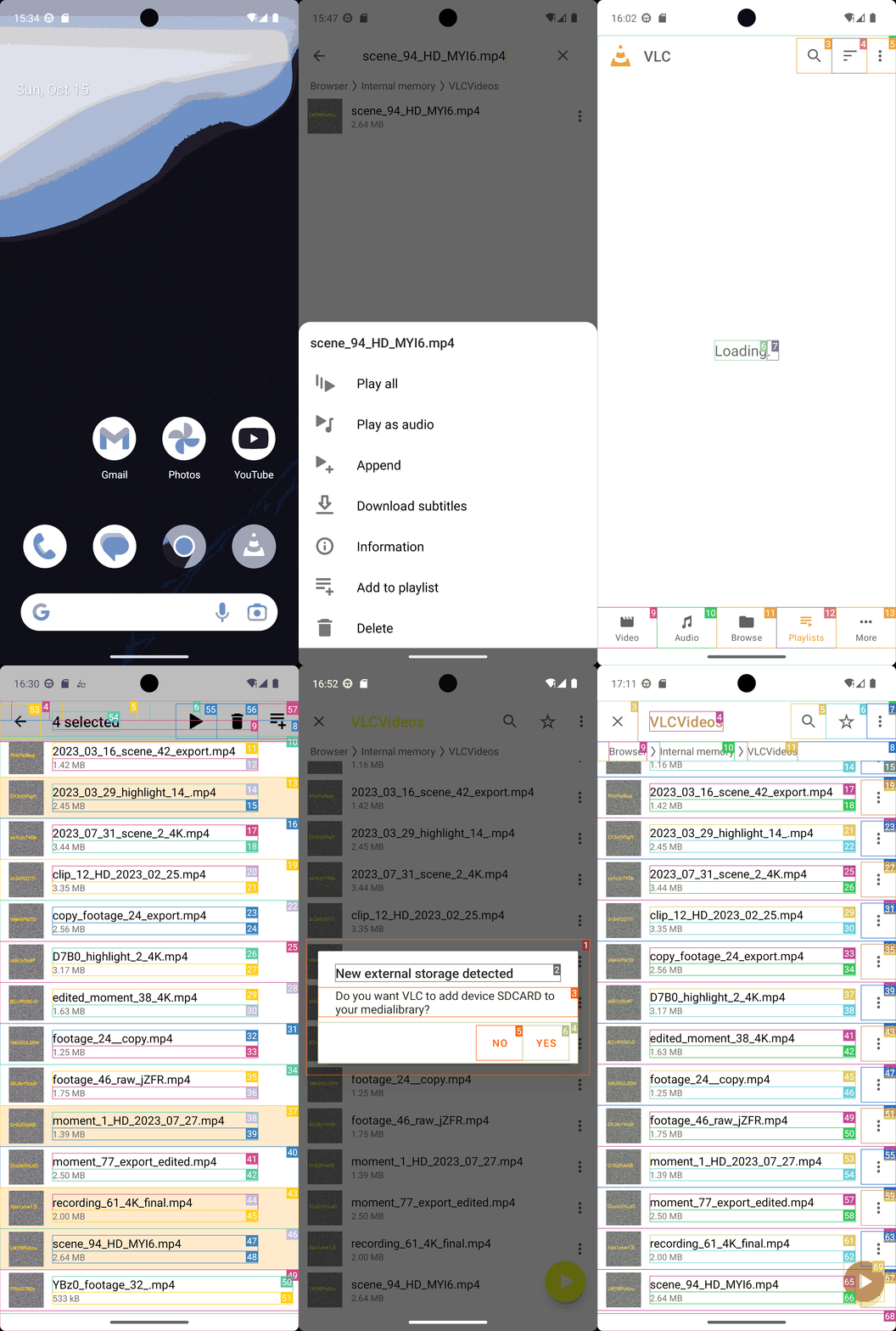
Goal: Create a playlist titled "Ultimate Fails Series" with the following files in VLC (located in Internal Memory/VLCVideos), in order: 2023_03_29_highlight14.mp4, scene_94_HD_MYI6.mp4, moment_1_HD_2023_07_27.mp4, recording_61_4K_final.mp4. And then, create a playlist titled "Adventure Marathon" with the following files in VLC, in order: clip_12_HD_2023_02_25.mp4, 8u3n_footage_29_HD.mp4, footage_46_raw_jZFR.mp4, D7B0_highlight_2_4K.mp4.
user: None
The current subgoal is to "Open VLC". I need to use the `open_app` action and specify "VLC" as the app name.
open_app(text="VLC")
Open the VLC app.
Open the VLC app.
The current subgoal is to "Tap Browse". I need to find the UI element corresponding to "Browse" and perform a click action on it. Based on the provided device state, element 12 is "FrameLayout: "org.videolan.vlc:id/nav_directories", "Browse" - (432, 2190, 648, 2337)". This is the correct element.
click(index=12)
Tap the "Browse" button.
Tap the "Browse" button.
The current subgoal is to tap "Internal memory". I will look for the UI element with the text "Internal memory" and use the `click` action on it. Based on the provided UI elements, element 26 has the text "Internal memory".
click(index=26)
Tap "Internal memory".
Tap "Internal memory".
The current subgoal is to "Tap “VLCVideos” to open the folder." I need to find the UI element with the text "VLCVideos" and perform a click action on it. Based on the provided device state, element 65 is a TextView with the text "VLCVideos".
click(index=65)
Tap "VLCVideos" to open the folder.
Tap "VLCVideos" to open the folder.
The current subgoal is to create a playlist. The first step is to tap the "More Actions" icon (⋮) for the file "2023_03_29_highlight_14_.mp4". I will locate the "More Actions" icon associated with this file in the UI elements and click it. The file "2023_03_29_highlight_14_.mp4" is element 26, and its corresponding "More Actions" icon is element 28.
click(index=28)
Tap the "More Actions" icon for "2023_03_29_highlight_14_.mp4".
Tap the "More Actions" icon for "2023_03_29_highlight_14_.mp4".
The current subgoal is to "Tap 'Add to playlist'". I will locate the UI element with the text "Add to playlist" and perform a click action on it. Based on the provided device state, element 18 is "Add to playlist".
click(index=18)
Tap "Add to playlist".
Tap "Add to playlist".
The subgoal requires typing "Ultimate Fails Series" into the "Playlist name" field and then tapping the "SAVE" button. Based on the provided UI elements: - Element 7 is the "Playlist name" EditText field. - Element 8 is the "SAVE" button. First, I will type the text into the EditText field (index 7). Second, I will click the "SAVE" button (index 8).
type(text="Ultimate Fails Series"index=7)
Type "Ultimate Fails Series" into the playlist name input field.
Type "Ultimate Fails Series" into the playlist name input field.
The subgoal explicitly states to "Tap SAVE". I will locate the "SAVE" button in the provided UI elements and perform a click action on it. Element 8 is identified as the "SAVE" button.
click(index=8)
Tap the "SAVE" button to create the playlist.
Tap the "SAVE" button to create the playlist.
The subgoal requires two actions: first, tapping the "Search control at the top", which is identified as the "Search…" TextView (element 5). Second, typing the specified text "scene_94_HD_MYI6.mp4" into the search field that appears.
click(index=5)
Tap the "Search…" control at the top.
Tap the "Search…" control at the top.
The current subgoal requires typing specific text into the search box. The search box is identified by the text " Search in current list" and has index 5. The action is `type`, the text is "scene_94_HD_MYI6.mp4", and the index is 5.
type(text="scene_94_HD_MYI6.mp4"index=5)
Type "scene_94_HD_MYI6.mp4" into the search box.
Type "scene_94_HD_MYI6.mp4" into the search box.
The current subgoal instructs to "Tap More Actions (⋮) for scene_94_HD_MYI6.mp4". I need to find the "More Actions" icon associated with "scene_94_HD_MYI6.mp4" in the UI elements and click it. The UI element with index 15, "ImageView: "org.videolan.vlc:id/item_more", "More Actions" - (954, 356, 1080, 482)", matches this description.
click(index=15)
Tap the "More Actions" icon for "scene_94_HD_MYI6.mp4".
Tap the "More Actions" icon for "scene_94_HD_MYI6.mp4".
The subgoal requires tapping "Add to playlist" in the open context menu. I will locate the "Add to playlist" element and perform a click action on it.
click(index=18)
Tap "Add to playlist" in the context menu.
Tap "Add to playlist" in the context menu.
The subgoal explicitly states "Press Back to dismiss the Add to playlist dialog." This translates directly to the `system_button` action with the parameter "Back".
system_button(button="Back")
Press the system back button.
Press the system back button.
The subgoal is to tap "Collapse" in the search bar. I see an ImageButton with the text "Collapse" and index 3. I will perform a click action on this element.
click(index=3)
Tap "Collapse" to exit the search bar.
Tap "Collapse" to exit the search bar.
The current subgoal is to add "moment_1_HD_2023_07_27.mp4" to the "Ultimate Fails Series" playlist. First, I need to locate "moment_1_HD_2023_07_27.mp4" on the screen. It is listed as element 52. Then, I need to tap the "More Actions" icon next to it, which is element 55.
click(index=55)
Tap the "More Actions" icon for "moment_1_HD_2023_07_27.mp4".
Tap the "More Actions" icon for "moment_1_HD_2023_07_27.mp4".
The current subgoal instructs to "tap 'Add to playlist'". I will locate the "Add to playlist" element in the provided UI elements and perform a click action on it. Element 18, "Add to playlist", matches this instruction.
click(index=18)
Tap "Add to playlist" in the open context menu.
Tap "Add to playlist" in the open context menu.
The current subgoal explicitly states to "Press Back to dismiss the Add to playlist dialog." This translates directly to using the `system_button` action with the parameter "Back".
system_button(button="Back")
Press the system back button to dismiss the current dialog.
Press the system back button to dismiss the current dialog.
The current subgoal is to "Go to Playlists tab and verify if “Ultimate Fails Series” exists." The current screen shows files within "VLCVideos", which is a subfolder of "Internal memory" within the "Browse" tab. The bottom navigation bar, which contains the "Playlists" tab, is not visible in the current screenshot. According to the App Card, "Go to Playlists Tab: Tap "Playlists" on the bottom bar." To access the bottom bar, I need to navigate back to the main "Browse" screen, or a higher level where the main navigation tabs are visible. The "Navigate up" button (index 3) will take me up one level in the file hierarchy. I am currently in "VLCVideos". Tapping "Navigate up" will take me to "Internal memory". Tapping it again will take me to the "Browse" root, where the bottom navigation bar should be visible. Therefore, the first step is to tap the "Navigate up" button to go from "VLCVideos" to "Internal memory".
click(index=3)
Tap the "Navigate up" button to go back to the "Internal memory" folder.
Tap the "Navigate up" button to go back to the "Internal memory" folder.
The subgoal is to "Tap Playlists on the bottom bar." I will locate the "Playlists" element in the provided UI elements and perform a click action on it. Element 41, "FrameLayout: org.videolan.vlc:id/nav_playlists, Playlists", is the correct target.
click(index=41)
Tap "Playlists" on the bottom bar.
Tap "Playlists" on the bottom bar.
The current subgoal is to "Wait for the Playlists tab to load." The current screen shows "Loading". As a low-level action executor, I cannot perform a "wait" action. I must provide an atomic action. Since the Playlists tab is currently loading, and I just navigated to it, clicking the "Playlists" tab again (element 12) is the most logical atomic action to attempt to refresh the view or ensure the loading process completes, as there are no other relevant interactive elements on the screen.
click(index=12)
Tap "Playlists" on the bottom bar again to potentially refresh the loading view.
Tap "Playlists" on the bottom bar again to potentially refresh the loading view.
The current subgoal is to "Verify playlists list: Wait for Playlists tab to finish loading." The device state shows "Loading" on the screen, indicating that the playlists tab has not finished loading yet. While the subgoal instructs to "wait", I am required to perform an atomic action. Clicking the currently selected "Playlists" tab again (element 12) is a common way to attempt to refresh or re-trigger the loading of content for that tab when it appears stuck or is still loading. This action does not contradict the "wait for loading" instruction, as it's an attempt to resolve the loading state.
click(index=12)
Tap "Playlists" on the bottom bar to potentially refresh the loading view or re-trigger the loading of the playlists.
Tap "Playlists" on the bottom bar to potentially refresh the loading view or re-trigger the loading of the playlists.
The current subgoal is to "Tap the More options (⋮) at the top right on the Playlists screen." I need to find the element that corresponds to "More options (⋮)" and click it. Based on the device state, element 5 is an "ImageView" with the text "More options" and is located at the top right.
click(index=5)
Tap the "More options" (⋮) icon at the top right of the screen.
Tap the "More options" (⋮) icon at the top right of the screen.
The current subgoal is to "Refresh the Playlists tab". The device state shows a menu with "Refresh" as an option. I need to tap on the "Refresh" option. The index for "Refresh" is 6.
click(index=6)
Tap "Refresh" to refresh the Playlists tab.
Tap "Refresh" to refresh the Playlists tab.
The current subgoal is "Refresh Playlists once: - Tap Playlists → More (⋮) → Refresh → wait a few seconds. - If still “Loading,” proceed; we’ll verify later." I have already performed the actions: "Tap Playlists", "Tap More (⋮)", and "Tap Refresh". The screen is currently showing "Loading". The instruction "wait a few seconds" is not an atomic action I can perform. The instruction "If still “Loading,” proceed; we’ll verify later" is a directive for the overall system to move to the next step of the plan, not an action for me, the low-level executor. Since I have already executed the "Refresh" action, and the screen is still loading, I have completed the executable part of this subgoal. There is no further atomic action to perform for this specific subgoal. I will indicate that I have completed the subgoal.
None()
No action is needed as the refresh action has been performed and the screen is still loading, which aligns with the "If still 'Loading,' proceed" instruction for the overall plan. The executable part of the subgoal is complete.
No action is needed as the refresh action has been performed and the screen is still loading, which aligns with the "If still 'Loading,' proceed" instruction for the overall plan. The executable part of the subgoal is complete.
The current subgoal is "Refresh Playlists once:". I have already performed the actions to refresh the playlists (tapped Playlists, More options, then Refresh). The screen currently shows "Loading...". The overall plan states: "If still “Loading,” proceed; we’ll verify later." This indicates that the refresh action has been initiated and this part of the subgoal is complete. The next step in the overall plan is to "Create 'Ultimate Fails Series'", which requires navigating to the "Browse" tab. Therefore, the appropriate action is to tap the "Browse" tab to move to the next phase of the overall plan.
click(index=11)
Tap the "Browse" tab to proceed to the next step of creating playlists, as the refresh action has been initiated and the screen is still loading.
Tap the "Browse" tab to proceed to the next step of creating playlists, as the refresh action has been initiated and the screen is still loading.
The current subgoal is to "Tap “Internal memory”". I will find the element with the text "Internal memory" and perform a click action on it. Based on the provided UI elements, index 26 corresponds to "Internal memory".
click(index=26)
Tap "Internal memory" to navigate into the internal storage.
Tap "Internal memory" to navigate into the internal storage.
The atomic action required is `click`. The target element is "VLCVideos". Based on the device state, the element with index 65 has the text "VLCVideos".
click(index=65)
Tap "VLCVideos" to open the folder.
Tap "VLCVideos" to open the folder.
The current subgoal requires long-pressing the file "2023_03_29_highlight_14_.mp4" to initiate multi-select mode. I will find the corresponding element in the UI and perform a long-press action. Element 26 matches the target file name.
long_press(index=26)
Long-press "2023_03_29_highlight_14_.mp4" to initiate multi-select mode.
Long-press "2023_03_29_highlight_14_.mp4" to initiate multi-select mode.
The current subgoal requires scrolling down to find "scene_94_HD_MYI6.mp4". This file is not visible on the current screen. Therefore, I need to perform a scroll down action. I will use the `swipe` action to scroll down the list of files.
swipe(coordinate=[540, 1500]coordinate2=[540, 500])
Scroll down the screen to locate "scene_94_HD_MYI6.mp4".
Scroll down the screen to locate "scene_94_HD_MYI6.mp4".
The current subgoal requires tapping "scene_94_HD_MYI6.mp4" to add it to the selection. Based on the device state, "scene_94_HD_MYI6.mp4" is associated with index 47. Therefore, the atomic action is a click on index 47.
click(index=47)
Tap "scene_94_HD_MYI6.mp4" to add it to the selection for the "Ultimate Fails Series" playlist.
Tap "scene_94_HD_MYI6.mp4" to add it to the selection for the "Ultimate Fails Series" playlist.
The current subgoal requires me to tap on "moment_1_HD_2023_07_27.mp4" to add it to the selection. I need to find the corresponding index for this file in the provided UI elements. "moment_1_HD_2023_07_27.mp4" is listed as element 38.
click(index=38)
Tap "moment_1_HD_2023_07_27.mp4" to add it to the selection for the "Ultimate Fails Series" playlist.
Tap "moment_1_HD_2023_07_27.mp4" to add it to the selection for the "Ultimate Fails Series" playlist.
The current subgoal requires me to tap on "recording_61_4K_final.mp4" to add it to the selection. I have identified "recording_61_4K_final.mp4" as element 44 in the provided UI elements.
click(index=44)
Tap "recording_61_4K_final.mp4" to add it to the selection.
Tap "recording_61_4K_final.mp4" to add it to the selection.
The current subgoal is to create a playlist from the current selection. The app card states that after selecting files, the next step is to tap "Add to playlist". I see a clickable element with the text "Add to playlist" and index 57.
click(index=57)
Tap "Add to playlist" to proceed with creating the playlist from the selected files.
Tap "Add to playlist" to proceed with creating the playlist from the selected files.
The current subgoal requires typing "Ultimate Fails Series" into the playlist name input field and then tapping the "SAVE" button. The input field is identified as "EditText: 'Playlist name'" with index 7, and the "SAVE" button is identified as "Button: 'org.videolan.vlc:id/dialog_playlist_save', 'SAVE'" with index 8.
type(text="Ultimate Fails Series"index=7)
Type "Ultimate Fails Series" into the playlist name input field.
Type "Ultimate Fails Series" into the playlist name input field.
The current subgoal is to "Save Ultimate Fails Series now". Based on the device state, the playlist name "Ultimate Fails Series" has already been typed into the input field. The next action to save the playlist is to tap the "SAVE" button. The "SAVE" button is identified as element 8 in the clickable UI elements.
click(index=8)
Tap the "SAVE" button to create the "Ultimate Fails Series" playlist.
Tap the "SAVE" button to create the "Ultimate Fails Series" playlist.
The current subgoal requires long-pressing "clip_12_HD_2023_02_25.mp4" to initiate multi-select mode. I need to find the index corresponding to this file name. Based on the provided UI elements, "clip_12_HD_2023_02_25.mp4" is associated with index 24.
long_press(index=24)
Long-press "clip_12_HD_2023_02_25.mp4" to start multi-select mode for creating the "Adventure Marathon" playlist.
Long-press "clip_12_HD_2023_02_25.mp4" to start multi-select mode for creating the "Adventure Marathon" playlist.
The current subgoal requires tapping "8u3n_footage_29_HD.mp4" to add it to the selection. I will find the corresponding clickable element and perform a click action.
click(index=8)
Tap "8u3n_footage_29_HD.mp4" to add to the selection.
Tap "8u3n_footage_29_HD.mp4" to add to the selection.
The subgoal is to "Navigate up to return to VLCVideos." The UI shows a "Navigate up" button (element 4) which is typically used for this purpose.
click(index=4)
Click the "Navigate up" button to go back to the previous directory, which is VLCVideos.
Click the "Navigate up" button to go back to the previous directory, which is VLCVideos.
The current subgoal requires me to continue selecting files for the "Adventure Marathon" playlist. I have already long-pressed "clip_12_HD_2023_02_25.mp4" and tapped "8u3n_footage_29_HD.mp4". The next file to tap is "footage_46_raw_jZFR.mp4". I will find its index in the clickable UI elements and perform a click action.
click(index=48)
Tap "footage_46_raw_jZFR.mp4" to add it to the selection for the "Adventure Marathon" playlist.
Tap "footage_46_raw_jZFR.mp4" to add it to the selection for the "Adventure Marathon" playlist.
The current subgoal requires tapping "Got it" on the "Viewing full screen" overlay. The device state shows a button with the text "Got it" and index 4. Therefore, the atomic action is to click this button.
click(index=4)
Tap "Got it" on the "Viewing full screen" overlay to dismiss it.
Tap "Got it" on the "Viewing full screen" overlay to dismiss it.
The current subgoal instructs to dismiss overlays by tapping "Close (X)" on the "Video player tips" overlay. I see a "Close" button with index 4 on the screen.
click(index=4)
Tap the "Close" button (X) on the "Video player tips" overlay to dismiss it.
Tap the "Close" button (X) on the "Video player tips" overlay to dismiss it.
The current subgoal is to "Exit the player to return to VLCVideos". The device state indicates that the app is currently in a video player view. To exit the video player, the appropriate action is to press the system back button.
system_button(button="Back")
Press the system Back button to exit the video player and return to the previous screen.
Press the system Back button to exit the video player and return to the previous screen.
The current subgoal is to dismiss the storage dialog by tapping "NO". I need to find the "NO" button in the clickable UI elements and perform a click action on it. The element with index 5 has the text "NO".
click(index=5)
Tap the "NO" button to dismiss the "New external storage detected" dialog.
Tap the "NO" button to dismiss the "New external storage detected" dialog.
The current subgoal requires me to tap on "D7B0_highlight_2_4K.mp4" to add it to the selection. I will locate this file in the clickable UI elements and perform a click action on it. Element 37 corresponds to "D7B0_highlight_2_4K.mp4".
click(index=37)
Tap "D7B0_highlight_2_4K.mp4" to add it to the selection for the "Adventure Marathon" playlist.
Tap "D7B0_highlight_2_4K.mp4" to add it to the selection for the "Adventure Marathon" playlist.
The current subgoal explicitly states "Press Back to exit the video player and return to the VLCVideos list." This translates directly to using the `system_button` action with the argument "Back".
system_button(button="Back")
Press the system Back button to exit the current screen.
Press the system Back button to exit the current screen.
The current subgoal is to create the "Adventure Marathon" playlist. The first step in the plan for this playlist is to "Long-press clip_12_HD_2023_02_25.mp4". I need to find the UI element corresponding to "clip_12_HD_2023_02_25.mp4" and perform a long-press action on it. Based on the device state, "clip_12_HD_2023_02_25.mp4" is associated with index 29.
long_press(index=29)
Long-press "clip_12_HD_2023_02_25.mp4" to initiate multi-select mode for creating the "Adventure Marathon" playlist.
Long-press "clip_12_HD_2023_02_25.mp4" to initiate multi-select mode for creating the "Adventure Marathon" playlist.
The current subgoal requires tapping "8u3n_footage_29_HD.mp4" to add it to the selection. Based on the provided UI elements, the corresponding clickable element for this file is index 13.
click(index=13)
Tap "8u3n_footage_29_HD.mp4" to add it to the selection.
Tap "8u3n_footage_29_HD.mp4" to add it to the selection.
The current subgoal requires me to add "footage_46_raw_jZFR.mp4" to the selection. I will locate this file in the provided UI elements and perform a click action on it.
click(index=40)
Tap "footage_46_raw_jZFR.mp4" to add it to the selection.
Tap "footage_46_raw_jZFR.mp4" to add it to the selection.
The atomic action required is `click`. The target element is "D7B0_highlight_2_4K.mp4". Based on the device state, this element is associated with index 31.
click(index=31)
Tap "D7B0_highlight_2_4K.mp4" to add it to the selection.
Tap "D7B0_highlight_2_4K.mp4" to add it to the selection.
The current subgoal is to "Create “Adventure Marathon” from current selection". The first action specified is to "Tap Add to playlist in the top action bar". I need to find the clickable element that says "Add to playlist" and click it. Based on the provided UI elements, index 60 corresponds to "Add to playlist".
click(index=60)
Tap "Add to playlist" to open the playlist creation/selection dialog.
Tap "Add to playlist" to open the playlist creation/selection dialog.
The current subgoal requires typing "Adventure Marathon" into the "Playlist name" field. Based on the provided UI elements, element 7 is the "Playlist name" EditText field. After typing, the subgoal instructs to tap "SAVE", which corresponds to element 8.
type(text="Adventure Marathon"index=7)
Type "Adventure Marathon" into the "Playlist name" input field.
Type "Adventure Marathon" into the "Playlist name" input field.
The subgoal explicitly states "Tap SAVE". I need to find the "SAVE" button in the provided clickable elements and click it. The "SAVE" button is identified with index 8.
click(index=8)
Tap the "SAVE" button to create the playlist.
Tap the "SAVE" button to create the playlist.
Created two VLC playlists as requested:
- Ultimate Fails Series (in order): 1) 2023_03_29_highlight_14_.mp4, 2) scene_94_HD_MYI6.mp4, 3) moment_1_HD_2023_07_27.mp4, 4) recording_61_4K_final.mp4
- Adventure Marathon (in order): 1) clip_12_HD_2023_02_25.mp4, 2) 8u3n_footage_29_HD.mp4, 3) footage_46_raw_jZFR.mp4, 4) D7B0_highlight_2_4K.mp4
complete_goal(message="Created two VLC playlists as requested:
- Ultimate Fails Series (in order): 1) 2023_03_29_highlight_14_.mp4, 2) scene_94_HD_MYI6.mp4, 3) moment_1_HD_2023_07_27.mp4, 4) recording_61_4K_final.mp4
- Adventure Marathon (in order): 1) clip_12_HD_2023_02_25.mp4, 2) 8u3n_footage_29_HD.mp4, 3) footage_46_raw_jZFR.mp4, 4) D7B0_highlight_2_4K.mp4")