
Vlc Create Playlist
Goal: Create a playlist titled "Ultimate Fails Series" with the following files in VLC (located in Internal Memory/VLCVideos), in order: highlight_41_4K_2023_03_30.mp4, scene_68_4K_copy.mp4
Goal: Create a playlist titled "Ultimate Fails Series" with the following files in VLC (located in Internal Memory/VLCVideos), in order: highlight_41_4K_2023_03_30.mp4, scene_68_4K_copy.mp4
user: None
The current subgoal is to open the VLC app. The instruction specifies "Open VLC from the home screen by tapping the VLC icon." I will use the `click` action on the UI element labeled "VLC".
click(index=11)
Clicking the VLC app icon to open the application.
Clicking the VLC app icon to open the application.
The current subgoal is to dismiss the "New external storage detected" prompt by tapping "NO". I need to locate the "NO" button in the provided UI elements and perform a click action on it. The element with index 5 is a button with the text "NO".
click(index=5)
Tapping the "NO" button to dismiss the external storage detection prompt.
Tapping the "NO" button to dismiss the external storage detection prompt.
The current subgoal is to "Tap the Browse tab on the bottom bar." I will locate the "Browse" element in the provided UI elements and perform a click action on it. The element with text "Browse" has index 11.
click(index=11)
Tapping the "Browse" tab on the bottom bar.
Tapping the "Browse" tab on the bottom bar.
The current subgoal is "Tap Internal Memory". I need to find the UI element that corresponds to "Internal memory" and click it. Based on the provided UI elements, element 25 is a CardView with the description "Folder: Internal memory". Clicking this element will open the "Internal memory" folder.
click(index=25)
Tapping on the "Internal memory" folder to access its contents.
Tapping on the "Internal memory" folder to access its contents.
The current subgoal is to tap the "VLCVideos" folder. I need to find the clickable element that corresponds to "VLCVideos" and perform a click action on it. Based on the provided UI elements, element 64 is a ViewGroup with the text "VLCVideos".
click(index=64)
Tapping the "VLCVideos" folder to open it.
Tapping the "VLCVideos" folder to open it.
The current subgoal is to "Long-press highlight_41_4K_2023_03_30.mp4 to start selection." I need to find the UI element corresponding to "highlight_41_4K_2023_03_30.mp4" and perform a long-press action on it. Based on the provided UI elements, index 21 corresponds to the ViewGroup for "highlight_41_4K_2023_03_30.mp4".
long_press(index=21)
Long-pressing "highlight_41_4K_2023_03_30.mp4" to initiate multi-select mode.
Long-pressing "highlight_41_4K_2023_03_30.mp4" to initiate multi-select mode.
The current subgoal is to "Tap scene_68_4K_copy.mp4 to add it to the selection." I need to find the clickable element that corresponds to "scene_68_4K_copy.mp4" and perform a click action on it. Based on the provided UI elements, element 23 is "scene_68_4K_copy.mp4".
click(index=23)
Tapping "scene_68_4K_copy.mp4" to add it to the selection.
Tapping "scene_68_4K_copy.mp4" to add it to the selection.
The current subgoal is to tap "Add to playlist" in the action bar. I need to find the element with the text "Add to playlist" and click it. Based on the provided UI elements, element 30 matches this description.
click(index=30)
Tapping "Add to playlist" in the action bar to proceed with playlist creation.
Tapping "Add to playlist" in the action bar to proceed with playlist creation.
The current subgoal requires three actions: first, type "Ultimate Fails Series" into the "Playlist name" field, which is element 7. Second, click the "SAVE" button, which is element 8.
type(text="Ultimate Fails Series"index=7)
Typing "Ultimate Fails Series" into the "Playlist name" input field.
Typing "Ultimate Fails Series" into the "Playlist name" input field.
The current subgoal is to "Tap SAVE to create the playlist." I need to find the "SAVE" button in the UI and perform a click action on it. Based on the provided UI elements, element 8 is a button with the text "SAVE".
click(index=8)
Tapping the "SAVE" button to create the playlist.
Tapping the "SAVE" button to create the playlist.
The current subgoal is "EXECUTE THIS SUBGOAL: Completed:". This is a status update, not an action to perform on the screen. Given the overall task is to fulfill the user request, and the "Overall Plan" has a "Next" section, I must proceed with the first item in the "Next" section of the "Overall Plan". The first item is "6. Tap the Playlists tab on the bottom bar." To tap the "Playlists" tab, I first need to be on a screen where the bottom navigation bar is visible. Currently, the device state shows I am in the "VLCVideos" folder, and the bottom bar is not visible. Therefore, I need to navigate back to the main VLC interface where the bottom navigation bar is typically displayed. The most appropriate action to go back is to use the system back button.
system_button(button="Back")
Pressing the system back button to navigate out of the current folder view and back to the main VLC interface, where the bottom navigation bar should be visible.
Pressing the system back button to navigate out of the current folder view and back to the main VLC interface, where the bottom navigation bar should be visible.
The current subgoal is to "Tap the Playlists tab on the bottom bar." The current screen shows the "Internal memory" directory, not the main VLC interface with the bottom navigation bar. To reach the bottom navigation bar, I need to navigate back from the current directory. The previous action was pressing the system back button, which brought me from "VLCVideos" to "Internal memory". I need to press the system back button one more time to get to the main "Browse" screen where the bottom navigation bar is visible.
system_button(button="Back")
Pressing the system back button to navigate out of the current "Internal memory" view and back to the main VLC interface, where the bottom navigation bar should be visible.
Pressing the system back button to navigate out of the current "Internal memory" view and back to the main VLC interface, where the bottom navigation bar should be visible.
The current subgoal indicates that the previous steps are completed and the next action is to "Tap the Playlists tab on the bottom bar." I need to locate the "Playlists" element in the UI and click it. Looking at the provided UI elements, element 41 is "FrameLayout: org.videolan.vlc:id/nav_playlists, Playlists - (648, 2190, 864, 2337)". This matches the target.
click(index=41)
Tapping the "Playlists" tab on the bottom bar.
Tapping the "Playlists" tab on the bottom bar.
The current subgoal is to tap the "Ultimate Fails Series" playlist. I can see a ViewGroup with the text "Playlist: Ultimate Fails Series, 2 tracks" at index 7, and a TextView with the text "Ultimate Fails Series" at index 9. Tapping the ViewGroup at index 7 should open the playlist.
click(index=7)
Tapping the "Playlist: Ultimate Fails Series" to open it.
Tapping the "Playlist: Ultimate Fails Series" to open it.
Playlist created and verified: “Ultimate Fails Series” now contains highlight_41_4K_2023_03_30.mp4 followed by scene_68_4K_copy.mp4 in VLC.
complete_goal(message="Playlist created and verified: “Ultimate Fails Series” now contains highlight_41_4K_2023_03_30.mp4 followed by scene_68_4K_copy.mp4 in VLC.")
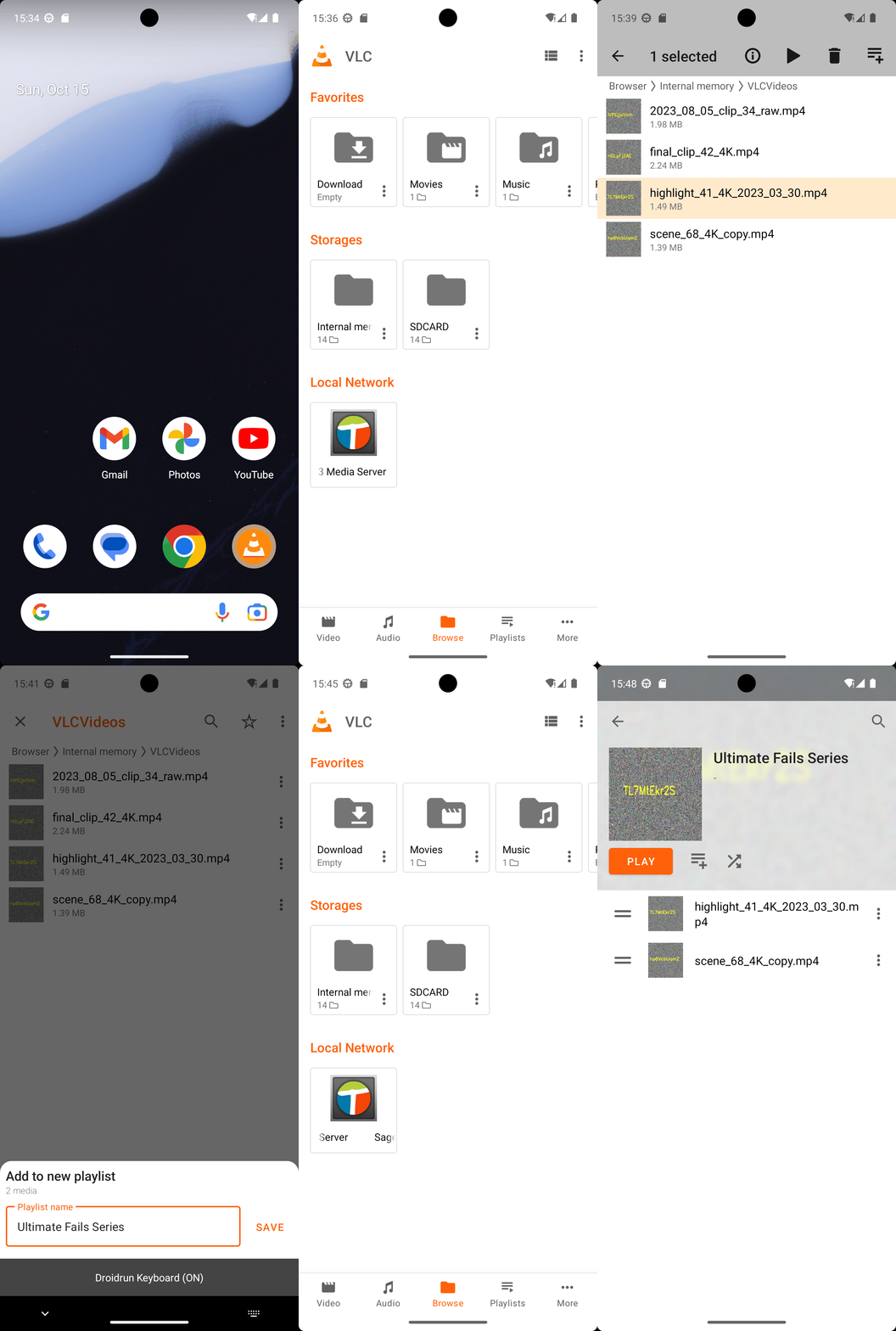
Goal: Create a playlist titled "Ultimate Fails Series" with the following files in VLC (located in Internal Memory/VLCVideos), in order: highlight_41_4K_2023_03_30.mp4, scene_68_4K_copy.mp4
user: None
The current subgoal is to open the VLC app. The instruction specifies "Open VLC from the home screen by tapping the VLC icon." I will use the `click` action on the UI element labeled "VLC".
click(index=11)
Clicking the VLC app icon to open the application.
Clicking the VLC app icon to open the application.
The current subgoal is to dismiss the "New external storage detected" prompt by tapping "NO". I need to locate the "NO" button in the provided UI elements and perform a click action on it. The element with index 5 is a button with the text "NO".
click(index=5)
Tapping the "NO" button to dismiss the external storage detection prompt.
Tapping the "NO" button to dismiss the external storage detection prompt.
The current subgoal is to "Tap the Browse tab on the bottom bar." I will locate the "Browse" element in the provided UI elements and perform a click action on it. The element with text "Browse" has index 11.
click(index=11)
Tapping the "Browse" tab on the bottom bar.
Tapping the "Browse" tab on the bottom bar.
The current subgoal is "Tap Internal Memory". I need to find the UI element that corresponds to "Internal memory" and click it. Based on the provided UI elements, element 25 is a CardView with the description "Folder: Internal memory". Clicking this element will open the "Internal memory" folder.
click(index=25)
Tapping on the "Internal memory" folder to access its contents.
Tapping on the "Internal memory" folder to access its contents.
The current subgoal is to tap the "VLCVideos" folder. I need to find the clickable element that corresponds to "VLCVideos" and perform a click action on it. Based on the provided UI elements, element 64 is a ViewGroup with the text "VLCVideos".
click(index=64)
Tapping the "VLCVideos" folder to open it.
Tapping the "VLCVideos" folder to open it.
The current subgoal is to "Long-press highlight_41_4K_2023_03_30.mp4 to start selection." I need to find the UI element corresponding to "highlight_41_4K_2023_03_30.mp4" and perform a long-press action on it. Based on the provided UI elements, index 21 corresponds to the ViewGroup for "highlight_41_4K_2023_03_30.mp4".
long_press(index=21)
Long-pressing "highlight_41_4K_2023_03_30.mp4" to initiate multi-select mode.
Long-pressing "highlight_41_4K_2023_03_30.mp4" to initiate multi-select mode.
The current subgoal is to "Tap scene_68_4K_copy.mp4 to add it to the selection." I need to find the clickable element that corresponds to "scene_68_4K_copy.mp4" and perform a click action on it. Based on the provided UI elements, element 23 is "scene_68_4K_copy.mp4".
click(index=23)
Tapping "scene_68_4K_copy.mp4" to add it to the selection.
Tapping "scene_68_4K_copy.mp4" to add it to the selection.
The current subgoal is to tap "Add to playlist" in the action bar. I need to find the element with the text "Add to playlist" and click it. Based on the provided UI elements, element 30 matches this description.
click(index=30)
Tapping "Add to playlist" in the action bar to proceed with playlist creation.
Tapping "Add to playlist" in the action bar to proceed with playlist creation.
The current subgoal requires three actions: first, type "Ultimate Fails Series" into the "Playlist name" field, which is element 7. Second, click the "SAVE" button, which is element 8.
type(text="Ultimate Fails Series"index=7)
Typing "Ultimate Fails Series" into the "Playlist name" input field.
Typing "Ultimate Fails Series" into the "Playlist name" input field.
The current subgoal is to "Tap SAVE to create the playlist." I need to find the "SAVE" button in the UI and perform a click action on it. Based on the provided UI elements, element 8 is a button with the text "SAVE".
click(index=8)
Tapping the "SAVE" button to create the playlist.
Tapping the "SAVE" button to create the playlist.
The current subgoal is "EXECUTE THIS SUBGOAL: Completed:". This is a status update, not an action to perform on the screen. Given the overall task is to fulfill the user request, and the "Overall Plan" has a "Next" section, I must proceed with the first item in the "Next" section of the "Overall Plan". The first item is "6. Tap the Playlists tab on the bottom bar." To tap the "Playlists" tab, I first need to be on a screen where the bottom navigation bar is visible. Currently, the device state shows I am in the "VLCVideos" folder, and the bottom bar is not visible. Therefore, I need to navigate back to the main VLC interface where the bottom navigation bar is typically displayed. The most appropriate action to go back is to use the system back button.
system_button(button="Back")
Pressing the system back button to navigate out of the current folder view and back to the main VLC interface, where the bottom navigation bar should be visible.
Pressing the system back button to navigate out of the current folder view and back to the main VLC interface, where the bottom navigation bar should be visible.
The current subgoal is to "Tap the Playlists tab on the bottom bar." The current screen shows the "Internal memory" directory, not the main VLC interface with the bottom navigation bar. To reach the bottom navigation bar, I need to navigate back from the current directory. The previous action was pressing the system back button, which brought me from "VLCVideos" to "Internal memory". I need to press the system back button one more time to get to the main "Browse" screen where the bottom navigation bar is visible.
system_button(button="Back")
Pressing the system back button to navigate out of the current "Internal memory" view and back to the main VLC interface, where the bottom navigation bar should be visible.
Pressing the system back button to navigate out of the current "Internal memory" view and back to the main VLC interface, where the bottom navigation bar should be visible.
The current subgoal indicates that the previous steps are completed and the next action is to "Tap the Playlists tab on the bottom bar." I need to locate the "Playlists" element in the UI and click it. Looking at the provided UI elements, element 41 is "FrameLayout: org.videolan.vlc:id/nav_playlists, Playlists - (648, 2190, 864, 2337)". This matches the target.
click(index=41)
Tapping the "Playlists" tab on the bottom bar.
Tapping the "Playlists" tab on the bottom bar.
The current subgoal is to tap the "Ultimate Fails Series" playlist. I can see a ViewGroup with the text "Playlist: Ultimate Fails Series, 2 tracks" at index 7, and a TextView with the text "Ultimate Fails Series" at index 9. Tapping the ViewGroup at index 7 should open the playlist.
click(index=7)
Tapping the "Playlist: Ultimate Fails Series" to open it.
Tapping the "Playlist: Ultimate Fails Series" to open it.
Playlist created and verified: “Ultimate Fails Series” now contains highlight_41_4K_2023_03_30.mp4 followed by scene_68_4K_copy.mp4 in VLC.
complete_goal(message="Playlist created and verified: “Ultimate Fails Series” now contains highlight_41_4K_2023_03_30.mp4 followed by scene_68_4K_copy.mp4 in VLC.")