
Goal: Turn wifi on.
user: None
The current subgoal requires two swipe actions: first to open Quick Settings, and second to fully expand it. I must perform individual atomic actions. Therefore, I will execute the first swipe action as specified: "swiping down from the top of the screen". I will choose a starting coordinate at the top center of the screen and an end coordinate further down to simulate a swipe down.
swipe(coordinate=[500, 50]coordinate2=[500, 500])
Swiping down from the top of the screen to open Quick Settings.
Swiping down from the top of the screen to open Quick Settings.
The current subgoal instructs to "swipe down from the very top edge of the screen to open Quick Settings; if only partially open, swipe down again to fully expand." The previous action was a swipe down from the top, which was successful. This suggests that the Quick Settings might be partially open, and to fully expand it, another swipe down is needed. Therefore, the atomic action is `swipe`. The target is to swipe down from the top of the screen. The parameters will be coordinates representing a swipe from the top to a lower point on the screen.
swipe(coordinate=[500, 50]coordinate2=[500, 500])
Swiping down again from the top of the screen to fully expand Quick Settings.
Swiping down again from the top of the screen to fully expand Quick Settings.
The current subgoal is to open the "Settings" app. This directly translates to using the `open_app` atomic action with "Settings" as the app name.
open_app(text="Settings")
Opening the "Settings" app.
Opening the "Settings" app.
The current subgoal is to "Tap "Network & internet"". This requires a `click` action. I need to find the element corresponding to "Network & internet" on the screen and use its index for the `click` action.
click(index=4)
Tapping "Network & internet".
Tapping "Network & internet".
The current subgoal is to tap the "Network & internet" row. The previous action history shows that this action was already performed and was successful. However, the instruction "EXECUTE THIS SUBGOAL" means I must perform the action specified in the current subgoal. According to the literal execution rule, I should perform the action exactly as written. The element "Network & internet" is identified by index 4 in the provided image.
click(index=4)
Tapping the "Network & internet" row.
Tapping the "Network & internet" row.
The current subgoal is to "Tap the 'Network & internet' item (by text) to open it." This requires a `click` action. The target is the text "Network & internet". Based on the provided image and the previous successful actions, the "Network & internet" item is visible and has index 4.
click(index=4)
Tapping the "Network & internet" item.
Tapping the "Network & internet" item.
The current subgoal requires me to tap the "Network & internet" item. I need to identify the element with this text and perform a click action on it. Based on the provided image, the "Network & internet" item is clearly visible.
click(index=4)
Tapping the "Network & internet" item by its text.
Tapping the "Network & internet" item by its text.
The current subgoal is to "Tap the “Search settings” bar at the top of Settings." I need to find the element with the text "Search settings" and perform a click action on it. Based on the screenshot, the "Search settings" bar is clearly visible and has an index of 2.
click(index=2)
Tapping the "Search settings" bar.
Tapping the "Search settings" bar.
The current subgoal is "Go back from the Apps page to the Settings main screen." This directly translates to pressing the system back button.
system_button(button="Back")
Pressing the system back button to go back from the Apps page.
Pressing the system back button to go back from the Apps page.
The current subgoal is to "Tap the “Network & internet” item (by its text) to open it." The required atomic action is `click`. The target element is the text "Network & internet". Based on the screenshot, the element with text "Network & internet" has index 4.
click(index=4)
Tapping the "Network & internet" item by its text.
Tapping the "Network & internet" item by its text.
The current subgoal requires tapping the "Search settings" bar. I will use the `click` action and identify the index of the "Search settings" bar from the provided screenshot. The "Search settings" bar is clearly visible and has index 2.
click(index=2)
Tapping the "Search settings" bar.
Tapping the "Search settings" bar.
The current subgoal is to "Tap the Back button". This requires using the `system_button` action with the argument "Back".
system_button(button="Back")
Pressing the system back button.
Pressing the system back button.
The current subgoal explicitly states to "Swipe down from the very top edge of the screen". This translates to a `swipe` action. The starting coordinate should be at the top of the screen, and the ending coordinate should be further down to indicate a downward swipe. I will choose `[500, 10]` as the starting point (top center) and `[500, 1000]` as the ending point to perform a significant swipe down.
swipe(coordinate=[500, 10]coordinate2=[500, 1000])
Swiping down from the very top edge of the screen to open Quick Settings.
Swiping down from the very top edge of the screen to open Quick Settings.
The current subgoal is to "Tap the “Internet” tile in Quick Settings to open the Internet panel." I need to find the "Internet" tile on the screen and perform a click action on it. Based on the provided image, the "Internet" tile is clearly visible and has an index of 1.
click(index=1)
Tapping the "Internet" tile in Quick Settings to open the Internet panel.
Tapping the "Internet" tile in Quick Settings to open the Internet panel.
The current subgoal is to "Tap the Internet tile (or its arrow) in Quick Settings to open the Internet panel." I can see an "Internet" tile in the provided image. The required atomic action is `click`. The target element is the "Internet" tile, which has an index of 1.
click(index=1)
Tapping the "Internet" tile in Quick Settings to open the Internet panel.
Tapping the "Internet" tile in Quick Settings to open the Internet panel.
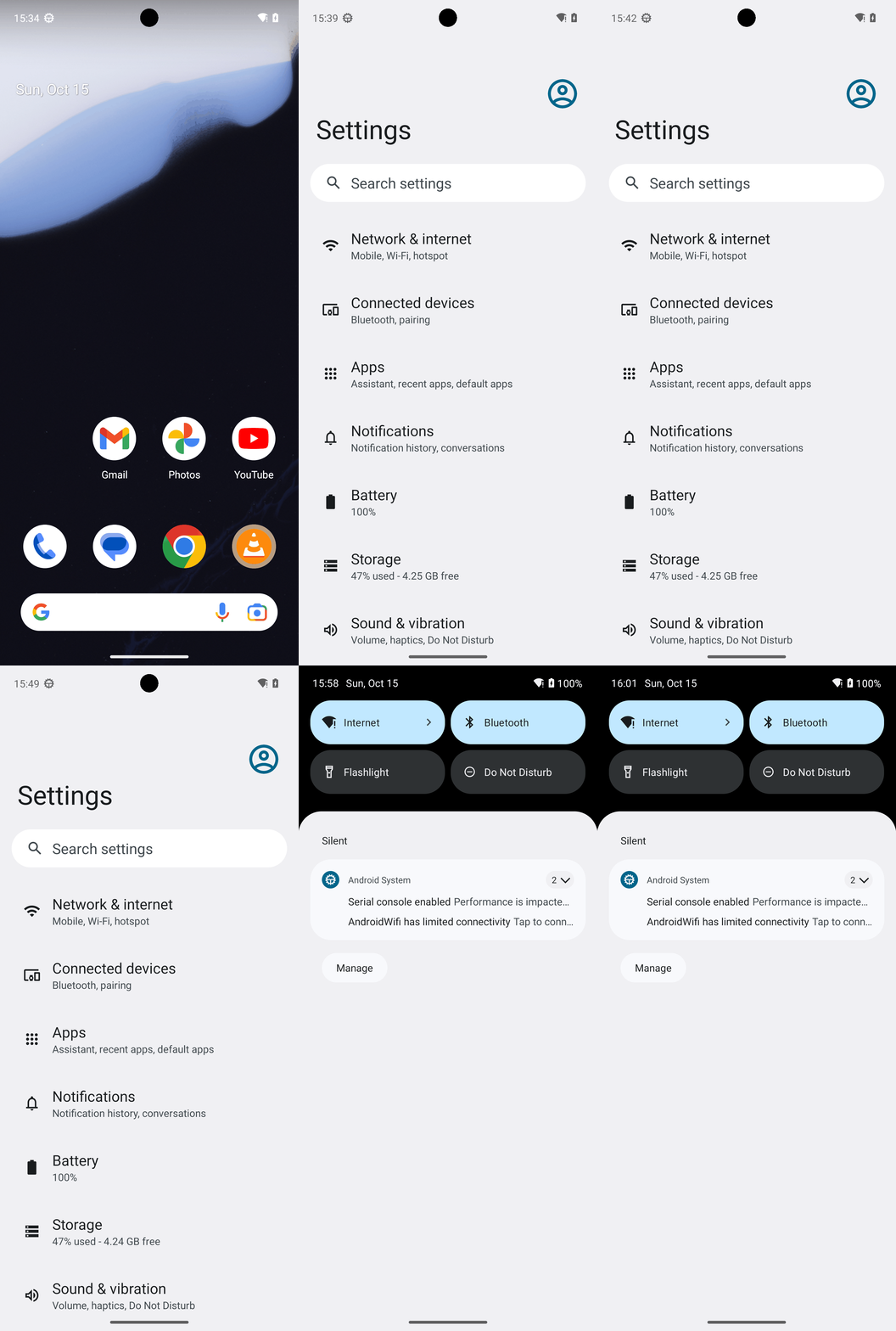
Wi‑Fi is ON. The Internet tile is active and the device shows “AndroidWifi has limited connectivity,” confirming Wi‑Fi was already enabled; no changes were needed.
complete_goal(message="Wi‑Fi is ON. The Internet tile is active and the device shows “AndroidWifi has limited connectivity,” confirming Wi‑Fi was already enabled; no changes were needed.")
Goal: Turn wifi on.
user: None
The current subgoal requires two swipe actions: first to open Quick Settings, and second to fully expand it. I must perform individual atomic actions. Therefore, I will execute the first swipe action as specified: "swiping down from the top of the screen". I will choose a starting coordinate at the top center of the screen and an end coordinate further down to simulate a swipe down.
swipe(coordinate=[500, 50]coordinate2=[500, 500])
Swiping down from the top of the screen to open Quick Settings.
Swiping down from the top of the screen to open Quick Settings.
The current subgoal instructs to "swipe down from the very top edge of the screen to open Quick Settings; if only partially open, swipe down again to fully expand." The previous action was a swipe down from the top, which was successful. This suggests that the Quick Settings might be partially open, and to fully expand it, another swipe down is needed. Therefore, the atomic action is `swipe`. The target is to swipe down from the top of the screen. The parameters will be coordinates representing a swipe from the top to a lower point on the screen.
swipe(coordinate=[500, 50]coordinate2=[500, 500])
Swiping down again from the top of the screen to fully expand Quick Settings.
Swiping down again from the top of the screen to fully expand Quick Settings.
The current subgoal is to open the "Settings" app. This directly translates to using the `open_app` atomic action with "Settings" as the app name.
open_app(text="Settings")
Opening the "Settings" app.
Opening the "Settings" app.
The current subgoal is to "Tap "Network & internet"". This requires a `click` action. I need to find the element corresponding to "Network & internet" on the screen and use its index for the `click` action.
click(index=4)
Tapping "Network & internet".
Tapping "Network & internet".
The current subgoal is to tap the "Network & internet" row. The previous action history shows that this action was already performed and was successful. However, the instruction "EXECUTE THIS SUBGOAL" means I must perform the action specified in the current subgoal. According to the literal execution rule, I should perform the action exactly as written. The element "Network & internet" is identified by index 4 in the provided image.
click(index=4)
Tapping the "Network & internet" row.
Tapping the "Network & internet" row.
The current subgoal is to "Tap the 'Network & internet' item (by text) to open it." This requires a `click` action. The target is the text "Network & internet". Based on the provided image and the previous successful actions, the "Network & internet" item is visible and has index 4.
click(index=4)
Tapping the "Network & internet" item.
Tapping the "Network & internet" item.
The current subgoal requires me to tap the "Network & internet" item. I need to identify the element with this text and perform a click action on it. Based on the provided image, the "Network & internet" item is clearly visible.
click(index=4)
Tapping the "Network & internet" item by its text.
Tapping the "Network & internet" item by its text.
The current subgoal is to "Tap the “Search settings” bar at the top of Settings." I need to find the element with the text "Search settings" and perform a click action on it. Based on the screenshot, the "Search settings" bar is clearly visible and has an index of 2.
click(index=2)
Tapping the "Search settings" bar.
Tapping the "Search settings" bar.
The current subgoal is "Go back from the Apps page to the Settings main screen." This directly translates to pressing the system back button.
system_button(button="Back")
Pressing the system back button to go back from the Apps page.
Pressing the system back button to go back from the Apps page.
The current subgoal is to "Tap the “Network & internet” item (by its text) to open it." The required atomic action is `click`. The target element is the text "Network & internet". Based on the screenshot, the element with text "Network & internet" has index 4.
click(index=4)
Tapping the "Network & internet" item by its text.
Tapping the "Network & internet" item by its text.
The current subgoal requires tapping the "Search settings" bar. I will use the `click` action and identify the index of the "Search settings" bar from the provided screenshot. The "Search settings" bar is clearly visible and has index 2.
click(index=2)
Tapping the "Search settings" bar.
Tapping the "Search settings" bar.
The current subgoal is to "Tap the Back button". This requires using the `system_button` action with the argument "Back".
system_button(button="Back")
Pressing the system back button.
Pressing the system back button.
The current subgoal explicitly states to "Swipe down from the very top edge of the screen". This translates to a `swipe` action. The starting coordinate should be at the top of the screen, and the ending coordinate should be further down to indicate a downward swipe. I will choose `[500, 10]` as the starting point (top center) and `[500, 1000]` as the ending point to perform a significant swipe down.
swipe(coordinate=[500, 10]coordinate2=[500, 1000])
Swiping down from the very top edge of the screen to open Quick Settings.
Swiping down from the very top edge of the screen to open Quick Settings.
The current subgoal is to "Tap the “Internet” tile in Quick Settings to open the Internet panel." I need to find the "Internet" tile on the screen and perform a click action on it. Based on the provided image, the "Internet" tile is clearly visible and has an index of 1.
click(index=1)
Tapping the "Internet" tile in Quick Settings to open the Internet panel.
Tapping the "Internet" tile in Quick Settings to open the Internet panel.
The current subgoal is to "Tap the Internet tile (or its arrow) in Quick Settings to open the Internet panel." I can see an "Internet" tile in the provided image. The required atomic action is `click`. The target element is the "Internet" tile, which has an index of 1.
click(index=1)
Tapping the "Internet" tile in Quick Settings to open the Internet panel.
Tapping the "Internet" tile in Quick Settings to open the Internet panel.
Wi‑Fi is ON. The Internet tile is active and the device shows “AndroidWifi has limited connectivity,” confirming Wi‑Fi was already enabled; no changes were needed.
complete_goal(message="Wi‑Fi is ON. The Internet tile is active and the device shows “AndroidWifi has limited connectivity,” confirming Wi‑Fi was already enabled; no changes were needed.")