
Plan Input
Input
user:
Goal: Turn wifi off.
user: None
Task Thinking Step 1
Thoughts
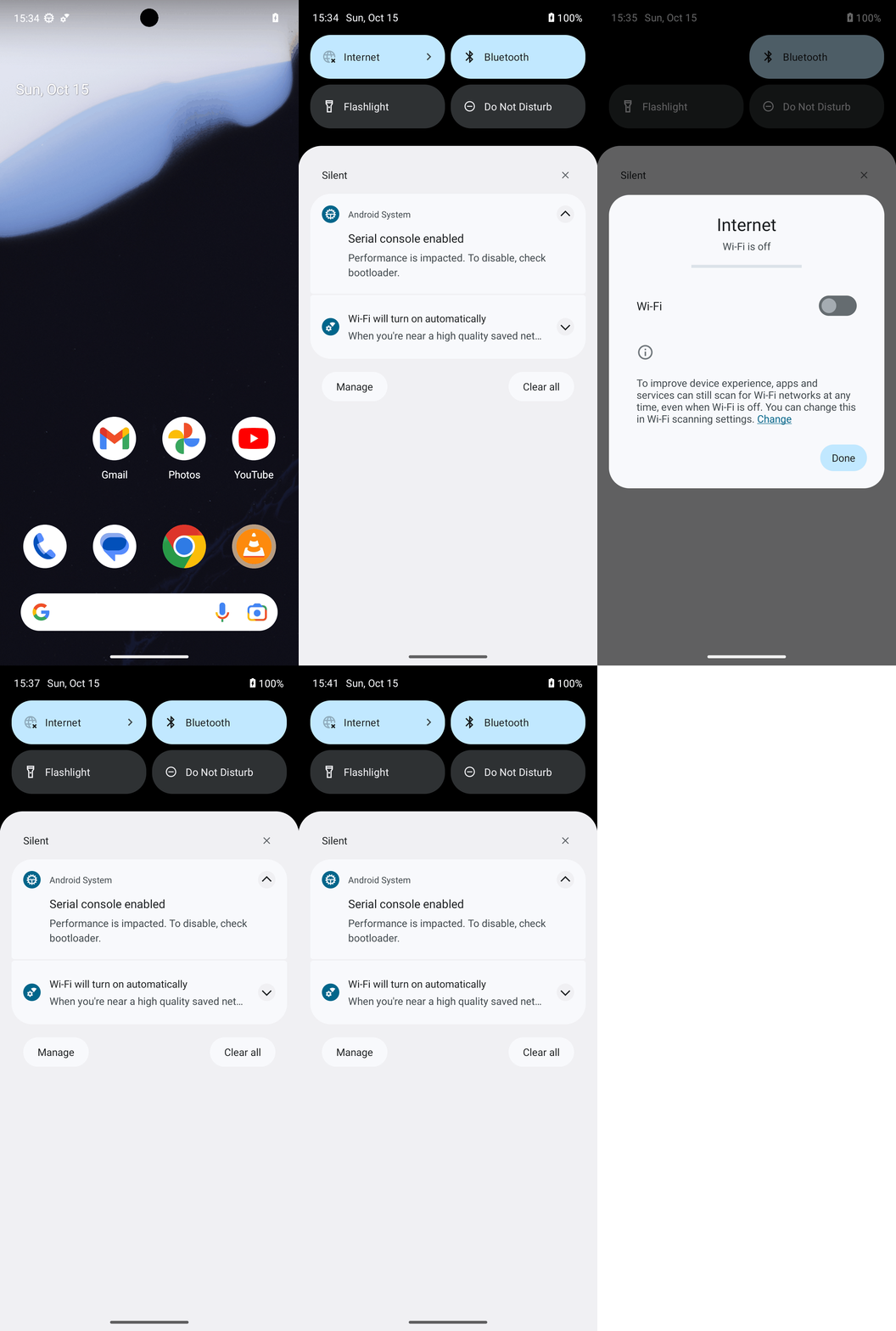
The current subgoal explicitly states to "Swipe down from the top edge". This translates to a `swipe` action. To swipe down from the top edge, I need to specify a starting coordinate near the top of the screen and an ending coordinate further down. I will use [540, 100] as the starting point (top center) and [540, 1000] as the ending point to ensure a sufficient downward swipe.
Code
swipe(coordinate=[540, 100]coordinate2=[540, 1000])
Task Execution Result
Output
Swipe down from the top edge of the screen to open the notification/quick settings shade.
Task End
Success reason
Swipe down from the top edge of the screen to open the notification/quick settings shade.
Success
Task Thinking Step 2
Thoughts
The current subgoal is to "Tap the Internet tile to open the Internet panel." Looking at the provided UI elements and the image, the element at index 4, `Switch: "Off" - (42, 126, 529, 284)`, corresponds to the visual "Internet" tile in the screenshot. Although it's labeled as a "Switch" with text "Off" in the UI dump, visually it is the "Internet" tile. I will perform a click action on this element.
Code
click(index=4)
Task Execution Result
Output
Click the "Internet" tile (represented by element 4) to open the Internet panel.
Task End
Success reason
Click the "Internet" tile (represented by element 4) to open the Internet panel.
Success
Task Thinking Step 3
Thoughts
The subgoal is to "Tap Done to close the Internet panel." I need to find the "Done" button and click it. Based on the provided UI elements, the "Done" button has index 9.
Code
click(index=9)
Task Execution Result
Output
Click the "Done" button to close the Internet panel.
Task End
Success reason
Click the "Done" button to close the Internet panel.
Success
Plan Thinking
Thoughts
Wi‑Fi has been turned off and verified (Internet tile shows Off and there is no Wi‑Fi icon in the status bar).
Code
complete_goal(message="Wi‑Fi has been turned off and verified (Internet tile shows Off and there is no Wi‑Fi icon in the status bar).")
Plan Input
Input
user:
Goal: Turn wifi off.
user: None
Task Thinking Step 1
Thoughts
The current subgoal explicitly states to "Swipe down from the top edge". This translates to a `swipe` action. To swipe down from the top edge, I need to specify a starting coordinate near the top of the screen and an ending coordinate further down. I will use [540, 100] as the starting point (top center) and [540, 1000] as the ending point to ensure a sufficient downward swipe.
Code
swipe(coordinate=[540, 100]coordinate2=[540, 1000])
Task Execution Result
Output
Swipe down from the top edge of the screen to open the notification/quick settings shade.
Task End
Success reason
Swipe down from the top edge of the screen to open the notification/quick settings shade.
Success
Task Thinking Step 2
Thoughts
The current subgoal is to "Tap the Internet tile to open the Internet panel." Looking at the provided UI elements and the image, the element at index 4, `Switch: "Off" - (42, 126, 529, 284)`, corresponds to the visual "Internet" tile in the screenshot. Although it's labeled as a "Switch" with text "Off" in the UI dump, visually it is the "Internet" tile. I will perform a click action on this element.
Code
click(index=4)
Task Execution Result
Output
Click the "Internet" tile (represented by element 4) to open the Internet panel.
Task End
Success reason
Click the "Internet" tile (represented by element 4) to open the Internet panel.
Success
Task Thinking Step 3
Thoughts
The subgoal is to "Tap Done to close the Internet panel." I need to find the "Done" button and click it. Based on the provided UI elements, the "Done" button has index 9.
Code
click(index=9)
Task Execution Result
Output
Click the "Done" button to close the Internet panel.
Task End
Success reason
Click the "Done" button to close the Internet panel.
Success
Plan Thinking
Thoughts
Wi‑Fi has been turned off and verified (Internet tile shows Off and there is no Wi‑Fi icon in the status bar).
Code
complete_goal(message="Wi‑Fi has been turned off and verified (Internet tile shows Off and there is no Wi‑Fi icon in the status bar).")