
Plan Input
Input
user:
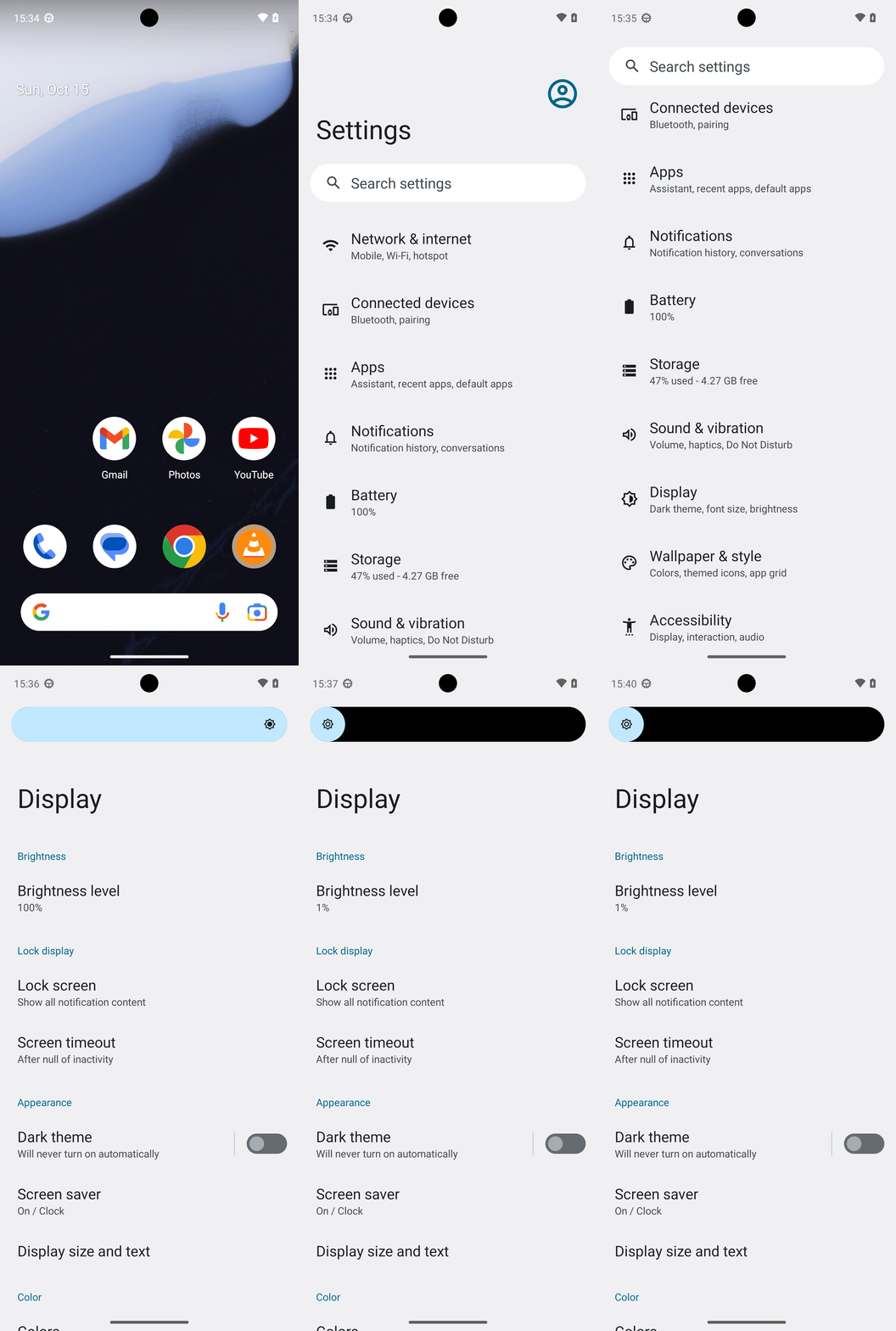
Goal: Turn brightness to the min value.
user: None
Task Thinking Step 1
Thoughts
The current subgoal explicitly states to "Open the Settings app using open_app("Settings")". This directly maps to the `open_app` atomic action. The target app is "Settings".Code
open_app(text="Settings")
Task Execution Result
Output
Open the "Settings" app.
Task End
Success reason
Open the "Settings" app.
Success
Task Thinking Step 2
Thoughts
The current subgoal is to "Scroll down to locate “Display”." Looking at the current UI elements, "Display" is not visible. Therefore, I need to perform a scroll down action. I will choose a swipe action from the middle of the screen downwards to reveal more content.
Code
swipe(coordinate=[540, 1500]coordinate2=[540, 700])
Task Execution Result
Output
Scroll down the screen to locate "Display".
Task End
Success reason
Scroll down the screen to locate "Display".
Success
Task Thinking Step 3
Thoughts
The current subgoal is to "Tap 'Display'". I need to find the element with the text "Display" and perform a click action on it. Based on the provided UI elements, "Display" is at index 27.
Code
click(index=27)
Task Execution Result
Output
Tap "Display".
Task End
Success reason
Tap "Display".
Success
Task Thinking Step 4
Thoughts
The current subgoal is to "Tap 'Brightness level'". I need to find the clickable element with the text "Brightness level" and perform a click action on it. Based on the provided UI elements, index 9 corresponds to "Brightness level".
Code
click(index=9)
Task Execution Result
Output
Tap "Brightness level".
Task End
Success reason
Tap "Brightness level".
Success
Task Thinking Step 5
Thoughts
The current subgoal is to "Drag the “Display brightness” slider fully to the left (minimum)". The UI elements show a SeekBar with the text "Display brightness" and bounds (42, 149, 1038, 275). To drag it to the minimum, I need to perform a swipe action from the right side of the slider to the left side. I will choose a starting coordinate near the right end of the slider and an ending coordinate near the left end, keeping the y-coordinate in the middle of the slider's height.
Code
swipe(coordinate=[1000, 212]coordinate2=[50, 212])
Task Execution Result
Output
Swipe the "Display brightness" slider from right to left to set it to the minimum value.
Task End
Success reason
Swipe the "Display brightness" slider from right to left to set it to the minimum value.
Success
Plan Thinking
Thoughts
I set the screen brightness to the minimum value (1%) and verified it on the Display settings page.
Code
complete_goal(message="I set the screen brightness to the minimum value (1%) and verified it on the Display settings page.")
Plan Input
Input
user:
Goal: Turn brightness to the min value.
user: None
Task Thinking Step 1
Thoughts
The current subgoal explicitly states to "Open the Settings app using open_app("Settings")". This directly maps to the `open_app` atomic action. The target app is "Settings".Code
open_app(text="Settings")
Task Execution Result
Output
Open the "Settings" app.
Task End
Success reason
Open the "Settings" app.
Success
Task Thinking Step 2
Thoughts
The current subgoal is to "Scroll down to locate “Display”." Looking at the current UI elements, "Display" is not visible. Therefore, I need to perform a scroll down action. I will choose a swipe action from the middle of the screen downwards to reveal more content.
Code
swipe(coordinate=[540, 1500]coordinate2=[540, 700])
Task Execution Result
Output
Scroll down the screen to locate "Display".
Task End
Success reason
Scroll down the screen to locate "Display".
Success
Task Thinking Step 3
Thoughts
The current subgoal is to "Tap 'Display'". I need to find the element with the text "Display" and perform a click action on it. Based on the provided UI elements, "Display" is at index 27.
Code
click(index=27)
Task Execution Result
Output
Tap "Display".
Task End
Success reason
Tap "Display".
Success
Task Thinking Step 4
Thoughts
The current subgoal is to "Tap 'Brightness level'". I need to find the clickable element with the text "Brightness level" and perform a click action on it. Based on the provided UI elements, index 9 corresponds to "Brightness level".
Code
click(index=9)
Task Execution Result
Output
Tap "Brightness level".
Task End
Success reason
Tap "Brightness level".
Success
Task Thinking Step 5
Thoughts
The current subgoal is to "Drag the “Display brightness” slider fully to the left (minimum)". The UI elements show a SeekBar with the text "Display brightness" and bounds (42, 149, 1038, 275). To drag it to the minimum, I need to perform a swipe action from the right side of the slider to the left side. I will choose a starting coordinate near the right end of the slider and an ending coordinate near the left end, keeping the y-coordinate in the middle of the slider's height.
Code
swipe(coordinate=[1000, 212]coordinate2=[50, 212])
Task Execution Result
Output
Swipe the "Display brightness" slider from right to left to set it to the minimum value.
Task End
Success reason
Swipe the "Display brightness" slider from right to left to set it to the minimum value.
Success
Plan Thinking
Thoughts
I set the screen brightness to the minimum value (1%) and verified it on the Display settings page.
Code
complete_goal(message="I set the screen brightness to the minimum value (1%) and verified it on the Display settings page.")