
Plan Input
Input
user:
Goal: Turn brightness to the max value.
user: None
Task Thinking Step 1
Thoughts
The current subgoal is to "Swipe down from the top status bar to open the notification/quick settings shade." This requires a `swipe` action. The top status bar is at the very top of the screen. I will swipe from the top center of the screen downwards.
Code
swipe(coordinate=[540, 50]coordinate2=[540, 1000])
Task Execution Result
Output
Swiping down from the top of the screen to open the notification shade.
Task End
Success reason
Swiping down from the top of the screen to open the notification shade.
Success
Task Thinking Step 2
Thoughts
The current subgoal explicitly states "Swipe down from the top again to fully expand Quick Settings." This requires a `swipe` action. The starting point should be near the top of the screen, and the end point should be further down to perform a downward swipe. I will use the coordinates [540, 50] as the start and [540, 1000] as the end to simulate a swipe from the top center to expand the quick settings.
Code
swipe(coordinate=[540, 50]coordinate2=[540, 1000])
Task Execution Result
Output
Swiping down from the top of the screen to fully expand Quick Settings.
Task End
Success reason
Swiping down from the top of the screen to fully expand Quick Settings.
Success
Task Thinking Step 3
Thoughts
The current subgoal requires dragging the "Display brightness" slider to the maximum value. The UI element for this is a `SeekBar` with index 4. To move it to the maximum, I need to perform a swipe action from the left side of the slider to the right side. The coordinates for the slider are (42, 357, 1038, 483). I will choose a starting point near the left edge and an ending point near the right edge, both within the vertical bounds of the slider.
Code
swipe(coordinate=[100, 420]coordinate2=[980, 420])
Task Execution Result
Output
Swiping on the Display brightness slider from left to right to set it to maximum brightness.
Task End
Success reason
Swiping on the Display brightness slider from left to right to set it to maximum brightness.
Success
Plan Thinking
Thoughts
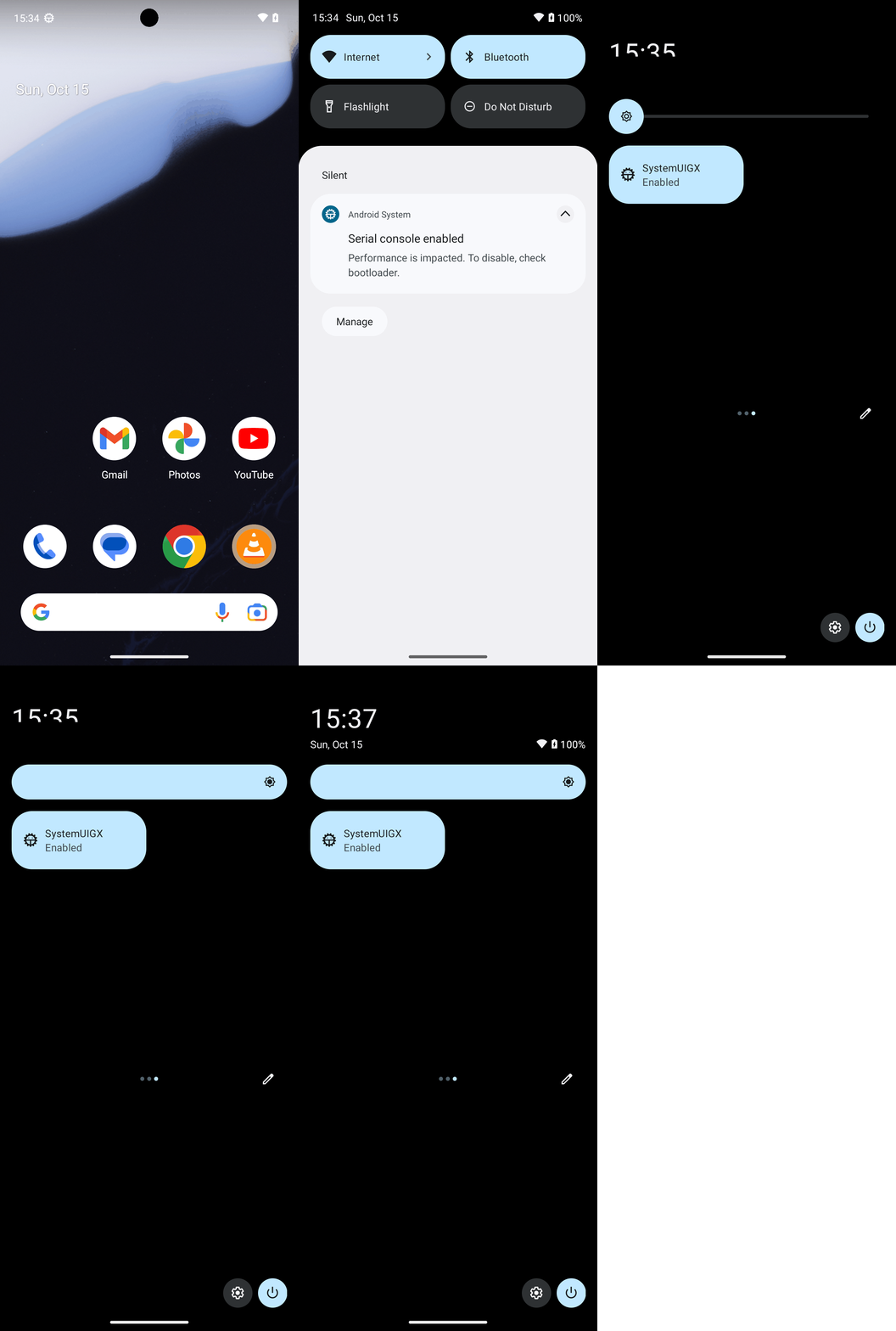
I set your screen brightness to the maximum using the Quick Settings slider and confirmed it’s at the far-right position.
Code
complete_goal(message="I set your screen brightness to the maximum using the Quick Settings slider and confirmed it’s at the far-right position.")
Plan Input
Input
user:
Goal: Turn brightness to the max value.
user: None
Task Thinking Step 1
Thoughts
The current subgoal is to "Swipe down from the top status bar to open the notification/quick settings shade." This requires a `swipe` action. The top status bar is at the very top of the screen. I will swipe from the top center of the screen downwards.
Code
swipe(coordinate=[540, 50]coordinate2=[540, 1000])
Task Execution Result
Output
Swiping down from the top of the screen to open the notification shade.
Task End
Success reason
Swiping down from the top of the screen to open the notification shade.
Success
Task Thinking Step 2
Thoughts
The current subgoal explicitly states "Swipe down from the top again to fully expand Quick Settings." This requires a `swipe` action. The starting point should be near the top of the screen, and the end point should be further down to perform a downward swipe. I will use the coordinates [540, 50] as the start and [540, 1000] as the end to simulate a swipe from the top center to expand the quick settings.
Code
swipe(coordinate=[540, 50]coordinate2=[540, 1000])
Task Execution Result
Output
Swiping down from the top of the screen to fully expand Quick Settings.
Task End
Success reason
Swiping down from the top of the screen to fully expand Quick Settings.
Success
Task Thinking Step 3
Thoughts
The current subgoal requires dragging the "Display brightness" slider to the maximum value. The UI element for this is a `SeekBar` with index 4. To move it to the maximum, I need to perform a swipe action from the left side of the slider to the right side. The coordinates for the slider are (42, 357, 1038, 483). I will choose a starting point near the left edge and an ending point near the right edge, both within the vertical bounds of the slider.
Code
swipe(coordinate=[100, 420]coordinate2=[980, 420])
Task Execution Result
Output
Swiping on the Display brightness slider from left to right to set it to maximum brightness.
Task End
Success reason
Swiping on the Display brightness slider from left to right to set it to maximum brightness.
Success
Plan Thinking
Thoughts
I set your screen brightness to the maximum using the Quick Settings slider and confirmed it’s at the far-right position.
Code
complete_goal(message="I set your screen brightness to the maximum using the Quick Settings slider and confirmed it’s at the far-right position.")