
Plan Input
Input
user:
Goal: Turn bluetooth on.
user: None
Task Thinking Step 1
Thoughts
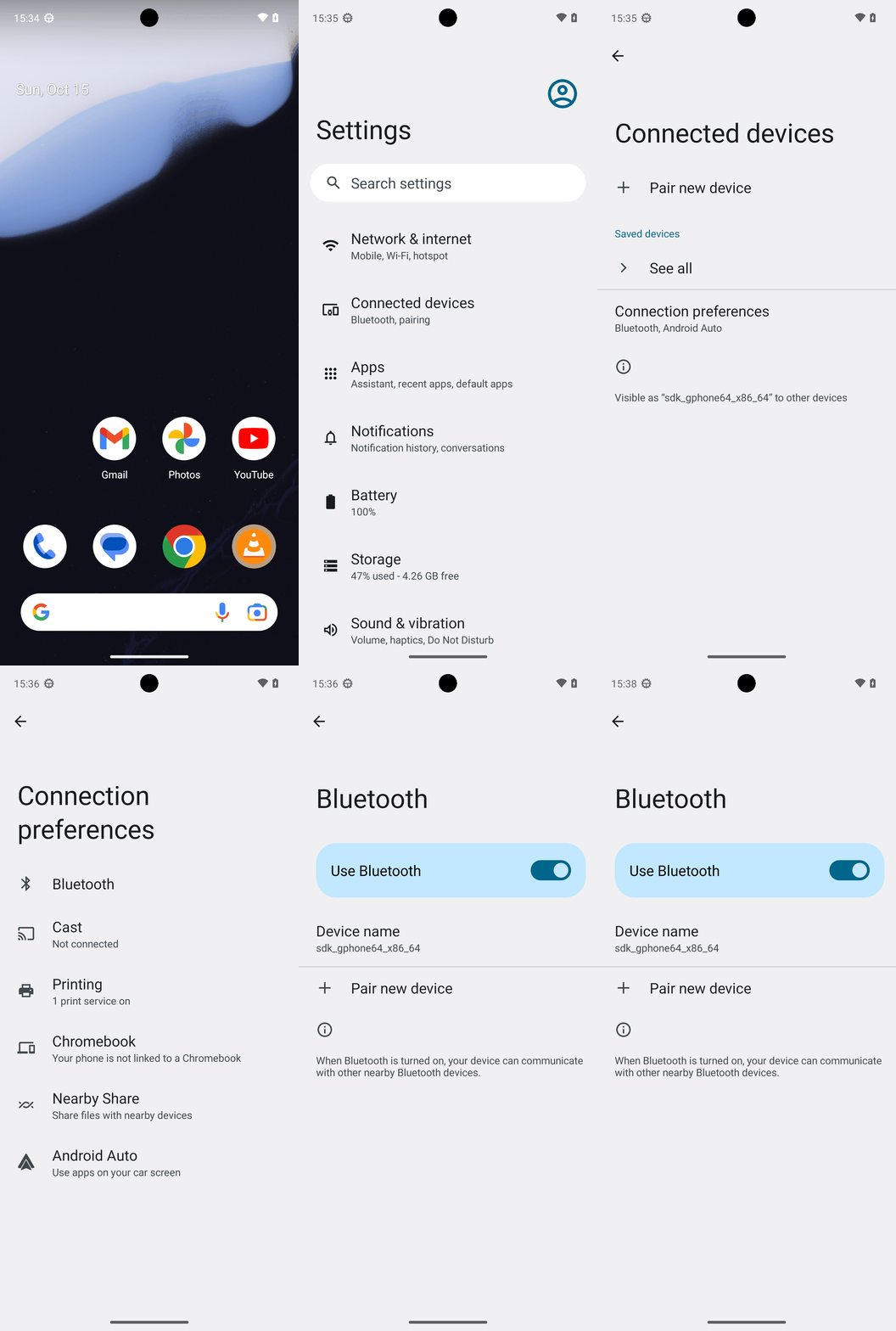
The current subgoal explicitly states to "Open the Settings app (use open_app: Settings)". This directly translates to using the `open_app` atomic action with the argument "Settings".
Code
open_app(text="Settings")
Task Execution Result
Output
Opening the Settings app as specified in the current subgoal.
Task End
Success reason
Opening the Settings app as specified in the current subgoal.
Success
Task Thinking Step 2
Thoughts
The current subgoal is to "Tap “Connected devices”". I need to find the element with the text "Connected devices" and click on it. Element 14 has the text "Connected devices" and its parent LinearLayout (element 13) is clickable.
Code
click(index=13)
Task Execution Result
Output
Tapping on "Connected devices" to proceed with turning Bluetooth on.
Task End
Success reason
Tapping on "Connected devices" to proceed with turning Bluetooth on.
Success
Task Thinking Step 3
Thoughts
The current subgoal is to "Tap “Connection preferences”". I need to find the element with this exact text and click it. Element 13 in the provided list matches this text.
Code
click(index=13)
Task Execution Result
Output
Tapping on "Connection preferences" as specified in the current subgoal.
Task End
Success reason
Tapping on "Connection preferences" as specified in the current subgoal.
Success
Task Thinking Step 4
Thoughts
The current subgoal is to "Tap 'Bluetooth'". I need to find the element with the text "Bluetooth" and perform a click action on it. Based on the provided UI elements, element 7 is "Bluetooth".
Code
click(index=7)
Task Execution Result
Output
Tapping on "Bluetooth" as specified in the current subgoal.
Task End
Success reason
Tapping on "Bluetooth" as specified in the current subgoal.
Success
Plan Thinking
Thoughts
Bluetooth is turned On. I confirmed this in Settings > Connection preferences > Bluetooth where the “Use Bluetooth” toggle is enabled.
Code
complete_goal(message="Bluetooth is turned On. I confirmed this in Settings > Connection preferences > Bluetooth where the “Use Bluetooth” toggle is enabled.")
Plan Input
Input
user:
Goal: Turn bluetooth on.
user: None
Task Thinking Step 1
Thoughts
The current subgoal explicitly states to "Open the Settings app (use open_app: Settings)". This directly translates to using the `open_app` atomic action with the argument "Settings".
Code
open_app(text="Settings")
Task Execution Result
Output
Opening the Settings app as specified in the current subgoal.
Task End
Success reason
Opening the Settings app as specified in the current subgoal.
Success
Task Thinking Step 2
Thoughts
The current subgoal is to "Tap “Connected devices”". I need to find the element with the text "Connected devices" and click on it. Element 14 has the text "Connected devices" and its parent LinearLayout (element 13) is clickable.
Code
click(index=13)
Task Execution Result
Output
Tapping on "Connected devices" to proceed with turning Bluetooth on.
Task End
Success reason
Tapping on "Connected devices" to proceed with turning Bluetooth on.
Success
Task Thinking Step 3
Thoughts
The current subgoal is to "Tap “Connection preferences”". I need to find the element with this exact text and click it. Element 13 in the provided list matches this text.
Code
click(index=13)
Task Execution Result
Output
Tapping on "Connection preferences" as specified in the current subgoal.
Task End
Success reason
Tapping on "Connection preferences" as specified in the current subgoal.
Success
Task Thinking Step 4
Thoughts
The current subgoal is to "Tap 'Bluetooth'". I need to find the element with the text "Bluetooth" and perform a click action on it. Based on the provided UI elements, element 7 is "Bluetooth".
Code
click(index=7)
Task Execution Result
Output
Tapping on "Bluetooth" as specified in the current subgoal.
Task End
Success reason
Tapping on "Bluetooth" as specified in the current subgoal.
Success
Plan Thinking
Thoughts
Bluetooth is turned On. I confirmed this in Settings > Connection preferences > Bluetooth where the “Use Bluetooth” toggle is enabled.
Code
complete_goal(message="Bluetooth is turned On. I confirmed this in Settings > Connection preferences > Bluetooth where the “Use Bluetooth” toggle is enabled.")