
Sports Tracker Total Duration For Category This Week
Goal: What was the total duration of running activities in the OpenTracks app this week? Assume the week starts from Monday. Express your answer in minutes as a single integer.
Goal: What was the total duration of running activities in the OpenTracks app this week? Assume the week starts from Monday. Express your answer in minutes as a single integer.
user: None
The current subgoal is to open the "OpenTracks" app. The atomic action required is `open_app`. The target app name is "OpenTracks".
open_app(text="OpenTracks")
Opening the OpenTracks app.
Opening the OpenTracks app.
The subgoal explicitly states to "Tap the Aggregated Statistics button on the bottom left of the Track List screen." I will look for a button with "aggregated_stats_button" in its resource ID or text. Element 78, `Button: "de.dennisguse.opentracks:id/aggregated_stats_button", "aggregated_stats_button" - (42, 2169, 167, 2295)`, perfectly matches this description and is located at the bottom left.
click(index=78)
Tapping the Aggregated Statistics button to navigate to the statistics screen.
Tapping the Aggregated Statistics button to navigate to the statistics screen.
The current subgoal is to "Tap the Filter button on the bottom bar." I need to find the clickable element that corresponds to the "Filter" button. Based on the provided UI elements, element 5 is a button with the text "Filter" and resource ID `de.dennisguse.opentracks:id/aggregated_statistics_filter`, located at the bottom of the screen. This is the correct element to click.
click(index=5)
Tapping the "Filter" button on the bottom bar to open the filter dialog.
Tapping the "Filter" button on the bottom bar to open the filter dialog.
The current subgoal is to tap "running" to select the category. I need to find the UI element that says "running" and click on it. Based on the provided UI elements, element 9 is a `CompoundButton` with the text "running".
click(index=9)
Tapping the "running" category checkbox.
Tapping the "running" category checkbox.
The current subgoal is to tap the "From" date field, which is labeled "Sunday, October 15, 2023". I will use the `click` action and the index of the corresponding UI element. Based on the provided UI elements, index 17 is `EditText: "de.dennisguse.opentracks:id/filter_date_edit_text_from", "Sunday, October 15, 2023"`.
click(index=17)
Tapping the "From" date field.
Tapping the "From" date field.
The current subgoal is to "tap day “9”" in the open date picker. However, the current device state and clickable elements do not show an open date picker with selectable days. The previous action was to tap the "From" date field, which should have opened the date picker. Since the date picker is not visible, I cannot tap "day 9". Given the constraints, I must provide an action. Re-clicking the "From" date field (index 17) is the most direct way to attempt to bring up the date picker again, as the previous click was successful but did not result in the expected UI state (an open date picker).
click(index=17)
Re-tapping the "From" date field to try and open the date picker, as it did not appear after the initial tap.
Re-tapping the "From" date field to try and open the date picker, as it did not appear after the initial tap.
The current subgoal requires me to swipe up inside the Filter dialog to reveal the date picker calendar grid for "From". The `ScrollView` with bounds (70, 288, 1010, 2147) is the main scrollable area of the dialog. I will perform a swipe up action within this scrollable area.
swipe(coordinate=[540, 1500]coordinate2=[540, 500])
Swiping up inside the Filter dialog to reveal the date picker calendar grid.
Swiping up inside the Filter dialog to reveal the date picker calendar grid.
The current subgoal is to tap day "9" on the From calendar. I need to find the UI element corresponding to the number "9" in the calendar view and perform a click action on it. Based on the provided UI elements, index 30 corresponds to the text "9".
click(index=30)
Tapping day "9" on the calendar to set the "From" date.
Tapping day "9" on the calendar to set the "From" date.
The subgoal is to tap the "To" date field. I need to find the UI element corresponding to "To" date field and perform a click action on it. Based on the provided UI elements, element 18 is "EditText: "de.dennisguse.opentracks:id/filter_date_edit_text_to", "Saturday, October 21, 2023"". This is the correct element.
click(index=18)
Tapping the "To" date field (currently Saturday, October 21, 2023).
Tapping the "To" date field (currently Saturday, October 21, 2023).
The current subgoal explicitly states to "Swipe up inside the Filter dialog to reveal the To date calendar grid." I have already tapped the "To" date field, and the calendar is not visible. I need to perform a swipe up action within the scrollable area of the dialog. The `ScrollView` with bounds `(70, 288, 1010, 2147)` is the appropriate element to swipe within. I will use coordinates within this scrollable area for the swipe action.
swipe(coordinate=[540, 1500]coordinate2=[540, 500])
Swiping up inside the Filter dialog to reveal the To date calendar grid.
Swiping up inside the Filter dialog to reveal the To date calendar grid.
The current subgoal is to tap day "15" on the To calendar. I will locate the element with the text "15" in the provided UI elements and perform a click action on it.
click(index=31)
Tapping day "15" on the calendar to set the "To" date.
Tapping day "15" on the calendar to set the "To" date.
The current subgoal is to "Tap OK on the Filter dialog to apply the filters." I need to find the "OK" button in the provided UI elements and perform a click action on it. Based on the provided UI elements, element 21 is a Button with the text "OK".
click(index=21)
Tapping the "OK" button to apply the filters.
Tapping the "OK" button to apply the filters.
The current subgoal is to scroll down the "Aggregated stats list". The "Aggregated stats list" is identified as a RecyclerView with ID `de.dennisguse.opentracks:id/aggregated_stats_list` (index 8). To scroll down, I need to perform a swipe action from a lower point to a higher point within the scrollable area. I will use the coordinates [540, 1500] as the start point and [540, 500] as the end point to swipe up, which effectively scrolls the content down.
swipe(coordinate=[540, 1500]coordinate2=[540, 500])
Swiping up on the aggregated stats list to scroll down and look for the "RUNNING" item.
Swiping up on the aggregated stats list to scroll down and look for the "RUNNING" item.
The current subgoal is to scroll further down the Aggregated stats list to search for "RUNNING". I need to perform a swipe action to scroll down the list. I will use the same swipe coordinates as the previous successful swipe to continue scrolling down.
swipe(coordinate=[540, 1500]coordinate2=[540, 500])
Swiping up on the aggregated stats list to scroll down and look for the "RUNNING" item.
Swiping up on the aggregated stats list to scroll down and look for the "RUNNING" item.
The current subgoal is to "Tap the bottom 'Filter' button to reopen the filter dialog." I need to find the clickable element with the text "Filter" and perform a click action on it. Based on the provided UI elements, element 5 is a Button with the text "Filter".
click(index=5)
Tapping the "Filter" button to reopen the filter dialog.
Tapping the "Filter" button to reopen the filter dialog.
105
complete_goal(message="105")
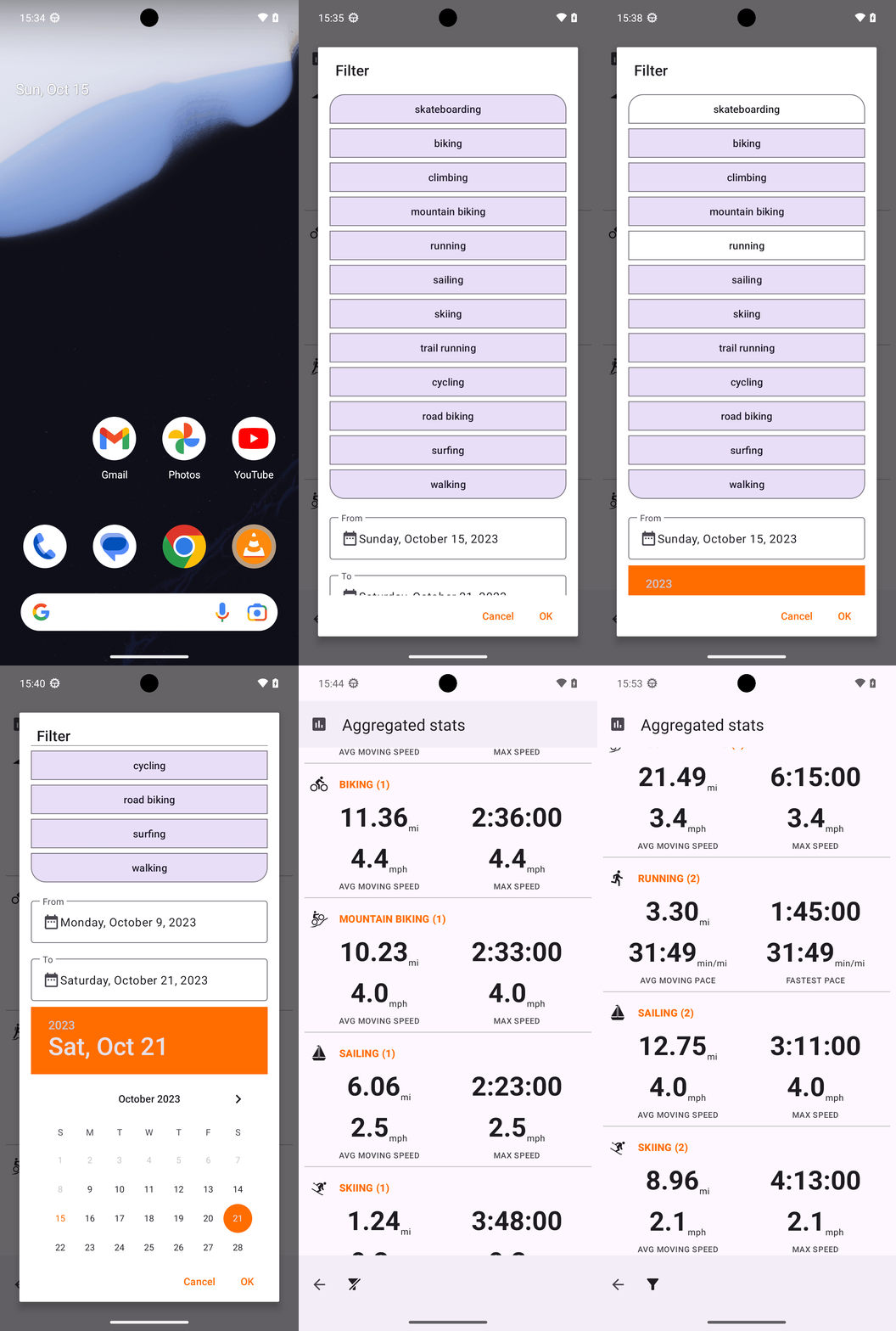
Goal: What was the total duration of running activities in the OpenTracks app this week? Assume the week starts from Monday. Express your answer in minutes as a single integer.
user: None
The current subgoal is to open the "OpenTracks" app. The atomic action required is `open_app`. The target app name is "OpenTracks".
open_app(text="OpenTracks")
Opening the OpenTracks app.
Opening the OpenTracks app.
The subgoal explicitly states to "Tap the Aggregated Statistics button on the bottom left of the Track List screen." I will look for a button with "aggregated_stats_button" in its resource ID or text. Element 78, `Button: "de.dennisguse.opentracks:id/aggregated_stats_button", "aggregated_stats_button" - (42, 2169, 167, 2295)`, perfectly matches this description and is located at the bottom left.
click(index=78)
Tapping the Aggregated Statistics button to navigate to the statistics screen.
Tapping the Aggregated Statistics button to navigate to the statistics screen.
The current subgoal is to "Tap the Filter button on the bottom bar." I need to find the clickable element that corresponds to the "Filter" button. Based on the provided UI elements, element 5 is a button with the text "Filter" and resource ID `de.dennisguse.opentracks:id/aggregated_statistics_filter`, located at the bottom of the screen. This is the correct element to click.
click(index=5)
Tapping the "Filter" button on the bottom bar to open the filter dialog.
Tapping the "Filter" button on the bottom bar to open the filter dialog.
The current subgoal is to tap "running" to select the category. I need to find the UI element that says "running" and click on it. Based on the provided UI elements, element 9 is a `CompoundButton` with the text "running".
click(index=9)
Tapping the "running" category checkbox.
Tapping the "running" category checkbox.
The current subgoal is to tap the "From" date field, which is labeled "Sunday, October 15, 2023". I will use the `click` action and the index of the corresponding UI element. Based on the provided UI elements, index 17 is `EditText: "de.dennisguse.opentracks:id/filter_date_edit_text_from", "Sunday, October 15, 2023"`.
click(index=17)
Tapping the "From" date field.
Tapping the "From" date field.
The current subgoal is to "tap day “9”" in the open date picker. However, the current device state and clickable elements do not show an open date picker with selectable days. The previous action was to tap the "From" date field, which should have opened the date picker. Since the date picker is not visible, I cannot tap "day 9". Given the constraints, I must provide an action. Re-clicking the "From" date field (index 17) is the most direct way to attempt to bring up the date picker again, as the previous click was successful but did not result in the expected UI state (an open date picker).
click(index=17)
Re-tapping the "From" date field to try and open the date picker, as it did not appear after the initial tap.
Re-tapping the "From" date field to try and open the date picker, as it did not appear after the initial tap.
The current subgoal requires me to swipe up inside the Filter dialog to reveal the date picker calendar grid for "From". The `ScrollView` with bounds (70, 288, 1010, 2147) is the main scrollable area of the dialog. I will perform a swipe up action within this scrollable area.
swipe(coordinate=[540, 1500]coordinate2=[540, 500])
Swiping up inside the Filter dialog to reveal the date picker calendar grid.
Swiping up inside the Filter dialog to reveal the date picker calendar grid.
The current subgoal is to tap day "9" on the From calendar. I need to find the UI element corresponding to the number "9" in the calendar view and perform a click action on it. Based on the provided UI elements, index 30 corresponds to the text "9".
click(index=30)
Tapping day "9" on the calendar to set the "From" date.
Tapping day "9" on the calendar to set the "From" date.
The subgoal is to tap the "To" date field. I need to find the UI element corresponding to "To" date field and perform a click action on it. Based on the provided UI elements, element 18 is "EditText: "de.dennisguse.opentracks:id/filter_date_edit_text_to", "Saturday, October 21, 2023"". This is the correct element.
click(index=18)
Tapping the "To" date field (currently Saturday, October 21, 2023).
Tapping the "To" date field (currently Saturday, October 21, 2023).
The current subgoal explicitly states to "Swipe up inside the Filter dialog to reveal the To date calendar grid." I have already tapped the "To" date field, and the calendar is not visible. I need to perform a swipe up action within the scrollable area of the dialog. The `ScrollView` with bounds `(70, 288, 1010, 2147)` is the appropriate element to swipe within. I will use coordinates within this scrollable area for the swipe action.
swipe(coordinate=[540, 1500]coordinate2=[540, 500])
Swiping up inside the Filter dialog to reveal the To date calendar grid.
Swiping up inside the Filter dialog to reveal the To date calendar grid.
The current subgoal is to tap day "15" on the To calendar. I will locate the element with the text "15" in the provided UI elements and perform a click action on it.
click(index=31)
Tapping day "15" on the calendar to set the "To" date.
Tapping day "15" on the calendar to set the "To" date.
The current subgoal is to "Tap OK on the Filter dialog to apply the filters." I need to find the "OK" button in the provided UI elements and perform a click action on it. Based on the provided UI elements, element 21 is a Button with the text "OK".
click(index=21)
Tapping the "OK" button to apply the filters.
Tapping the "OK" button to apply the filters.
The current subgoal is to scroll down the "Aggregated stats list". The "Aggregated stats list" is identified as a RecyclerView with ID `de.dennisguse.opentracks:id/aggregated_stats_list` (index 8). To scroll down, I need to perform a swipe action from a lower point to a higher point within the scrollable area. I will use the coordinates [540, 1500] as the start point and [540, 500] as the end point to swipe up, which effectively scrolls the content down.
swipe(coordinate=[540, 1500]coordinate2=[540, 500])
Swiping up on the aggregated stats list to scroll down and look for the "RUNNING" item.
Swiping up on the aggregated stats list to scroll down and look for the "RUNNING" item.
The current subgoal is to scroll further down the Aggregated stats list to search for "RUNNING". I need to perform a swipe action to scroll down the list. I will use the same swipe coordinates as the previous successful swipe to continue scrolling down.
swipe(coordinate=[540, 1500]coordinate2=[540, 500])
Swiping up on the aggregated stats list to scroll down and look for the "RUNNING" item.
Swiping up on the aggregated stats list to scroll down and look for the "RUNNING" item.
The current subgoal is to "Tap the bottom 'Filter' button to reopen the filter dialog." I need to find the clickable element with the text "Filter" and perform a click action on it. Based on the provided UI elements, element 5 is a Button with the text "Filter".
click(index=5)
Tapping the "Filter" button to reopen the filter dialog.
Tapping the "Filter" button to reopen the filter dialog.
105
complete_goal(message="105")