
Sports Tracker Activities On Date
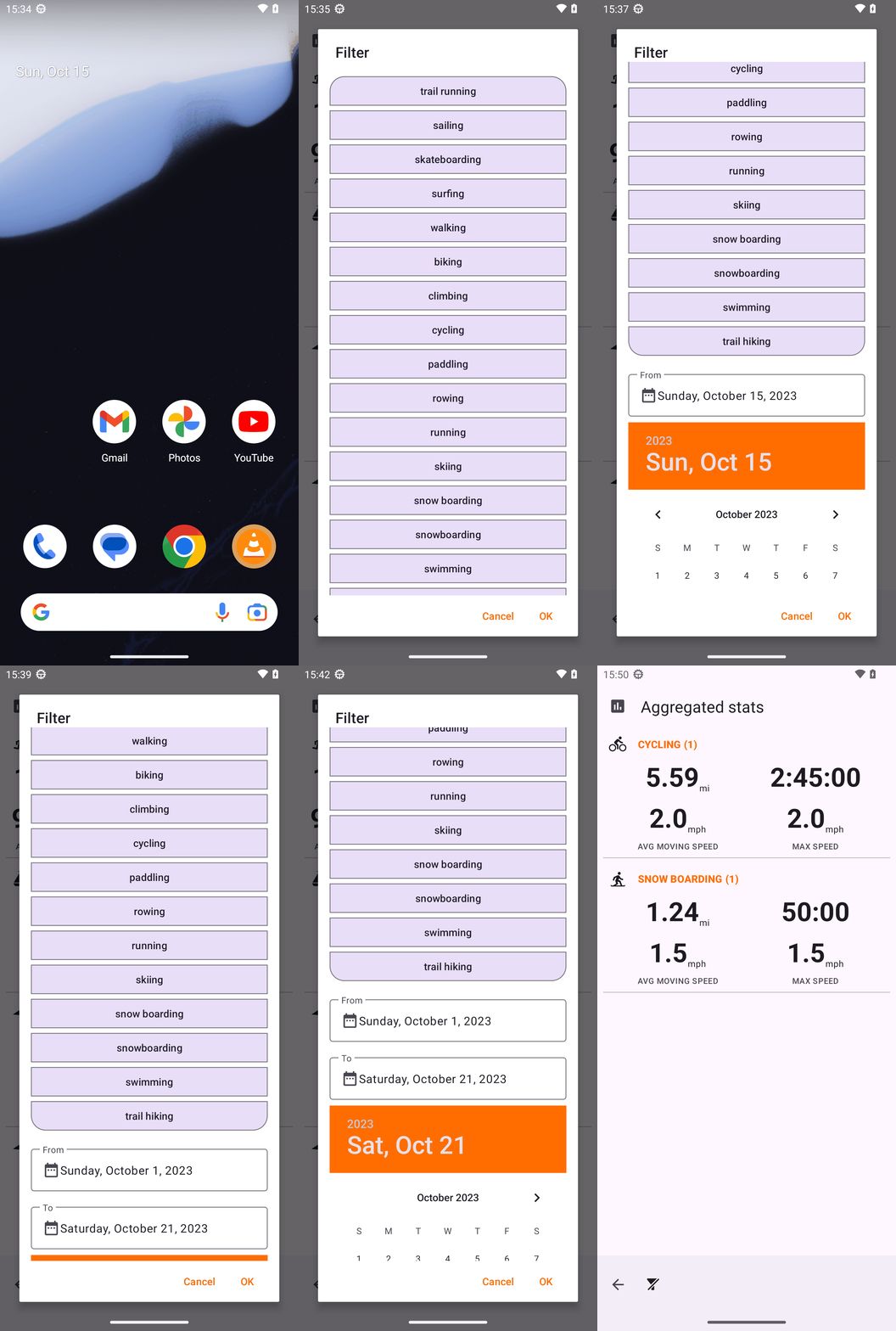
Goal: What activities did I do October 01 in the OpenTracks app? Answer with the activity type only. If there are multiple types, format your answer in a comma separated list.
Goal: What activities did I do October 01 in the OpenTracks app? Answer with the activity type only. If there are multiple types, format your answer in a comma separated list.
user: None
The current subgoal is "Step 1: open_app 'OpenTracks'". This requires the `open_app` atomic action. The target app name is "OpenTracks".
open_app(text="OpenTracks")
Open the "OpenTracks" application.
Open the "OpenTracks" application.
The current subgoal is to "Tap the Aggregated Statistics button". I will locate the UI element corresponding to "aggregated_stats_button" and perform a click action on it. Based on the provided UI elements, element 82 is "Button: "de.dennisguse.opentracks:id/aggregated_stats_button", "aggregated_stats_button"".
click(index=82)
Click the "Aggregated Statistics button".
Click the "Aggregated Statistics button".
The current subgoal is to "Tap the Filter button." I need to find the UI element that corresponds to the "Filter" button and use its index with the `click` action. Based on the provided UI elements, element with index 5 has the text "Filter".
click(index=5)
Tap the "Filter" button.
Tap the "Filter" button.
The subgoal is to scroll down within the Filter dialog. The current screen shows a scrollable list of activity types. I need to perform a swipe action to scroll down and reveal the "From" and "To" date fields, which are not currently visible. I will swipe from the middle of the scrollable area downwards.
swipe(coordinate=[540, 1500]coordinate2=[540, 500])
Scroll down within the filter dialog to reveal more options, specifically the date fields.
Scroll down within the filter dialog to reveal more options, specifically the date fields.
The current subgoal is to tap the "From date field". Based on the device state, element 17, "EditText: "de.dennisguse.opentracks:id/filter_date_edit_text_from", "Sunday, October 15, 2023" - (112, 1743, 968, 1896)", corresponds to the "From" date field. The required action is a "tap".
click(index=17)
Tap the "From" date field to open the date picker.
Tap the "From" date field to open the date picker.
The current subgoal is to scroll within the date picker area to reveal the calendar grid. The current screen shows the header of the date picker ("2023", "Sun, Oct 15"), but not the actual calendar grid with the days. To reveal the calendar grid, I need to swipe upwards on the screen, which will scroll the content downwards. I will choose a swipe action from a lower y-coordinate to a higher y-coordinate within the visible dialog area.swipe(coordinate=[540, 1500]coordinate2=[540, 1000])
Swipe upwards within the date picker dialog to reveal the calendar grid.
Swipe upwards within the date picker dialog to reveal the calendar grid.
The current subgoal requires tapping the day "1" in the calendar. I need to locate the UI element corresponding to "1" and perform a click action on it. Based on the provided clickable elements, index 24 is "View: '1' - (165, 2024, 272, 2129)", which is the correct target.
click(index=24)
Tap the day "1" in the October 2023 calendar.
Tap the day "1" in the October 2023 calendar.
The current subgoal is to "Tap the 'To' date field and select Oct 1, 2023 in the calendar." The first part of this is to tap the 'To' date field. I will look for the element corresponding to the 'To' date field in the current UI. Element 18, "EditText: 'de.dennisguse.opentracks:id/filter_date_edit_text_to', 'Saturday, October 21, 2023'", is the 'To' date field. I will perform a click action on this element.
click(index=18)
Tap the "To" date field to open the date picker.
Tap the "To" date field to open the date picker.
The current subgoal explicitly states to "Tap the To date field again". Looking at the provided UI elements, the "To" date field is identified as element 18: `EditText: "de.dennisguse.opentracks:id/filter_date_edit_text_to", "Saturday, October 21, 2023"`. Therefore, the atomic action required is a `click` on element 18.
click(index=18)
Tap the "To" date field to open the date picker.
Tap the "To" date field to open the date picker.
The current subgoal explicitly states to "Tap the To date field again". The "To date" field is identified as element 18 in the current UI elements. Therefore, the atomic action required is a `click` on element 18.
click(index=18)
Tap the "To date" field to open the date picker.
Tap the "To date" field to open the date picker.
The current subgoal is to "Tap the To date field by coordinate at its center (approx 540, 2029) to open the date picker." I need to find the UI element corresponding to the "To date" field and click it. Based on the provided UI elements, element 18 is `EditText: "de.dennisguse.opentracks:id/filter_date_edit_text_to", "Saturday, October 21, 2023"`. This is the "To date" field.
click(index=18)
Tap the "To date" field to open the date picker.
Tap the "To date" field to open the date picker.
The current subgoal is to "Slightly scroll the Filter dialog up a bit". This translates to a `swipe` action. I need to identify a scrollable area within the Filter dialog. The `ScrollView` with bounds (70, 223, 1010, 2147) is the main scrollable content area. To scroll up, I will swipe from a lower y-coordinate to a higher y-coordinate within this scrollable area.
swipe(coordinate=[500, 1500]coordinate2=[500, 1000])
Slightly scroll the Filter dialog up to refresh focus on the To field.
Slightly scroll the Filter dialog up to refresh focus on the To field.
The atomic action required is a `click`. The target is the day "1" in the calendar. I need to find the index corresponding to "1" in the UI elements. Based on the provided UI elements, `View: "1" - (165, 2186, 272, 2291)` has index 21.
click(index=21)
Tap the day "1" in the October 2023 calendar.
Tap the day "1" in the October 2023 calendar.
The current subgoal is to "Scroll the calendar area up slightly to bring the day grid fully into view." The calendar area is represented by `ScrollView: "ScrollView" - (112, 1928, 968, 2147)`. I will perform a swipe action within this scroll view, from bottom to top, to scroll it up.
swipe(coordinate=[540, 2100]coordinate2=[540, 1950])
Scroll the calendar area up slightly.
Scroll the calendar area up slightly.
The current subgoal is to tap the calendar day "1". I need to find the element with text "1" and perform a click action on it. Based on the provided UI elements, index 20 corresponds to the "1" in the calendar.
click(index=20)
Tap the calendar day "1".
Tap the calendar day "1".
The subgoal is to "Tap OK on the Filter dialog". I need to find the "OK" button in the provided UI elements and perform a click action on it. The element with index 21 has the text "OK".
click(index=21)
Tap the "OK" button to apply the date filter.
Tap the "OK" button to apply the date filter.
CYCLING, SNOW BOARDING
complete_goal(message="CYCLING, SNOW BOARDING")
Goal: What activities did I do October 01 in the OpenTracks app? Answer with the activity type only. If there are multiple types, format your answer in a comma separated list.
user: None
The current subgoal is "Step 1: open_app 'OpenTracks'". This requires the `open_app` atomic action. The target app name is "OpenTracks".
open_app(text="OpenTracks")
Open the "OpenTracks" application.
Open the "OpenTracks" application.
The current subgoal is to "Tap the Aggregated Statistics button". I will locate the UI element corresponding to "aggregated_stats_button" and perform a click action on it. Based on the provided UI elements, element 82 is "Button: "de.dennisguse.opentracks:id/aggregated_stats_button", "aggregated_stats_button"".
click(index=82)
Click the "Aggregated Statistics button".
Click the "Aggregated Statistics button".
The current subgoal is to "Tap the Filter button." I need to find the UI element that corresponds to the "Filter" button and use its index with the `click` action. Based on the provided UI elements, element with index 5 has the text "Filter".
click(index=5)
Tap the "Filter" button.
Tap the "Filter" button.
The subgoal is to scroll down within the Filter dialog. The current screen shows a scrollable list of activity types. I need to perform a swipe action to scroll down and reveal the "From" and "To" date fields, which are not currently visible. I will swipe from the middle of the scrollable area downwards.
swipe(coordinate=[540, 1500]coordinate2=[540, 500])
Scroll down within the filter dialog to reveal more options, specifically the date fields.
Scroll down within the filter dialog to reveal more options, specifically the date fields.
The current subgoal is to tap the "From date field". Based on the device state, element 17, "EditText: "de.dennisguse.opentracks:id/filter_date_edit_text_from", "Sunday, October 15, 2023" - (112, 1743, 968, 1896)", corresponds to the "From" date field. The required action is a "tap".
click(index=17)
Tap the "From" date field to open the date picker.
Tap the "From" date field to open the date picker.
The current subgoal is to scroll within the date picker area to reveal the calendar grid. The current screen shows the header of the date picker ("2023", "Sun, Oct 15"), but not the actual calendar grid with the days. To reveal the calendar grid, I need to swipe upwards on the screen, which will scroll the content downwards. I will choose a swipe action from a lower y-coordinate to a higher y-coordinate within the visible dialog area.swipe(coordinate=[540, 1500]coordinate2=[540, 1000])
Swipe upwards within the date picker dialog to reveal the calendar grid.
Swipe upwards within the date picker dialog to reveal the calendar grid.
The current subgoal requires tapping the day "1" in the calendar. I need to locate the UI element corresponding to "1" and perform a click action on it. Based on the provided clickable elements, index 24 is "View: '1' - (165, 2024, 272, 2129)", which is the correct target.
click(index=24)
Tap the day "1" in the October 2023 calendar.
Tap the day "1" in the October 2023 calendar.
The current subgoal is to "Tap the 'To' date field and select Oct 1, 2023 in the calendar." The first part of this is to tap the 'To' date field. I will look for the element corresponding to the 'To' date field in the current UI. Element 18, "EditText: 'de.dennisguse.opentracks:id/filter_date_edit_text_to', 'Saturday, October 21, 2023'", is the 'To' date field. I will perform a click action on this element.
click(index=18)
Tap the "To" date field to open the date picker.
Tap the "To" date field to open the date picker.
The current subgoal explicitly states to "Tap the To date field again". Looking at the provided UI elements, the "To" date field is identified as element 18: `EditText: "de.dennisguse.opentracks:id/filter_date_edit_text_to", "Saturday, October 21, 2023"`. Therefore, the atomic action required is a `click` on element 18.
click(index=18)
Tap the "To" date field to open the date picker.
Tap the "To" date field to open the date picker.
The current subgoal explicitly states to "Tap the To date field again". The "To date" field is identified as element 18 in the current UI elements. Therefore, the atomic action required is a `click` on element 18.
click(index=18)
Tap the "To date" field to open the date picker.
Tap the "To date" field to open the date picker.
The current subgoal is to "Tap the To date field by coordinate at its center (approx 540, 2029) to open the date picker." I need to find the UI element corresponding to the "To date" field and click it. Based on the provided UI elements, element 18 is `EditText: "de.dennisguse.opentracks:id/filter_date_edit_text_to", "Saturday, October 21, 2023"`. This is the "To date" field.
click(index=18)
Tap the "To date" field to open the date picker.
Tap the "To date" field to open the date picker.
The current subgoal is to "Slightly scroll the Filter dialog up a bit". This translates to a `swipe` action. I need to identify a scrollable area within the Filter dialog. The `ScrollView` with bounds (70, 223, 1010, 2147) is the main scrollable content area. To scroll up, I will swipe from a lower y-coordinate to a higher y-coordinate within this scrollable area.
swipe(coordinate=[500, 1500]coordinate2=[500, 1000])
Slightly scroll the Filter dialog up to refresh focus on the To field.
Slightly scroll the Filter dialog up to refresh focus on the To field.
The atomic action required is a `click`. The target is the day "1" in the calendar. I need to find the index corresponding to "1" in the UI elements. Based on the provided UI elements, `View: "1" - (165, 2186, 272, 2291)` has index 21.
click(index=21)
Tap the day "1" in the October 2023 calendar.
Tap the day "1" in the October 2023 calendar.
The current subgoal is to "Scroll the calendar area up slightly to bring the day grid fully into view." The calendar area is represented by `ScrollView: "ScrollView" - (112, 1928, 968, 2147)`. I will perform a swipe action within this scroll view, from bottom to top, to scroll it up.
swipe(coordinate=[540, 2100]coordinate2=[540, 1950])
Scroll the calendar area up slightly.
Scroll the calendar area up slightly.
The current subgoal is to tap the calendar day "1". I need to find the element with text "1" and perform a click action on it. Based on the provided UI elements, index 20 corresponds to the "1" in the calendar.
click(index=20)
Tap the calendar day "1".
Tap the calendar day "1".
The subgoal is to "Tap OK on the Filter dialog". I need to find the "OK" button in the provided UI elements and perform a click action on it. The element with index 21 has the text "OK".
click(index=21)
Tap the "OK" button to apply the date filter.
Tap the "OK" button to apply the date filter.
CYCLING, SNOW BOARDING
complete_goal(message="CYCLING, SNOW BOARDING")