
Sports Tracker Activities Count For Week
Goal: How many running activities did I do this week in the OpenTracks app? Assume the week starts from Monday. Express your answer as a single integer.
Goal: How many running activities did I do this week in the OpenTracks app? Assume the week starts from Monday. Express your answer as a single integer.
user: None
The current subgoal explicitly states to "Open the OpenTracks app (use open_app)". This directly maps to the `open_app` atomic action. The target is the app name "OpenTracks".
open_app(text="OpenTracks")
Opening the OpenTracks app.
Opening the OpenTracks app.
The current subgoal is to tap the "Aggregated Statistics button". I have identified a clickable element with the resource ID `de.dennisguse.opentracks:id/aggregated_stats_button` and text "aggregated_stats_button" which corresponds to the Aggregated Statistics button. I will use the `click` action with the index of this element.
click(index=78)
Tapping the Aggregated Statistics button.
Tapping the Aggregated Statistics button.
The current subgoal is to "Tap the Filter button on the bottom bar." I need to find the UI element corresponding to the "Filter" button and perform a click action on it. Based on the provided UI elements, element 5 is a Button with the text "Filter" and is located at the bottom of the screen.
click(index=5)
Tapping the "Filter" button on the bottom bar.
Tapping the "Filter" button on the bottom bar.
The current subgoal is to tap the "running" category. I will find the element with the text "running" and perform a click action on it. Based on the provided UI elements, element 8 is "running".
click(index=8)
Tapping the "running" category.
Tapping the "running" category.
The current subgoal is to "Tap the From date field". Based on the provided UI elements, the "From" date field is represented by element 16, which has the text "Sunday, October 15, 2023". I will use the `click` action on this element.
click(index=16)
Tapping the "From" date field.
Tapping the "From" date field.
The current subgoal explicitly states to "Tap the header date “Sun, Oct 15”". I need to find the UI element with the text "Sun, Oct 15" and perform a click action on it. Based on the provided UI elements, element 18 matches this description.
click(index=18)
Tapping the header date "Sun, Oct 15" to bring up the day selection.
Tapping the header date "Sun, Oct 15" to bring up the day selection.
The current subgoal is to "Tap Cancel in the Filter dialog." I need to find the "Cancel" button in the provided UI elements and perform a click action on it. Element 20 is a button with the text "Cancel".
click(index=20)
Tapping the "Cancel" button in the Filter dialog.
Tapping the "Cancel" button in the Filter dialog.
The current subgoal is to "Tap the Navigate up button to go back to the Track List screen." I need to find the "Navigate up" button in the provided UI elements and perform a click action on it. Looking at the clickable elements, element 4 is an `ImageButton` with the text "Navigate up". This matches the target specified in the subgoal.
click(index=4)
Tapping the "Navigate up" button to go back to the Track List screen.
Tapping the "Navigate up" button to go back to the Track List screen.
The current subgoal is to tap the Search icon. I will look for a clickable element that represents a search icon or has "Search" in its description. Element 6, an ImageView with the text "Search" and resource ID `de.dennisguse.opentracks:id/search_button`, is the correct target.
click(index=6)
Tapping the Search icon.
Tapping the Search icon.
The current subgoal is to type "running" in the search field. The device state shows that the keyboard is visible and the focused element is the search field (index 5). Therefore, I need to use the `type` action with the text "running" and the index 5.
type(text="running"index=5)
Typing "running" into the search field.
Typing "running" into the search field.
The current subgoal explicitly states to "Tap the Submit query (magnifying glass/arrow) button". I need to find the UI element that corresponds to "Submit query" and perform a click action on it. Based on the provided UI elements, element 7 is an ImageView with the text "Submit query".
click(index=7)
Tapping the "Submit query" button to apply the search filter.
Tapping the "Submit query" button to apply the search filter.
2
complete_goal(message="2")
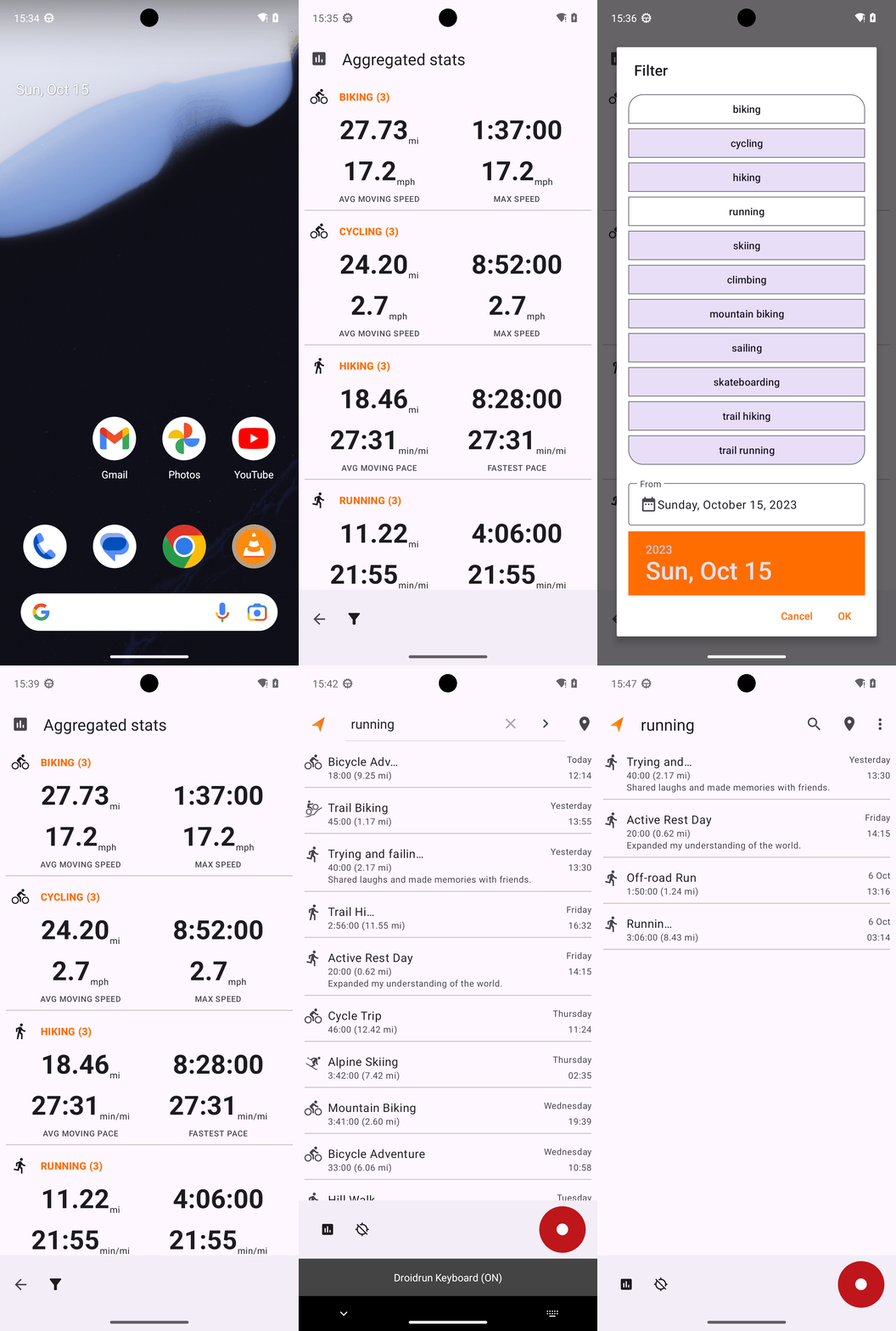
Goal: How many running activities did I do this week in the OpenTracks app? Assume the week starts from Monday. Express your answer as a single integer.
user: None
The current subgoal explicitly states to "Open the OpenTracks app (use open_app)". This directly maps to the `open_app` atomic action. The target is the app name "OpenTracks".
open_app(text="OpenTracks")
Opening the OpenTracks app.
Opening the OpenTracks app.
The current subgoal is to tap the "Aggregated Statistics button". I have identified a clickable element with the resource ID `de.dennisguse.opentracks:id/aggregated_stats_button` and text "aggregated_stats_button" which corresponds to the Aggregated Statistics button. I will use the `click` action with the index of this element.
click(index=78)
Tapping the Aggregated Statistics button.
Tapping the Aggregated Statistics button.
The current subgoal is to "Tap the Filter button on the bottom bar." I need to find the UI element corresponding to the "Filter" button and perform a click action on it. Based on the provided UI elements, element 5 is a Button with the text "Filter" and is located at the bottom of the screen.
click(index=5)
Tapping the "Filter" button on the bottom bar.
Tapping the "Filter" button on the bottom bar.
The current subgoal is to tap the "running" category. I will find the element with the text "running" and perform a click action on it. Based on the provided UI elements, element 8 is "running".
click(index=8)
Tapping the "running" category.
Tapping the "running" category.
The current subgoal is to "Tap the From date field". Based on the provided UI elements, the "From" date field is represented by element 16, which has the text "Sunday, October 15, 2023". I will use the `click` action on this element.
click(index=16)
Tapping the "From" date field.
Tapping the "From" date field.
The current subgoal explicitly states to "Tap the header date “Sun, Oct 15”". I need to find the UI element with the text "Sun, Oct 15" and perform a click action on it. Based on the provided UI elements, element 18 matches this description.
click(index=18)
Tapping the header date "Sun, Oct 15" to bring up the day selection.
Tapping the header date "Sun, Oct 15" to bring up the day selection.
The current subgoal is to "Tap Cancel in the Filter dialog." I need to find the "Cancel" button in the provided UI elements and perform a click action on it. Element 20 is a button with the text "Cancel".
click(index=20)
Tapping the "Cancel" button in the Filter dialog.
Tapping the "Cancel" button in the Filter dialog.
The current subgoal is to "Tap the Navigate up button to go back to the Track List screen." I need to find the "Navigate up" button in the provided UI elements and perform a click action on it. Looking at the clickable elements, element 4 is an `ImageButton` with the text "Navigate up". This matches the target specified in the subgoal.
click(index=4)
Tapping the "Navigate up" button to go back to the Track List screen.
Tapping the "Navigate up" button to go back to the Track List screen.
The current subgoal is to tap the Search icon. I will look for a clickable element that represents a search icon or has "Search" in its description. Element 6, an ImageView with the text "Search" and resource ID `de.dennisguse.opentracks:id/search_button`, is the correct target.
click(index=6)
Tapping the Search icon.
Tapping the Search icon.
The current subgoal is to type "running" in the search field. The device state shows that the keyboard is visible and the focused element is the search field (index 5). Therefore, I need to use the `type` action with the text "running" and the index 5.
type(text="running"index=5)
Typing "running" into the search field.
Typing "running" into the search field.
The current subgoal explicitly states to "Tap the Submit query (magnifying glass/arrow) button". I need to find the UI element that corresponds to "Submit query" and perform a click action on it. Based on the provided UI elements, element 7 is an ImageView with the text "Submit query".
click(index=7)
Tapping the "Submit query" button to apply the search filter.
Tapping the "Submit query" button to apply the search filter.
2
complete_goal(message="2")