
Simple Sms Send Clipboard Content
Goal: Send a message to +15459061746 with the clipboard content in Simple SMS Messenger
Goal: Send a message to +15459061746 with the clipboard content in Simple SMS Messenger
user: None
The current subgoal explicitly states "Open Simple SMS Messenger via open_app." This requires the `open_app` action. The target application name is "Simple SMS Messenger".
open_app(text="Simple SMS Messenger")
Open the "Simple SMS Messenger" app.
Open the "Simple SMS Messenger" app.
The current subgoal is to "Tap the + compose button to start a new conversation." I need to find a clickable element that represents a "compose button" or a "+" button. Looking at the UI elements, element 12, `ImageButton: "com.simplemobiletools.smsmessenger:id/conversations_fab"`, is a floating action button in the bottom right corner, which typically serves as a compose button. I will click this element.
click(index=12)
Click the ImageButton with resource ID "com.simplemobiletools.smsmessenger:id/conversations_fab" which is the compose button.
Click the ImageButton with resource ID "com.simplemobiletools.smsmessenger:id/conversations_fab" which is the compose button.
The subgoal requires typing a specific number into the "Add Contact or Number" field. I have identified this field as element 5 in the provided UI elements. Therefore, I will use the `type` action with the specified number and the index of the target element.
type(text="+15459061746"index=5)
Type "+15459061746" into the "Add Contact or Number…" text field.
Type "+15459061746" into the "Add Contact or Number…" text field.
The subgoal is to "Tap the checkmark to confirm the recipient and open the conversation." I need to find the checkmark element in the UI. Element 6 is an ImageView with resource ID "com.simplemobiletools.smsmessenger:id/new_conversation_confirm". This is the checkmark icon. The action required is "tap". Therefore, I should click on element 6.
click(index=6)
Click the checkmark icon to confirm the recipient.
Click the checkmark icon to confirm the recipient.
The current subgoal requires long-pressing the "Type a message…" field and then tapping "Paste". The `paste` action directly performs this operation by taking the index of the target text field. The "Type a message…" field is identified as element 10.
paste(index=10)
Long-press the "Type a message…" field (index 10) and paste the clipboard content.
Long-press the "Type a message…" field (index 10) and paste the clipboard content.
The current subgoal explicitly states to "Long-press the “Type a message…” field and tap Paste to insert clipboard content." The `paste` action is designed for this purpose. The target element is "Type a message…", which has index 10.
paste(index=10)
Long-press the "Type a message…" field and paste the clipboard content.
Long-press the "Type a message…" field and paste the clipboard content.
The current subgoal explicitly states to "Long-press (long_click) the “Type a message…” field". I need to find the index of the "Type a message…" field from the provided UI elements and then use the `long_press` action with that index. Element 10 is "Type a message…".
long_press(index=10)
Long-press the "Type a message…" field to open the paste menu.
Long-press the "Type a message…" field to open the paste menu.
The current subgoal is to "Tap 'Paste' in the floating menu to insert the clipboard content into the message field." The `paste` atomic action is designed for this purpose. It takes an `index` to specify the target text field. The focused element is 'Type a message…', which has index 10. This is the field where the content should be pasted. Therefore, I should use the `paste` action with index 10.
paste(index=10clear=false)
Paste the clipboard content into the 'Type a message…' text field (index 10).
Paste the clipboard content into the 'Type a message…' text field (index 10).
The current subgoal is to tap the "SMS" send button. I need to find the element labeled "SMS" and perform a click action on it. Based on the provided UI elements, element 11 is a button with the text "SMS".
click(index=11)
Tap the "SMS" send button to send the message.
Tap the "SMS" send button to send the message.
I sent the clipboard content to +15459061746 in Simple SMS Messenger and verified the sent message appears in the thread.
complete_goal(message="I sent the clipboard content to +15459061746 in Simple SMS Messenger and verified the sent message appears in the thread.")
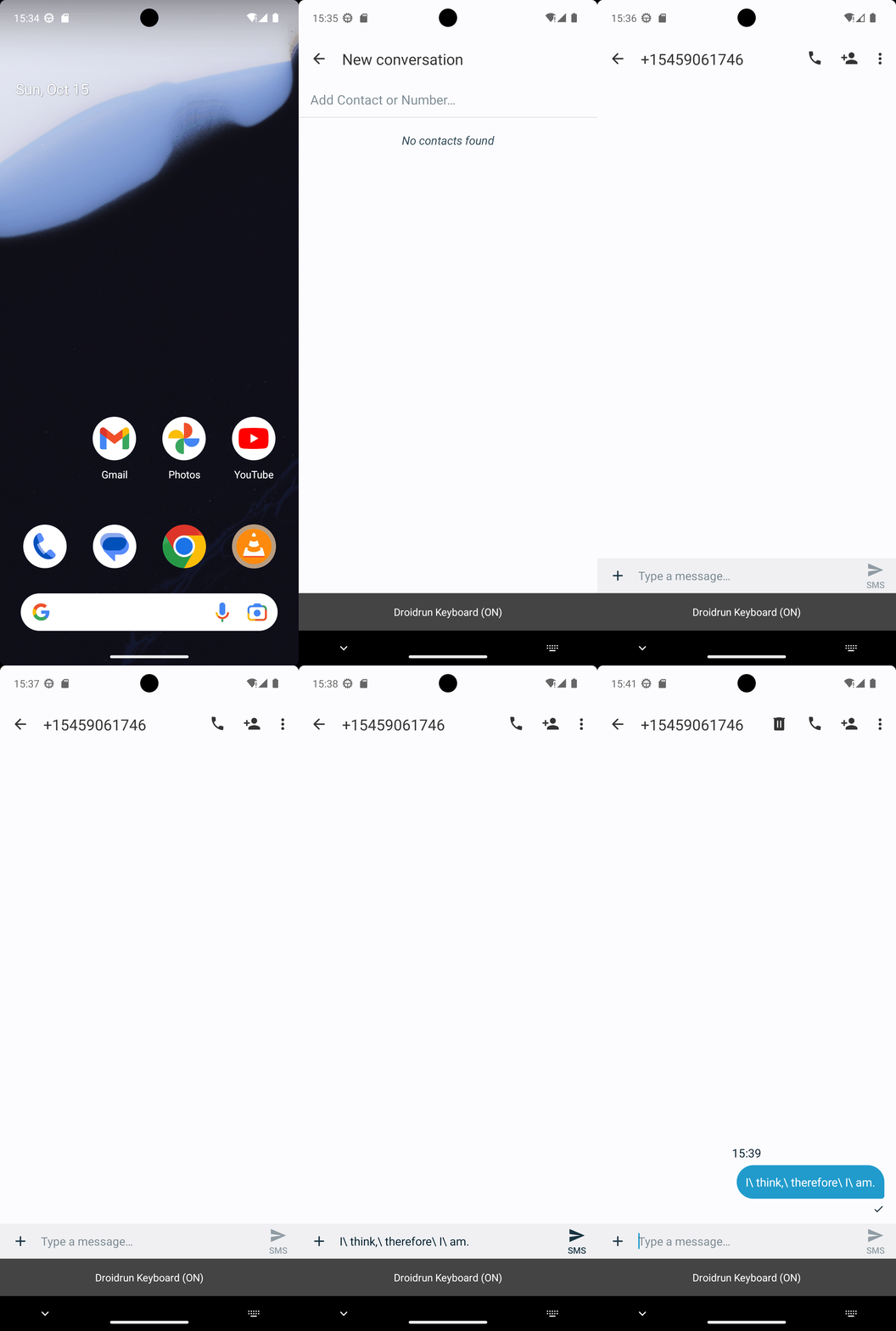
Goal: Send a message to +15459061746 with the clipboard content in Simple SMS Messenger
user: None
The current subgoal explicitly states "Open Simple SMS Messenger via open_app." This requires the `open_app` action. The target application name is "Simple SMS Messenger".
open_app(text="Simple SMS Messenger")
Open the "Simple SMS Messenger" app.
Open the "Simple SMS Messenger" app.
The current subgoal is to "Tap the + compose button to start a new conversation." I need to find a clickable element that represents a "compose button" or a "+" button. Looking at the UI elements, element 12, `ImageButton: "com.simplemobiletools.smsmessenger:id/conversations_fab"`, is a floating action button in the bottom right corner, which typically serves as a compose button. I will click this element.
click(index=12)
Click the ImageButton with resource ID "com.simplemobiletools.smsmessenger:id/conversations_fab" which is the compose button.
Click the ImageButton with resource ID "com.simplemobiletools.smsmessenger:id/conversations_fab" which is the compose button.
The subgoal requires typing a specific number into the "Add Contact or Number" field. I have identified this field as element 5 in the provided UI elements. Therefore, I will use the `type` action with the specified number and the index of the target element.
type(text="+15459061746"index=5)
Type "+15459061746" into the "Add Contact or Number…" text field.
Type "+15459061746" into the "Add Contact or Number…" text field.
The subgoal is to "Tap the checkmark to confirm the recipient and open the conversation." I need to find the checkmark element in the UI. Element 6 is an ImageView with resource ID "com.simplemobiletools.smsmessenger:id/new_conversation_confirm". This is the checkmark icon. The action required is "tap". Therefore, I should click on element 6.
click(index=6)
Click the checkmark icon to confirm the recipient.
Click the checkmark icon to confirm the recipient.
The current subgoal requires long-pressing the "Type a message…" field and then tapping "Paste". The `paste` action directly performs this operation by taking the index of the target text field. The "Type a message…" field is identified as element 10.
paste(index=10)
Long-press the "Type a message…" field (index 10) and paste the clipboard content.
Long-press the "Type a message…" field (index 10) and paste the clipboard content.
The current subgoal explicitly states to "Long-press the “Type a message…” field and tap Paste to insert clipboard content." The `paste` action is designed for this purpose. The target element is "Type a message…", which has index 10.
paste(index=10)
Long-press the "Type a message…" field and paste the clipboard content.
Long-press the "Type a message…" field and paste the clipboard content.
The current subgoal explicitly states to "Long-press (long_click) the “Type a message…” field". I need to find the index of the "Type a message…" field from the provided UI elements and then use the `long_press` action with that index. Element 10 is "Type a message…".
long_press(index=10)
Long-press the "Type a message…" field to open the paste menu.
Long-press the "Type a message…" field to open the paste menu.
The current subgoal is to "Tap 'Paste' in the floating menu to insert the clipboard content into the message field." The `paste` atomic action is designed for this purpose. It takes an `index` to specify the target text field. The focused element is 'Type a message…', which has index 10. This is the field where the content should be pasted. Therefore, I should use the `paste` action with index 10.
paste(index=10clear=false)
Paste the clipboard content into the 'Type a message…' text field (index 10).
Paste the clipboard content into the 'Type a message…' text field (index 10).
The current subgoal is to tap the "SMS" send button. I need to find the element labeled "SMS" and perform a click action on it. Based on the provided UI elements, element 11 is a button with the text "SMS".
click(index=11)
Tap the "SMS" send button to send the message.
Tap the "SMS" send button to send the message.
I sent the clipboard content to +15459061746 in Simple SMS Messenger and verified the sent message appears in the thread.
complete_goal(message="I sent the clipboard content to +15459061746 in Simple SMS Messenger and verified the sent message appears in the thread.")