
Simple Sms Send
Goal: Send a text message using Simple SMS Messenger to +16597910719 with message: Beauty is in the eye of the beholder.
Goal: Send a text message using Simple SMS Messenger to +16597910719 with message: Beauty is in the eye of the beholder.
user: None
The current subgoal is to open the "Simple SMS Messenger" app. This directly corresponds to the `open_app` atomic action. The target is the app name "Simple SMS Messenger".
open_app(text="Simple SMS Messenger")
Open the "Simple SMS Messenger" app.
Open the "Simple SMS Messenger" app.
The current subgoal is to "Tap the + compose button (conversations_fab)". I need to find the element with the resource ID "conversations_fab" and perform a click action on it. Element 12 matches this description.
click(index=12)
Tap the "+ compose button" (conversations_fab) to start a new conversation.
Tap the "+ compose button" (conversations_fab) to start a new conversation.
The current subgoal requires typing text into a specific field. The action is `type`. The target is the "Add Contact or Number…" field, which corresponds to index 5 in the provided UI elements. The text to type is "+16597910719".
type(text="+16597910719"index=5)
Type "+16597910719" into the "Add Contact or Number…" text field.
Type "+16597910719" into the "Add Contact or Number…" text field.
The current subgoal is to "Tap the checkmark button (new_conversation_confirm) to confirm the recipient". I need to find the element with the resource ID or description "new_conversation_confirm" and perform a click action on it. Element 6, `ImageView: "com.simplemobiletools.smsmessenger:id/new_conversation_confirm", "new_conversation_confirm"`, matches this description.
click(index=6)
Tap the checkmark button (new_conversation_confirm) to confirm the recipient.
Tap the checkmark button (new_conversation_confirm) to confirm the recipient.
The current subgoal is to type the exact message "Beauty is in the eye of the beholder." into the message field. The focused element is 'Type a message…', which is element 10. The action required is `type`, the text is "Beauty is in the eye of the beholder.", and the index is 10.
type(text="Beauty is in the eye of the beholder."index=10)
Type "Beauty is in the eye of the beholder." into the message field.
Type "Beauty is in the eye of the beholder." into the message field.
The current subgoal is to "Tap the Send (SMS) button". I need to find the element that corresponds to "Send (SMS) button" in the provided UI elements and perform a click action on it. Element 11 is a Button with text "SMS" and resource ID "com.simplemobiletools.smsmessenger:id/thread_send_message", which is the target.
click(index=11)
Tap the Send (SMS) button.
Tap the Send (SMS) button.
I sent a text via Simple SMS Messenger to +16597910719 with the exact message: "Beauty is in the eye of the beholder." and verified it appears in the conversation thread as sent.
complete_goal(message="I sent a text via Simple SMS Messenger to +16597910719 with the exact message: "Beauty is in the eye of the beholder." and verified it appears in the conversation thread as sent.")
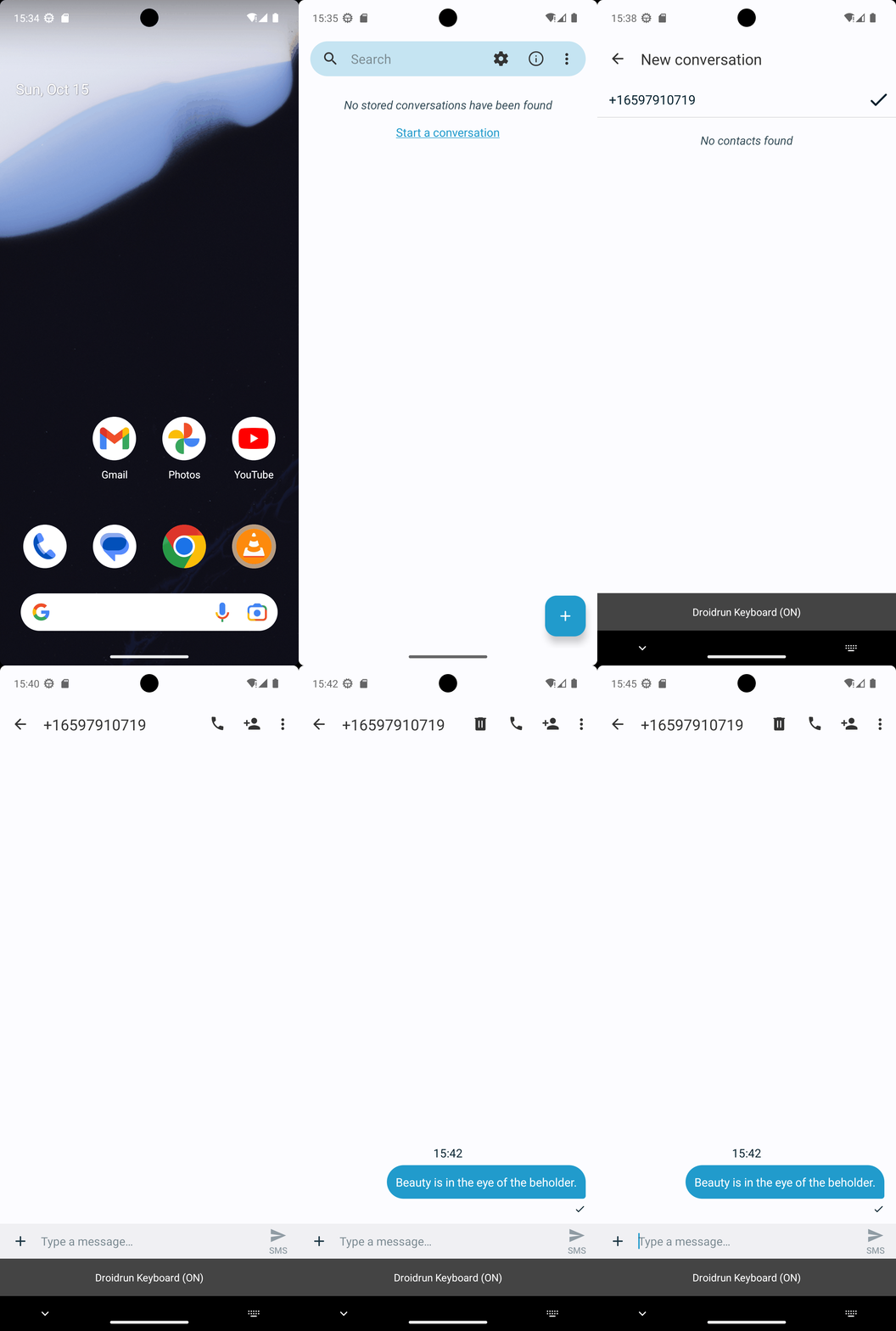
Goal: Send a text message using Simple SMS Messenger to +16597910719 with message: Beauty is in the eye of the beholder.
user: None
The current subgoal is to open the "Simple SMS Messenger" app. This directly corresponds to the `open_app` atomic action. The target is the app name "Simple SMS Messenger".
open_app(text="Simple SMS Messenger")
Open the "Simple SMS Messenger" app.
Open the "Simple SMS Messenger" app.
The current subgoal is to "Tap the + compose button (conversations_fab)". I need to find the element with the resource ID "conversations_fab" and perform a click action on it. Element 12 matches this description.
click(index=12)
Tap the "+ compose button" (conversations_fab) to start a new conversation.
Tap the "+ compose button" (conversations_fab) to start a new conversation.
The current subgoal requires typing text into a specific field. The action is `type`. The target is the "Add Contact or Number…" field, which corresponds to index 5 in the provided UI elements. The text to type is "+16597910719".
type(text="+16597910719"index=5)
Type "+16597910719" into the "Add Contact or Number…" text field.
Type "+16597910719" into the "Add Contact or Number…" text field.
The current subgoal is to "Tap the checkmark button (new_conversation_confirm) to confirm the recipient". I need to find the element with the resource ID or description "new_conversation_confirm" and perform a click action on it. Element 6, `ImageView: "com.simplemobiletools.smsmessenger:id/new_conversation_confirm", "new_conversation_confirm"`, matches this description.
click(index=6)
Tap the checkmark button (new_conversation_confirm) to confirm the recipient.
Tap the checkmark button (new_conversation_confirm) to confirm the recipient.
The current subgoal is to type the exact message "Beauty is in the eye of the beholder." into the message field. The focused element is 'Type a message…', which is element 10. The action required is `type`, the text is "Beauty is in the eye of the beholder.", and the index is 10.
type(text="Beauty is in the eye of the beholder."index=10)
Type "Beauty is in the eye of the beholder." into the message field.
Type "Beauty is in the eye of the beholder." into the message field.
The current subgoal is to "Tap the Send (SMS) button". I need to find the element that corresponds to "Send (SMS) button" in the provided UI elements and perform a click action on it. Element 11 is a Button with text "SMS" and resource ID "com.simplemobiletools.smsmessenger:id/thread_send_message", which is the target.
click(index=11)
Tap the Send (SMS) button.
Tap the Send (SMS) button.
I sent a text via Simple SMS Messenger to +16597910719 with the exact message: "Beauty is in the eye of the beholder." and verified it appears in the conversation thread as sent.
complete_goal(message="I sent a text via Simple SMS Messenger to +16597910719 with the exact message: "Beauty is in the eye of the beholder." and verified it appears in the conversation thread as sent.")