
Back to benchmark
Simple Sms Reply Most Recent
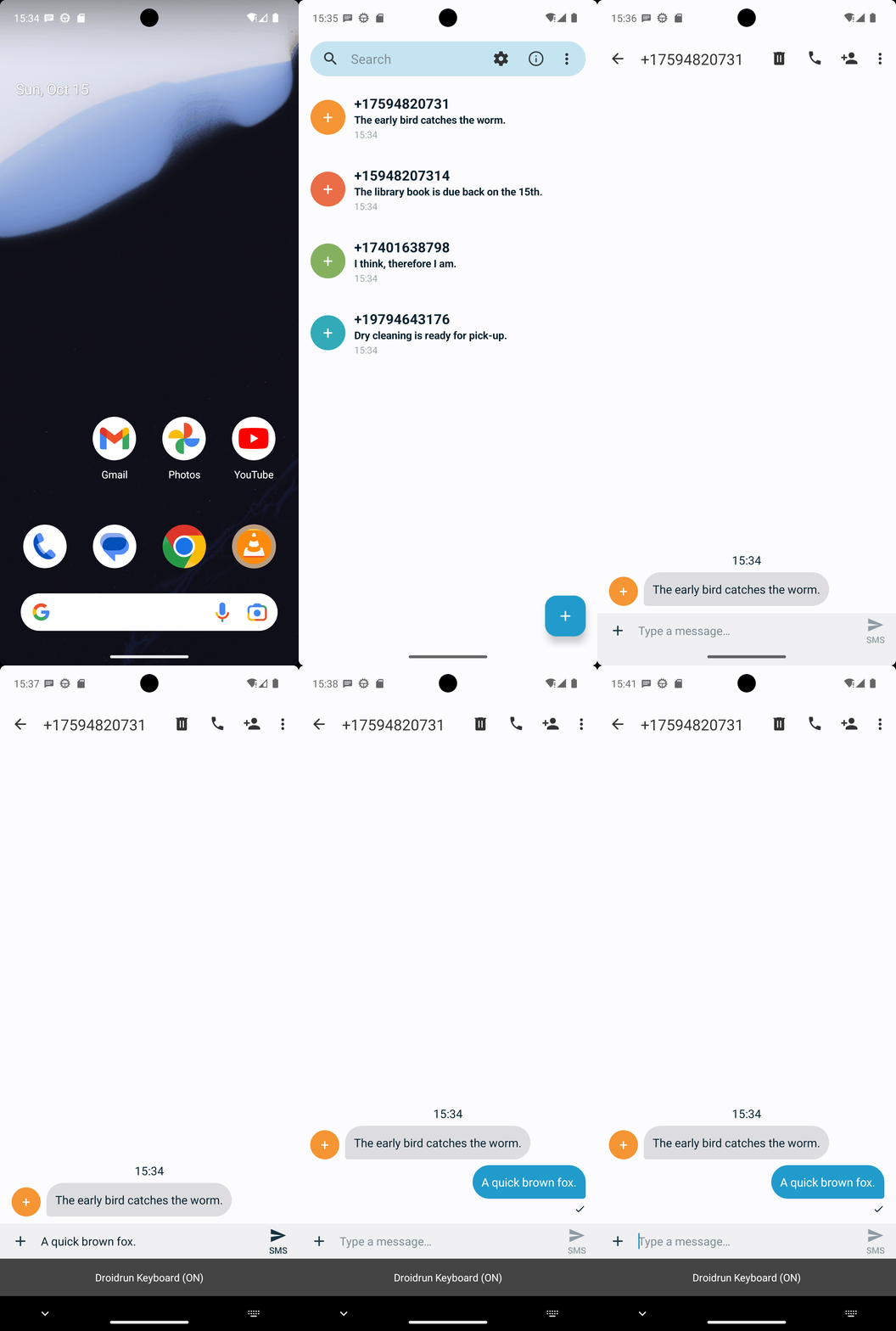
Goal: Reply to the most recent text message using Simple SMS Messenger with message: A quick brown fox.
Plan Input
Input
user:
Goal: Reply to the most recent text message using Simple SMS Messenger with message: A quick brown fox.
user: None
Task Thinking Step 1
Thoughts
The current subgoal explicitly states to "Open the app 'Simple SMS Messenger' using open_app". This maps directly to the `open_app` action. The target app name is "Simple SMS Messenger".
Code
open_app(text="Simple SMS Messenger")
Task Execution Result
Output
Open the app named "Simple SMS Messenger".
Task End
Success reason
Open the app named "Simple SMS Messenger".
Success
Task Thinking Step 2
Thoughts
The current subgoal is to open the top/most recent conversation (+17594820731). I need to find the clickable element corresponding to this conversation. Element 12 has the text "+17594820731" and is part of the first conversation frame, which is the most recent. I will click on this element.
Code
click(index=12)
Task Execution Result
Output
Click on the TextView with text "+17594820731" to open the most recent conversation.
Task End
Success reason
Click on the TextView with text "+17594820731" to open the most recent conversation.
Success
Task Thinking Step 3
Thoughts
The current subgoal is to tap the "Type a message…" field. I need to find the element corresponding to "Type a message…" and perform a click action on it. Element 16 in the provided UI elements list is an EditText with the text "Type a message…".
Code
click(index=16)
Task Execution Result
Output
Click the "Type a message…" text field.
Task End
Success reason
Click the "Type a message…" text field.
Success
Task Thinking Step 4
Thoughts
The current subgoal is to type "A quick brown fox." into the message field. The device state indicates that the keyboard is visible and the "Type a message..." field is focused. I need to use the `type` action with the specified text and the index of the input field. The input field is element 16, "Type a message…".
Code
type(text="A quick brown fox."index=16)
Task Execution Result
Output
Type "A quick brown fox." into the "Type a message…" text field.
Task End
Success reason
Type "A quick brown fox." into the "Type a message…" text field.
Success
Task Thinking Step 5
Thoughts
The current subgoal is to tap the "SMS" send button. I need to find the element that corresponds to the "SMS" send button and perform a click action on it. Based on the provided UI elements, element 17 is a Button with the text "SMS" and resource ID "com.simplemobiletools.smsmessenger:id/thread_send_message", which is the send button.
Code
click(index=17)
Task Execution Result
Output
Click the "SMS" send button to send the message.
Task End
Success reason
Click the "SMS" send button to send the message.
Success
Plan Thinking
Thoughts
Replied to the most recent SMS in Simple SMS Messenger (thread: +17594820731) with the message: "A quick brown fox.", and confirmed it appears as the latest outgoing message.
Code
complete_goal(message="Replied to the most recent SMS in Simple SMS Messenger (thread: +17594820731) with the message: "A quick brown fox.", and confirmed it appears as the latest outgoing message.")
Plan Input
Input
user:
Goal: Reply to the most recent text message using Simple SMS Messenger with message: A quick brown fox.
user: None
Task Thinking Step 1
Thoughts
The current subgoal explicitly states to "Open the app 'Simple SMS Messenger' using open_app". This maps directly to the `open_app` action. The target app name is "Simple SMS Messenger".
Code
open_app(text="Simple SMS Messenger")
Task Execution Result
Output
Open the app named "Simple SMS Messenger".
Task End
Success reason
Open the app named "Simple SMS Messenger".
Success
Task Thinking Step 2
Thoughts
The current subgoal is to open the top/most recent conversation (+17594820731). I need to find the clickable element corresponding to this conversation. Element 12 has the text "+17594820731" and is part of the first conversation frame, which is the most recent. I will click on this element.
Code
click(index=12)
Task Execution Result
Output
Click on the TextView with text "+17594820731" to open the most recent conversation.
Task End
Success reason
Click on the TextView with text "+17594820731" to open the most recent conversation.
Success
Task Thinking Step 3
Thoughts
The current subgoal is to tap the "Type a message…" field. I need to find the element corresponding to "Type a message…" and perform a click action on it. Element 16 in the provided UI elements list is an EditText with the text "Type a message…".
Code
click(index=16)
Task Execution Result
Output
Click the "Type a message…" text field.
Task End
Success reason
Click the "Type a message…" text field.
Success
Task Thinking Step 4
Thoughts
The current subgoal is to type "A quick brown fox." into the message field. The device state indicates that the keyboard is visible and the "Type a message..." field is focused. I need to use the `type` action with the specified text and the index of the input field. The input field is element 16, "Type a message…".
Code
type(text="A quick brown fox."index=16)
Task Execution Result
Output
Type "A quick brown fox." into the "Type a message…" text field.
Task End
Success reason
Type "A quick brown fox." into the "Type a message…" text field.
Success
Task Thinking Step 5
Thoughts
The current subgoal is to tap the "SMS" send button. I need to find the element that corresponds to the "SMS" send button and perform a click action on it. Based on the provided UI elements, element 17 is a Button with the text "SMS" and resource ID "com.simplemobiletools.smsmessenger:id/thread_send_message", which is the send button.
Code
click(index=17)
Task Execution Result
Output
Click the "SMS" send button to send the message.
Task End
Success reason
Click the "SMS" send button to send the message.
Success
Plan Thinking
Thoughts
Replied to the most recent SMS in Simple SMS Messenger (thread: +17594820731) with the message: "A quick brown fox.", and confirmed it appears as the latest outgoing message.
Code
complete_goal(message="Replied to the most recent SMS in Simple SMS Messenger (thread: +17594820731) with the message: "A quick brown fox.", and confirmed it appears as the latest outgoing message.")