
Simple Calendar First Event After Start Time
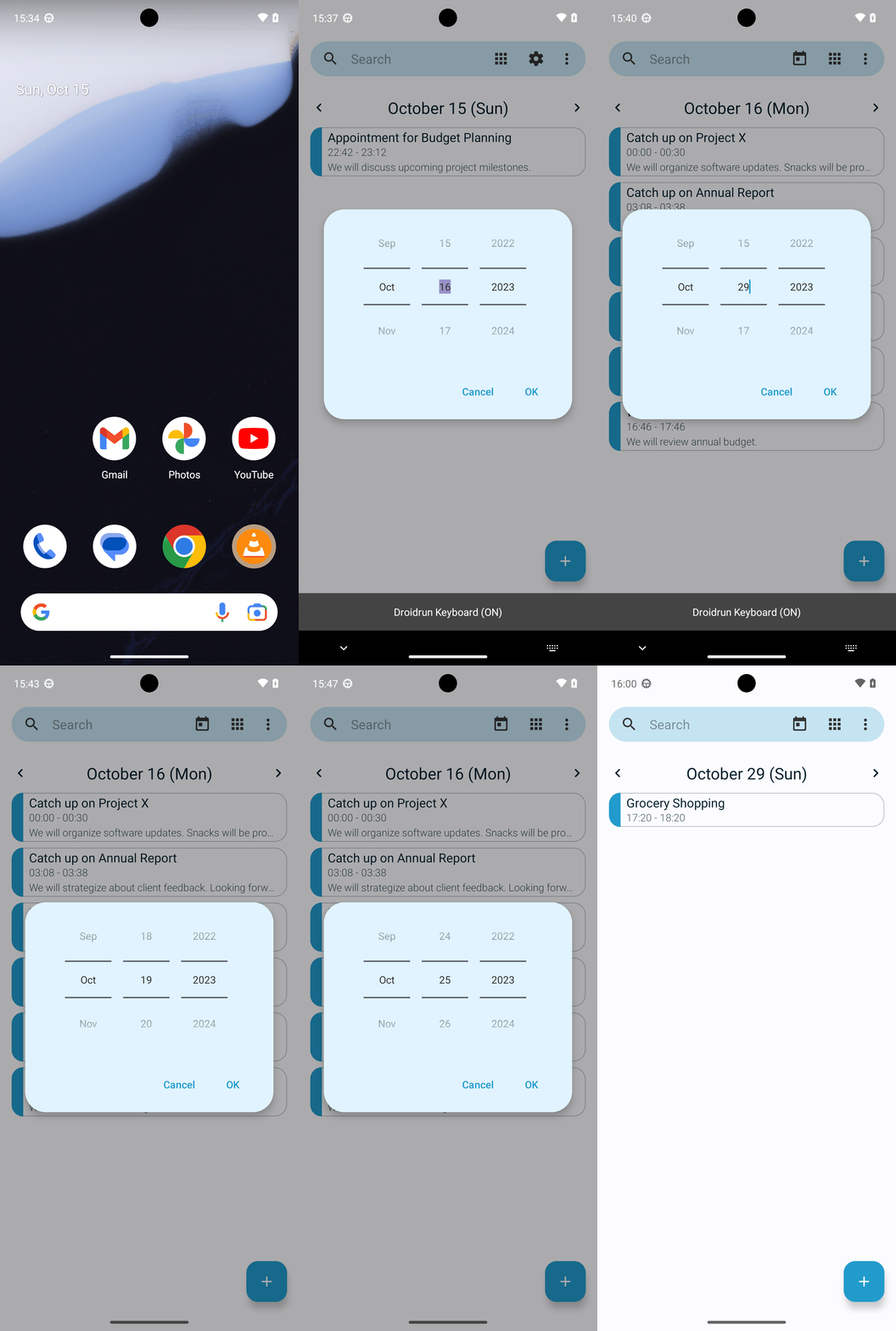
Goal: What is my first event after 5:20pm October 29 2023 in Simple Calendar Pro? Answer with the titles only. If there are multiples titles, format your answer in a comma separated list.
Goal: What is my first event after 5:20pm October 29 2023 in Simple Calendar Pro? Answer with the titles only. If there are multiples titles, format your answer in a comma separated list.
user: None
The current subgoal explicitly states to "Use open_app to launch “Simple Calendar Pro”." This directly maps to the `open_app` atomic action. The target is the app name "Simple Calendar Pro".
open_app(text="Simple Calendar Pro")
Opening the "Simple Calendar Pro" app.
Opening the "Simple Calendar Pro" app.
The current subgoal requires me to tap the "Change view" button. I will locate the element with the text "Change view" and perform a click action on it. Based on the provided UI elements, element 6 is a button with the text "Change view".
click(index=6)
Tapping the "Change view" button to change the calendar view.
Tapping the "Change view" button to change the calendar view.
The current subgoal is to "Tap “Daily view” in the view selector." I need to find the UI element with the text "Daily view" and click it. Based on the provided clickable UI elements, index 4 corresponds to "Daily view".
click(index=4)
Tapping the "Daily view" radio button.
Tapping the "Daily view" radio button.
The current subgoal is to "Tap the header date (“October 15 (Sun)”) to open the date picker." I need to find the element with the text "October 15 (Sun)" and perform a click action on it. Based on the provided UI elements, element 12 is a TextView with the text "October 15 (Sun)".
click(index=12)
Tapping the header date "October 15 (Sun)" to open the date picker.
Tapping the header date "October 15 (Sun)" to open the date picker.
The current subgoal is to increment the day from 15 to 29. The current day is 15, and the button to increment the day is "16" (index 10). I need to click this button repeatedly until the day becomes 29. This means I need to click it 14 times.
click(index=10)
Clicking the "16" button to increment the day in the date picker.
Clicking the "16" button to increment the day in the date picker.
The current subgoal is to "Tap the day field (currently showing 16) to focus it." Based on the provided UI elements, the day field showing "16" is identified as element with index 9, which is an EditText. The required atomic action is `click`. The target element is the day field showing "16", which corresponds to index 9.
click(index=9)
Tapping the day field (currently showing 16) to focus it.
Tapping the day field (currently showing 16) to focus it.
The current subgoal is to type "29" into the focused day field. The device state indicates that the focused element is '16', which is an EditText with index 9. This is the "day field". Therefore, I need to use the `type` action with the text "29" and the index 9.
type(text="29"index=9)
Typing "29" into the focused day field (index 9).
Typing "29" into the focused day field (index 9).
The current subgoal is to "Tap “OK” to jump to Oct 29, 2023 Daily view." I need to find the "OK" button in the provided UI elements and perform a click action on it. Element 17 is a button with the text "OK".
click(index=17)
Tapping the "OK" button to confirm the date selection.
Tapping the "OK" button to confirm the date selection.
The current subgoal is to "Tap the header date (“October 16 (Mon)”) to open the date picker." I need to find the clickable element with the text "October 16 (Mon)" and perform a click action on it. Element 12 has the text "October 16 (Mon)".
click(index=12)
Tapping the header date "October 16 (Mon)" to open the date picker.
Tapping the header date "October 16 (Mon)" to open the date picker.
The current subgoal is to "Tap the day EditText (“16”) in the date picker and type “29”." Based on the provided UI elements, the EditText with the text "16" is at index 9. Therefore, I need to first click on index 9, and then type "29" into it.
click(index=9)
Tapping the day EditText ("16") to focus it.Tapping the day EditText ("16") to focus it.
The current subgoal is to "Tap “OK” to jump to October 29, 2023 Daily view." I need to find the "OK" button in the provided UI elements and click it. Element 17 is labeled "OK".
click(index=17)
Tapping the "OK" button to confirm the date selection.
Tapping the "OK" button to confirm the date selection.
The current subgoal is to tap the header date "October 16 (Mon)". I need to find the element with this text and perform a click action on it. Element 12 has the text "October 16 (Mon)".
click(index=12)
Tapping the header date "October 16 (Mon)" to open the date picker.
Tapping the header date "October 16 (Mon)" to open the date picker.
The current subgoal requires tapping the "day NumberPicker's lower button (currently showing "17")". I need to locate the button with the text "17" that is part of the day NumberPicker. Based on the provided UI elements, element 10, "Button: "17" - (445, 1195, 613, 1369)", fits this description. The action is to "tap".
click(index=10)
Tapping the day NumberPicker’s lower button, which currently shows “17”.
Tapping the day NumberPicker’s lower button, which currently shows “17”.
The current subgoal is to tap the day NumberPicker's lower button (index 10) repeatedly until the center day shows "29". The current day is "17". The action required is "click" and the target is the element at index 10.
click(index=10)
Tapping the day NumberPicker’s lower button, which currently shows “18”.
Tapping the day NumberPicker’s lower button, which currently shows “18”.
The current subgoal is to keep tapping the lower day button until the center day shows 29. The current center day is 18. The lower day button is "19" (index 10). I need to tap this button.
click(index=10)
Tapping the day NumberPicker’s lower button, which currently shows “19”.
Tapping the day NumberPicker’s lower button, which currently shows “19”.
The subgoal is to tap the lower day button repeatedly until the center day shows "29". The current center day is "19" (index 9) and the lower button is "20" (index 10). I need to tap the button with text "20" to increment the day.
click(index=10)
Tapping the day NumberPicker’s lower button, which currently shows “20”.
Tapping the day NumberPicker’s lower button, which currently shows “20”.
The current subgoal is to "Tap the lower day button repeatedly until the center day shows “29”." The current day displayed in the center is "20" (index 9). The lower day button is "21" (index 10). I need to click on the lower day button, which is element 10.
click(index=10)
Tapping the day NumberPicker’s lower button, which currently shows “21”.
Tapping the day NumberPicker’s lower button, which currently shows “21”.
The current subgoal requires me to tap the day NumberPicker lower button (index 10). The current day displayed is 21, and I need to reach 29. Therefore, I will perform a click action on index 10.
click(index=10)
Tapping the day NumberPicker’s lower button, which currently shows “21”.
Tapping the day NumberPicker’s lower button, which currently shows “21”.
The subgoal requires tapping the lower day button (index 10) repeatedly. The current center day is 22. Tapping index 10 will increment the day. I need to perform a single click action on index 10.
click(index=10)
Tapping the day NumberPicker’s lower button, which currently shows “23”.
Tapping the day NumberPicker’s lower button, which currently shows “23”.
The current subgoal is to tap the lower day button (index 10) repeatedly until the center day shows 29. The last action was clicking index 10, and the current center day is 23. I need to continue tapping index 10.
click(index=10)
Tapping the day NumberPicker’s lower button, which currently shows “24”.
Tapping the day NumberPicker’s lower button, which currently shows “24”.
The current subgoal explicitly states to "Tap the lower day button (index 10) repeatedly until the center shows 29." The current day shown is 24. Therefore, I need to click the lower day button (index 10) again.
click(index=10)
Tapping the day NumberPicker’s lower button, which currently shows “24”.
Tapping the day NumberPicker’s lower button, which currently shows “24”.
The current subgoal is to tap the lower day button (index 10) four times. The previous action history shows that I have already tapped it multiple times, and the current day displayed is "25". To reach "29", I need to tap the lower button for the day 4 more times. I will perform the click action on index 10.
click(index=10)
Tapping the lower day button (index 10) to increment the day.
Tapping the lower day button (index 10) to increment the day.
The subgoal explicitly states to "Tap the lower day button (index 10) three times". I have already tapped it several times, and the current day is 26. To reach 29, I need to tap it three more times. The atomic action required is `click`. The target is the element with index 10.
click(index=10)
Tapping the lower day button (index 10) to increment the day.
Tapping the lower day button (index 10) to increment the day.
The current subgoal is to "Tap the lower day button (index 10) to change the center day from 27 to 28." I need to perform a click action on the element with index 10.
click(index=10)
Tapping the lower day button (index 10) to increment the day.
Tapping the lower day button (index 10) to increment the day.
The current subgoal is to "Tap the lower day button (index 10) to change the center day to 29." The atomic action required is `click`. The target element is specified by `index 10`. The parameter for the click action is `index: 10`.
click(index=10)
Tapping the lower day button (index 10) which displays "29" to set the day to 29.
Tapping the lower day button (index 10) which displays "29" to set the day to 29.
The current subgoal explicitly states to "Tap “OK” (index 17)". This translates directly to a `click` action on the element with index 17.
click(index=17)
Tapping the "OK" button to confirm the date selection.
Tapping the "OK" button to confirm the date selection.
Grocery Shopping
complete_goal(message="Grocery Shopping")
Goal: What is my first event after 5:20pm October 29 2023 in Simple Calendar Pro? Answer with the titles only. If there are multiples titles, format your answer in a comma separated list.
user: None
The current subgoal explicitly states to "Use open_app to launch “Simple Calendar Pro”." This directly maps to the `open_app` atomic action. The target is the app name "Simple Calendar Pro".
open_app(text="Simple Calendar Pro")
Opening the "Simple Calendar Pro" app.
Opening the "Simple Calendar Pro" app.
The current subgoal requires me to tap the "Change view" button. I will locate the element with the text "Change view" and perform a click action on it. Based on the provided UI elements, element 6 is a button with the text "Change view".
click(index=6)
Tapping the "Change view" button to change the calendar view.
Tapping the "Change view" button to change the calendar view.
The current subgoal is to "Tap “Daily view” in the view selector." I need to find the UI element with the text "Daily view" and click it. Based on the provided clickable UI elements, index 4 corresponds to "Daily view".
click(index=4)
Tapping the "Daily view" radio button.
Tapping the "Daily view" radio button.
The current subgoal is to "Tap the header date (“October 15 (Sun)”) to open the date picker." I need to find the element with the text "October 15 (Sun)" and perform a click action on it. Based on the provided UI elements, element 12 is a TextView with the text "October 15 (Sun)".
click(index=12)
Tapping the header date "October 15 (Sun)" to open the date picker.
Tapping the header date "October 15 (Sun)" to open the date picker.
The current subgoal is to increment the day from 15 to 29. The current day is 15, and the button to increment the day is "16" (index 10). I need to click this button repeatedly until the day becomes 29. This means I need to click it 14 times.
click(index=10)
Clicking the "16" button to increment the day in the date picker.
Clicking the "16" button to increment the day in the date picker.
The current subgoal is to "Tap the day field (currently showing 16) to focus it." Based on the provided UI elements, the day field showing "16" is identified as element with index 9, which is an EditText. The required atomic action is `click`. The target element is the day field showing "16", which corresponds to index 9.
click(index=9)
Tapping the day field (currently showing 16) to focus it.
Tapping the day field (currently showing 16) to focus it.
The current subgoal is to type "29" into the focused day field. The device state indicates that the focused element is '16', which is an EditText with index 9. This is the "day field". Therefore, I need to use the `type` action with the text "29" and the index 9.
type(text="29"index=9)
Typing "29" into the focused day field (index 9).
Typing "29" into the focused day field (index 9).
The current subgoal is to "Tap “OK” to jump to Oct 29, 2023 Daily view." I need to find the "OK" button in the provided UI elements and perform a click action on it. Element 17 is a button with the text "OK".
click(index=17)
Tapping the "OK" button to confirm the date selection.
Tapping the "OK" button to confirm the date selection.
The current subgoal is to "Tap the header date (“October 16 (Mon)”) to open the date picker." I need to find the clickable element with the text "October 16 (Mon)" and perform a click action on it. Element 12 has the text "October 16 (Mon)".
click(index=12)
Tapping the header date "October 16 (Mon)" to open the date picker.
Tapping the header date "October 16 (Mon)" to open the date picker.
The current subgoal is to "Tap the day EditText (“16”) in the date picker and type “29”." Based on the provided UI elements, the EditText with the text "16" is at index 9. Therefore, I need to first click on index 9, and then type "29" into it.
click(index=9)
Tapping the day EditText ("16") to focus it.Tapping the day EditText ("16") to focus it.
The current subgoal is to "Tap “OK” to jump to October 29, 2023 Daily view." I need to find the "OK" button in the provided UI elements and click it. Element 17 is labeled "OK".
click(index=17)
Tapping the "OK" button to confirm the date selection.
Tapping the "OK" button to confirm the date selection.
The current subgoal is to tap the header date "October 16 (Mon)". I need to find the element with this text and perform a click action on it. Element 12 has the text "October 16 (Mon)".
click(index=12)
Tapping the header date "October 16 (Mon)" to open the date picker.
Tapping the header date "October 16 (Mon)" to open the date picker.
The current subgoal requires tapping the "day NumberPicker's lower button (currently showing "17")". I need to locate the button with the text "17" that is part of the day NumberPicker. Based on the provided UI elements, element 10, "Button: "17" - (445, 1195, 613, 1369)", fits this description. The action is to "tap".
click(index=10)
Tapping the day NumberPicker’s lower button, which currently shows “17”.
Tapping the day NumberPicker’s lower button, which currently shows “17”.
The current subgoal is to tap the day NumberPicker's lower button (index 10) repeatedly until the center day shows "29". The current day is "17". The action required is "click" and the target is the element at index 10.
click(index=10)
Tapping the day NumberPicker’s lower button, which currently shows “18”.
Tapping the day NumberPicker’s lower button, which currently shows “18”.
The current subgoal is to keep tapping the lower day button until the center day shows 29. The current center day is 18. The lower day button is "19" (index 10). I need to tap this button.
click(index=10)
Tapping the day NumberPicker’s lower button, which currently shows “19”.
Tapping the day NumberPicker’s lower button, which currently shows “19”.
The subgoal is to tap the lower day button repeatedly until the center day shows "29". The current center day is "19" (index 9) and the lower button is "20" (index 10). I need to tap the button with text "20" to increment the day.
click(index=10)
Tapping the day NumberPicker’s lower button, which currently shows “20”.
Tapping the day NumberPicker’s lower button, which currently shows “20”.
The current subgoal is to "Tap the lower day button repeatedly until the center day shows “29”." The current day displayed in the center is "20" (index 9). The lower day button is "21" (index 10). I need to click on the lower day button, which is element 10.
click(index=10)
Tapping the day NumberPicker’s lower button, which currently shows “21”.
Tapping the day NumberPicker’s lower button, which currently shows “21”.
The current subgoal requires me to tap the day NumberPicker lower button (index 10). The current day displayed is 21, and I need to reach 29. Therefore, I will perform a click action on index 10.
click(index=10)
Tapping the day NumberPicker’s lower button, which currently shows “21”.
Tapping the day NumberPicker’s lower button, which currently shows “21”.
The subgoal requires tapping the lower day button (index 10) repeatedly. The current center day is 22. Tapping index 10 will increment the day. I need to perform a single click action on index 10.
click(index=10)
Tapping the day NumberPicker’s lower button, which currently shows “23”.
Tapping the day NumberPicker’s lower button, which currently shows “23”.
The current subgoal is to tap the lower day button (index 10) repeatedly until the center day shows 29. The last action was clicking index 10, and the current center day is 23. I need to continue tapping index 10.
click(index=10)
Tapping the day NumberPicker’s lower button, which currently shows “24”.
Tapping the day NumberPicker’s lower button, which currently shows “24”.
The current subgoal explicitly states to "Tap the lower day button (index 10) repeatedly until the center shows 29." The current day shown is 24. Therefore, I need to click the lower day button (index 10) again.
click(index=10)
Tapping the day NumberPicker’s lower button, which currently shows “24”.
Tapping the day NumberPicker’s lower button, which currently shows “24”.
The current subgoal is to tap the lower day button (index 10) four times. The previous action history shows that I have already tapped it multiple times, and the current day displayed is "25". To reach "29", I need to tap the lower button for the day 4 more times. I will perform the click action on index 10.
click(index=10)
Tapping the lower day button (index 10) to increment the day.
Tapping the lower day button (index 10) to increment the day.
The subgoal explicitly states to "Tap the lower day button (index 10) three times". I have already tapped it several times, and the current day is 26. To reach 29, I need to tap it three more times. The atomic action required is `click`. The target is the element with index 10.
click(index=10)
Tapping the lower day button (index 10) to increment the day.
Tapping the lower day button (index 10) to increment the day.
The current subgoal is to "Tap the lower day button (index 10) to change the center day from 27 to 28." I need to perform a click action on the element with index 10.
click(index=10)
Tapping the lower day button (index 10) to increment the day.
Tapping the lower day button (index 10) to increment the day.
The current subgoal is to "Tap the lower day button (index 10) to change the center day to 29." The atomic action required is `click`. The target element is specified by `index 10`. The parameter for the click action is `index: 10`.
click(index=10)
Tapping the lower day button (index 10) which displays "29" to set the day to 29.
Tapping the lower day button (index 10) which displays "29" to set the day to 29.
The current subgoal explicitly states to "Tap “OK” (index 17)". This translates directly to a `click` action on the element with index 17.
click(index=17)
Tapping the "OK" button to confirm the date selection.
Tapping the "OK" button to confirm the date selection.
Grocery Shopping
complete_goal(message="Grocery Shopping")