
Back to benchmark
Simple Calendar Event On Date At Time
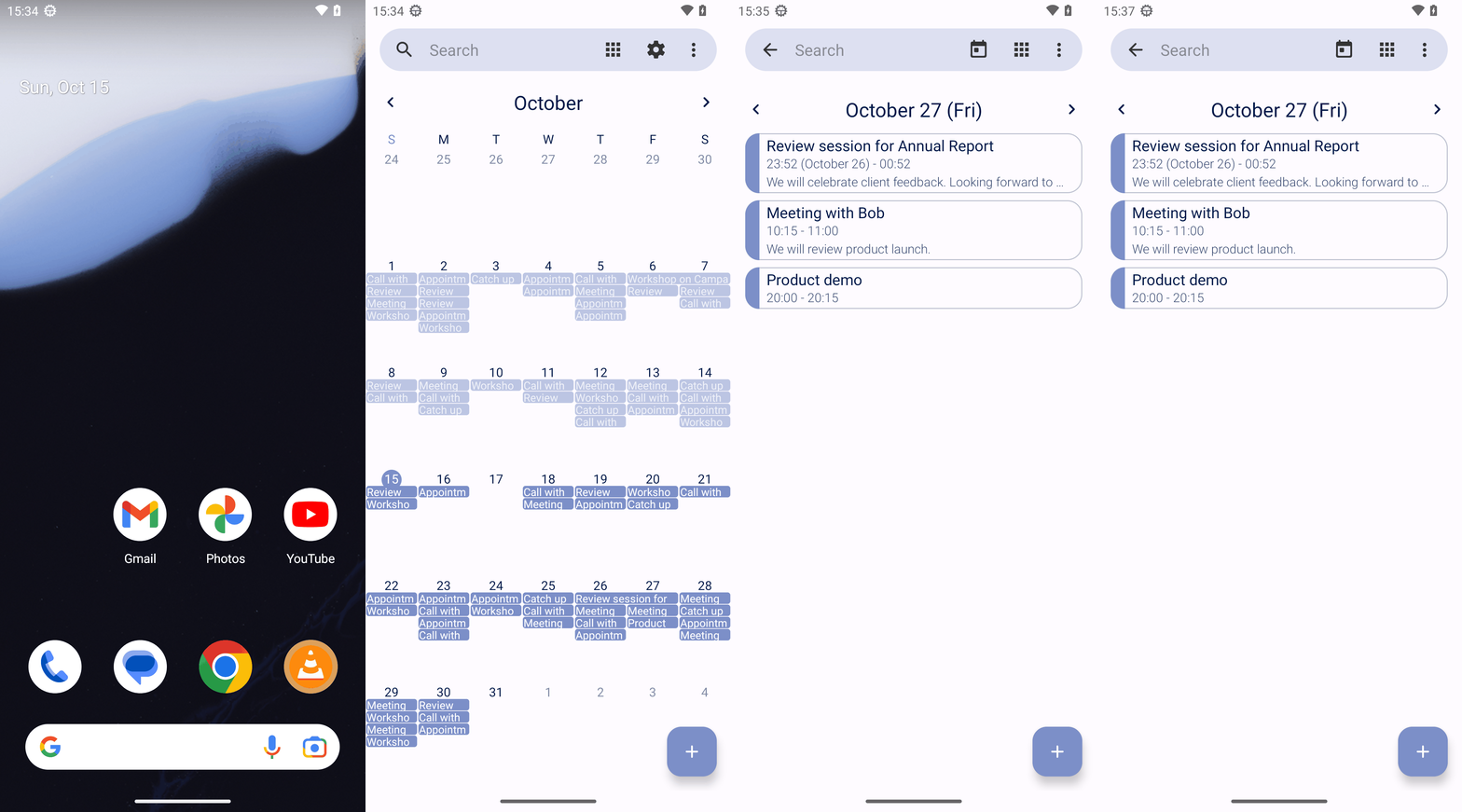
Goal: What is on my schedule for October 27 2023 at 8:00pm in Simple Calendar Pro? Answer with the titles only. If there are multiples titles, format your answer in a comma separated list.
Plan Input
Input
user:
Goal: What is on my schedule for October 27 2023 at 8:00pm in Simple Calendar Pro? Answer with the titles only. If there are multiples titles, format your answer in a comma separated list.
user: None
Task Thinking Step 1
Thoughts
The current subgoal explicitly states "Open the Simple Calendar Pro app using open_app." This directly maps to the `open_app` atomic action. The target is the app name "Simple Calendar Pro".
Code
open_app(text="Simple Calendar Pro")
Task Execution Result
Output
Opening the Simple Calendar Pro app.
Task End
Success reason
Opening the Simple Calendar Pro app.
Success
Task Thinking Step 2
Thoughts
The current subgoal is to "Tap the October 27 date cell in the month grid (row for 22–28, Friday column)." I need to identify the clickable element corresponding to October 27. Based on the provided UI elements, the dates are represented by `View` elements with `month_view_background` resource IDs. The dates 22, 23, 24, 25, 26, 27, 28 are in the same row. Element 42 corresponds to the first day in this row (22). Counting from 22, the 27th is the 6th day in this row. So, I need to click on the 6th `month_view_background` element starting from element 42. Element 42 (22), 43 (23), 44 (24), 45 (25), 46 (26), 47 (27). Therefore, I need to click on element 47.
Code
click(index=47)
Task Execution Result
Output
Clicking the calendar cell for October 27.
Task End
Success reason
Clicking the calendar cell for October 27.
Success
Plan Thinking
Thoughts
Product demo
Code
complete_goal(message="Product demo")
Plan Input
Input
user:
Goal: What is on my schedule for October 27 2023 at 8:00pm in Simple Calendar Pro? Answer with the titles only. If there are multiples titles, format your answer in a comma separated list.
user: None
Task Thinking Step 1
Thoughts
The current subgoal explicitly states "Open the Simple Calendar Pro app using open_app." This directly maps to the `open_app` atomic action. The target is the app name "Simple Calendar Pro".
Code
open_app(text="Simple Calendar Pro")
Task Execution Result
Output
Opening the Simple Calendar Pro app.
Task End
Success reason
Opening the Simple Calendar Pro app.
Success
Task Thinking Step 2
Thoughts
The current subgoal is to "Tap the October 27 date cell in the month grid (row for 22–28, Friday column)." I need to identify the clickable element corresponding to October 27. Based on the provided UI elements, the dates are represented by `View` elements with `month_view_background` resource IDs. The dates 22, 23, 24, 25, 26, 27, 28 are in the same row. Element 42 corresponds to the first day in this row (22). Counting from 22, the 27th is the 6th day in this row. So, I need to click on the 6th `month_view_background` element starting from element 42. Element 42 (22), 43 (23), 44 (24), 45 (25), 46 (26), 47 (27). Therefore, I need to click on element 47.
Code
click(index=47)
Task Execution Result
Output
Clicking the calendar cell for October 27.
Task End
Success reason
Clicking the calendar cell for October 27.
Success
Plan Thinking
Thoughts
Product demo
Code
complete_goal(message="Product demo")