
Simple Calendar Delete Events On Relative Day
Goal: In Simple Calendar Pro, delete all events scheduled for this Monday.
Goal: In Simple Calendar Pro, delete all events scheduled for this Monday.
user: None
The current subgoal explicitly states to "Open Simple Calendar Pro using the open_app action." This requires the `open_app` action with the application name "Simple Calendar Pro" as the text argument.
open_app(text="Simple Calendar Pro")
Opening the "Simple Calendar Pro" app.
Opening the "Simple Calendar Pro" app.
The current subgoal is to "Tap the Oct 16 date cell (row with 15–21, Monday column) to open that day’s view." I need to find the clickable element that corresponds to October 16. Based on the provided UI elements, the `month_view_background` elements represent the date cells. The dates are arranged in a grid. The row with 15-21 starts with element 28 (for Oct 15). The next element, 29, is for Oct 16. It is a `View` with resource ID `com.simplemobiletools.calendar.pro:id/month_view_background` and bounds (154, 1120, 308, 1424). This is the Monday column for that week. Therefore, I should perform a click action on element 29.
click(index=29)
Tapping the Oct 16 date cell.
Tapping the Oct 16 date cell.
The current subgoal is to "Tap 'Go to today'". I need to find the clickable element with the text "Go to today" and perform a click action on it. Based on the provided UI elements, element 6 is a button with the text "Go to today".
click(index=6)
Tapping the "Go to today" button.
Tapping the "Go to today" button.
The current subgoal is to "Tap the Search field and type “Review” to list matching events." First, I need to identify the "Search field". Based on the provided UI elements, element 5 is an `EditText` with the text "Search". Second, I need to "type 'Review'". This means I will use the `type` action with the text "Review" and the index of the search field.
type(text="Review"index=5)
Tapping the Search field (index 5) and typing "Review".
Tapping the Search field (index 5) and typing "Review".
The current subgoal is to tap "Review session for Budget Planning". I need to find the element with this exact text and perform a click action on it. Based on the provided UI elements, element 82 has the text "Review session for Budget Planning".
click(index=82)
Tapping "Review session for Budget Planning".
Tapping "Review session for Budget Planning".
The current subgoal is to "Tap the Delete button on this event screen". I need to find the "Delete" button in the provided UI elements and click it. Element 6 is a button with the text "Delete".
click(index=6)
Tapping the "Delete" button.
Tapping the "Delete" button.
The current subgoal is to tap "Yes" on the deletion confirmation. I need to find the element with the text "Yes" and perform a click action on it. Based on the provided UI elements, the "Yes" button is associated with index 5.
click(index=5)
Tapping "Yes" on the deletion confirmation.
Tapping "Yes" on the deletion confirmation.
The current subgoal requires tapping a specific event in the search results. I need to find the event "Review session for Project X" with the time "10:00 - 10:30" under "16 Monday" and click on its parent ViewGroup. Based on the provided UI elements, this corresponds to index 85.
click(index=85)
Tapping the event "Review session for Project X" (10:00 - 10:30) under "16 Monday".
Tapping the event "Review session for Project X" (10:00 - 10:30) under "16 Monday".
The current subgoal is to "Tap the Delete button on this screen." I need to find the element with the text "Delete" and perform a click action on it. Based on the provided UI elements, element 6 is a button with the text "Delete".
click(index=6)
Tapping the "Delete" button.
Tapping the "Delete" button.
The current subgoal is to "Tap 'Yes' on the confirmation dialog". I need to find the "Yes" button in the provided UI elements and perform a click action on it. The "Yes" button is listed with index 5.
click(index=5)
Tapping "Yes" on the confirmation dialog.
Tapping "Yes" on the confirmation dialog.
The current subgoal is to exit the search overlay. The instruction provides two options: "tap the search icon or press Back". Since the search icon is not visible in the current UI, pressing the system back button is the appropriate action.
system_button(button="Back")
Pressing the system back button to exit the search overlay.
Pressing the system back button to exit the search overlay.
The current subgoal is to "Tap the right arrow (next to the date) to move from Oct 15 (Sun) to Oct 16 (Mon)." Looking at the clickable UI elements, element 13 is an `ImageView` with resource ID `com.simplemobiletools.calendar.pro:id/top_right_arrow` and text "top_right_arrow", located at the right of "October 15 (Sun)". This matches the description of the target element. The required atomic action is `click`.
click(index=13)
Tapping the right arrow to advance the calendar to the next day.
Tapping the right arrow to advance the calendar to the next day.
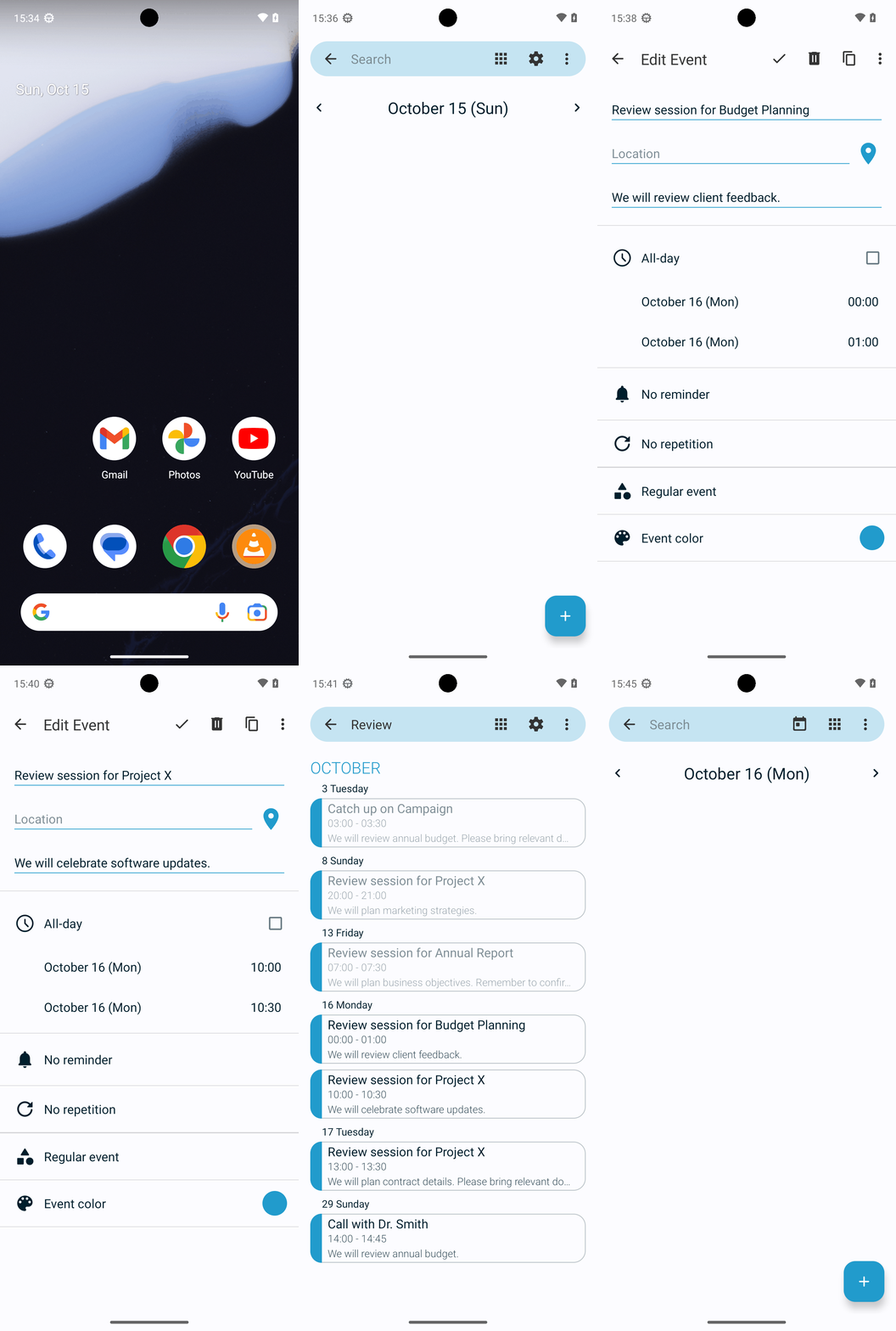
All events scheduled for this Monday (Oct 16, 2023) in Simple Calendar Pro have been deleted. Specifically removed:
- “Review session for Budget Planning” (00:00–01:00)
- “Review session for Project X” (10:00–10:30)
Verified the Day view for Oct 16 now shows no events.
complete_goal(message="All events scheduled for this Monday (Oct 16, 2023) in Simple Calendar Pro have been deleted. Specifically removed:
- “Review session for Budget Planning” (00:00–01:00)
- “Review session for Project X” (10:00–10:30)
Verified the Day view for Oct 16 now shows no events.")
Goal: In Simple Calendar Pro, delete all events scheduled for this Monday.
user: None
The current subgoal explicitly states to "Open Simple Calendar Pro using the open_app action." This requires the `open_app` action with the application name "Simple Calendar Pro" as the text argument.
open_app(text="Simple Calendar Pro")
Opening the "Simple Calendar Pro" app.
Opening the "Simple Calendar Pro" app.
The current subgoal is to "Tap the Oct 16 date cell (row with 15–21, Monday column) to open that day’s view." I need to find the clickable element that corresponds to October 16. Based on the provided UI elements, the `month_view_background` elements represent the date cells. The dates are arranged in a grid. The row with 15-21 starts with element 28 (for Oct 15). The next element, 29, is for Oct 16. It is a `View` with resource ID `com.simplemobiletools.calendar.pro:id/month_view_background` and bounds (154, 1120, 308, 1424). This is the Monday column for that week. Therefore, I should perform a click action on element 29.
click(index=29)
Tapping the Oct 16 date cell.
Tapping the Oct 16 date cell.
The current subgoal is to "Tap 'Go to today'". I need to find the clickable element with the text "Go to today" and perform a click action on it. Based on the provided UI elements, element 6 is a button with the text "Go to today".
click(index=6)
Tapping the "Go to today" button.
Tapping the "Go to today" button.
The current subgoal is to "Tap the Search field and type “Review” to list matching events." First, I need to identify the "Search field". Based on the provided UI elements, element 5 is an `EditText` with the text "Search". Second, I need to "type 'Review'". This means I will use the `type` action with the text "Review" and the index of the search field.
type(text="Review"index=5)
Tapping the Search field (index 5) and typing "Review".
Tapping the Search field (index 5) and typing "Review".
The current subgoal is to tap "Review session for Budget Planning". I need to find the element with this exact text and perform a click action on it. Based on the provided UI elements, element 82 has the text "Review session for Budget Planning".
click(index=82)
Tapping "Review session for Budget Planning".
Tapping "Review session for Budget Planning".
The current subgoal is to "Tap the Delete button on this event screen". I need to find the "Delete" button in the provided UI elements and click it. Element 6 is a button with the text "Delete".
click(index=6)
Tapping the "Delete" button.
Tapping the "Delete" button.
The current subgoal is to tap "Yes" on the deletion confirmation. I need to find the element with the text "Yes" and perform a click action on it. Based on the provided UI elements, the "Yes" button is associated with index 5.
click(index=5)
Tapping "Yes" on the deletion confirmation.
Tapping "Yes" on the deletion confirmation.
The current subgoal requires tapping a specific event in the search results. I need to find the event "Review session for Project X" with the time "10:00 - 10:30" under "16 Monday" and click on its parent ViewGroup. Based on the provided UI elements, this corresponds to index 85.
click(index=85)
Tapping the event "Review session for Project X" (10:00 - 10:30) under "16 Monday".
Tapping the event "Review session for Project X" (10:00 - 10:30) under "16 Monday".
The current subgoal is to "Tap the Delete button on this screen." I need to find the element with the text "Delete" and perform a click action on it. Based on the provided UI elements, element 6 is a button with the text "Delete".
click(index=6)
Tapping the "Delete" button.
Tapping the "Delete" button.
The current subgoal is to "Tap 'Yes' on the confirmation dialog". I need to find the "Yes" button in the provided UI elements and perform a click action on it. The "Yes" button is listed with index 5.
click(index=5)
Tapping "Yes" on the confirmation dialog.
Tapping "Yes" on the confirmation dialog.
The current subgoal is to exit the search overlay. The instruction provides two options: "tap the search icon or press Back". Since the search icon is not visible in the current UI, pressing the system back button is the appropriate action.
system_button(button="Back")
Pressing the system back button to exit the search overlay.
Pressing the system back button to exit the search overlay.
The current subgoal is to "Tap the right arrow (next to the date) to move from Oct 15 (Sun) to Oct 16 (Mon)." Looking at the clickable UI elements, element 13 is an `ImageView` with resource ID `com.simplemobiletools.calendar.pro:id/top_right_arrow` and text "top_right_arrow", located at the right of "October 15 (Sun)". This matches the description of the target element. The required atomic action is `click`.
click(index=13)
Tapping the right arrow to advance the calendar to the next day.
Tapping the right arrow to advance the calendar to the next day.
All events scheduled for this Monday (Oct 16, 2023) in Simple Calendar Pro have been deleted. Specifically removed:
- “Review session for Budget Planning” (00:00–01:00)
- “Review session for Project X” (10:00–10:30)
Verified the Day view for Oct 16 now shows no events.
complete_goal(message="All events scheduled for this Monday (Oct 16, 2023) in Simple Calendar Pro have been deleted. Specifically removed:
- “Review session for Budget Planning” (00:00–01:00)
- “Review session for Project X” (10:00–10:30)
Verified the Day view for Oct 16 now shows no events.")