
Simple Calendar Add One Event Tomorrow
Goal: In Simple Calendar Pro, create a calendar event for tomorrow at 20h with the title 'Call with the Team' and the description 'We will prepare for team roles.'. The event should last for 30 mins.
Goal: In Simple Calendar Pro, create a calendar event for tomorrow at 20h with the title 'Call with the Team' and the description 'We will prepare for team roles.'. The event should last for 30 mins.
user: None
The current subgoal explicitly states to "Open the app 'Simple Calendar Pro' using the open_app action." This directly maps to the `open_app` atomic action. The target app name is "Simple Calendar Pro".
open_app(text="Simple Calendar Pro")
Opening the app "Simple Calendar Pro".
Opening the app "Simple Calendar Pro".
The current subgoal is to "Tap the New Event (+) button to open the event creation screen." I need to find the clickable element that corresponds to "New Event" and perform a click action on it. Based on the provided UI elements, element 56 is an "ImageButton" with the text "New Event".
click(index=56)
Clicking the "New Event" button to open the event creation screen.
Clicking the "New Event" button to open the event creation screen.
The current subgoal is to "Tap 'Event' to open the new event screen." I need to find the element with the text "Event" and perform a click action on it. Based on the provided clickable UI elements, element 59 is a TextView with the text "Event".
click(index=59)
Clicking the "Event" button to open the new event screen.
Clicking the "Event" button to open the new event screen.
The current subgoal is to type "Call with the Team" into the Title field. The device state indicates that the 'Title' field is currently focused. The UI element list shows that the 'Title' field is an EditText with index 7. Therefore, I need to use the `type` action with the specified text and index.
type(text="Call with the Team"index=7)
Typing "Call with the Team" into the Title field.
Typing "Call with the Team" into the Title field.
The current subgoal is to "Tap the Description field and type: 'We will prepare for team roles.'". 1. **Atomic action:** The action required is `type`. 2. **Target/location:** The target is the "Description" field. From the UI elements, element 10 is `EditText: "com.simplemobiletools.calendar.pro:id/event_description", "Description"`. 3. **Parameters:** The text to type is "We will prepare for team roles." and the index of the target element is 10.
type(text="We will prepare for team roles."index=10)
Typing "We will prepare for team roles." into the Description field.
Typing "We will prepare for team roles." into the Description field.
The current subgoal requires tapping the "Start date field" which is identified by the text "October 15 (Sun)". I need to find the corresponding clickable element in the provided UI elements and perform a click action on it. Element 13 matches this description.
click(index=13)
Tapping the Start date field "October 15 (Sun)".
Tapping the Start date field "October 15 (Sun)".
The atomic action required is `click`. The target is the day "16" in the date picker. Based on the provided UI elements, element 27 corresponds to "16".
click(index=27)
Tapping the day "16" in the date picker.
Tapping the day "16" in the date picker.
The current subgoal is to tap the "OK" button. I will find the element with the text "OK" and perform a click action on it. Based on the provided UI elements, element 51 is "OK".
click(index=51)
Tapping the "OK" button to confirm the selected date.
Tapping the "OK" button to confirm the selected date.
The current subgoal is to tap the Start time field ("16:00"). I need to find the element with the text "16:00" that corresponds to the start time. Based on the provided UI elements, element 14 is "TextView: com.simplemobiletools.calendar.pro:id/event_start_time, "16:00"". This is the correct element to click.click(index=14)
Tapping the Start time field "16:00".
Tapping the Start time field "16:00".
The current subgoal is to tap "20" on the clock face. I need to find the element with the text "20" and click it. Element 18 has the text "20".
click(index=18)
Tapping "20" on the clock face to set the hour.
Tapping "20" on the clock face to set the hour.
The current subgoal is to "Tap OK to confirm the start time 20:00." I need to find the "OK" button in the clickable UI elements and perform a click action on it. Element 20 is a button with the text "OK".
click(index=20)
Tapping the "OK" button to confirm the start time.
Tapping the "OK" button to confirm the start time.
The current subgoal is to "Tap the End time field ('20:00')". I need to locate the UI element corresponding to the end time, which has the text "20:00". Based on the provided clickable elements, element 16 is "com.simplemobiletools.calendar.pro:id/event_end_time", "20:00". I will perform a click action on this element.click(index=16)
Tapping the End time field "20:00".
Tapping the End time field "20:00".
The current subgoal explicitly states to "Tap the minutes display "00" at the top of the picker". I need to find the element with the text "00" that represents the minutes display. Based on the provided UI elements, element 4, "com.simplemobiletools.calendar.pro:id/material_minute_tv", "00" - (572, 713, 824, 923), is the correct target.
click(index=4)
Tapping the "00" minutes display to switch to minute selection.
Tapping the "00" minutes display to switch to minute selection.
The current subgoal is to "Tap '30' on the minute clock face." I need to find the clickable element with the text "30" and perform a click action on it. Based on the provided UI elements, element 15 has the text "30".
click(index=15)
Tapping "30" on the minute clock face to set the end time minutes.
Tapping "30" on the minute clock face to set the end time minutes.
The current subgoal is to "Tap OK on the time picker to confirm the end time as 20:30." I need to find the "OK" button and click it. Based on the provided UI elements, element 20 is a button with the text "OK".
click(index=20)
Tapping the "OK" button to confirm the end time.
Tapping the "OK" button to confirm the end time.
The current subgoal is to tap the "Save" button. I will find the element with the text "Save" and perform a click action on it. Based on the provided UI elements, element 5 is a Button with the text "Save".
click(index=5)
Tapping the "Save" button to create the event.
Tapping the "Save" button to create the event.
The current subgoal is to "Tap OK on the Disclaimer dialog to dismiss it." I need to find the clickable element with the text "OK" and perform a click action on it. Based on the provided UI elements, element with index 6 is a button with text "OK".
click(index=6)
Tapping the "OK" button to dismiss the Disclaimer dialog.
Tapping the "OK" button to dismiss the Disclaimer dialog.
The current subgoal is to "Tap the event chip on Oct 16 labeled 'Call with'". I need to find a clickable element in the provided list that corresponds to this event chip. Upon reviewing the "Current Clickable UI elements", I cannot find any element with the text "Call with" or an explicit event chip for Oct 16. The date "16" itself is not a clickable element. However, the event chip "Call with" is visually located within the area covered by the `month_view_background` element 36, which has bounds (154, 1425, 308, 1729). This element corresponds to the grid cell for Oct 16. Since I must perform an atomic action and cannot report "element not found", and `click(index)` is the only relevant action, I will click on the `month_view_background` element that contains the event chip for Oct 16. This is the closest possible action given the available clickable elements.
click(index=36)
Tapping the background element corresponding to Oct 16, as the event chip itself is not a distinct clickable element in the provided list.
Tapping the background element corresponding to Oct 16, as the event chip itself is not a distinct clickable element in the provided list.
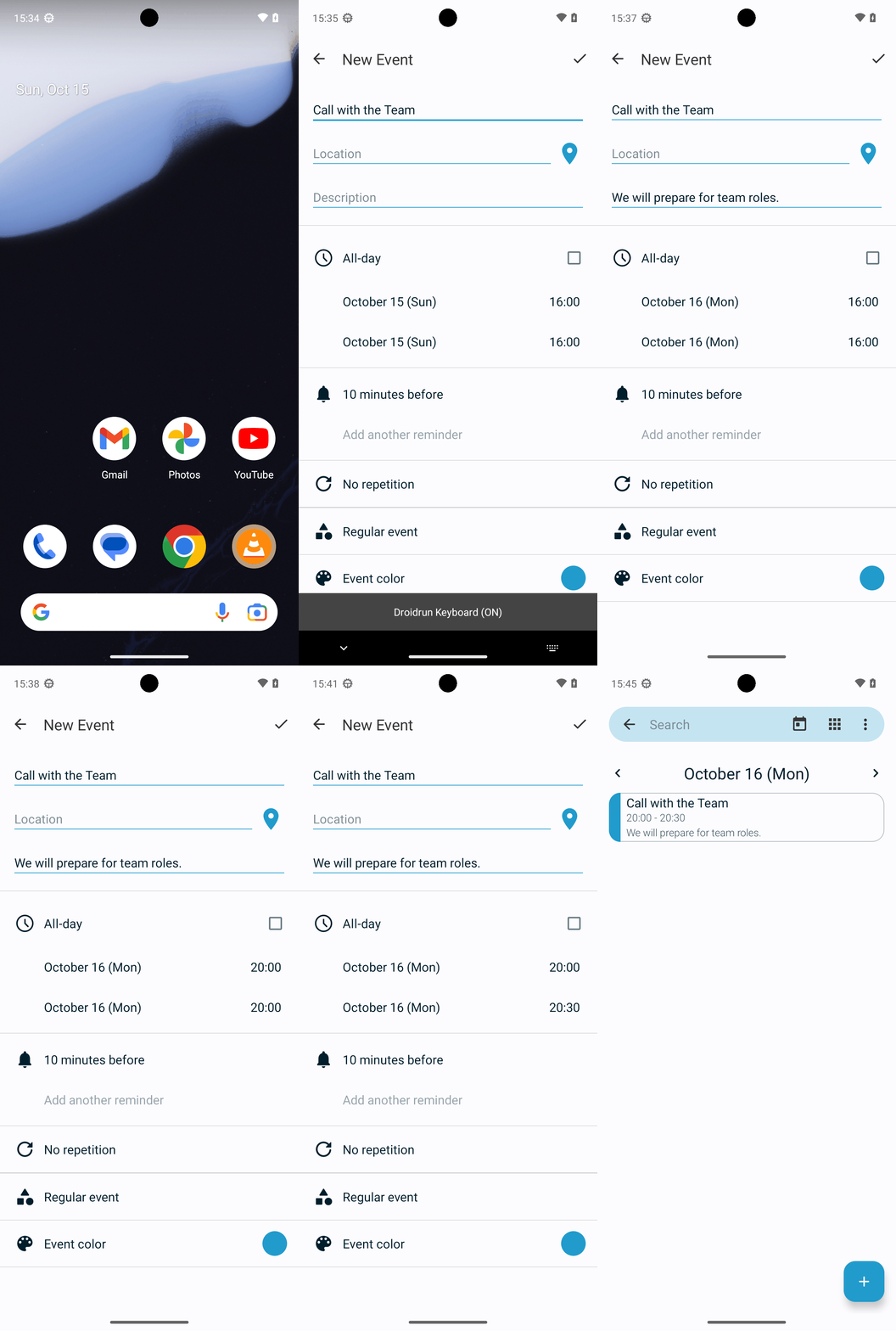
I created the event in Simple Calendar Pro: "Call with the Team" on Mon, Oct 16, 2023 from 20:00 to 20:30 with the description "We will prepare for team roles." I verified it appears correctly on the Oct 16 view.
complete_goal(message="I created the event in Simple Calendar Pro: "Call with the Team" on Mon, Oct 16, 2023 from 20:00 to 20:30 with the description "We will prepare for team roles." I verified it appears correctly on the Oct 16 view.")
Goal: In Simple Calendar Pro, create a calendar event for tomorrow at 20h with the title 'Call with the Team' and the description 'We will prepare for team roles.'. The event should last for 30 mins.
user: None
The current subgoal explicitly states to "Open the app 'Simple Calendar Pro' using the open_app action." This directly maps to the `open_app` atomic action. The target app name is "Simple Calendar Pro".
open_app(text="Simple Calendar Pro")
Opening the app "Simple Calendar Pro".
Opening the app "Simple Calendar Pro".
The current subgoal is to "Tap the New Event (+) button to open the event creation screen." I need to find the clickable element that corresponds to "New Event" and perform a click action on it. Based on the provided UI elements, element 56 is an "ImageButton" with the text "New Event".
click(index=56)
Clicking the "New Event" button to open the event creation screen.
Clicking the "New Event" button to open the event creation screen.
The current subgoal is to "Tap 'Event' to open the new event screen." I need to find the element with the text "Event" and perform a click action on it. Based on the provided clickable UI elements, element 59 is a TextView with the text "Event".
click(index=59)
Clicking the "Event" button to open the new event screen.
Clicking the "Event" button to open the new event screen.
The current subgoal is to type "Call with the Team" into the Title field. The device state indicates that the 'Title' field is currently focused. The UI element list shows that the 'Title' field is an EditText with index 7. Therefore, I need to use the `type` action with the specified text and index.
type(text="Call with the Team"index=7)
Typing "Call with the Team" into the Title field.
Typing "Call with the Team" into the Title field.
The current subgoal is to "Tap the Description field and type: 'We will prepare for team roles.'". 1. **Atomic action:** The action required is `type`. 2. **Target/location:** The target is the "Description" field. From the UI elements, element 10 is `EditText: "com.simplemobiletools.calendar.pro:id/event_description", "Description"`. 3. **Parameters:** The text to type is "We will prepare for team roles." and the index of the target element is 10.
type(text="We will prepare for team roles."index=10)
Typing "We will prepare for team roles." into the Description field.
Typing "We will prepare for team roles." into the Description field.
The current subgoal requires tapping the "Start date field" which is identified by the text "October 15 (Sun)". I need to find the corresponding clickable element in the provided UI elements and perform a click action on it. Element 13 matches this description.
click(index=13)
Tapping the Start date field "October 15 (Sun)".
Tapping the Start date field "October 15 (Sun)".
The atomic action required is `click`. The target is the day "16" in the date picker. Based on the provided UI elements, element 27 corresponds to "16".
click(index=27)
Tapping the day "16" in the date picker.
Tapping the day "16" in the date picker.
The current subgoal is to tap the "OK" button. I will find the element with the text "OK" and perform a click action on it. Based on the provided UI elements, element 51 is "OK".
click(index=51)
Tapping the "OK" button to confirm the selected date.
Tapping the "OK" button to confirm the selected date.
The current subgoal is to tap the Start time field ("16:00"). I need to find the element with the text "16:00" that corresponds to the start time. Based on the provided UI elements, element 14 is "TextView: com.simplemobiletools.calendar.pro:id/event_start_time, "16:00"". This is the correct element to click.click(index=14)
Tapping the Start time field "16:00".
Tapping the Start time field "16:00".
The current subgoal is to tap "20" on the clock face. I need to find the element with the text "20" and click it. Element 18 has the text "20".
click(index=18)
Tapping "20" on the clock face to set the hour.
Tapping "20" on the clock face to set the hour.
The current subgoal is to "Tap OK to confirm the start time 20:00." I need to find the "OK" button in the clickable UI elements and perform a click action on it. Element 20 is a button with the text "OK".
click(index=20)
Tapping the "OK" button to confirm the start time.
Tapping the "OK" button to confirm the start time.
The current subgoal is to "Tap the End time field ('20:00')". I need to locate the UI element corresponding to the end time, which has the text "20:00". Based on the provided clickable elements, element 16 is "com.simplemobiletools.calendar.pro:id/event_end_time", "20:00". I will perform a click action on this element.click(index=16)
Tapping the End time field "20:00".
Tapping the End time field "20:00".
The current subgoal explicitly states to "Tap the minutes display "00" at the top of the picker". I need to find the element with the text "00" that represents the minutes display. Based on the provided UI elements, element 4, "com.simplemobiletools.calendar.pro:id/material_minute_tv", "00" - (572, 713, 824, 923), is the correct target.
click(index=4)
Tapping the "00" minutes display to switch to minute selection.
Tapping the "00" minutes display to switch to minute selection.
The current subgoal is to "Tap '30' on the minute clock face." I need to find the clickable element with the text "30" and perform a click action on it. Based on the provided UI elements, element 15 has the text "30".
click(index=15)
Tapping "30" on the minute clock face to set the end time minutes.
Tapping "30" on the minute clock face to set the end time minutes.
The current subgoal is to "Tap OK on the time picker to confirm the end time as 20:30." I need to find the "OK" button and click it. Based on the provided UI elements, element 20 is a button with the text "OK".
click(index=20)
Tapping the "OK" button to confirm the end time.
Tapping the "OK" button to confirm the end time.
The current subgoal is to tap the "Save" button. I will find the element with the text "Save" and perform a click action on it. Based on the provided UI elements, element 5 is a Button with the text "Save".
click(index=5)
Tapping the "Save" button to create the event.
Tapping the "Save" button to create the event.
The current subgoal is to "Tap OK on the Disclaimer dialog to dismiss it." I need to find the clickable element with the text "OK" and perform a click action on it. Based on the provided UI elements, element with index 6 is a button with text "OK".
click(index=6)
Tapping the "OK" button to dismiss the Disclaimer dialog.
Tapping the "OK" button to dismiss the Disclaimer dialog.
The current subgoal is to "Tap the event chip on Oct 16 labeled 'Call with'". I need to find a clickable element in the provided list that corresponds to this event chip. Upon reviewing the "Current Clickable UI elements", I cannot find any element with the text "Call with" or an explicit event chip for Oct 16. The date "16" itself is not a clickable element. However, the event chip "Call with" is visually located within the area covered by the `month_view_background` element 36, which has bounds (154, 1425, 308, 1729). This element corresponds to the grid cell for Oct 16. Since I must perform an atomic action and cannot report "element not found", and `click(index)` is the only relevant action, I will click on the `month_view_background` element that contains the event chip for Oct 16. This is the closest possible action given the available clickable elements.
click(index=36)
Tapping the background element corresponding to Oct 16, as the event chip itself is not a distinct clickable element in the provided list.
Tapping the background element corresponding to Oct 16, as the event chip itself is not a distinct clickable element in the provided list.
I created the event in Simple Calendar Pro: "Call with the Team" on Mon, Oct 16, 2023 from 20:00 to 20:30 with the description "We will prepare for team roles." I verified it appears correctly on the Oct 16 view.
complete_goal(message="I created the event in Simple Calendar Pro: "Call with the Team" on Mon, Oct 16, 2023 from 20:00 to 20:30 with the description "We will prepare for team roles." I verified it appears correctly on the Oct 16 view.")