
Simple Calendar Add One Event
Goal: In Simple Calendar Pro, create a calendar event on 2023-10-29 at 13h with the title 'Call with the Team' and the description 'We will understand upcoming project milestones.'. The event should last for 60 mins.
Goal: In Simple Calendar Pro, create a calendar event on 2023-10-29 at 13h with the title 'Call with the Team' and the description 'We will understand upcoming project milestones.'. The event should last for 60 mins.
user: None
The current subgoal explicitly states to "Open Simple Calendar Pro using open_app". This translates directly to the `open_app` action with the text parameter set to "Simple Calendar Pro".
open_app(text="Simple Calendar Pro")
Opening the "Simple Calendar Pro" application.
Opening the "Simple Calendar Pro" application.
The subgoal is to "Tap the New Event (plus) button." I need to find the clickable element that corresponds to "New Event" or a plus button. Based on the provided UI elements, element 56 is an "ImageButton" with the text "New Event" and resource ID `com.simplemobiletools.calendar.pro:id/calendar_fab`. This is the correct element to click.
click(index=56)
Tapping the "New Event" button to create a new event.
Tapping the "New Event" button to create a new event.
The current subgoal is to tap "Event". I need to find the clickable element with the text "Event" and click on it. Based on the provided UI elements, element 59 is a TextView with the text "Event".
click(index=59)
Tapping the "Event" button to open the event creation screen.
Tapping the "Event" button to open the event creation screen.
The current subgoal requires typing text into the 'Title' field. The device state indicates that the 'Title' field is currently focused and the keyboard is visible. I need to use the `type` action, specify the text "Call with the Team", and provide the index of the 'Title' EditText element, which is 7.
type(text="Call with the Team"index=7)
Typing "Call with the Team" into the 'Title' field.
Typing "Call with the Team" into the 'Title' field.
The current subgoal requires me to tap the "Description" field and then type the specified text. I have identified the "Description" field as element 10. The action will be `type` with the text "We will understand upcoming project milestones." and the index 10.
type(text="We will understand upcoming project milestones."index=10)
Typing "We will understand upcoming project milestones." into the 'Description' field.
Typing "We will understand upcoming project milestones." into the 'Description' field.
The current subgoal requires tapping the "Start date" field, which is labeled "October 15 (Sun)". I need to find the corresponding element in the provided UI elements and perform a `click` action on it. Element 13, `TextView: "com.simplemobiletools.calendar.pro:id/event_start_date", "October 15 (Sun)"`, matches this description.
click(index=13)
Tapping the "October 15 (Sun)" field to open the date picker.
Tapping the "October 15 (Sun)" field to open the date picker.
The current subgoal is to tap the date "29". I need to find the element with the text "29" and perform a click action on it. Based on the provided UI elements, element 40 has the text "29".
click(index=40)
Tapping the date "29" in the calendar.
Tapping the date "29" in the calendar.
The current subgoal requires tapping the "OK" button to confirm the selected date. I need to find the "OK" button in the provided UI elements and perform a click action on it. Based on the UI elements, element 51 is a button with the text "OK".
click(index=51)
Tapping the "OK" button to confirm the selected date.
Tapping the "OK" button to confirm the selected date.
The current subgoal is to tap the Start time field showing "16:00". I need to find the element with the text "16:00" that corresponds to the start time. Based on the provided UI elements, element 14 is `TextView: "com.simplemobiletools.calendar.pro:id/event_start_time", "16:00"`. This is the correct element to click.
click(index=14)
Tapping the Start time field showing "16:00".
Tapping the Start time field showing "16:00".
The current subgoal is to tap "13" on the clock face. I need to find the element with the text "13" and perform a click action on it. Based on the provided UI elements, element 11 has the text "13".
click(index=11)
Tapping "13" on the clock face to set the start hour.
Tapping "13" on the clock face to set the start hour.
The current subgoal is to "Tap OK on the time picker to confirm Start time 13:00." I need to find the "OK" button in the provided UI elements and perform a click action on it. Element 20 is a button with the text "OK".
click(index=20)
Tapping the "OK" button to confirm the selected start time.
Tapping the "OK" button to confirm the selected start time.
The current subgoal is to "Tap the End time field (currently 13:00)". I need to find the UI element that displays "13:00" and is associated with the end time. Based on the provided UI elements, element 16, `TextView: "com.simplemobiletools.calendar.pro:id/event_end_time", "13:00" - (864, 1212, 1059, 1357)`, is the correct target.
click(index=16)
Tapping the End time field, which currently shows "13:00".
Tapping the End time field, which currently shows "13:00".
The current subgoal is to tap "14" on the clock face to set the End hour. I need to find the element with the text "14" and click it. Based on the provided UI elements, element 17 has the text "14".
click(index=17)
Tapping "14" on the clock face to set the End hour.
Tapping "14" on the clock face to set the End hour.
The current subgoal is to "Tap OK to confirm the End time as 14:00." I need to find the "OK" button and click it. Based on the provided UI elements, element 20 is a button with the text "OK".
click(index=20)
Tapping the "OK" button to confirm the end time.
Tapping the "OK" button to confirm the end time.
The current subgoal is to tap the "Save" button. I need to find the element corresponding to "Save" in the provided UI elements and then perform a click action on it. Element 5 is a Button with the text "Save".
click(index=5)
Tapping the "Save" button to create the event.
Tapping the "Save" button to create the event.
The current subgoal is to "Tap the 'OK' button on the Disclaimer dialog". I need to find the "OK" button in the provided clickable UI elements and perform a click action on it. Element 6 is a button with the text "OK".
click(index=6)
Tapping the "OK" button on the Disclaimer dialog.
Tapping the "OK" button on the Disclaimer dialog.
The current subgoal is to "Tap on Oct 29 in the Month view to open its events." I need to find the clickable element that represents the 29th of October on the calendar. Based on the screenshot and the provided UI elements, the date "29" is visible and is associated with the `month_view_background` element at index 49.
click(index=49)
Tapping on the calendar cell for October 29th.
Tapping on the calendar cell for October 29th.
Created the event "Call with the Team" on 2023-10-29 from 13:00 to 14:00 with the description "We will understand upcoming project milestones." in Simple Calendar Pro, and confirmed it appears correctly.
complete_goal(message="Created the event "Call with the Team" on 2023-10-29 from 13:00 to 14:00 with the description "We will understand upcoming project milestones." in Simple Calendar Pro, and confirmed it appears correctly.")
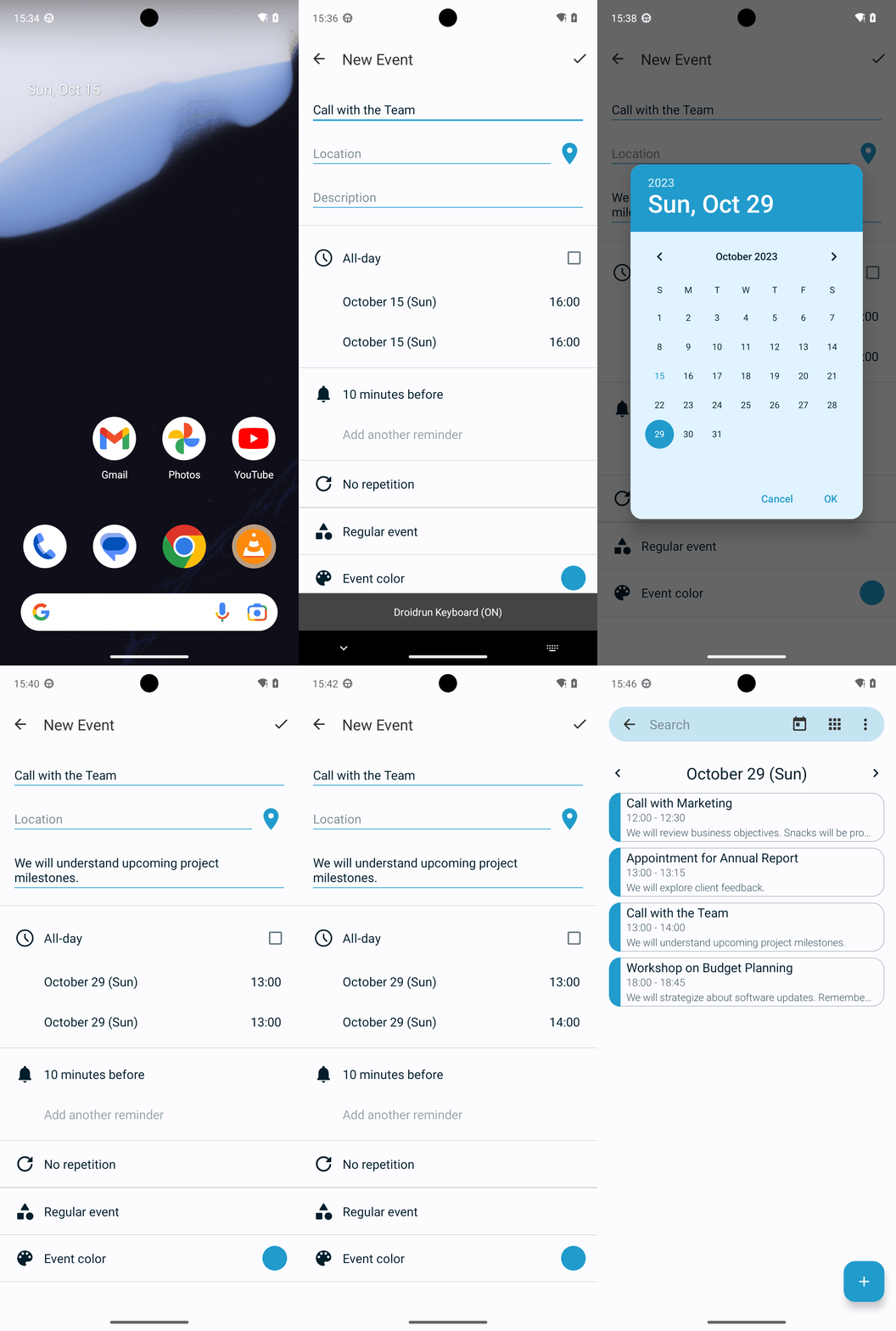
Goal: In Simple Calendar Pro, create a calendar event on 2023-10-29 at 13h with the title 'Call with the Team' and the description 'We will understand upcoming project milestones.'. The event should last for 60 mins.
user: None
The current subgoal explicitly states to "Open Simple Calendar Pro using open_app". This translates directly to the `open_app` action with the text parameter set to "Simple Calendar Pro".
open_app(text="Simple Calendar Pro")
Opening the "Simple Calendar Pro" application.
Opening the "Simple Calendar Pro" application.
The subgoal is to "Tap the New Event (plus) button." I need to find the clickable element that corresponds to "New Event" or a plus button. Based on the provided UI elements, element 56 is an "ImageButton" with the text "New Event" and resource ID `com.simplemobiletools.calendar.pro:id/calendar_fab`. This is the correct element to click.
click(index=56)
Tapping the "New Event" button to create a new event.
Tapping the "New Event" button to create a new event.
The current subgoal is to tap "Event". I need to find the clickable element with the text "Event" and click on it. Based on the provided UI elements, element 59 is a TextView with the text "Event".
click(index=59)
Tapping the "Event" button to open the event creation screen.
Tapping the "Event" button to open the event creation screen.
The current subgoal requires typing text into the 'Title' field. The device state indicates that the 'Title' field is currently focused and the keyboard is visible. I need to use the `type` action, specify the text "Call with the Team", and provide the index of the 'Title' EditText element, which is 7.
type(text="Call with the Team"index=7)
Typing "Call with the Team" into the 'Title' field.
Typing "Call with the Team" into the 'Title' field.
The current subgoal requires me to tap the "Description" field and then type the specified text. I have identified the "Description" field as element 10. The action will be `type` with the text "We will understand upcoming project milestones." and the index 10.
type(text="We will understand upcoming project milestones."index=10)
Typing "We will understand upcoming project milestones." into the 'Description' field.
Typing "We will understand upcoming project milestones." into the 'Description' field.
The current subgoal requires tapping the "Start date" field, which is labeled "October 15 (Sun)". I need to find the corresponding element in the provided UI elements and perform a `click` action on it. Element 13, `TextView: "com.simplemobiletools.calendar.pro:id/event_start_date", "October 15 (Sun)"`, matches this description.
click(index=13)
Tapping the "October 15 (Sun)" field to open the date picker.
Tapping the "October 15 (Sun)" field to open the date picker.
The current subgoal is to tap the date "29". I need to find the element with the text "29" and perform a click action on it. Based on the provided UI elements, element 40 has the text "29".
click(index=40)
Tapping the date "29" in the calendar.
Tapping the date "29" in the calendar.
The current subgoal requires tapping the "OK" button to confirm the selected date. I need to find the "OK" button in the provided UI elements and perform a click action on it. Based on the UI elements, element 51 is a button with the text "OK".
click(index=51)
Tapping the "OK" button to confirm the selected date.
Tapping the "OK" button to confirm the selected date.
The current subgoal is to tap the Start time field showing "16:00". I need to find the element with the text "16:00" that corresponds to the start time. Based on the provided UI elements, element 14 is `TextView: "com.simplemobiletools.calendar.pro:id/event_start_time", "16:00"`. This is the correct element to click.
click(index=14)
Tapping the Start time field showing "16:00".
Tapping the Start time field showing "16:00".
The current subgoal is to tap "13" on the clock face. I need to find the element with the text "13" and perform a click action on it. Based on the provided UI elements, element 11 has the text "13".
click(index=11)
Tapping "13" on the clock face to set the start hour.
Tapping "13" on the clock face to set the start hour.
The current subgoal is to "Tap OK on the time picker to confirm Start time 13:00." I need to find the "OK" button in the provided UI elements and perform a click action on it. Element 20 is a button with the text "OK".
click(index=20)
Tapping the "OK" button to confirm the selected start time.
Tapping the "OK" button to confirm the selected start time.
The current subgoal is to "Tap the End time field (currently 13:00)". I need to find the UI element that displays "13:00" and is associated with the end time. Based on the provided UI elements, element 16, `TextView: "com.simplemobiletools.calendar.pro:id/event_end_time", "13:00" - (864, 1212, 1059, 1357)`, is the correct target.
click(index=16)
Tapping the End time field, which currently shows "13:00".
Tapping the End time field, which currently shows "13:00".
The current subgoal is to tap "14" on the clock face to set the End hour. I need to find the element with the text "14" and click it. Based on the provided UI elements, element 17 has the text "14".
click(index=17)
Tapping "14" on the clock face to set the End hour.
Tapping "14" on the clock face to set the End hour.
The current subgoal is to "Tap OK to confirm the End time as 14:00." I need to find the "OK" button and click it. Based on the provided UI elements, element 20 is a button with the text "OK".
click(index=20)
Tapping the "OK" button to confirm the end time.
Tapping the "OK" button to confirm the end time.
The current subgoal is to tap the "Save" button. I need to find the element corresponding to "Save" in the provided UI elements and then perform a click action on it. Element 5 is a Button with the text "Save".
click(index=5)
Tapping the "Save" button to create the event.
Tapping the "Save" button to create the event.
The current subgoal is to "Tap the 'OK' button on the Disclaimer dialog". I need to find the "OK" button in the provided clickable UI elements and perform a click action on it. Element 6 is a button with the text "OK".
click(index=6)
Tapping the "OK" button on the Disclaimer dialog.
Tapping the "OK" button on the Disclaimer dialog.
The current subgoal is to "Tap on Oct 29 in the Month view to open its events." I need to find the clickable element that represents the 29th of October on the calendar. Based on the screenshot and the provided UI elements, the date "29" is visible and is associated with the `month_view_background` element at index 49.
click(index=49)
Tapping on the calendar cell for October 29th.
Tapping on the calendar cell for October 29th.
Created the event "Call with the Team" on 2023-10-29 from 13:00 to 14:00 with the description "We will understand upcoming project milestones." in Simple Calendar Pro, and confirmed it appears correctly.
complete_goal(message="Created the event "Call with the Team" on 2023-10-29 from 13:00 to 14:00 with the description "We will understand upcoming project milestones." in Simple Calendar Pro, and confirmed it appears correctly.")