
Save Copy Of Receipt Task Eval
Goal: In Simple Gallery Pro, copy receipt_2023_01_22_sure_frog.jpg in DCIM and save a copy with the same name in Download
Goal: In Simple Gallery Pro, copy receipt_2023_01_22_sure_frog.jpg in DCIM and save a copy with the same name in Download
user: None
The current subgoal explicitly states to "Open Simple Gallery Pro (use open_app)". This translates directly to using the `open_app` action with the text "Simple Gallery Pro".
open_app(text="Simple Gallery Pro")
Open the "Simple Gallery Pro" application.
Open the "Simple Gallery Pro" application.
The current subgoal is to "Open the DCIM folder." I need to find the UI element corresponding to the "DCIM" folder and perform a click action on it. Based on the provided UI elements, element 11 has the text "DCIM" and is part of element 10, which is a clickable RelativeLayout. Therefore, I will click element 10.
click(index=10)
Click the "DCIM" folder to open it.
Click the "DCIM" folder to open it.
The current subgoal is to "Tap 'Toggle filename visibility' to reveal the file name." I need to find the element with the text "Toggle filename visibility" and perform a click action on it. From the provided UI elements, element 6 is a Button with the text "Toggle filename visibility".
click(index=6)
Click the "Toggle filename visibility" button.
Click the "Toggle filename visibility" button.
The current subgoal is to long-press the image "receipt_2023_01_22_sure_frog.jpg". I need to find the index of this element and use the `long_press` action. The element "receipt_2023_01_22_sure_frog.jpg" is listed with index 11.
long_press(index=11)
Long press the image "receipt_2023_01_22_sure_frog.jpg" to select it.
Long press the image "receipt_2023_01_22_sure_frog.jpg" to select it.
The current subgoal is to "Tap More options on the selection toolbar." I need to find the "More options" element in the UI and perform a click action on it. Based on the provided UI elements, index 16 is an ImageView with the text "More options".
click(index=16)
Click the "More options" button on the selection toolbar.
Click the "More options" button on the selection toolbar.
The current subgoal is to tap "Copy to". I need to find the element with the text "Copy to" and click it. Based on the provided UI elements, element 12 has the text "Copy to".
click(index=12)
Click the "Copy to" option from the menu.
Click the "Copy to" option from the menu.
The current subgoal is to "Tap the Search folders field and type 'Download'". The target element is the "Search folders" field, which is an EditText with index 6. The action required is to `type` the text "Download" into this field.
type(text="Download"index=6)
Tap the "Search folders" field and type "Download".
Tap the "Search folders" field and type "Download".
The current subgoal is to "Tap 'Other folder'". I need to find the clickable element with the text "Other folder" and perform a click action on it. Based on the provided UI elements, element 10 is a Button with the text "Other folder".
click(index=10)
Click the "Other folder" button.
Click the "Other folder" button.
The current subgoal requires tapping the "Internal" breadcrumb. I have identified the "Internal" TextView with index 5 in the provided UI elements. Therefore, I will perform a click action on this element.
click(index=5)
Click the "Internal" breadcrumb to go up one level.
Click the "Internal" breadcrumb to go up one level.
The current subgoal is to "Tap the 'Download' folder in the picker." I need to find the UI element with the text "Download" and perform a click action on it. Based on the provided UI elements, element 23 is a TextView with the text "Download".
click(index=23)
Click the "Download" folder.
Click the "Download" folder.
The current subgoal is to "Tap OK to confirm copying to Internal > Download." I need to find the "OK" button in the provided clickable UI elements and perform a click action on it. The element with text "OK" has index 12.
click(index=12)
Click the "OK" button to confirm copying.
Click the "OK" button to confirm copying.
The current subgoal is to "Tap Done to exit selection mode." I need to find the clickable element with the text "Done" and perform a click action on it. Based on the provided UI elements, index 12 is an ImageView with the text "Done".
click(index=12)
Click the "Done" button to exit selection mode.
Click the "Done" button to exit selection mode.
The current subgoal is to "Tap the Back arrow (top-left) to return to the folders list." I need to find the element that represents the back arrow in the top-left corner and perform a click action on it. Based on the provided UI elements, element 4 is an "ImageView" with the text "Back" and is located in the top-left area.
click(index=4)
Click the Back arrow in the top-left corner.
Click the Back arrow in the top-left corner.
The current subgoal is to "Open the Download folder." I need to find the element with the text "Download" and perform a click action on it. Based on the provided UI elements, element 14 is a TextView with the text "Download".
click(index=14)
Click the "Download" folder.
Click the "Download" folder.
I copied receipt_2023_01_22_sure_frog.jpg from DCIM and confirmed a copy with the same name now exists in the Download folder.
complete_goal(message="I copied receipt_2023_01_22_sure_frog.jpg from DCIM and confirmed a copy with the same name now exists in the Download folder.")
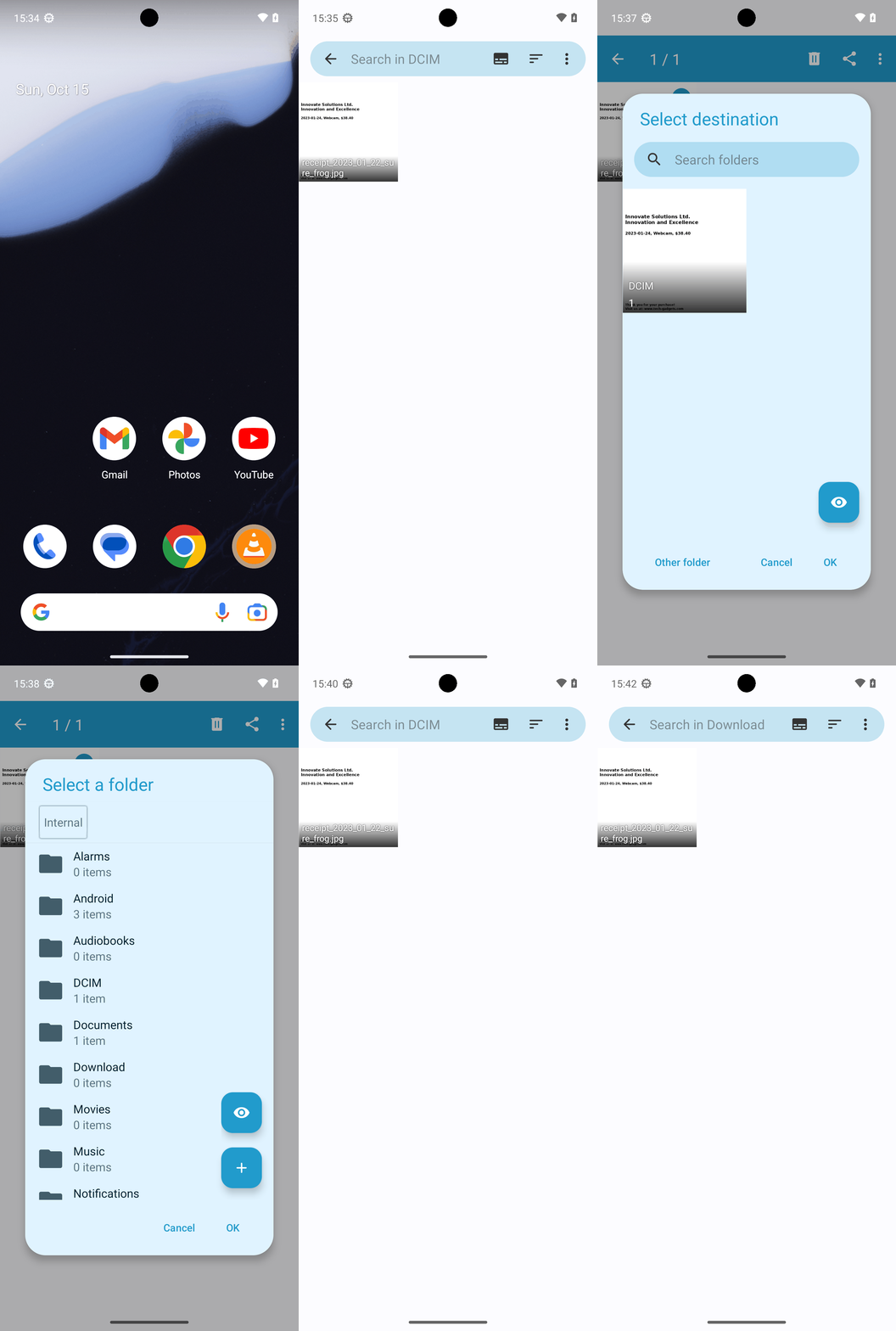
Goal: In Simple Gallery Pro, copy receipt_2023_01_22_sure_frog.jpg in DCIM and save a copy with the same name in Download
user: None
The current subgoal explicitly states to "Open Simple Gallery Pro (use open_app)". This translates directly to using the `open_app` action with the text "Simple Gallery Pro".
open_app(text="Simple Gallery Pro")
Open the "Simple Gallery Pro" application.
Open the "Simple Gallery Pro" application.
The current subgoal is to "Open the DCIM folder." I need to find the UI element corresponding to the "DCIM" folder and perform a click action on it. Based on the provided UI elements, element 11 has the text "DCIM" and is part of element 10, which is a clickable RelativeLayout. Therefore, I will click element 10.
click(index=10)
Click the "DCIM" folder to open it.
Click the "DCIM" folder to open it.
The current subgoal is to "Tap 'Toggle filename visibility' to reveal the file name." I need to find the element with the text "Toggle filename visibility" and perform a click action on it. From the provided UI elements, element 6 is a Button with the text "Toggle filename visibility".
click(index=6)
Click the "Toggle filename visibility" button.
Click the "Toggle filename visibility" button.
The current subgoal is to long-press the image "receipt_2023_01_22_sure_frog.jpg". I need to find the index of this element and use the `long_press` action. The element "receipt_2023_01_22_sure_frog.jpg" is listed with index 11.
long_press(index=11)
Long press the image "receipt_2023_01_22_sure_frog.jpg" to select it.
Long press the image "receipt_2023_01_22_sure_frog.jpg" to select it.
The current subgoal is to "Tap More options on the selection toolbar." I need to find the "More options" element in the UI and perform a click action on it. Based on the provided UI elements, index 16 is an ImageView with the text "More options".
click(index=16)
Click the "More options" button on the selection toolbar.
Click the "More options" button on the selection toolbar.
The current subgoal is to tap "Copy to". I need to find the element with the text "Copy to" and click it. Based on the provided UI elements, element 12 has the text "Copy to".
click(index=12)
Click the "Copy to" option from the menu.
Click the "Copy to" option from the menu.
The current subgoal is to "Tap the Search folders field and type 'Download'". The target element is the "Search folders" field, which is an EditText with index 6. The action required is to `type` the text "Download" into this field.
type(text="Download"index=6)
Tap the "Search folders" field and type "Download".
Tap the "Search folders" field and type "Download".
The current subgoal is to "Tap 'Other folder'". I need to find the clickable element with the text "Other folder" and perform a click action on it. Based on the provided UI elements, element 10 is a Button with the text "Other folder".
click(index=10)
Click the "Other folder" button.
Click the "Other folder" button.
The current subgoal requires tapping the "Internal" breadcrumb. I have identified the "Internal" TextView with index 5 in the provided UI elements. Therefore, I will perform a click action on this element.
click(index=5)
Click the "Internal" breadcrumb to go up one level.
Click the "Internal" breadcrumb to go up one level.
The current subgoal is to "Tap the 'Download' folder in the picker." I need to find the UI element with the text "Download" and perform a click action on it. Based on the provided UI elements, element 23 is a TextView with the text "Download".
click(index=23)
Click the "Download" folder.
Click the "Download" folder.
The current subgoal is to "Tap OK to confirm copying to Internal > Download." I need to find the "OK" button in the provided clickable UI elements and perform a click action on it. The element with text "OK" has index 12.
click(index=12)
Click the "OK" button to confirm copying.
Click the "OK" button to confirm copying.
The current subgoal is to "Tap Done to exit selection mode." I need to find the clickable element with the text "Done" and perform a click action on it. Based on the provided UI elements, index 12 is an ImageView with the text "Done".
click(index=12)
Click the "Done" button to exit selection mode.
Click the "Done" button to exit selection mode.
The current subgoal is to "Tap the Back arrow (top-left) to return to the folders list." I need to find the element that represents the back arrow in the top-left corner and perform a click action on it. Based on the provided UI elements, element 4 is an "ImageView" with the text "Back" and is located in the top-left area.
click(index=4)
Click the Back arrow in the top-left corner.
Click the Back arrow in the top-left corner.
The current subgoal is to "Open the Download folder." I need to find the element with the text "Download" and perform a click action on it. Based on the provided UI elements, element 14 is a TextView with the text "Download".
click(index=14)
Click the "Download" folder.
Click the "Download" folder.
I copied receipt_2023_01_22_sure_frog.jpg from DCIM and confirmed a copy with the same name now exists in the Download folder.
complete_goal(message="I copied receipt_2023_01_22_sure_frog.jpg from DCIM and confirmed a copy with the same name now exists in the Download folder.")