
Retro Playing Queue
Goal: Add the following songs, in order, Through the Storm, Hidden Paths, Forever Young, Whispers of the Past, Heartbeat Away to my playing queue in Retro music.
Goal: Add the following songs, in order, Through the Storm, Hidden Paths, Forever Young, Whispers of the Past, Heartbeat Away to my playing queue in Retro music.
user: None
The current subgoal explicitly states to "Open the 'Retro Music' app using open_app." This directly maps to the `open_app` action. The target is the app name "Retro Music".
open_app(text="Retro Music")
Open the "Retro Music" app.
Open the "Retro Music" app.
The current subgoal is to "Tap the Songs tab in the bottom bar." I need to find the UI element corresponding to "Songs" in the bottom bar and perform a click action on it. Looking at the provided clickable UI elements, element 40 is "FrameLayout: "code.name.monkey.retromusic:id/action_song", "Songs" - (216, 2127, 432, 2337)". This element has the text "Songs" and is located in the bottom part of the screen, consistent with a "bottom bar".
click(index=40)
Click the "Songs" tab in the bottom bar.
Click the "Songs" tab in the bottom bar.
The current subgoal is to "Open the overflow menu (⋮) for “Through the Storm”". I need to find the "Through the Storm" song and then click on the menu icon associated with it. Based on the provided UI elements, element 55 is the "menu" icon for "Through the Storm".
click(index=55)
Click the overflow menu icon for "Through the Storm".
Click the overflow menu icon for "Through the Storm".
The current subgoal is to "Tap the Songs tab in the bottom bar to return to the Songs list." I need to find the UI element corresponding to "Songs" in the bottom bar and perform a click action on it. Based on the provided UI elements, element 12 is "FrameLayout: "code.name.monkey.retromusic:id/action_song", "Songs"".
click(index=12)
Click the "Songs" tab in the bottom bar.
Click the "Songs" tab in the bottom bar.
The current subgoal is to "Tap the overflow menu (⋮) for “Through the Storm” and select “Add to queue.”" Based on the device state, the overflow menu for "Through the Storm" is represented by element 55. I need to click this element. After clicking, a new menu should appear, and I will then need to select "Add to queue". For this step, I am only performing the first part of the subgoal, which is tapping the overflow menu.
click(index=55)
Tap the overflow menu (⋮) for “Through the Storm”.
Tap the overflow menu (⋮) for “Through the Storm”.
The current subgoal is to "Tap the Songs tab in the bottom bar to return to the Songs list." I need to locate the "Songs" tab in the provided UI elements and perform a click action on it. Based on the provided UI elements, element 12 is "Songs" in the bottom bar.
click(index=12)
Click the "Songs" tab in the bottom bar.
Click the "Songs" tab in the bottom bar.
The current subgoal explicitly states to "Tap the overflow menu (⋮) for “Through the Storm” (index 55)". I need to perform a click action on the element with index 55.
click(index=55)
Tap the overflow menu (⋮) for “Through the Storm”.
Tap the overflow menu (⋮) for “Through the Storm”.
The current subgoal is to "Tap the Songs tab in the bottom bar to return to the Songs list." I need to find the UI element corresponding to "Songs" in the bottom bar and perform a click action on it. Based on the provided UI elements, element 12 is "FrameLayout: "code.name.monkey.retromusic:id/action_song", "Songs" - (216, 2127, 432, 2337)". This is the correct element.
click(index=12)
Click the "Songs" tab in the bottom bar.
Click the "Songs" tab in the bottom bar.
The current subgoal requires a `swipe` action. The target is to swipe up so "Through the Storm" is not at the bottom edge. I will choose a start coordinate near the bottom of the screen and an end coordinate higher up to perform an upward swipe.
swipe(coordinate=[540, 1800]coordinate2=[540, 1000])
Swipe up to move "Through the Storm" away from the bottom edge.
Swipe up to move "Through the Storm" away from the bottom edge.
The current subgoal is to "Tap the overflow menu (⋮) for “Through the Storm”". I need to find the overflow menu icon associated with "Through the Storm" in the provided UI elements and perform a click action on it. "Through the Storm" is element 44, and its associated menu icon is element 46.
click(index=46)
Tap the overflow menu (⋮) for “Through the Storm”.
Tap the overflow menu (⋮) for “Through the Storm”.
The current subgoal explicitly states to "Tap 'Add to playing queue'". I need to find the element with this exact text in the provided UI elements and perform a click action on it. Element 6, a TextView, has the text "Add to playing queue".
click(index=6)
Tap "Add to playing queue" to add the song to the playing queue.
Tap "Add to playing queue" to add the song to the playing queue.
The current subgoal is to "Open the overflow menu (⋮) for “Hidden Paths” and tap “Add to playing queue.”". First, I need to find the overflow menu for "Hidden Paths". Looking at the provided UI elements, "Hidden Paths" is `TextView: "code.name.monkey.retromusic:id/title", "Hidden Paths" - (163, 1083, 951, 1140)` which is part of `ViewGroup` element 31. The overflow menu for this `ViewGroup` is `ImageView: "code.name.monkey.retromusic:id/menu", "menu" - (951, 1079, 1077, 1205)`, which is element 34. Therefore, the atomic action is to click on element 34.
click(index=34)
Tap the overflow menu (⋮) for “Hidden Paths”.
Tap the overflow menu (⋮) for “Hidden Paths”.
The current subgoal is to tap "Add to playing queue". I need to find the clickable element with this exact text. Based on the provided UI elements, element 6, which is a TextView with the text "Add to playing queue", matches this requirement.
click(index=6)
Tap "Add to playing queue" to add "Hidden Paths".
Tap "Add to playing queue" to add "Hidden Paths".
The current subgoal is to open the overflow menu (⋮) for “Forever Young”. I need to find the element corresponding to the overflow menu for "Forever Young" and click it. Based on the provided UI elements, element 22 is the menu icon for "Forever Young".
click(index=22)
Tap the overflow menu (⋮) for “Forever Young”.
Tap the overflow menu (⋮) for “Forever Young”.
The current subgoal explicitly states to "Tap “Add to playing queue” in the open menu". I need to find the element with the text "Add to playing queue" and perform a click action on it. Based on the provided UI elements, element 6 has the text "Add to playing queue".
click(index=6)
Tap "Add to playing queue" to add "Forever Young" to the playing queue.
Tap "Add to playing queue" to add "Forever Young" to the playing queue.
The current subgoal is to "Slightly swipe up so 'Whispers of the Past' is fully above the mini-player/bottom bar." This requires a swipe action. I will swipe from the middle of the screen upwards to scroll the content. I will choose coordinates that are within the scrollable area and away from the bottom bar.
swipe(coordinate=[540, 1500]coordinate2=[540, 500])
Swipe up to make "Whispers of the Past" fully visible.
Swipe up to make "Whispers of the Past" fully visible.
The current subgoal is to tap the overflow menu (⋮) for “Whispers of the Past”. I need to find the clickable element that corresponds to the overflow menu for "Whispers of the Past". Based on the provided UI elements, element 50 is the "menu" (overflow menu) for "Whispers of the Past".
click(index=50)
Tap the overflow menu (⋮) for “Whispers of the Past”.
Tap the overflow menu (⋮) for “Whispers of the Past”.
The current subgoal is to "Tap “Add to playing queue” for “Whispers of the Past.”". The visible UI elements show "Add to playing queue" as element 6. I need to perform a click action on this element.
click(index=6)
Tap "Add to playing queue" to add "Whispers of the Past" to the playing queue.
Tap "Add to playing queue" to add "Whispers of the Past" to the playing queue.
The current subgoal is to "Tap the overflow menu (⋮) for “Heartbeat Away.”". I need to find the element corresponding to the overflow menu for "Heartbeat Away". Based on the provided UI elements, "Heartbeat Away" is element 20, and its associated menu icon is element 22.
click(index=22)
Tap the overflow menu (⋮) for “Heartbeat Away.”
Tap the overflow menu (⋮) for “Heartbeat Away.”
The current subgoal is to "Tap 'Add to playing queue' to add 'Heartbeat Away.'" I need to find the clickable element with the text "Add to playing queue" and perform a click action on it. Based on the provided UI elements, index 6 corresponds to "Add to playing queue".
click(index=6)
Tap "Add to playing queue".
Tap "Add to playing queue".
Added the five songs to your Retro Music playing queue in the exact order: Through the Storm; Hidden Paths; Forever Young; Whispers of the Past; Heartbeat Away. I did not modify or clear any existing items in your queue.
complete_goal(message="Added the five songs to your Retro Music playing queue in the exact order: Through the Storm; Hidden Paths; Forever Young; Whispers of the Past; Heartbeat Away. I did not modify or clear any existing items in your queue.")
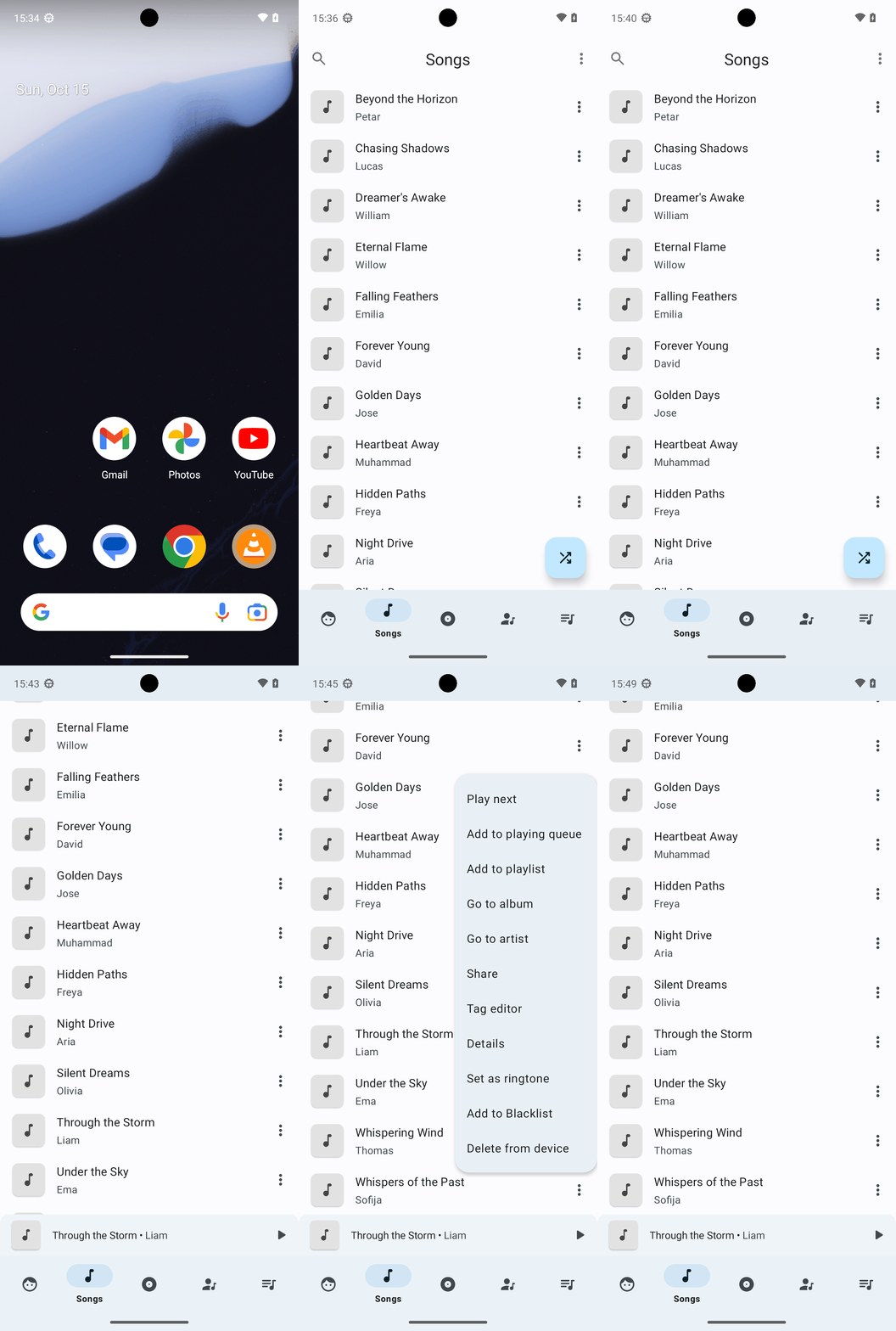
Goal: Add the following songs, in order, Through the Storm, Hidden Paths, Forever Young, Whispers of the Past, Heartbeat Away to my playing queue in Retro music.
user: None
The current subgoal explicitly states to "Open the 'Retro Music' app using open_app." This directly maps to the `open_app` action. The target is the app name "Retro Music".
open_app(text="Retro Music")
Open the "Retro Music" app.
Open the "Retro Music" app.
The current subgoal is to "Tap the Songs tab in the bottom bar." I need to find the UI element corresponding to "Songs" in the bottom bar and perform a click action on it. Looking at the provided clickable UI elements, element 40 is "FrameLayout: "code.name.monkey.retromusic:id/action_song", "Songs" - (216, 2127, 432, 2337)". This element has the text "Songs" and is located in the bottom part of the screen, consistent with a "bottom bar".
click(index=40)
Click the "Songs" tab in the bottom bar.
Click the "Songs" tab in the bottom bar.
The current subgoal is to "Open the overflow menu (⋮) for “Through the Storm”". I need to find the "Through the Storm" song and then click on the menu icon associated with it. Based on the provided UI elements, element 55 is the "menu" icon for "Through the Storm".
click(index=55)
Click the overflow menu icon for "Through the Storm".
Click the overflow menu icon for "Through the Storm".
The current subgoal is to "Tap the Songs tab in the bottom bar to return to the Songs list." I need to find the UI element corresponding to "Songs" in the bottom bar and perform a click action on it. Based on the provided UI elements, element 12 is "FrameLayout: "code.name.monkey.retromusic:id/action_song", "Songs"".
click(index=12)
Click the "Songs" tab in the bottom bar.
Click the "Songs" tab in the bottom bar.
The current subgoal is to "Tap the overflow menu (⋮) for “Through the Storm” and select “Add to queue.”" Based on the device state, the overflow menu for "Through the Storm" is represented by element 55. I need to click this element. After clicking, a new menu should appear, and I will then need to select "Add to queue". For this step, I am only performing the first part of the subgoal, which is tapping the overflow menu.
click(index=55)
Tap the overflow menu (⋮) for “Through the Storm”.
Tap the overflow menu (⋮) for “Through the Storm”.
The current subgoal is to "Tap the Songs tab in the bottom bar to return to the Songs list." I need to locate the "Songs" tab in the provided UI elements and perform a click action on it. Based on the provided UI elements, element 12 is "Songs" in the bottom bar.
click(index=12)
Click the "Songs" tab in the bottom bar.
Click the "Songs" tab in the bottom bar.
The current subgoal explicitly states to "Tap the overflow menu (⋮) for “Through the Storm” (index 55)". I need to perform a click action on the element with index 55.
click(index=55)
Tap the overflow menu (⋮) for “Through the Storm”.
Tap the overflow menu (⋮) for “Through the Storm”.
The current subgoal is to "Tap the Songs tab in the bottom bar to return to the Songs list." I need to find the UI element corresponding to "Songs" in the bottom bar and perform a click action on it. Based on the provided UI elements, element 12 is "FrameLayout: "code.name.monkey.retromusic:id/action_song", "Songs" - (216, 2127, 432, 2337)". This is the correct element.
click(index=12)
Click the "Songs" tab in the bottom bar.
Click the "Songs" tab in the bottom bar.
The current subgoal requires a `swipe` action. The target is to swipe up so "Through the Storm" is not at the bottom edge. I will choose a start coordinate near the bottom of the screen and an end coordinate higher up to perform an upward swipe.
swipe(coordinate=[540, 1800]coordinate2=[540, 1000])
Swipe up to move "Through the Storm" away from the bottom edge.
Swipe up to move "Through the Storm" away from the bottom edge.
The current subgoal is to "Tap the overflow menu (⋮) for “Through the Storm”". I need to find the overflow menu icon associated with "Through the Storm" in the provided UI elements and perform a click action on it. "Through the Storm" is element 44, and its associated menu icon is element 46.
click(index=46)
Tap the overflow menu (⋮) for “Through the Storm”.
Tap the overflow menu (⋮) for “Through the Storm”.
The current subgoal explicitly states to "Tap 'Add to playing queue'". I need to find the element with this exact text in the provided UI elements and perform a click action on it. Element 6, a TextView, has the text "Add to playing queue".
click(index=6)
Tap "Add to playing queue" to add the song to the playing queue.
Tap "Add to playing queue" to add the song to the playing queue.
The current subgoal is to "Open the overflow menu (⋮) for “Hidden Paths” and tap “Add to playing queue.”". First, I need to find the overflow menu for "Hidden Paths". Looking at the provided UI elements, "Hidden Paths" is `TextView: "code.name.monkey.retromusic:id/title", "Hidden Paths" - (163, 1083, 951, 1140)` which is part of `ViewGroup` element 31. The overflow menu for this `ViewGroup` is `ImageView: "code.name.monkey.retromusic:id/menu", "menu" - (951, 1079, 1077, 1205)`, which is element 34. Therefore, the atomic action is to click on element 34.
click(index=34)
Tap the overflow menu (⋮) for “Hidden Paths”.
Tap the overflow menu (⋮) for “Hidden Paths”.
The current subgoal is to tap "Add to playing queue". I need to find the clickable element with this exact text. Based on the provided UI elements, element 6, which is a TextView with the text "Add to playing queue", matches this requirement.
click(index=6)
Tap "Add to playing queue" to add "Hidden Paths".
Tap "Add to playing queue" to add "Hidden Paths".
The current subgoal is to open the overflow menu (⋮) for “Forever Young”. I need to find the element corresponding to the overflow menu for "Forever Young" and click it. Based on the provided UI elements, element 22 is the menu icon for "Forever Young".
click(index=22)
Tap the overflow menu (⋮) for “Forever Young”.
Tap the overflow menu (⋮) for “Forever Young”.
The current subgoal explicitly states to "Tap “Add to playing queue” in the open menu". I need to find the element with the text "Add to playing queue" and perform a click action on it. Based on the provided UI elements, element 6 has the text "Add to playing queue".
click(index=6)
Tap "Add to playing queue" to add "Forever Young" to the playing queue.
Tap "Add to playing queue" to add "Forever Young" to the playing queue.
The current subgoal is to "Slightly swipe up so 'Whispers of the Past' is fully above the mini-player/bottom bar." This requires a swipe action. I will swipe from the middle of the screen upwards to scroll the content. I will choose coordinates that are within the scrollable area and away from the bottom bar.
swipe(coordinate=[540, 1500]coordinate2=[540, 500])
Swipe up to make "Whispers of the Past" fully visible.
Swipe up to make "Whispers of the Past" fully visible.
The current subgoal is to tap the overflow menu (⋮) for “Whispers of the Past”. I need to find the clickable element that corresponds to the overflow menu for "Whispers of the Past". Based on the provided UI elements, element 50 is the "menu" (overflow menu) for "Whispers of the Past".
click(index=50)
Tap the overflow menu (⋮) for “Whispers of the Past”.
Tap the overflow menu (⋮) for “Whispers of the Past”.
The current subgoal is to "Tap “Add to playing queue” for “Whispers of the Past.”". The visible UI elements show "Add to playing queue" as element 6. I need to perform a click action on this element.
click(index=6)
Tap "Add to playing queue" to add "Whispers of the Past" to the playing queue.
Tap "Add to playing queue" to add "Whispers of the Past" to the playing queue.
The current subgoal is to "Tap the overflow menu (⋮) for “Heartbeat Away.”". I need to find the element corresponding to the overflow menu for "Heartbeat Away". Based on the provided UI elements, "Heartbeat Away" is element 20, and its associated menu icon is element 22.
click(index=22)
Tap the overflow menu (⋮) for “Heartbeat Away.”
Tap the overflow menu (⋮) for “Heartbeat Away.”
The current subgoal is to "Tap 'Add to playing queue' to add 'Heartbeat Away.'" I need to find the clickable element with the text "Add to playing queue" and perform a click action on it. Based on the provided UI elements, index 6 corresponds to "Add to playing queue".
click(index=6)
Tap "Add to playing queue".
Tap "Add to playing queue".
Added the five songs to your Retro Music playing queue in the exact order: Through the Storm; Hidden Paths; Forever Young; Whispers of the Past; Heartbeat Away. I did not modify or clear any existing items in your queue.
complete_goal(message="Added the five songs to your Retro Music playing queue in the exact order: Through the Storm; Hidden Paths; Forever Young; Whispers of the Past; Heartbeat Away. I did not modify or clear any existing items in your queue.")