
Retro Create Playlist
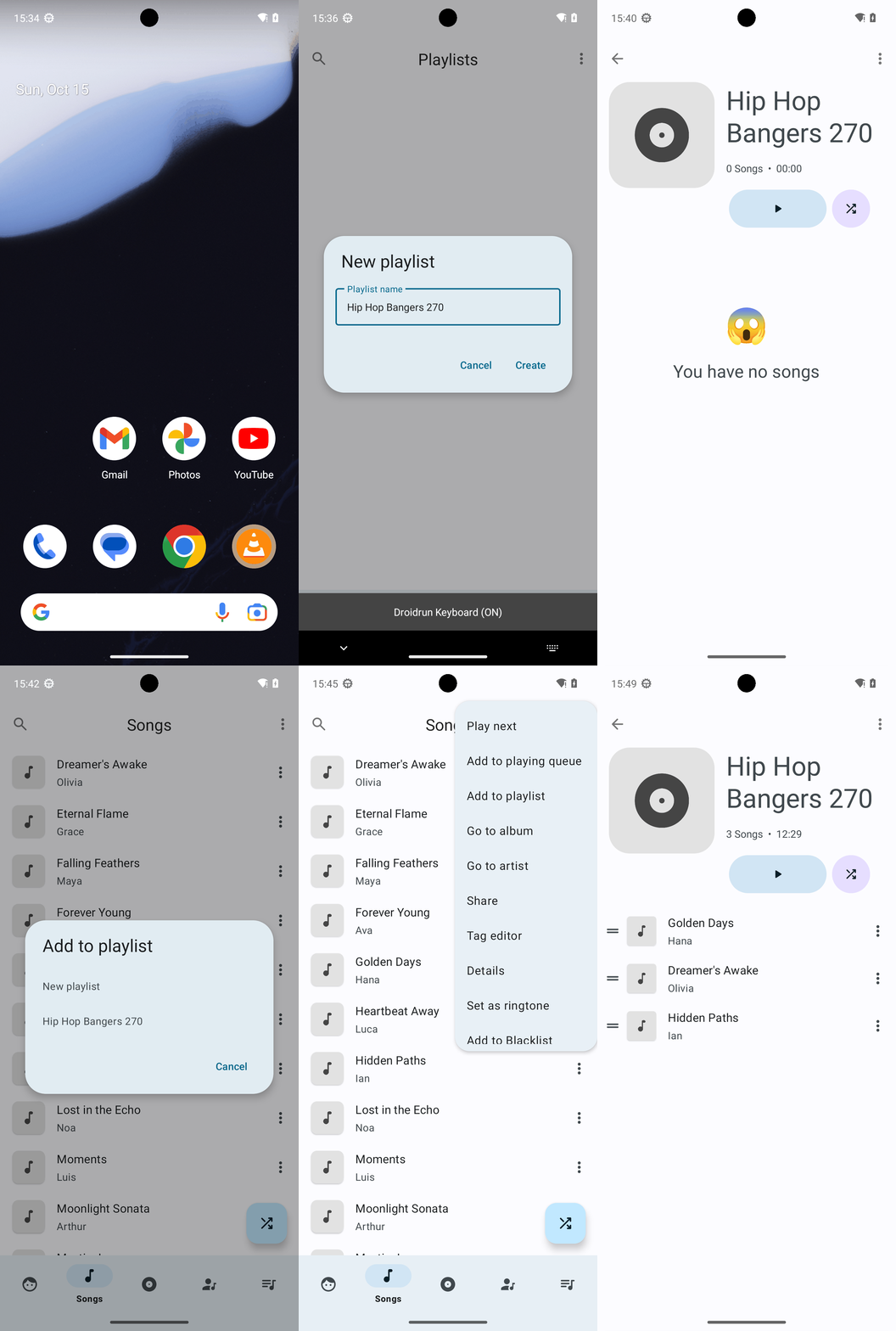
Goal: Create a playlist in Retro Music titled "Hip Hop Bangers 270" with the following songs, in order: Golden Days, Dreamer's Awake, Hidden Paths
Goal: Create a playlist in Retro Music titled "Hip Hop Bangers 270" with the following songs, in order: Golden Days, Dreamer's Awake, Hidden Paths
user: None
The current subgoal explicitly states to "Open the Retro Music app (using open_app)". This requires the `open_app` action with the app name "Retro Music" as the argument.
open_app(text="Retro Music")
Opening the Retro Music app as specified in the subgoal.
Opening the Retro Music app as specified in the subgoal.
The current subgoal is to "Tap the Playlists tab in the bottom navigation." I need to find the clickable element corresponding to "Playlists" in the provided UI elements and use the `click` action on it. Element 43 is "FrameLayout: "code.name.monkey.retromusic:id/action_playlist", "Playlists" - (864, 2127, 1080, 2337)", which is the correct target.
click(index=43)
Tapping the Playlists tab in the bottom navigation.
Tapping the Playlists tab in the bottom navigation.
The subgoal explicitly states to "Tap the More options (three dots)". I need to find the UI element that corresponds to "More options" and then perform a click action on it. From the provided list, element 6 is "ImageView: "More options"".
click(index=6)
Tapping the "More options" (three dots) icon on the Playlists screen.
Tapping the "More options" (three dots) icon on the Playlists screen.
The current subgoal is to tap "New playlist". I will find the element with the text "New playlist" and perform a click action on it. Based on the provided UI elements, element 8 is a TextView with the text "New playlist".
click(index=8)
Tapping the "New playlist" option to create a new playlist.
Tapping the "New playlist" option to create a new playlist.
The current subgoal requires typing "Hip Hop Bangers 270" into the "Playlist name" field. Based on the provided UI elements, the "Playlist name" field is an EditText with index 3. Therefore, the atomic action is `type` with the text "Hip Hop Bangers 270" and index 3.
type(text="Hip Hop Bangers 270"index=3)
Typing "Hip Hop Bangers 270" into the playlist name field.
Typing "Hip Hop Bangers 270" into the playlist name field.
The subgoal explicitly states to "Tap the Create button". I need to locate the "Create" button in the provided UI elements and perform a click action on it. The "Create" button is listed as index 6.
click(index=6)
Tapping the "Create" button to finalize the playlist creation.
Tapping the "Create" button to finalize the playlist creation.
The current subgoal is to "Open the 'Hip Hop Bangers 270' playlist." I need to find the element with the text "Hip Hop Bangers 270" and click it. Based on the provided UI elements, element 9 has the text "Hip Hop Bangers 270".
click(index=9)
Tapping the "Hip Hop Bangers 270" playlist to open it.
Tapping the "Hip Hop Bangers 270" playlist to open it.
The subgoal explicitly states to "Tap the playlist’s More options (three dots)". I need to find the element corresponding to "More options" and click it. In the provided UI elements, element 10 is "ImageView: More options".
click(index=10)
Tapping the "More options" (three dots) icon on the playlist screen.
Tapping the "More options" (three dots) icon on the playlist screen.
The current subgoal is to "Dismiss the overflow menu and tap Navigate up to return to the library." The "Navigate up" action is typically represented by a back arrow icon in the top-left corner of the screen. Clicking this icon will both dismiss the currently open overflow menu and navigate back to the previous screen (the library in this case). Since there is no index for the back arrow in the provided clickable elements, I will use a coordinate click. Based on the image, a suitable coordinate for the back arrow is approximately (70, 70).
click(coordinate=[70, 70])
Tapping the back arrow icon in the top-left corner to dismiss the overflow menu and navigate up.
Tapping the back arrow icon in the top-left corner to dismiss the overflow menu and navigate up.
The current subgoal is to "Dismiss the overflow menu and tap Navigate up to return to the library." The overflow menu is currently open. The "Navigate up" button is typically the back arrow icon in the top-left corner of the screen. This icon is visible in the screenshot. Since it's not listed in the clickable UI elements, I need to click it using its coordinates. Based on the screenshot, the back arrow is located around the coordinates [60, 70].
click(coordinate=[60, 70])
Tapping the back arrow (Navigate up) icon in the top-left corner to dismiss the overflow menu and return to the library.
Tapping the back arrow (Navigate up) icon in the top-left corner to dismiss the overflow menu and return to the library.
The current subgoal is "Press Back to dismiss the overflow menu." This directly translates to using the `system_button` action with the argument "Back".
system_button(button="Back")
Pressing the system back button to dismiss the overflow menu.
Pressing the system back button to dismiss the overflow menu.
The current subgoal is to "Tap Navigate up (top-left) to return from the playlist to the library." I need to find the "Navigate up" element and click it. Based on the provided UI elements, element 9 is "ImageButton: "Navigate up"". This is located in the top-left, as specified.
click(index=9)
Tapping the "Navigate up" button to return to the previous screen.
Tapping the "Navigate up" button to return to the previous screen.
The current subgoal is to "Tap the Songs tab in the bottom navigation." I need to find the UI element corresponding to "Songs" in the bottom navigation and click it. Based on the provided UI elements, element 14 is "FrameLayout: "code.name.monkey.retromusic:id/action_song", "Songs" - (216, 2127, 432, 2337)". This is the correct element to click.
click(index=14)
Tapping the "Songs" tab in the bottom navigation.
Tapping the "Songs" tab in the bottom navigation.
The current subgoal is to "Tap the overflow menu for 'Golden Days'". I need to find the "Golden Days" entry and then locate the corresponding overflow menu icon (three dots) and click it. Based on the provided UI elements, "Golden Days" is element 25, and its menu icon is element 27.
click(index=27)
Tapping the overflow menu icon for "Golden Days".
Tapping the overflow menu icon for "Golden Days".
The current subgoal requires me to tap "Add to playlist". I can see "Add to playlist" as element 8 in the provided UI elements. Therefore, I will perform a click action on element 8.
click(index=8)
Tapping "Add to playlist" from the current menu.
Tapping "Add to playlist" from the current menu.
The current subgoal is to "Tap 'Hip Hop Bangers 270' in the Add to playlist dialog to add 'Golden Days'". The required atomic action is `click`. The target element is the text "Hip Hop Bangers 270". From the provided UI elements, index 5 corresponds to "Hip Hop Bangers 270".
click(index=5)
Tapping "Hip Hop Bangers 270" to add the song to the playlist.
Tapping "Hip Hop Bangers 270" to add the song to the playlist.
The current subgoal requires me to open the overflow menu for "Dreamer's Awake". Based on the provided UI elements, "Dreamer's Awake" is element 9, and its corresponding overflow menu icon is element 11. Therefore, I need to perform a click action on element 11.
click(index=11)
Tapping the overflow menu icon for "Dreamer's Awake".
Tapping the overflow menu icon for "Dreamer's Awake".
The current subgoal requires me to tap "Add to playlist". I have identified the clickable element with the text "Add to playlist" and its index is 8.
click(index=8)
Tapping "Add to playlist" from the current menu.
Tapping "Add to playlist" from the current menu.
The current subgoal is to tap "Hip Hop Bangers 270" in the current dialog. Based on the provided UI elements, "Hip Hop Bangers 270" corresponds to index 5. Therefore, the required atomic action is a click on index 5.
click(index=5)
Tapping "Hip Hop Bangers 270" to add "Dreamer's Awake" to the playlist.
Tapping "Hip Hop Bangers 270" to add "Dreamer's Awake" to the playlist.
The current subgoal is to "Tap the overflow menu for 'Hidden Paths'". I need to find the element corresponding to the overflow menu for "Hidden Paths" and perform a click action on it. Based on the provided UI elements, element 35 is the "menu" (ImageView) which is the overflow menu for "Hidden Paths" (element 33).
click(index=35)
Tapping the overflow menu icon for "Hidden Paths".
Tapping the overflow menu icon for "Hidden Paths".
The current subgoal is to "Tap 'Add to playlist' in the current menu." I need to find the clickable element that has the text "Add to playlist" and perform a click action on it. Based on the provided UI elements, index 8 corresponds to "Add to playlist".
click(index=8)
Tapping "Add to playlist" in the current menu.
Tapping "Add to playlist" in the current menu.
The current subgoal is to "Tap “Hip Hop Bangers 270” in the dialog to add “Hidden Paths” to the playlist." I need to find the element with the text "Hip Hop Bangers 270" and perform a click action on it. Based on the provided UI elements, element with index 5 is "Hip Hop Bangers 270".
click(index=5)
Tapping "Hip Hop Bangers 270" in the dialog.
Tapping "Hip Hop Bangers 270" in the dialog.
The current subgoal is to "Tap the Playlists tab in the bottom navigation." I need to find the clickable element that corresponds to "Playlists" in the provided UI elements and perform a click action on it. Element 62 is "FrameLayout: "code.name.monkey.retromusic:id/action_playlist", "Playlists" - (864, 2127, 1080, 2337)", which matches the description.
click(index=62)
Tapping the "Playlists" tab in the bottom navigation.
Tapping the "Playlists" tab in the bottom navigation.
The current subgoal is to tap the "Hip Hop Bangers 270" playlist card. I need to find the element that corresponds to this playlist card. Based on the provided UI elements, index 8 is a ViewGroup that contains the text "Hip Hop Bangers 270" (index 9). Therefore, I should click on index 8.
click(index=8)
Tapping the "Hip Hop Bangers 270" playlist card.
Tapping the "Hip Hop Bangers 270" playlist card.
Playlist "Hip Hop Bangers 270" has been created and the songs were added and verified in this exact order: 1) Golden Days, 2) Dreamer's Awake, 3) Hidden Paths.
complete_goal(message="Playlist "Hip Hop Bangers 270" has been created and the songs were added and verified in this exact order: 1) Golden Days, 2) Dreamer's Awake, 3) Hidden Paths.")
Goal: Create a playlist in Retro Music titled "Hip Hop Bangers 270" with the following songs, in order: Golden Days, Dreamer's Awake, Hidden Paths
user: None
The current subgoal explicitly states to "Open the Retro Music app (using open_app)". This requires the `open_app` action with the app name "Retro Music" as the argument.
open_app(text="Retro Music")
Opening the Retro Music app as specified in the subgoal.
Opening the Retro Music app as specified in the subgoal.
The current subgoal is to "Tap the Playlists tab in the bottom navigation." I need to find the clickable element corresponding to "Playlists" in the provided UI elements and use the `click` action on it. Element 43 is "FrameLayout: "code.name.monkey.retromusic:id/action_playlist", "Playlists" - (864, 2127, 1080, 2337)", which is the correct target.
click(index=43)
Tapping the Playlists tab in the bottom navigation.
Tapping the Playlists tab in the bottom navigation.
The subgoal explicitly states to "Tap the More options (three dots)". I need to find the UI element that corresponds to "More options" and then perform a click action on it. From the provided list, element 6 is "ImageView: "More options"".
click(index=6)
Tapping the "More options" (three dots) icon on the Playlists screen.
Tapping the "More options" (three dots) icon on the Playlists screen.
The current subgoal is to tap "New playlist". I will find the element with the text "New playlist" and perform a click action on it. Based on the provided UI elements, element 8 is a TextView with the text "New playlist".
click(index=8)
Tapping the "New playlist" option to create a new playlist.
Tapping the "New playlist" option to create a new playlist.
The current subgoal requires typing "Hip Hop Bangers 270" into the "Playlist name" field. Based on the provided UI elements, the "Playlist name" field is an EditText with index 3. Therefore, the atomic action is `type` with the text "Hip Hop Bangers 270" and index 3.
type(text="Hip Hop Bangers 270"index=3)
Typing "Hip Hop Bangers 270" into the playlist name field.
Typing "Hip Hop Bangers 270" into the playlist name field.
The subgoal explicitly states to "Tap the Create button". I need to locate the "Create" button in the provided UI elements and perform a click action on it. The "Create" button is listed as index 6.
click(index=6)
Tapping the "Create" button to finalize the playlist creation.
Tapping the "Create" button to finalize the playlist creation.
The current subgoal is to "Open the 'Hip Hop Bangers 270' playlist." I need to find the element with the text "Hip Hop Bangers 270" and click it. Based on the provided UI elements, element 9 has the text "Hip Hop Bangers 270".
click(index=9)
Tapping the "Hip Hop Bangers 270" playlist to open it.
Tapping the "Hip Hop Bangers 270" playlist to open it.
The subgoal explicitly states to "Tap the playlist’s More options (three dots)". I need to find the element corresponding to "More options" and click it. In the provided UI elements, element 10 is "ImageView: More options".
click(index=10)
Tapping the "More options" (three dots) icon on the playlist screen.
Tapping the "More options" (three dots) icon on the playlist screen.
The current subgoal is to "Dismiss the overflow menu and tap Navigate up to return to the library." The "Navigate up" action is typically represented by a back arrow icon in the top-left corner of the screen. Clicking this icon will both dismiss the currently open overflow menu and navigate back to the previous screen (the library in this case). Since there is no index for the back arrow in the provided clickable elements, I will use a coordinate click. Based on the image, a suitable coordinate for the back arrow is approximately (70, 70).
click(coordinate=[70, 70])
Tapping the back arrow icon in the top-left corner to dismiss the overflow menu and navigate up.
Tapping the back arrow icon in the top-left corner to dismiss the overflow menu and navigate up.
The current subgoal is to "Dismiss the overflow menu and tap Navigate up to return to the library." The overflow menu is currently open. The "Navigate up" button is typically the back arrow icon in the top-left corner of the screen. This icon is visible in the screenshot. Since it's not listed in the clickable UI elements, I need to click it using its coordinates. Based on the screenshot, the back arrow is located around the coordinates [60, 70].
click(coordinate=[60, 70])
Tapping the back arrow (Navigate up) icon in the top-left corner to dismiss the overflow menu and return to the library.
Tapping the back arrow (Navigate up) icon in the top-left corner to dismiss the overflow menu and return to the library.
The current subgoal is "Press Back to dismiss the overflow menu." This directly translates to using the `system_button` action with the argument "Back".
system_button(button="Back")
Pressing the system back button to dismiss the overflow menu.
Pressing the system back button to dismiss the overflow menu.
The current subgoal is to "Tap Navigate up (top-left) to return from the playlist to the library." I need to find the "Navigate up" element and click it. Based on the provided UI elements, element 9 is "ImageButton: "Navigate up"". This is located in the top-left, as specified.
click(index=9)
Tapping the "Navigate up" button to return to the previous screen.
Tapping the "Navigate up" button to return to the previous screen.
The current subgoal is to "Tap the Songs tab in the bottom navigation." I need to find the UI element corresponding to "Songs" in the bottom navigation and click it. Based on the provided UI elements, element 14 is "FrameLayout: "code.name.monkey.retromusic:id/action_song", "Songs" - (216, 2127, 432, 2337)". This is the correct element to click.
click(index=14)
Tapping the "Songs" tab in the bottom navigation.
Tapping the "Songs" tab in the bottom navigation.
The current subgoal is to "Tap the overflow menu for 'Golden Days'". I need to find the "Golden Days" entry and then locate the corresponding overflow menu icon (three dots) and click it. Based on the provided UI elements, "Golden Days" is element 25, and its menu icon is element 27.
click(index=27)
Tapping the overflow menu icon for "Golden Days".
Tapping the overflow menu icon for "Golden Days".
The current subgoal requires me to tap "Add to playlist". I can see "Add to playlist" as element 8 in the provided UI elements. Therefore, I will perform a click action on element 8.
click(index=8)
Tapping "Add to playlist" from the current menu.
Tapping "Add to playlist" from the current menu.
The current subgoal is to "Tap 'Hip Hop Bangers 270' in the Add to playlist dialog to add 'Golden Days'". The required atomic action is `click`. The target element is the text "Hip Hop Bangers 270". From the provided UI elements, index 5 corresponds to "Hip Hop Bangers 270".
click(index=5)
Tapping "Hip Hop Bangers 270" to add the song to the playlist.
Tapping "Hip Hop Bangers 270" to add the song to the playlist.
The current subgoal requires me to open the overflow menu for "Dreamer's Awake". Based on the provided UI elements, "Dreamer's Awake" is element 9, and its corresponding overflow menu icon is element 11. Therefore, I need to perform a click action on element 11.
click(index=11)
Tapping the overflow menu icon for "Dreamer's Awake".
Tapping the overflow menu icon for "Dreamer's Awake".
The current subgoal requires me to tap "Add to playlist". I have identified the clickable element with the text "Add to playlist" and its index is 8.
click(index=8)
Tapping "Add to playlist" from the current menu.
Tapping "Add to playlist" from the current menu.
The current subgoal is to tap "Hip Hop Bangers 270" in the current dialog. Based on the provided UI elements, "Hip Hop Bangers 270" corresponds to index 5. Therefore, the required atomic action is a click on index 5.
click(index=5)
Tapping "Hip Hop Bangers 270" to add "Dreamer's Awake" to the playlist.
Tapping "Hip Hop Bangers 270" to add "Dreamer's Awake" to the playlist.
The current subgoal is to "Tap the overflow menu for 'Hidden Paths'". I need to find the element corresponding to the overflow menu for "Hidden Paths" and perform a click action on it. Based on the provided UI elements, element 35 is the "menu" (ImageView) which is the overflow menu for "Hidden Paths" (element 33).
click(index=35)
Tapping the overflow menu icon for "Hidden Paths".
Tapping the overflow menu icon for "Hidden Paths".
The current subgoal is to "Tap 'Add to playlist' in the current menu." I need to find the clickable element that has the text "Add to playlist" and perform a click action on it. Based on the provided UI elements, index 8 corresponds to "Add to playlist".
click(index=8)
Tapping "Add to playlist" in the current menu.
Tapping "Add to playlist" in the current menu.
The current subgoal is to "Tap “Hip Hop Bangers 270” in the dialog to add “Hidden Paths” to the playlist." I need to find the element with the text "Hip Hop Bangers 270" and perform a click action on it. Based on the provided UI elements, element with index 5 is "Hip Hop Bangers 270".
click(index=5)
Tapping "Hip Hop Bangers 270" in the dialog.
Tapping "Hip Hop Bangers 270" in the dialog.
The current subgoal is to "Tap the Playlists tab in the bottom navigation." I need to find the clickable element that corresponds to "Playlists" in the provided UI elements and perform a click action on it. Element 62 is "FrameLayout: "code.name.monkey.retromusic:id/action_playlist", "Playlists" - (864, 2127, 1080, 2337)", which matches the description.
click(index=62)
Tapping the "Playlists" tab in the bottom navigation.
Tapping the "Playlists" tab in the bottom navigation.
The current subgoal is to tap the "Hip Hop Bangers 270" playlist card. I need to find the element that corresponds to this playlist card. Based on the provided UI elements, index 8 is a ViewGroup that contains the text "Hip Hop Bangers 270" (index 9). Therefore, I should click on index 8.
click(index=8)
Tapping the "Hip Hop Bangers 270" playlist card.
Tapping the "Hip Hop Bangers 270" playlist card.
Playlist "Hip Hop Bangers 270" has been created and the songs were added and verified in this exact order: 1) Golden Days, 2) Dreamer's Awake, 3) Hidden Paths.
complete_goal(message="Playlist "Hip Hop Bangers 270" has been created and the songs were added and verified in this exact order: 1) Golden Days, 2) Dreamer's Awake, 3) Hidden Paths.")