
Recipe Delete Multiple Recipes With Noise
Goal: Delete the following recipes from Broccoli app: Chicken Alfredo Pasta, Tomato Basil Bruschetta, Grilled Cheese with Tomato and Basil.
Goal: Delete the following recipes from Broccoli app: Chicken Alfredo Pasta, Tomato Basil Bruschetta, Grilled Cheese with Tomato and Basil.
user: None
The current subgoal explicitly states to "Open the Broccoli app using open_app". This requires the `open_app` action with the argument "Broccoli".
open_app(text="Broccoli")
Open the "Broccoli" app.
Open the "Broccoli" app.
The current subgoal is to "Tap the Search button in Broccoli." I need to find the clickable element that corresponds to the "Search" button and perform a click action on it. Based on the provided UI elements, element 9 is a Button with the text "Search".
click(index=9)
Click the "Search" button.
Click the "Search" button.
The current subgoal is to type "Chicken Alfredo Pasta" into the search field and submit. The search field is identified as "Search in ALL RECIPES" with index 9. The action is `type` with the specified text, followed by a `system_button` action for "Enter" to submit.
type(text="Chicken Alfredo Pasta"index=9)
Type "Chicken Alfredo Pasta" into the search field.
Type "Chicken Alfredo Pasta" into the search field.
The current subgoal is to tap the "Chicken Alfredo Pasta" card. I need to find the element that represents this card and perform a click action on it. Based on the provided UI elements, element 12 is a CardView containing the text "Chicken Alfredo Pasta".
click(index=12)
Tap the "Chicken Alfredo Pasta" card.
Tap the "Chicken Alfredo Pasta" card.
The current subgoal requires tapping the "More options" button. I have identified element 7 as "ImageView: "More options"". Therefore, I will perform a click action on element 7.
click(index=7)
Tap the "More options" button.
Tap the "More options" button.
The current subgoal is to "Tap Delete in the options menu". I need to find the element with the text "Delete" and perform a click action on it. From the provided UI elements, index 10 corresponds to the "Delete" option.
click(index=10)
Tap the "Delete" option in the menu.
Tap the "Delete" option in the menu.
The current subgoal is to "Tap DELETE on the confirmation dialog". I need to find the clickable element with the text "DELETE" and perform a click action on it. Based on the provided UI elements, element 5 is a button with the text "DELETE".
click(index=5)
Tap the "DELETE" button on the confirmation dialog.
Tap the "DELETE" button on the confirmation dialog.
The current subgoal is to tap the "Clear query (X)" button. I need to find the element that corresponds to "Clear query" and perform a click action on it. Based on the provided UI elements, element 10 is an ImageView with the text "Clear query" and resource ID "com.flauschcode.broccoli:id/search_close_btn". This is the correct element to click.
click(index=10)
Tap the "Clear query" button (X) to clear the current search.
Tap the "Clear query" button (X) to clear the current search.
The current subgoal requires typing "Tomato Basil Bruschetta" into the search field and submitting it. The search field is identified as "Search in ALL RECIPES" with index 9. After typing, a system button "Enter" should be pressed to submit the search.
type(text="Tomato Basil Bruschetta"index=9)
Type "Tomato Basil Bruschetta" into the search field.
Type "Tomato Basil Bruschetta" into the search field.
The current subgoal is to tap the "Tomato Basil Bruschetta" card to open it. I need to find the element corresponding to "Tomato Basil Bruschetta" and perform a click action on it. Based on the provided UI elements, index 12 corresponds to the CardView containing "Tomato Basil Bruschetta".
click(index=12)
Tap the "Tomato Basil Bruschetta" card to open it.
Tap the "Tomato Basil Bruschetta" card to open it.
The current subgoal is to "Tap the More options (three dots) on the Tomato Basil Bruschetta page." I need to find the element corresponding to "More options" and click it. Based on the provided UI elements, element 7 is an "ImageView" with the text "More options".
click(index=7)
Tap the "More options" (three dots) on the Tomato Basil Bruschetta page.
Tap the "More options" (three dots) on the Tomato Basil Bruschetta page.
The current subgoal is to "Tap Delete in the menu for “Tomato Basil Bruschetta”". The current screen shows a menu with "Delete" as an option. I need to click on the "Delete" option. Based on the provided UI elements, "Delete" is element 10.
click(index=10)
Tap the "Delete" option in the menu.
Tap the "Delete" option in the menu.
The current subgoal is to "Tap DELETE on the confirmation dialog". I need to find the element with the text "DELETE" and perform a click action on it. Based on the provided UI elements, element with index 5 is "DELETE".
click(index=5)
Tap the "DELETE" button on the confirmation dialog.
Tap the "DELETE" button on the confirmation dialog.
The current subgoal is to "Tap the Clear query (X) button to clear the current search." I need to find the element corresponding to "Clear query (X) button" and perform a click action on it. In the provided UI elements, element 10 is "ImageView: "com.flauschcode.broccoli:id/search_close_btn", "Clear query" - (954, 220, 1059, 346)". This matches the target.
click(index=10)
Tap the Clear query (X) button.
Tap the Clear query (X) button.
The current subgoal is to "Type 'Grilled Cheese with Tomato and Basil' into the search field and submit." 1. **Atomic action:** The action required is `type`. 2. **Target/location:** The target is the "search field". From the device state, the focused element is 'Search in ALL RECIPES', which corresponds to index 9. 3. **Parameters:** The text to type is "Grilled Cheese with Tomato and Basil". The index is 9.
type(text="Grilled Cheese with Tomato and Basil"index=9)
Type "Grilled Cheese with Tomato and Basil" into the search field.
Type "Grilled Cheese with Tomato and Basil" into the search field.
The current subgoal is to tap the "Grilled Cheese with Tomato and Basil" card. I need to find the index of this card in the provided UI elements. Element 12 is a CardView with the title "Grilled Cheese with Tomato and Basil" (element 14). Therefore, I will click on element 12.
click(index=12)
Tap the "Grilled Cheese with Tomato and Basil" card.
Tap the "Grilled Cheese with Tomato and Basil" card.
The current subgoal is to "Tap the More options (three dots) button". I need to find the element that corresponds to "More options" and perform a click action on it. Based on the provided UI elements, element 7 is "ImageView: "More options"".
click(index=7)
Tap the "More options" button.
Tap the "More options" button.
The current subgoal is to "Tap Delete in the options menu for “Grilled Cheese with Tomato and Basil”." I need to find the element with the text "Delete" and click on it. Based on the provided UI elements, index 10 has the text "Delete".
click(index=10)
Tap the "Delete" option in the menu.
Tap the "Delete" option in the menu.
The current subgoal is to "Tap DELETE on the confirmation dialog". I need to find the clickable element with the text "DELETE" and perform a click action on it. Based on the provided UI elements, element 5 is a button with the text "DELETE".
click(index=5)
Tap the "DELETE" button on the confirmation dialog.
Tap the "DELETE" button on the confirmation dialog.
I deleted the three specified recipes from the Broccoli app and verified each by exact-title searches:
- Chicken Alfredo Pasta
- Tomato Basil Bruschetta
- Grilled Cheese with Tomato and Basil
All now show “No recipes found.”
complete_goal(message="I deleted the three specified recipes from the Broccoli app and verified each by exact-title searches:
- Chicken Alfredo Pasta
- Tomato Basil Bruschetta
- Grilled Cheese with Tomato and Basil
All now show “No recipes found.”")
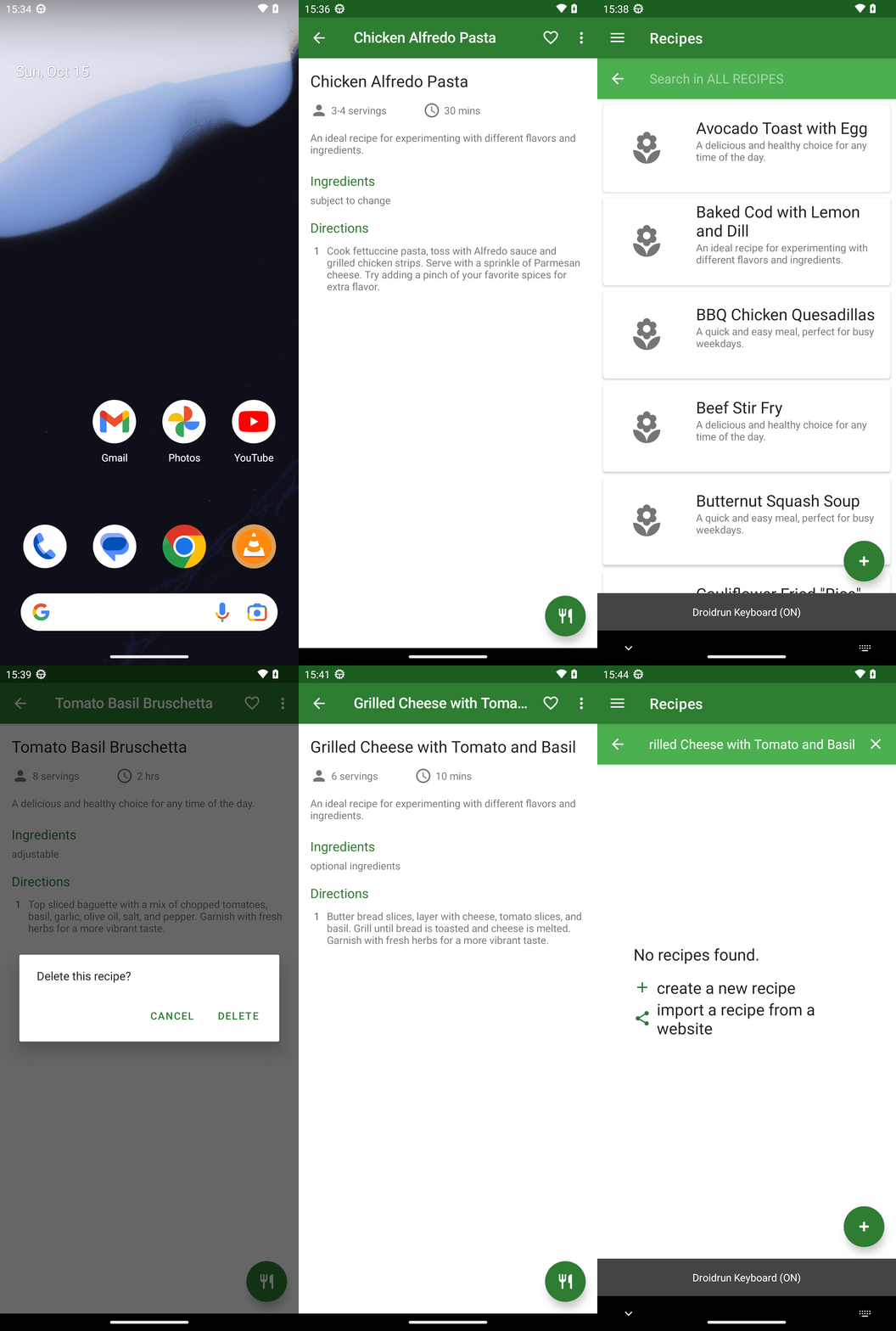
Goal: Delete the following recipes from Broccoli app: Chicken Alfredo Pasta, Tomato Basil Bruschetta, Grilled Cheese with Tomato and Basil.
user: None
The current subgoal explicitly states to "Open the Broccoli app using open_app". This requires the `open_app` action with the argument "Broccoli".
open_app(text="Broccoli")
Open the "Broccoli" app.
Open the "Broccoli" app.
The current subgoal is to "Tap the Search button in Broccoli." I need to find the clickable element that corresponds to the "Search" button and perform a click action on it. Based on the provided UI elements, element 9 is a Button with the text "Search".
click(index=9)
Click the "Search" button.
Click the "Search" button.
The current subgoal is to type "Chicken Alfredo Pasta" into the search field and submit. The search field is identified as "Search in ALL RECIPES" with index 9. The action is `type` with the specified text, followed by a `system_button` action for "Enter" to submit.
type(text="Chicken Alfredo Pasta"index=9)
Type "Chicken Alfredo Pasta" into the search field.
Type "Chicken Alfredo Pasta" into the search field.
The current subgoal is to tap the "Chicken Alfredo Pasta" card. I need to find the element that represents this card and perform a click action on it. Based on the provided UI elements, element 12 is a CardView containing the text "Chicken Alfredo Pasta".
click(index=12)
Tap the "Chicken Alfredo Pasta" card.
Tap the "Chicken Alfredo Pasta" card.
The current subgoal requires tapping the "More options" button. I have identified element 7 as "ImageView: "More options"". Therefore, I will perform a click action on element 7.
click(index=7)
Tap the "More options" button.
Tap the "More options" button.
The current subgoal is to "Tap Delete in the options menu". I need to find the element with the text "Delete" and perform a click action on it. From the provided UI elements, index 10 corresponds to the "Delete" option.
click(index=10)
Tap the "Delete" option in the menu.
Tap the "Delete" option in the menu.
The current subgoal is to "Tap DELETE on the confirmation dialog". I need to find the clickable element with the text "DELETE" and perform a click action on it. Based on the provided UI elements, element 5 is a button with the text "DELETE".
click(index=5)
Tap the "DELETE" button on the confirmation dialog.
Tap the "DELETE" button on the confirmation dialog.
The current subgoal is to tap the "Clear query (X)" button. I need to find the element that corresponds to "Clear query" and perform a click action on it. Based on the provided UI elements, element 10 is an ImageView with the text "Clear query" and resource ID "com.flauschcode.broccoli:id/search_close_btn". This is the correct element to click.
click(index=10)
Tap the "Clear query" button (X) to clear the current search.
Tap the "Clear query" button (X) to clear the current search.
The current subgoal requires typing "Tomato Basil Bruschetta" into the search field and submitting it. The search field is identified as "Search in ALL RECIPES" with index 9. After typing, a system button "Enter" should be pressed to submit the search.
type(text="Tomato Basil Bruschetta"index=9)
Type "Tomato Basil Bruschetta" into the search field.
Type "Tomato Basil Bruschetta" into the search field.
The current subgoal is to tap the "Tomato Basil Bruschetta" card to open it. I need to find the element corresponding to "Tomato Basil Bruschetta" and perform a click action on it. Based on the provided UI elements, index 12 corresponds to the CardView containing "Tomato Basil Bruschetta".
click(index=12)
Tap the "Tomato Basil Bruschetta" card to open it.
Tap the "Tomato Basil Bruschetta" card to open it.
The current subgoal is to "Tap the More options (three dots) on the Tomato Basil Bruschetta page." I need to find the element corresponding to "More options" and click it. Based on the provided UI elements, element 7 is an "ImageView" with the text "More options".
click(index=7)
Tap the "More options" (three dots) on the Tomato Basil Bruschetta page.
Tap the "More options" (three dots) on the Tomato Basil Bruschetta page.
The current subgoal is to "Tap Delete in the menu for “Tomato Basil Bruschetta”". The current screen shows a menu with "Delete" as an option. I need to click on the "Delete" option. Based on the provided UI elements, "Delete" is element 10.
click(index=10)
Tap the "Delete" option in the menu.
Tap the "Delete" option in the menu.
The current subgoal is to "Tap DELETE on the confirmation dialog". I need to find the element with the text "DELETE" and perform a click action on it. Based on the provided UI elements, element with index 5 is "DELETE".
click(index=5)
Tap the "DELETE" button on the confirmation dialog.
Tap the "DELETE" button on the confirmation dialog.
The current subgoal is to "Tap the Clear query (X) button to clear the current search." I need to find the element corresponding to "Clear query (X) button" and perform a click action on it. In the provided UI elements, element 10 is "ImageView: "com.flauschcode.broccoli:id/search_close_btn", "Clear query" - (954, 220, 1059, 346)". This matches the target.
click(index=10)
Tap the Clear query (X) button.
Tap the Clear query (X) button.
The current subgoal is to "Type 'Grilled Cheese with Tomato and Basil' into the search field and submit." 1. **Atomic action:** The action required is `type`. 2. **Target/location:** The target is the "search field". From the device state, the focused element is 'Search in ALL RECIPES', which corresponds to index 9. 3. **Parameters:** The text to type is "Grilled Cheese with Tomato and Basil". The index is 9.
type(text="Grilled Cheese with Tomato and Basil"index=9)
Type "Grilled Cheese with Tomato and Basil" into the search field.
Type "Grilled Cheese with Tomato and Basil" into the search field.
The current subgoal is to tap the "Grilled Cheese with Tomato and Basil" card. I need to find the index of this card in the provided UI elements. Element 12 is a CardView with the title "Grilled Cheese with Tomato and Basil" (element 14). Therefore, I will click on element 12.
click(index=12)
Tap the "Grilled Cheese with Tomato and Basil" card.
Tap the "Grilled Cheese with Tomato and Basil" card.
The current subgoal is to "Tap the More options (three dots) button". I need to find the element that corresponds to "More options" and perform a click action on it. Based on the provided UI elements, element 7 is "ImageView: "More options"".
click(index=7)
Tap the "More options" button.
Tap the "More options" button.
The current subgoal is to "Tap Delete in the options menu for “Grilled Cheese with Tomato and Basil”." I need to find the element with the text "Delete" and click on it. Based on the provided UI elements, index 10 has the text "Delete".
click(index=10)
Tap the "Delete" option in the menu.
Tap the "Delete" option in the menu.
The current subgoal is to "Tap DELETE on the confirmation dialog". I need to find the clickable element with the text "DELETE" and perform a click action on it. Based on the provided UI elements, element 5 is a button with the text "DELETE".
click(index=5)
Tap the "DELETE" button on the confirmation dialog.
Tap the "DELETE" button on the confirmation dialog.
I deleted the three specified recipes from the Broccoli app and verified each by exact-title searches:
- Chicken Alfredo Pasta
- Tomato Basil Bruschetta
- Grilled Cheese with Tomato and Basil
All now show “No recipes found.”
complete_goal(message="I deleted the three specified recipes from the Broccoli app and verified each by exact-title searches:
- Chicken Alfredo Pasta
- Tomato Basil Bruschetta
- Grilled Cheese with Tomato and Basil
All now show “No recipes found.”")