
Recipe Delete Multiple Recipes
Goal: Delete the following recipes from Broccoli app: Zucchini Noodles with Pesto, Garlic Butter Shrimp, Lentil Soup.
Goal: Delete the following recipes from Broccoli app: Zucchini Noodles with Pesto, Garlic Butter Shrimp, Lentil Soup.
user: None
The current subgoal is to "Open the Broccoli app using the open_app action." This directly translates to using the `open_app` atomic action with the argument "Broccoli".
open_app(text="Broccoli")
Opening the Broccoli app.
Opening the Broccoli app.
The current subgoal is to "Open 'Garlic Butter Shrimp'". I need to find the element corresponding to "Garlic Butter Shrimp" and click it. Based on the provided UI elements, "Garlic Butter Shrimp" is a TextView with index 13.
click(index=13)
Clicking on "Garlic Butter Shrimp" to open the recipe.
Clicking on "Garlic Butter Shrimp" to open the recipe.
The current subgoal requires tapping "More options (top-right)". Based on the provided UI elements, element 7, labeled "More options", is located at the top right of the screen. Therefore, the atomic action is to click on this element.
click(index=7)
Tapping the "More options" icon.
Tapping the "More options" icon.
The current subgoal explicitly states to "Tap 'Delete' in the More options menu". I need to find the element with the text "Delete" and perform a click action on it. From the provided UI elements, element with index 10 has the text "Delete".
click(index=10)
Tapping on the "Delete" option in the More options menu.
Tapping on the "Delete" option in the More options menu.
The current subgoal is to "Tap DELETE on the confirmation dialog". I need to find the "DELETE" button in the UI elements and perform a click action on it. The element with text "DELETE" has index 5.
click(index=5)
Tapping DELETE on the confirmation dialog.
Tapping DELETE on the confirmation dialog.
The current subgoal is to "Open “Lentil Soup”". I need to find the clickable element corresponding to "Lentil Soup" and click it. Based on the provided UI elements, "Lentil Soup" is element 13.
click(index=13)
Clicking on "Lentil Soup" to open the recipe.
Clicking on "Lentil Soup" to open the recipe.
The current subgoal is to "In Lentil Soup: tap More options → tap Delete → confirm deletion." I am currently on the "Lentil Soup" page. The next action is to "tap More options". I need to find the "More options" element and click it. Based on the provided UI elements, element 7 is "ImageView: "More options"".
click(index=7)
Tapping on the "More options" icon.
Tapping on the "More options" icon.
The current subgoal is to "Tap “Delete” in the options menu." I need to find the element with the text "Delete" and click on it. Based on the provided UI elements, element 10 has the text "Delete".
click(index=10)
Tapping on the "Delete" option in the options menu.
Tapping on the "Delete" option in the options menu.
The current subgoal is to "Tap DELETE on the confirmation dialog". I need to find the "DELETE" button in the provided UI elements and perform a click action on it. Element 5 is a button with the text "DELETE".
click(index=5)
Tapping DELETE on the confirmation dialog.
Tapping DELETE on the confirmation dialog.
The current subgoal is to "Open 'Zucchini Noodles with Pesto'". I need to find the clickable element corresponding to "Zucchini Noodles with Pesto" and click it. Based on the provided UI elements, element 13 is "Zucchini Noodles with Pesto".
click(index=13)
Clicking on "Zucchini Noodles with Pesto" to open the recipe.
Clicking on "Zucchini Noodles with Pesto" to open the recipe.
The current subgoal is to "Tap the More options icon on the Zucchini Noodles with Pesto screen." I need to find the clickable element corresponding to "More options" and perform a click action on it. Element 7, "ImageView: "More options" - (975, 138, 1080, 264)", matches this description.
click(index=7)
Tapping the "More options" icon.
Tapping the "More options" icon.
The current subgoal is to "Tap 'Delete' in the options menu for 'Zucchini Noodles with Pesto'". The UI elements show a "Delete" option with index 10. The required atomic action is `click`. The target element is "Delete", which corresponds to index 10.
click(index=10)
Tapping on the "Delete" option in the options menu.
Tapping on the "Delete" option in the options menu.
The current subgoal is to "Tap DELETE on the confirmation dialog to remove 'Zucchini Noodles with Pesto.'" I need to find the "DELETE" button in the UI elements and perform a click action on it. The "DELETE" button is listed as element 5.
click(index=5)
Tapping DELETE on the confirmation dialog.
Tapping DELETE on the confirmation dialog.
I deleted the three recipes you requested from the Broccoli app: "Zucchini Noodles with Pesto", "Garlic Butter Shrimp", and "Lentil Soup". The All recipes list now shows "No recipes found.", confirming they’re all removed.
complete_goal(message="I deleted the three recipes you requested from the Broccoli app: "Zucchini Noodles with Pesto", "Garlic Butter Shrimp", and "Lentil Soup". The All recipes list now shows "No recipes found.", confirming they’re all removed.")
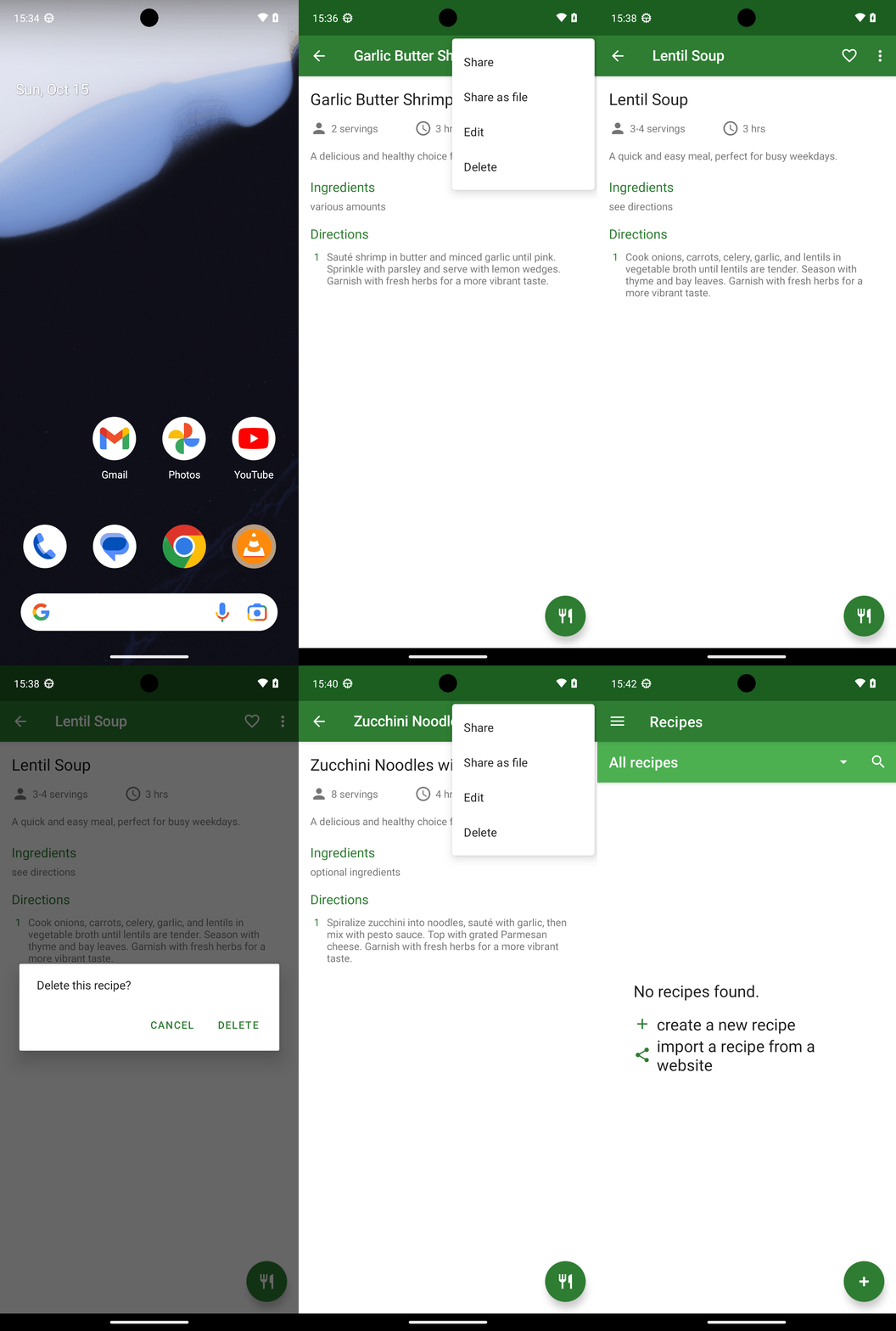
Goal: Delete the following recipes from Broccoli app: Zucchini Noodles with Pesto, Garlic Butter Shrimp, Lentil Soup.
user: None
The current subgoal is to "Open the Broccoli app using the open_app action." This directly translates to using the `open_app` atomic action with the argument "Broccoli".
open_app(text="Broccoli")
Opening the Broccoli app.
Opening the Broccoli app.
The current subgoal is to "Open 'Garlic Butter Shrimp'". I need to find the element corresponding to "Garlic Butter Shrimp" and click it. Based on the provided UI elements, "Garlic Butter Shrimp" is a TextView with index 13.
click(index=13)
Clicking on "Garlic Butter Shrimp" to open the recipe.
Clicking on "Garlic Butter Shrimp" to open the recipe.
The current subgoal requires tapping "More options (top-right)". Based on the provided UI elements, element 7, labeled "More options", is located at the top right of the screen. Therefore, the atomic action is to click on this element.
click(index=7)
Tapping the "More options" icon.
Tapping the "More options" icon.
The current subgoal explicitly states to "Tap 'Delete' in the More options menu". I need to find the element with the text "Delete" and perform a click action on it. From the provided UI elements, element with index 10 has the text "Delete".
click(index=10)
Tapping on the "Delete" option in the More options menu.
Tapping on the "Delete" option in the More options menu.
The current subgoal is to "Tap DELETE on the confirmation dialog". I need to find the "DELETE" button in the UI elements and perform a click action on it. The element with text "DELETE" has index 5.
click(index=5)
Tapping DELETE on the confirmation dialog.
Tapping DELETE on the confirmation dialog.
The current subgoal is to "Open “Lentil Soup”". I need to find the clickable element corresponding to "Lentil Soup" and click it. Based on the provided UI elements, "Lentil Soup" is element 13.
click(index=13)
Clicking on "Lentil Soup" to open the recipe.
Clicking on "Lentil Soup" to open the recipe.
The current subgoal is to "In Lentil Soup: tap More options → tap Delete → confirm deletion." I am currently on the "Lentil Soup" page. The next action is to "tap More options". I need to find the "More options" element and click it. Based on the provided UI elements, element 7 is "ImageView: "More options"".
click(index=7)
Tapping on the "More options" icon.
Tapping on the "More options" icon.
The current subgoal is to "Tap “Delete” in the options menu." I need to find the element with the text "Delete" and click on it. Based on the provided UI elements, element 10 has the text "Delete".
click(index=10)
Tapping on the "Delete" option in the options menu.
Tapping on the "Delete" option in the options menu.
The current subgoal is to "Tap DELETE on the confirmation dialog". I need to find the "DELETE" button in the provided UI elements and perform a click action on it. Element 5 is a button with the text "DELETE".
click(index=5)
Tapping DELETE on the confirmation dialog.
Tapping DELETE on the confirmation dialog.
The current subgoal is to "Open 'Zucchini Noodles with Pesto'". I need to find the clickable element corresponding to "Zucchini Noodles with Pesto" and click it. Based on the provided UI elements, element 13 is "Zucchini Noodles with Pesto".
click(index=13)
Clicking on "Zucchini Noodles with Pesto" to open the recipe.
Clicking on "Zucchini Noodles with Pesto" to open the recipe.
The current subgoal is to "Tap the More options icon on the Zucchini Noodles with Pesto screen." I need to find the clickable element corresponding to "More options" and perform a click action on it. Element 7, "ImageView: "More options" - (975, 138, 1080, 264)", matches this description.
click(index=7)
Tapping the "More options" icon.
Tapping the "More options" icon.
The current subgoal is to "Tap 'Delete' in the options menu for 'Zucchini Noodles with Pesto'". The UI elements show a "Delete" option with index 10. The required atomic action is `click`. The target element is "Delete", which corresponds to index 10.
click(index=10)
Tapping on the "Delete" option in the options menu.
Tapping on the "Delete" option in the options menu.
The current subgoal is to "Tap DELETE on the confirmation dialog to remove 'Zucchini Noodles with Pesto.'" I need to find the "DELETE" button in the UI elements and perform a click action on it. The "DELETE" button is listed as element 5.
click(index=5)
Tapping DELETE on the confirmation dialog.
Tapping DELETE on the confirmation dialog.
I deleted the three recipes you requested from the Broccoli app: "Zucchini Noodles with Pesto", "Garlic Butter Shrimp", and "Lentil Soup". The All recipes list now shows "No recipes found.", confirming they’re all removed.
complete_goal(message="I deleted the three recipes you requested from the Broccoli app: "Zucchini Noodles with Pesto", "Garlic Butter Shrimp", and "Lentil Soup". The All recipes list now shows "No recipes found.", confirming they’re all removed.")