
Back to benchmark
Osm And Favorite
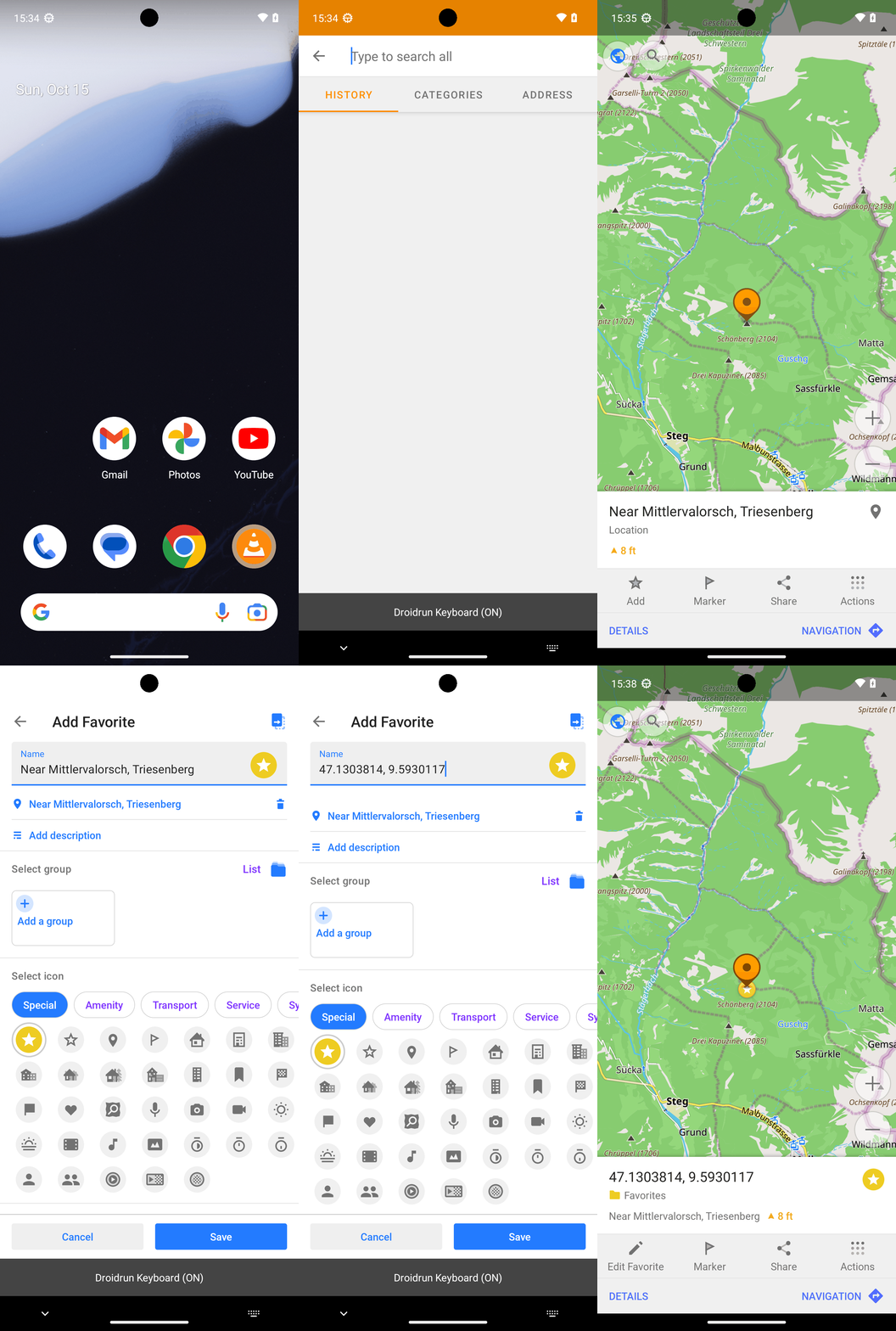
Goal: Add a favorite location marker for 47.1303814, 9.5930117 in the OsmAnd maps app.
Plan Input
Input
user:
Goal: Add a favorite location marker for 47.1303814, 9.5930117 in the OsmAnd maps app.
user: None
Task Thinking Step 1
Thoughts
The current subgoal is to "Open the OsmAnd app." This directly translates to the `open_app` atomic action. The target is the app named "OsmAnd".
Code
open_app(text="OsmAnd")
Task Execution Result
Output
Opening the OsmAnd app.
Task End
Success reason
Opening the OsmAnd app.
Success
Task Thinking Step 2
Thoughts
The current subgoal is to "Tap the Search button in OsmAnd." I need to find the UI element corresponding to the "Search" button and perform a `click` action on it. Based on the provided UI elements, element with index 8 has the text "Search".
Code
click(index=8)
Task Execution Result
Output
Tapping the Search button.
Task End
Success reason
Tapping the Search button.
Success
Task Thinking Step 3
Thoughts
The current subgoal is to type "47.1303814, 9.5930117" into the search field and submit. The search field is identified as "Type to search all" with index 5. After typing, I need to submit, which means pressing the "Enter" system button.
Code
type(text="47.1303814, 9.5930117"index=5)
Task Execution Result
Output
Typing "47.1303814, 9.5930117" into the search field.
Task End
Success reason
Typing "47.1303814, 9.5930117" into the search field.
Success
Task Thinking Step 4
Thoughts
The current subgoal is to "Tap the search result row showing '47.13038° N, 9.59301° E'". I need to find the clickable element that corresponds to this text. Element 11 is a LinearLayout that contains TextView 12 with the exact text "47.13038° N, 9.59301° E". Therefore, I should click element 11.
Code
click(index=11)
Task Execution Result
Output
Tapping the search result row showing "47.13038° N, 9.59301° E".
Task End
Success reason
Tapping the search result row showing "47.13038° N, 9.59301° E".
Success
Task Thinking Step 5
Thoughts
The current subgoal is to "Tap Add to save the point as a Favorite." I need to find the element with the text "Add" and perform a click action on it. Based on the provided UI elements, element 12 is a TextView with the text "Add", which is inside LinearLayout 11. I should click on the LinearLayout 11 to tap the "Add" button.
Code
click(index=11)
Task Execution Result
Output
Tapping the "Add" button to save the location as a favorite.
Task End
Success reason
Tapping the "Add" button to save the location as a favorite.
Success
Task Thinking Step 6
Thoughts
The current subgoal is to "Tap Save". I need to find the UI element with the text "Save" and perform a click action on it. Based on the provided UI elements, element 76 has the text "Save".
Code
click(index=76)
Task Execution Result
Output
Tapping the "Save" button to add the favorite.
Task End
Success reason
Tapping the "Save" button to add the favorite.
Success
Plan Thinking
Thoughts
Added a favorite location marker for 47.1303814, 9.5930117 in OsmAnd and confirmed it is saved as a Favorite with the specified name.
Code
complete_goal(message="Added a favorite location marker for 47.1303814, 9.5930117 in OsmAnd and confirmed it is saved as a Favorite with the specified name.")
Plan Input
Input
user:
Goal: Add a favorite location marker for 47.1303814, 9.5930117 in the OsmAnd maps app.
user: None
Task Thinking Step 1
Thoughts
The current subgoal is to "Open the OsmAnd app." This directly translates to the `open_app` atomic action. The target is the app named "OsmAnd".
Code
open_app(text="OsmAnd")
Task Execution Result
Output
Opening the OsmAnd app.
Task End
Success reason
Opening the OsmAnd app.
Success
Task Thinking Step 2
Thoughts
The current subgoal is to "Tap the Search button in OsmAnd." I need to find the UI element corresponding to the "Search" button and perform a `click` action on it. Based on the provided UI elements, element with index 8 has the text "Search".
Code
click(index=8)
Task Execution Result
Output
Tapping the Search button.
Task End
Success reason
Tapping the Search button.
Success
Task Thinking Step 3
Thoughts
The current subgoal is to type "47.1303814, 9.5930117" into the search field and submit. The search field is identified as "Type to search all" with index 5. After typing, I need to submit, which means pressing the "Enter" system button.
Code
type(text="47.1303814, 9.5930117"index=5)
Task Execution Result
Output
Typing "47.1303814, 9.5930117" into the search field.
Task End
Success reason
Typing "47.1303814, 9.5930117" into the search field.
Success
Task Thinking Step 4
Thoughts
The current subgoal is to "Tap the search result row showing '47.13038° N, 9.59301° E'". I need to find the clickable element that corresponds to this text. Element 11 is a LinearLayout that contains TextView 12 with the exact text "47.13038° N, 9.59301° E". Therefore, I should click element 11.
Code
click(index=11)
Task Execution Result
Output
Tapping the search result row showing "47.13038° N, 9.59301° E".
Task End
Success reason
Tapping the search result row showing "47.13038° N, 9.59301° E".
Success
Task Thinking Step 5
Thoughts
The current subgoal is to "Tap Add to save the point as a Favorite." I need to find the element with the text "Add" and perform a click action on it. Based on the provided UI elements, element 12 is a TextView with the text "Add", which is inside LinearLayout 11. I should click on the LinearLayout 11 to tap the "Add" button.
Code
click(index=11)
Task Execution Result
Output
Tapping the "Add" button to save the location as a favorite.
Task End
Success reason
Tapping the "Add" button to save the location as a favorite.
Success
Task Thinking Step 6
Thoughts
The current subgoal is to "Tap Save". I need to find the UI element with the text "Save" and perform a click action on it. Based on the provided UI elements, element 76 has the text "Save".
Code
click(index=76)
Task Execution Result
Output
Tapping the "Save" button to add the favorite.
Task End
Success reason
Tapping the "Save" button to add the favorite.
Success
Plan Thinking
Thoughts
Added a favorite location marker for 47.1303814, 9.5930117 in OsmAnd and confirmed it is saved as a Favorite with the specified name.
Code
complete_goal(message="Added a favorite location marker for 47.1303814, 9.5930117 in OsmAnd and confirmed it is saved as a Favorite with the specified name.")