
Back to benchmark
Open App Task Eval
Goal: Open the contacts app. Clear any pop-ups that may appear by granting all permissions that are required.
Plan Input
Input
user:
Goal: Open the contacts app. Clear any pop-ups that may appear by granting all permissions that are required.
user: None
Task Thinking Step 1
Thoughts
The current subgoal explicitly states "Use open_app to launch the Contacts app." 1. **Atomic action:** `open_app` 2. **Target/location:** "Contacts" app 3. **Parameters:** The app name "Contacts"
Code
open_app(text="Contacts")
Task Execution Result
Output
Opening the Contacts app using the `open_app` action.
Task End
Success reason
Opening the Contacts app using the `open_app` action.
Success
Task Thinking Step 2
Thoughts
The current subgoal is to "Tap 'Allow' on the 'Allow Contacts to send you notifications?' dialog." I need to find the "Allow" button in the provided UI elements and perform a click action on it. From the UI elements, I see: `4. Button: "com.android.permissioncontroller:id/permission_allow_button", "Allow" - (133, 1231, 947, 1378)`. The action required is `click` and the target is the button with index `4`.
Code
click(index=4)
Task Execution Result
Output
Tapping the "Allow" button to grant notification permission for the Contacts app.
Task End
Success reason
Tapping the "Allow" button to grant notification permission for the Contacts app.
Success
Task Thinking Step 3
Thoughts
The subgoal explicitly states to "dismiss the blue tooltip by tapping the overlay/screen". The UI element `og_tooltip_scrim_view` (index 2) is an overlay that covers the entire screen and is likely responsible for dismissing the tooltip when tapped. Therefore, I should click on this element.
Code
click(index=2)
Task Execution Result
Output
Tapping the `og_tooltip_scrim_view` overlay to dismiss the blue tooltip.
Task End
Success reason
Tapping the `og_tooltip_scrim_view` overlay to dismiss the blue tooltip.
Success
Plan Thinking
Thoughts
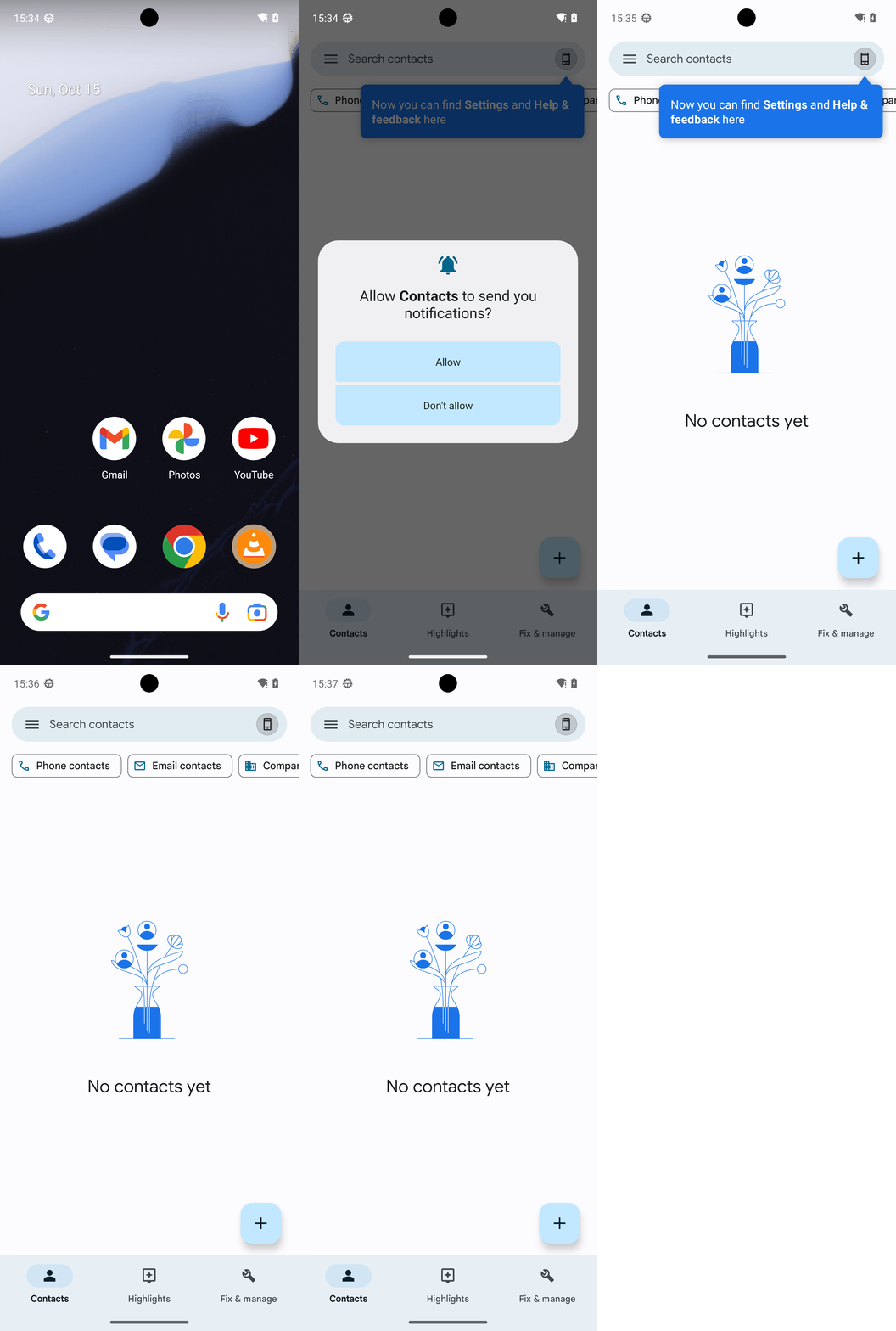
I opened the Contacts app, granted the notification permission, dismissed the tooltip, and confirmed there are no remaining pop-ups. The Contacts main screen is visible with “No contacts yet.”
Code
complete_goal(message="I opened the Contacts app, granted the notification permission, dismissed the tooltip, and confirmed there are no remaining pop-ups. The Contacts main screen is visible with “No contacts yet.”")
Plan Input
Input
user:
Goal: Open the contacts app. Clear any pop-ups that may appear by granting all permissions that are required.
user: None
Task Thinking Step 1
Thoughts
The current subgoal explicitly states "Use open_app to launch the Contacts app." 1. **Atomic action:** `open_app` 2. **Target/location:** "Contacts" app 3. **Parameters:** The app name "Contacts"
Code
open_app(text="Contacts")
Task Execution Result
Output
Opening the Contacts app using the `open_app` action.
Task End
Success reason
Opening the Contacts app using the `open_app` action.
Success
Task Thinking Step 2
Thoughts
The current subgoal is to "Tap 'Allow' on the 'Allow Contacts to send you notifications?' dialog." I need to find the "Allow" button in the provided UI elements and perform a click action on it. From the UI elements, I see: `4. Button: "com.android.permissioncontroller:id/permission_allow_button", "Allow" - (133, 1231, 947, 1378)`. The action required is `click` and the target is the button with index `4`.
Code
click(index=4)
Task Execution Result
Output
Tapping the "Allow" button to grant notification permission for the Contacts app.
Task End
Success reason
Tapping the "Allow" button to grant notification permission for the Contacts app.
Success
Task Thinking Step 3
Thoughts
The subgoal explicitly states to "dismiss the blue tooltip by tapping the overlay/screen". The UI element `og_tooltip_scrim_view` (index 2) is an overlay that covers the entire screen and is likely responsible for dismissing the tooltip when tapped. Therefore, I should click on this element.
Code
click(index=2)
Task Execution Result
Output
Tapping the `og_tooltip_scrim_view` overlay to dismiss the blue tooltip.
Task End
Success reason
Tapping the `og_tooltip_scrim_view` overlay to dismiss the blue tooltip.
Success
Plan Thinking
Thoughts
I opened the Contacts app, granted the notification permission, dismissed the tooltip, and confirmed there are no remaining pop-ups. The Contacts main screen is visible with “No contacts yet.”
Code
complete_goal(message="I opened the Contacts app, granted the notification permission, dismissed the tooltip, and confirmed there are no remaining pop-ups. The Contacts main screen is visible with “No contacts yet.”")