
Markor Transcribe Receipt
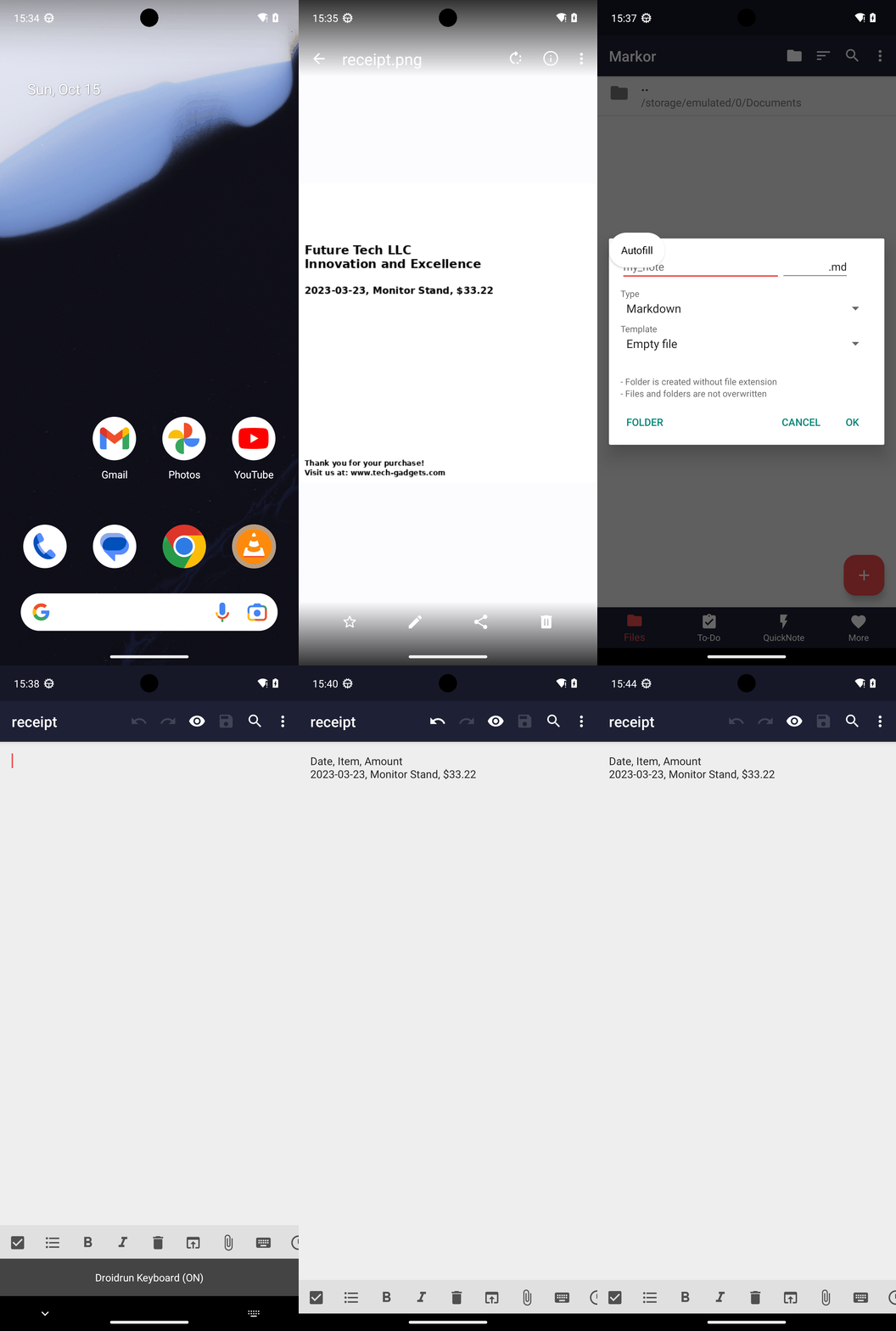
Goal: Create a file in Markor, called receipt.md with the transactions from the receipt.png. Use Simple Gallery to view the receipt. Please enter transactions in csv format including the header "Date, Item, Amount".
Goal: Create a file in Markor, called receipt.md with the transactions from the receipt.png. Use Simple Gallery to view the receipt. Please enter transactions in csv format including the header "Date, Item, Amount".
user: None
The current subgoal is to "Open Simple Gallery". This directly maps to the `open_app` atomic action. The parameter needed is the name of the app, which is "Simple Gallery".
open_app(text="Simple Gallery")
Open the Simple Gallery app.
Open the Simple Gallery app.
The current subgoal is to "Tap the DCIM folder in Simple Gallery." I need to find the UI element with the text "DCIM" and perform a click action on it. Based on the provided UI elements, element 11 is a TextView with the text "DCIM".
click(index=11)
Tap the DCIM folder.
Tap the DCIM folder.
The subgoal explicitly states to "Tap the single media item in DCIM to open receipt.png." Based on the provided UI elements, the `RelativeLayout` with `com.simplemobiletools.gallery.pro:id/media_item_holder` at index 10 represents a media item within the gallery. I will click this element.
click(index=10)
Tap the single media item (receipt.png) to open it.
Tap the single media item (receipt.png) to open it.
The current subgoal is "Open the Markor app." This directly maps to the `open_app` atomic action. The target app name is "Markor".
open_app(text="Markor")
Open the Markor app.
Open the Markor app.
The current subgoal is "Tap the + (Create a new file or folder)". I need to find the clickable element with the text "Create a new file or folder" or the "+" symbol and perform a click action on it. Looking at the provided UI elements, element 13 is "ImageButton: "net.gsantner.markor:id/fab_add_new_item", "Create a new file or folder" - (891, 2001, 1038, 2148)". This matches the description.
click(index=13)
Tap the "Create a new file or folder" button.
Tap the "Create a new file or folder" button.
The current subgoal requires a long press on the "Name" field, which is represented by the EditText with the text "my_note" and index 4. This will likely select the existing text.
long_press(index=4)
Long-press the "Name" field to select the existing text.
Long-press the "Name" field to select the existing text.
The subgoal requires two actions: first, type "receipt" into the "Name" field, and second, tap the "OK" button. The "Name" field is identified by index 4, and the "OK" button is identified by index 17.
type(text="receipt"index=4)
Type "receipt" into the Name field.
Type "receipt" into the Name field.
The current subgoal is to tap "OK". I need to find the "OK" button in the provided clickable UI elements and perform a click action on it. Element 17 is labeled "OK".
click(index=17)
Tap the "OK" button to create the file.
Tap the "OK" button to create the file.
The current subgoal requires typing two lines of text into the editor. The `type` action is suitable for this. The text to be typed is "Date, Item, Amount\n2023-03-23, Monitor Stand, $33.22". The target element is the `EditText` with index 12, which is `net.gsantner.markor:id/document__fragment__edit__highlighting_editor`.
type(text="Date, Item, Amount\n2023-03-23, Monitor Stand, $33.22"index=12)
Type the specified two lines of text into the editor.
Type the specified two lines of text into the editor.
The current subgoal is to "Tap Save on the top bar to save receipt.md." I need to find the "Save" element in the UI and click it. Based on the provided UI elements, element 7 is "TextView: "net.gsantner.markor:id/action_save", "Save"". This is located on the top bar.
click(index=7)
Tap the "Save" button on the top bar.
Tap the "Save" button on the top bar.
The current subgoal is to navigate back to the Files tab. The current app is Markor and we are in the editor view. The app card suggests using the system Back button to navigate.
system_button(button="Back")
Press the system Back button to navigate out of the current note editor and back to the previous screen, which should be the Files tab.
Press the system Back button to navigate out of the current note editor and back to the previous screen, which should be the Files tab.
The current subgoal is to press the Back button to return to the Files tab. The previous action was already pressing the Back button, but the device state still shows the editor. Therefore, I will press the Back button again as specified in the subgoal.
system_button(button="Back")
Press the system Back button to navigate out of the current note editor and back to the previous screen, which should be the Files tab.
Press the system Back button to navigate out of the current note editor and back to the previous screen, which should be the Files tab.
The subgoal is to tap "receipt.md". I will find the UI element with the text "receipt.md" and click on it. Based on the provided UI elements, index 13 corresponds to "File receipt.md".
click(index=13)
Tap the "receipt.md" file to open it.
Tap the "receipt.md" file to open it.
Created receipt.md in Markor after viewing receipt.png in Simple Gallery. Entered the transactions in CSV format with the header:
Date, Item, Amount
2023-03-23, Monitor Stand, $33.22
Saved and verified the file contents.
complete_goal(message="Created receipt.md in Markor after viewing receipt.png in Simple Gallery. Entered the transactions in CSV format with the header:
Date, Item, Amount
2023-03-23, Monitor Stand, $33.22
Saved and verified the file contents.")
Goal: Create a file in Markor, called receipt.md with the transactions from the receipt.png. Use Simple Gallery to view the receipt. Please enter transactions in csv format including the header "Date, Item, Amount".
user: None
The current subgoal is to "Open Simple Gallery". This directly maps to the `open_app` atomic action. The parameter needed is the name of the app, which is "Simple Gallery".
open_app(text="Simple Gallery")
Open the Simple Gallery app.
Open the Simple Gallery app.
The current subgoal is to "Tap the DCIM folder in Simple Gallery." I need to find the UI element with the text "DCIM" and perform a click action on it. Based on the provided UI elements, element 11 is a TextView with the text "DCIM".
click(index=11)
Tap the DCIM folder.
Tap the DCIM folder.
The subgoal explicitly states to "Tap the single media item in DCIM to open receipt.png." Based on the provided UI elements, the `RelativeLayout` with `com.simplemobiletools.gallery.pro:id/media_item_holder` at index 10 represents a media item within the gallery. I will click this element.
click(index=10)
Tap the single media item (receipt.png) to open it.
Tap the single media item (receipt.png) to open it.
The current subgoal is "Open the Markor app." This directly maps to the `open_app` atomic action. The target app name is "Markor".
open_app(text="Markor")
Open the Markor app.
Open the Markor app.
The current subgoal is "Tap the + (Create a new file or folder)". I need to find the clickable element with the text "Create a new file or folder" or the "+" symbol and perform a click action on it. Looking at the provided UI elements, element 13 is "ImageButton: "net.gsantner.markor:id/fab_add_new_item", "Create a new file or folder" - (891, 2001, 1038, 2148)". This matches the description.
click(index=13)
Tap the "Create a new file or folder" button.
Tap the "Create a new file or folder" button.
The current subgoal requires a long press on the "Name" field, which is represented by the EditText with the text "my_note" and index 4. This will likely select the existing text.
long_press(index=4)
Long-press the "Name" field to select the existing text.
Long-press the "Name" field to select the existing text.
The subgoal requires two actions: first, type "receipt" into the "Name" field, and second, tap the "OK" button. The "Name" field is identified by index 4, and the "OK" button is identified by index 17.
type(text="receipt"index=4)
Type "receipt" into the Name field.
Type "receipt" into the Name field.
The current subgoal is to tap "OK". I need to find the "OK" button in the provided clickable UI elements and perform a click action on it. Element 17 is labeled "OK".
click(index=17)
Tap the "OK" button to create the file.
Tap the "OK" button to create the file.
The current subgoal requires typing two lines of text into the editor. The `type` action is suitable for this. The text to be typed is "Date, Item, Amount\n2023-03-23, Monitor Stand, $33.22". The target element is the `EditText` with index 12, which is `net.gsantner.markor:id/document__fragment__edit__highlighting_editor`.
type(text="Date, Item, Amount\n2023-03-23, Monitor Stand, $33.22"index=12)
Type the specified two lines of text into the editor.
Type the specified two lines of text into the editor.
The current subgoal is to "Tap Save on the top bar to save receipt.md." I need to find the "Save" element in the UI and click it. Based on the provided UI elements, element 7 is "TextView: "net.gsantner.markor:id/action_save", "Save"". This is located on the top bar.
click(index=7)
Tap the "Save" button on the top bar.
Tap the "Save" button on the top bar.
The current subgoal is to navigate back to the Files tab. The current app is Markor and we are in the editor view. The app card suggests using the system Back button to navigate.
system_button(button="Back")
Press the system Back button to navigate out of the current note editor and back to the previous screen, which should be the Files tab.
Press the system Back button to navigate out of the current note editor and back to the previous screen, which should be the Files tab.
The current subgoal is to press the Back button to return to the Files tab. The previous action was already pressing the Back button, but the device state still shows the editor. Therefore, I will press the Back button again as specified in the subgoal.
system_button(button="Back")
Press the system Back button to navigate out of the current note editor and back to the previous screen, which should be the Files tab.
Press the system Back button to navigate out of the current note editor and back to the previous screen, which should be the Files tab.
The subgoal is to tap "receipt.md". I will find the UI element with the text "receipt.md" and click on it. Based on the provided UI elements, index 13 corresponds to "File receipt.md".
click(index=13)
Tap the "receipt.md" file to open it.
Tap the "receipt.md" file to open it.
Created receipt.md in Markor after viewing receipt.png in Simple Gallery. Entered the transactions in CSV format with the header:
Date, Item, Amount
2023-03-23, Monitor Stand, $33.22
Saved and verified the file contents.
complete_goal(message="Created receipt.md in Markor after viewing receipt.png in Simple Gallery. Entered the transactions in CSV format with the header:
Date, Item, Amount
2023-03-23, Monitor Stand, $33.22
Saved and verified the file contents.")