
Markor Move Note
Goal: In Markor, move the note shy_king_copy.md from StudyGuides to MeetingMinutes.
Goal: In Markor, move the note shy_king_copy.md from StudyGuides to MeetingMinutes.
user: None
The current subgoal is "Open the Markor app." This directly translates to the `open_app` atomic action. The target app is "Markor".
open_app(text="Markor")
Open the Markor app.
Open the Markor app.
The current subgoal is to "Tap the StudyGuides folder to open it." I need to find the UI element corresponding to "StudyGuides" and perform a click action on it. Based on the provided device state, element 13 is "Folder StudyGuides".
click(index=13)
Tap the StudyGuides folder.
Tap the StudyGuides folder.
The current subgoal requires scrolling to find a specific file. I need to perform a swipe action to scroll down the list of files. I will choose a starting coordinate in the middle of the screen and an ending coordinate further down to simulate a scroll down.
swipe(coordinate=[540, 1000]coordinate2=[540, 500])
Swipe down to scroll through the list of files in the StudyGuides folder.
Swipe down to scroll through the list of files in the StudyGuides folder.
The subgoal is to long-press "shy_king_copy.md". I need to find the UI element corresponding to "shy_king_copy.md" and use the `long_press` action. Element 25 is "File shy_king_copy.md".
long_press(index=25)
Long-press "shy_king_copy.md" to select it.
Long-press "shy_king_copy.md" to select it.
The current subgoal is to "Tap the More options (three dots) in the selection toolbar." I need to find the UI element corresponding to "More options" and perform a click action on it. Based on the device state, element 7 is an ImageView with the text "More options".
click(index=7)
Tap the "More options" icon (three dots) in the toolbar.
Tap the "More options" icon (three dots) in the toolbar.
The current subgoal is to "Tap Move in the context menu." I need to identify the UI element corresponding to "Move" and perform a click action on it. From the provided device state, element 6 is a LinearLayout containing a TextView with the text "Move".
click(index=6)
Tap the "Move" option in the context menu.
Tap the "Move" option in the context menu.
The current subgoal is to "Tap 'Folder ..' to go up to the parent directory that lists MeetingMinutes." I need to find the UI element with the text "Folder .." and perform a click action on it. Looking at the provided UI elements, element 6 has the text "Folder .." and is clickable.
click(index=6)
Tap "Folder .." to go up to the parent directory.
Tap "Folder .." to go up to the parent directory.
The current subgoal is to "Tap MeetingMinutes to open it in the Move dialog." I need to find the UI element with the text "MeetingMinutes" and perform a click action on it. Based on the provided device state, element 7 is "Folder MeetingMinutes".
click(index=7)
Tap "MeetingMinutes" to open it in the Move dialog.
Tap "MeetingMinutes" to open it in the Move dialog.
The subgoal explicitly states to "Tap 'SELECT THIS FOLDER'". I need to find the UI element with this exact text and perform a click action on it. Based on the provided device state, element 8 is "SELECT THIS FOLDER".
click(index=8)
Tap "SELECT THIS FOLDER" to confirm the move operation.
Tap "SELECT THIS FOLDER" to confirm the move operation.
The current subgoal is to scroll to the bottom. This requires a `swipe` action. I will swipe from the middle of the screen downwards to scroll to the bottom of the list.
swipe(coordinate=[540, 1000]coordinate2=[540, 500])
Swipe down to scroll to the bottom of the StudyGuides folder.
Swipe down to scroll to the bottom of the StudyGuides folder.
The current subgoal explicitly states to "Use the system Back". This directly translates to the `system_button` action with the argument "Back".
system_button(button="Back")
Press the system Back button.
Press the system Back button.
The current subgoal is to "Tap MeetingMinutes to open it." I need to find the UI element with the text "MeetingMinutes" and perform a click action on it. Based on the device state, element with index 12 corresponds to "MeetingMinutes".
click(index=12)
Tap "MeetingMinutes" to open the folder.
Tap "MeetingMinutes" to open the folder.
Moved shy_king_copy.md from StudyGuides to MeetingMinutes and verified it now appears in MeetingMinutes.
complete_goal(message="Moved shy_king_copy.md from StudyGuides to MeetingMinutes and verified it now appears in MeetingMinutes.")
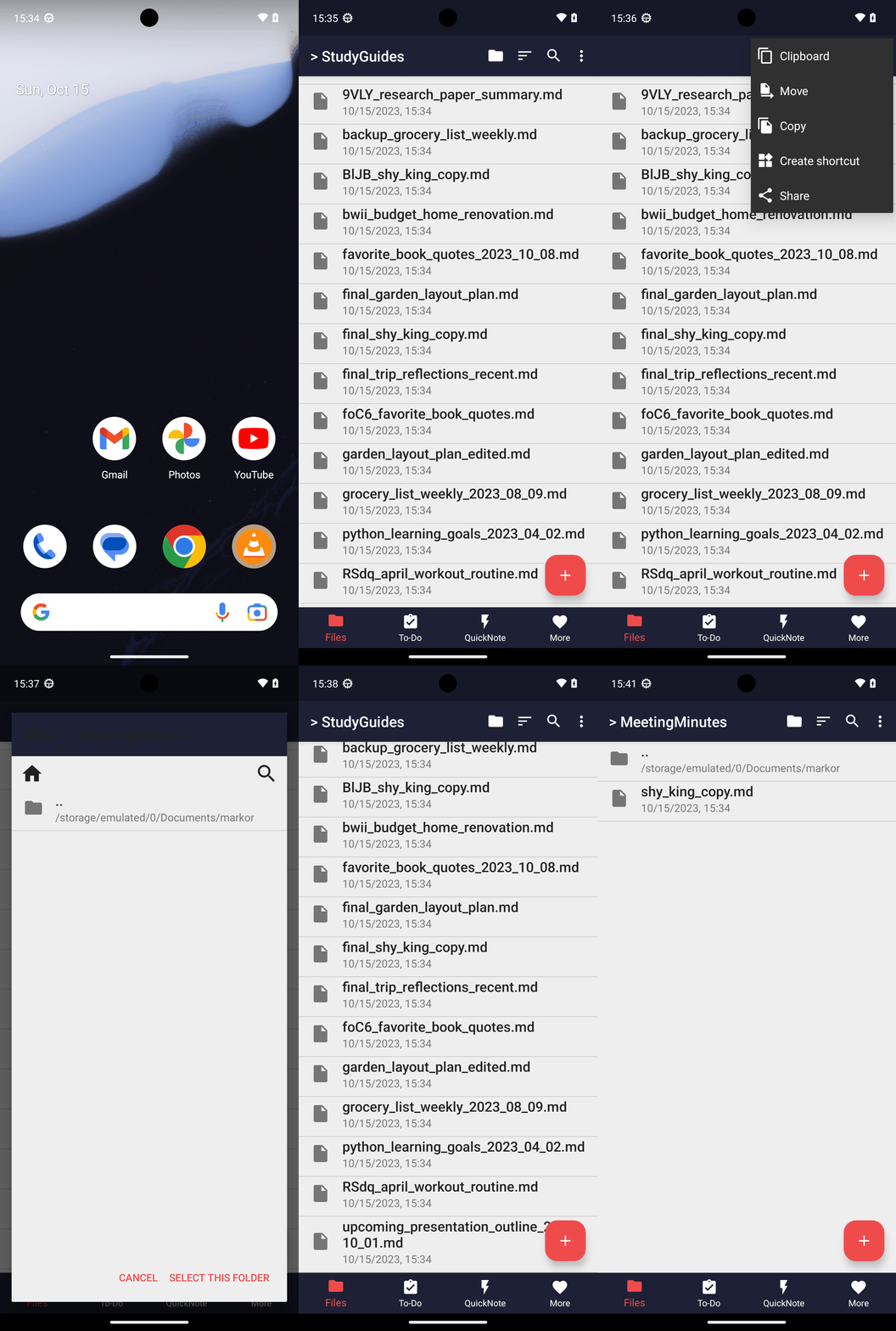
Goal: In Markor, move the note shy_king_copy.md from StudyGuides to MeetingMinutes.
user: None
The current subgoal is "Open the Markor app." This directly translates to the `open_app` atomic action. The target app is "Markor".
open_app(text="Markor")
Open the Markor app.
Open the Markor app.
The current subgoal is to "Tap the StudyGuides folder to open it." I need to find the UI element corresponding to "StudyGuides" and perform a click action on it. Based on the provided device state, element 13 is "Folder StudyGuides".
click(index=13)
Tap the StudyGuides folder.
Tap the StudyGuides folder.
The current subgoal requires scrolling to find a specific file. I need to perform a swipe action to scroll down the list of files. I will choose a starting coordinate in the middle of the screen and an ending coordinate further down to simulate a scroll down.
swipe(coordinate=[540, 1000]coordinate2=[540, 500])
Swipe down to scroll through the list of files in the StudyGuides folder.
Swipe down to scroll through the list of files in the StudyGuides folder.
The subgoal is to long-press "shy_king_copy.md". I need to find the UI element corresponding to "shy_king_copy.md" and use the `long_press` action. Element 25 is "File shy_king_copy.md".
long_press(index=25)
Long-press "shy_king_copy.md" to select it.
Long-press "shy_king_copy.md" to select it.
The current subgoal is to "Tap the More options (three dots) in the selection toolbar." I need to find the UI element corresponding to "More options" and perform a click action on it. Based on the device state, element 7 is an ImageView with the text "More options".
click(index=7)
Tap the "More options" icon (three dots) in the toolbar.
Tap the "More options" icon (three dots) in the toolbar.
The current subgoal is to "Tap Move in the context menu." I need to identify the UI element corresponding to "Move" and perform a click action on it. From the provided device state, element 6 is a LinearLayout containing a TextView with the text "Move".
click(index=6)
Tap the "Move" option in the context menu.
Tap the "Move" option in the context menu.
The current subgoal is to "Tap 'Folder ..' to go up to the parent directory that lists MeetingMinutes." I need to find the UI element with the text "Folder .." and perform a click action on it. Looking at the provided UI elements, element 6 has the text "Folder .." and is clickable.
click(index=6)
Tap "Folder .." to go up to the parent directory.
Tap "Folder .." to go up to the parent directory.
The current subgoal is to "Tap MeetingMinutes to open it in the Move dialog." I need to find the UI element with the text "MeetingMinutes" and perform a click action on it. Based on the provided device state, element 7 is "Folder MeetingMinutes".
click(index=7)
Tap "MeetingMinutes" to open it in the Move dialog.
Tap "MeetingMinutes" to open it in the Move dialog.
The subgoal explicitly states to "Tap 'SELECT THIS FOLDER'". I need to find the UI element with this exact text and perform a click action on it. Based on the provided device state, element 8 is "SELECT THIS FOLDER".
click(index=8)
Tap "SELECT THIS FOLDER" to confirm the move operation.
Tap "SELECT THIS FOLDER" to confirm the move operation.
The current subgoal is to scroll to the bottom. This requires a `swipe` action. I will swipe from the middle of the screen downwards to scroll to the bottom of the list.
swipe(coordinate=[540, 1000]coordinate2=[540, 500])
Swipe down to scroll to the bottom of the StudyGuides folder.
Swipe down to scroll to the bottom of the StudyGuides folder.
The current subgoal explicitly states to "Use the system Back". This directly translates to the `system_button` action with the argument "Back".
system_button(button="Back")
Press the system Back button.
Press the system Back button.
The current subgoal is to "Tap MeetingMinutes to open it." I need to find the UI element with the text "MeetingMinutes" and perform a click action on it. Based on the device state, element with index 12 corresponds to "MeetingMinutes".
click(index=12)
Tap "MeetingMinutes" to open the folder.
Tap "MeetingMinutes" to open the folder.
Moved shy_king_copy.md from StudyGuides to MeetingMinutes and verified it now appears in MeetingMinutes.
complete_goal(message="Moved shy_king_copy.md from StudyGuides to MeetingMinutes and verified it now appears in MeetingMinutes.")