
Plan Input
Input
user:
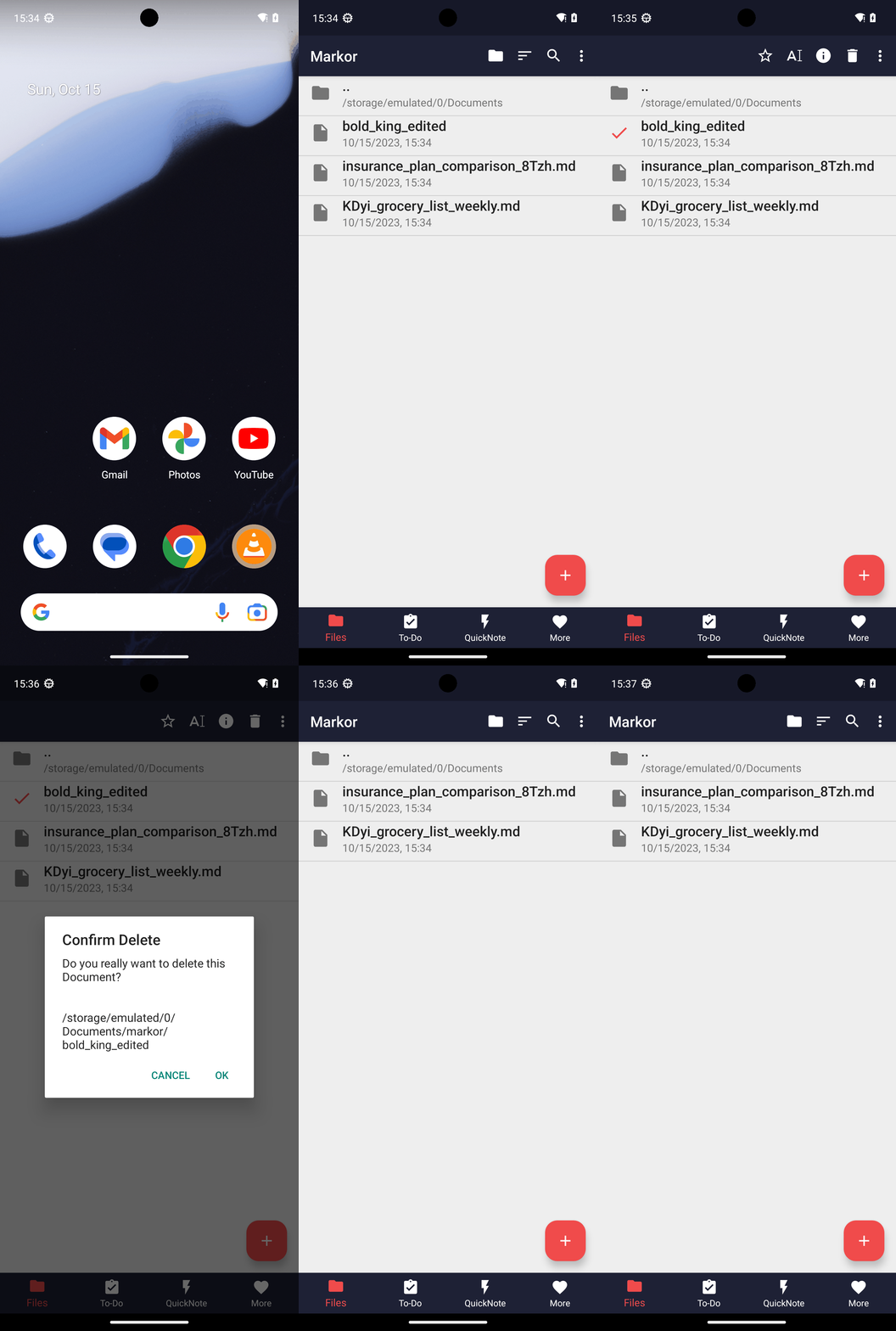
Goal: Delete the note in Markor named bold_king_edited.
user: None
Task Thinking Step 1
Thoughts
The current subgoal explicitly states to "Open the Markor app (use open_app action)". This directly translates to using the `open_app` atomic action with the text "Markor".
Code
open_app(text="Markor")
Task Execution Result
Output
Open the Markor app.
Task End
Success reason
Open the Markor app.
Success
Task Thinking Step 2
Thoughts
The current subgoal requires a "long_press" action. The target is the file named "bold_king_edited". I need to find the index of this element from the provided UI elements. Element 12 is "File bold_king_edited".
Code
long_press(index=12)
Task Execution Result
Output
Long-pressing the file "bold_king_edited" to open context actions.
Task End
Success reason
Long-pressing the file "bold_king_edited" to open context actions.
Success
Task Thinking Step 3
Thoughts
The current subgoal is to "Tap Delete in the top toolbar." I need to find the "Delete" element in the UI and perform a click action on it. Based on the provided UI elements, element 6 is a TextView with the text "Delete" and is located in the toolbar.
Code
click(index=6)
Task Execution Result
Output
Tap the "Delete" button in the top toolbar.
Task End
Success reason
Tap the "Delete" button in the top toolbar.
Success
Task Thinking Step 4
Thoughts
The current subgoal is to "Tap OK in the confirmation dialog". I need to find the "OK" button in the provided UI elements and perform a click action on it. Based on the device state, the "OK" button is element 6.
Code
click(index=6)
Task Execution Result
Output
Tap the "OK" button in the confirmation dialog to proceed with the deletion.
Task End
Success reason
Tap the "OK" button in the confirmation dialog to proceed with the deletion.
Success
Plan Thinking
Thoughts
I deleted the note named "bold_king_edited" in Markor and verified it no longer appears in the Files list.
Code
complete_goal(message="I deleted the note named "bold_king_edited" in Markor and verified it no longer appears in the Files list.")
Plan Input
Input
user:
Goal: Delete the note in Markor named bold_king_edited.
user: None
Task Thinking Step 1
Thoughts
The current subgoal explicitly states to "Open the Markor app (use open_app action)". This directly translates to using the `open_app` atomic action with the text "Markor".
Code
open_app(text="Markor")
Task Execution Result
Output
Open the Markor app.
Task End
Success reason
Open the Markor app.
Success
Task Thinking Step 2
Thoughts
The current subgoal requires a "long_press" action. The target is the file named "bold_king_edited". I need to find the index of this element from the provided UI elements. Element 12 is "File bold_king_edited".
Code
long_press(index=12)
Task Execution Result
Output
Long-pressing the file "bold_king_edited" to open context actions.
Task End
Success reason
Long-pressing the file "bold_king_edited" to open context actions.
Success
Task Thinking Step 3
Thoughts
The current subgoal is to "Tap Delete in the top toolbar." I need to find the "Delete" element in the UI and perform a click action on it. Based on the provided UI elements, element 6 is a TextView with the text "Delete" and is located in the toolbar.
Code
click(index=6)
Task Execution Result
Output
Tap the "Delete" button in the top toolbar.
Task End
Success reason
Tap the "Delete" button in the top toolbar.
Success
Task Thinking Step 4
Thoughts
The current subgoal is to "Tap OK in the confirmation dialog". I need to find the "OK" button in the provided UI elements and perform a click action on it. Based on the device state, the "OK" button is element 6.
Code
click(index=6)
Task Execution Result
Output
Tap the "OK" button in the confirmation dialog to proceed with the deletion.
Task End
Success reason
Tap the "OK" button in the confirmation dialog to proceed with the deletion.
Success
Plan Thinking
Thoughts
I deleted the note named "bold_king_edited" in Markor and verified it no longer appears in the Files list.
Code
complete_goal(message="I deleted the note named "bold_king_edited" in Markor and verified it no longer appears in the Files list.")