
Goal: Delete all my notes in Markor.
user: None
The current subgoal explicitly states to "Open Markor using open_app". This requires the `open_app` action with the argument "Markor".
open_app(text="Markor")
Opening the Markor app.
Opening the Markor app.
The current subgoal is to long-press "art_project_sketches_st16.md". I need to find the index of this element and use the `long_press` action. Element 12 has the text "File art_project_sketches_st16.md".
long_press(index=12)
Long-pressing the file "art_project_sketches_st16.md" to enter selection mode.
Long-pressing the file "art_project_sketches_st16.md" to enter selection mode.
The current subgoal is to tap "backup_favorite_book_quotes.md" and "final_budget_home_renovation.md" to multi-select them. I have already long-pressed one item to enter multi-select mode. Now I need to tap the remaining two items. I will tap "backup_favorite_book_quotes.md" first, which corresponds to index 13.
click(index=13)
Tapping "backup_favorite_book_quotes.md" to add it to the multi-selection.
Tapping "backup_favorite_book_quotes.md" to add it to the multi-selection.
The current subgoal is to tap "final_budget_home_renovation.md" to include it in the selection. I need to find the UI element corresponding to "final_budget_home_renovation.md" and perform a click action on it. Based on the provided UI elements, element 11 has the text "File final_budget_home_renovation.md".
click(index=11)
Tapping "final_budget_home_renovation.md" to add it to the multi-selection.
Tapping "final_budget_home_renovation.md" to add it to the multi-selection.
The subgoal explicitly states to "Tap the Delete button in the top bar." I need to locate the "Delete" button in the provided UI elements and perform a click action on it. Element 3, "TextView: "net.gsantner.markor:id/action_delete_selected_items", "Delete" - (870, 138, 975, 264)", is clearly identified as the "Delete" button.
click(index=3)
Tapping the Delete button in the top bar to delete the selected notes.
Tapping the Delete button in the top bar to delete the selected notes.
The current subgoal is to "Tap OK on the Confirm Delete dialog to delete the three notes." I need to find the "OK" button in the provided UI elements and click it. The "OK" button is listed as index 6.
click(index=6)
Tapping the "OK" button on the "Confirm Delete" dialog to proceed with deleting the selected notes.
Tapping the "OK" button on the "Confirm Delete" dialog to proceed with deleting the selected notes.
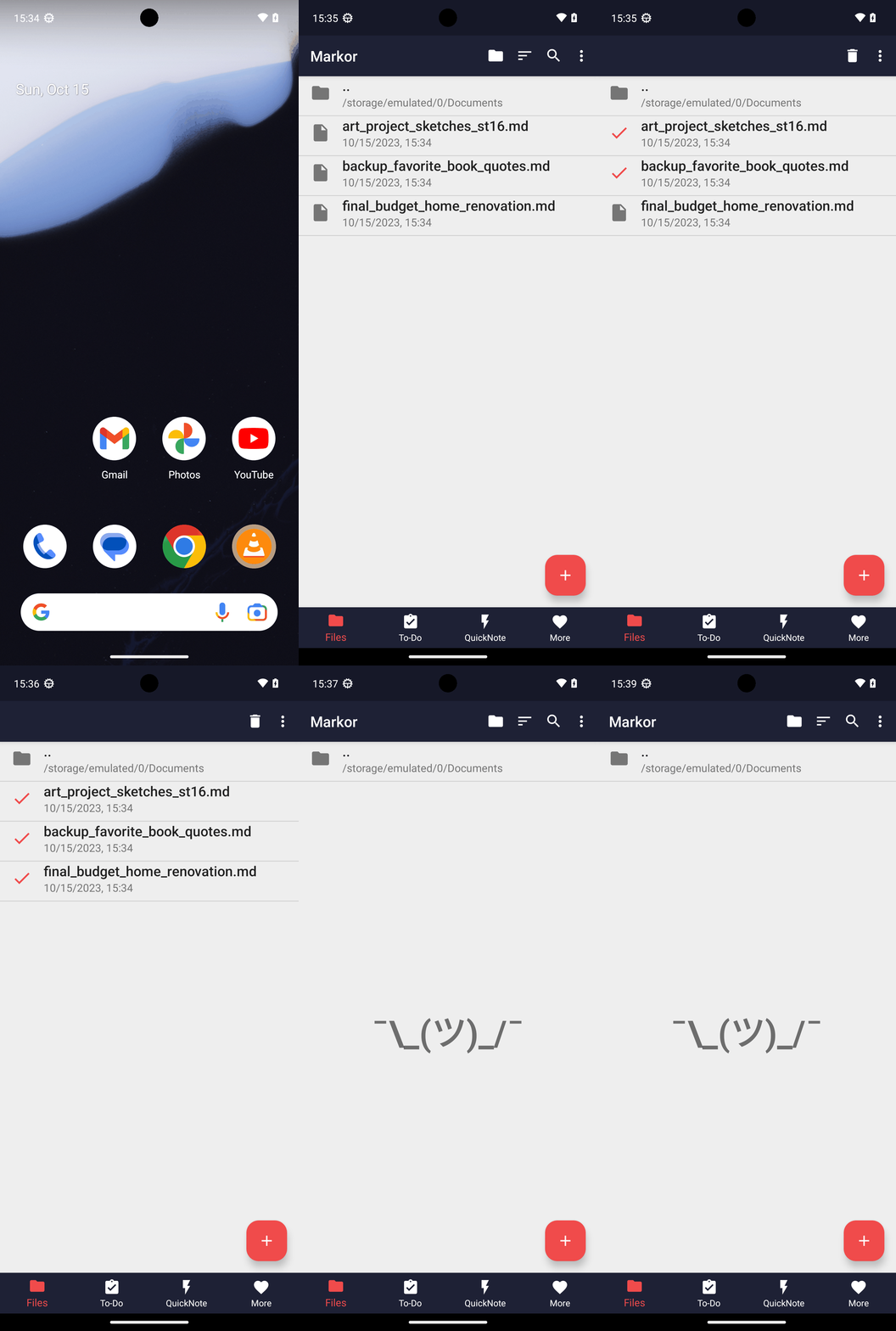
All notes in Markor have been deleted. The Files tab is now empty after removing: art_project_sketches_st16.md, backup_favorite_book_quotes.md, and final_budget_home_renovation.md.
complete_goal(message="All notes in Markor have been deleted. The Files tab is now empty after removing: art_project_sketches_st16.md, backup_favorite_book_quotes.md, and final_budget_home_renovation.md.")
Goal: Delete all my notes in Markor.
user: None
The current subgoal explicitly states to "Open Markor using open_app". This requires the `open_app` action with the argument "Markor".
open_app(text="Markor")
Opening the Markor app.
Opening the Markor app.
The current subgoal is to long-press "art_project_sketches_st16.md". I need to find the index of this element and use the `long_press` action. Element 12 has the text "File art_project_sketches_st16.md".
long_press(index=12)
Long-pressing the file "art_project_sketches_st16.md" to enter selection mode.
Long-pressing the file "art_project_sketches_st16.md" to enter selection mode.
The current subgoal is to tap "backup_favorite_book_quotes.md" and "final_budget_home_renovation.md" to multi-select them. I have already long-pressed one item to enter multi-select mode. Now I need to tap the remaining two items. I will tap "backup_favorite_book_quotes.md" first, which corresponds to index 13.
click(index=13)
Tapping "backup_favorite_book_quotes.md" to add it to the multi-selection.
Tapping "backup_favorite_book_quotes.md" to add it to the multi-selection.
The current subgoal is to tap "final_budget_home_renovation.md" to include it in the selection. I need to find the UI element corresponding to "final_budget_home_renovation.md" and perform a click action on it. Based on the provided UI elements, element 11 has the text "File final_budget_home_renovation.md".
click(index=11)
Tapping "final_budget_home_renovation.md" to add it to the multi-selection.
Tapping "final_budget_home_renovation.md" to add it to the multi-selection.
The subgoal explicitly states to "Tap the Delete button in the top bar." I need to locate the "Delete" button in the provided UI elements and perform a click action on it. Element 3, "TextView: "net.gsantner.markor:id/action_delete_selected_items", "Delete" - (870, 138, 975, 264)", is clearly identified as the "Delete" button.
click(index=3)
Tapping the Delete button in the top bar to delete the selected notes.
Tapping the Delete button in the top bar to delete the selected notes.
The current subgoal is to "Tap OK on the Confirm Delete dialog to delete the three notes." I need to find the "OK" button in the provided UI elements and click it. The "OK" button is listed as index 6.
click(index=6)
Tapping the "OK" button on the "Confirm Delete" dialog to proceed with deleting the selected notes.
Tapping the "OK" button on the "Confirm Delete" dialog to proceed with deleting the selected notes.
All notes in Markor have been deleted. The Files tab is now empty after removing: art_project_sketches_st16.md, backup_favorite_book_quotes.md, and final_budget_home_renovation.md.
complete_goal(message="All notes in Markor have been deleted. The Files tab is now empty after removing: art_project_sketches_st16.md, backup_favorite_book_quotes.md, and final_budget_home_renovation.md.")