
Files Move File
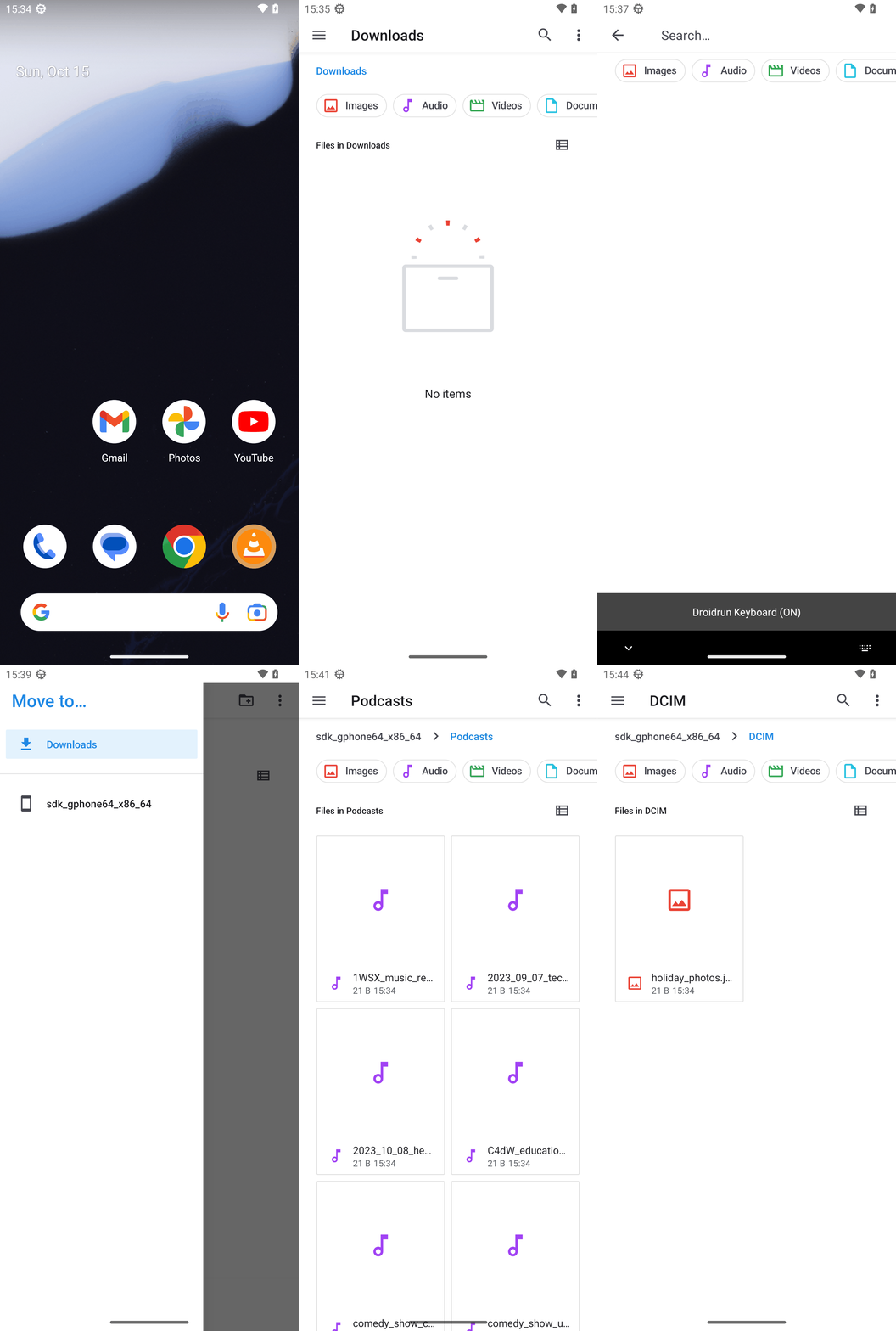
Goal: Move the file holiday_photos.jpg from Podcasts within the sdk_gphone_x86_64 storage area to the DCIM within the same sdk_gphone_x86_64 storage area in the Android filesystem.
Goal: Move the file holiday_photos.jpg from Podcasts within the sdk_gphone_x86_64 storage area to the DCIM within the same sdk_gphone_x86_64 storage area in the Android filesystem.
user: None
The current subgoal explicitly states "Use open_app to open the Files app." This requires using the `open_app` action with the text "Files".
open_app(text="Files")
Open the Files app.
Open the Files app.
The current subgoal is to "Tap Search in the Files app." I need to find the UI element with the text "Search" and perform a click action on it. Based on the provided UI elements, element 18 is a TextView with the text "Search".
click(index=18)
Click the "Search" button in the Files app.
Click the "Search" button in the Files app.
The current subgoal is to type "holiday_photos.jpg" into the search field and then run the search. The search field is identified as 'Search…' with index 7. After typing, I need to simulate pressing the enter key to run the search.
type(text="holiday_photos.jpg"index=7)
Type "holiday_photos.jpg" into the search field (index 7).
Type "holiday_photos.jpg" into the search field (index 7).
The current subgoal is to "Tap the Back button to exit the search results." I need to find the "Back" button in the provided UI elements and perform a click action on it. Element 13 is an "ImageButton" with the text "Back". This is the correct element.
click(index=13)
Tap the Back button to exit the search results.
Tap the Back button to exit the search results.
The current subgoal explicitly states to "Tap “Show roots” (hamburger icon)". I will locate the element with the text "Show roots" and perform a click action on it. Element 16 matches this description.
click(index=16)
Tap "Show roots" (hamburger icon) to open the storage list.
Tap "Show roots" (hamburger icon) to open the storage list.
The current subgoal is to tap "sdk_gphone64_x86_64". I need to find the index of this text in the provided UI elements and use the `click` action. The element with text "sdk_gphone64_x86_64" has index 21.
click(index=21)
Tap "sdk_gphone64_x86_64" in the roots list.
Tap "sdk_gphone64_x86_64" in the roots list.
The current subgoal is to "Tap the Podcasts folder." I need to find the clickable element with the text "Podcasts" and perform a click action on it. Based on the provided UI elements, element 42 has the text "Podcasts".
click(index=42)
Tap the "Podcasts" folder.
Tap the "Podcasts" folder.
The current subgoal explicitly states to "Tap the Search button in the top bar." I need to locate the "Search" button in the provided UI elements and perform a click action on it. Element 20, "TextView: "com.google.android.documentsui:id/option_menu_search", "Search"", directly matches this description.
click(index=20)
Tap the Search button in the top bar.
Tap the Search button in the top bar.
The current subgoal is to type "holiday_photos.jpg" into the search field and submit the search. 1. **Atomic action:** The subgoal explicitly states "Type". 2. **Target/location:** The target is the "search field", which is identified as 'Search…' (index 7) in the current UI elements. 3. **Parameters:** The text to type is "holiday_photos.jpg". After typing, the subgoal also mentions "submit the search", which can be done by pressing the system "Enter" button.
type(text="holiday_photos.jpg"index=7)
Type "holiday_photos.jpg" into the search field.
Type "holiday_photos.jpg" into the search field.
The current subgoal is to long-press the "holiday_photos.jpg" item. I need to find the index of this item in the provided UI elements. Element 18, a CardView, represents the item root, and element 19 is the TextView containing "holiday_photos.jpg". I will long-press element 18, which is the item itself.
long_press(index=18)
Long-press the "holiday_photos.jpg" item to select it.
Long-press the "holiday_photos.jpg" item to select it.
The current subgoal is to "Tap the More options (⋮) in the action bar." I need to find the clickable UI element that corresponds to "More options". Based on the provided UI elements, index 25 is an ImageView with the text "More options". Therefore, the atomic action required is `click` with index 25.
click(index=25)
Tap the More options button.
Tap the More options button.
The current subgoal is to "Tap 'Move to…'". I need to find the clickable element with the text "Move to…" and perform a click action on it. Looking at the provided UI elements, element 12 has the text "Move to…".
click(index=12)
Tap "Move to…".
Tap "Move to…".
The current subgoal is to "Tap “Show roots” (hamburger icon) to open the storage list." I need to find the element labeled "Show roots" and click it. Based on the provided UI elements, element 11 is an "ImageButton" with the text "Show roots".
click(index=11)
Tap "Show roots" (hamburger icon) to open the storage list.
Tap "Show roots" (hamburger icon) to open the storage list.
The current subgoal is to "Tap “sdk_gphone64_x86_64” in the roots list." I need to find the element with the text "sdk_gphone64_x86_64" and perform a click action on it. Based on the provided UI elements, element with index 11 has the text "sdk_gphone64_x86_64".
click(index=11)
Tap "sdk_gphone64_x86_64" in the roots list.
Tap "sdk_gphone64_x86_64" in the roots list.
The current subgoal is to "Tap the DCIM folder in the destination picker." I need to find the UI element corresponding to "DCIM" and perform a click action on it. Based on the provided UI elements, element 23 is a CardView containing a TextView with the text "DCIM".
click(index=23)
Tap the "DCIM" folder.
Tap the "DCIM" folder.
The current subgoal is to "Tap the MOVE button". I need to find the element with the text "MOVE" and perform a click action on it. Based on the provided UI elements, the "MOVE" button has index 22.
click(index=22)
Tap the MOVE button.
Tap the MOVE button.
The current subgoal is to "Tap Back to exit the search in Podcasts." I need to find the "Back" element in the UI and perform a click action on it. Element 13 is an "ImageButton" with the text "Back".
click(index=13)
Tap Back to exit the search in Podcasts.
Tap Back to exit the search in Podcasts.
The current subgoal explicitly states to "Tap “Show roots” (hamburger icon) to open the storage list." I need to find the element with the text "Show roots" and perform a click action on it. Element 18 matches this description.
click(index=18)
Tap "Show roots" (hamburger icon) to open the storage list.
Tap "Show roots" (hamburger icon) to open the storage list.
The current subgoal is to "Tap sdk_gphone64_x86_64 in the drawer." I need to find the clickable element with this text. Element 21, a TextView, has the text "sdk_gphone64_x86_64". This element is located within the drawer layout.
click(index=21)
Tap "sdk_gphone64_x86_64" in the drawer.
Tap "sdk_gphone64_x86_64" in the drawer.
The current subgoal is to "Tap the DCIM folder." I need to find the UI element that represents the "DCIM" folder and perform a click action on it. Based on the provided UI elements, index 27 is a CardView with the text "DCIM" inside it (index 28). I will click on the CardView.
click(index=27)
Tap the DCIM folder.
Tap the DCIM folder.
Moved "holiday_photos.jpg" from Podcasts to DCIM within the sdk_gphone64_x86_64 storage and verified it’s now in DCIM (21 B, 15:34) and no longer in Podcasts.
complete_goal(message="Moved "holiday_photos.jpg" from Podcasts to DCIM within the sdk_gphone64_x86_64 storage and verified it’s now in DCIM (21 B, 15:34) and no longer in Podcasts.")
Goal: Move the file holiday_photos.jpg from Podcasts within the sdk_gphone_x86_64 storage area to the DCIM within the same sdk_gphone_x86_64 storage area in the Android filesystem.
user: None
The current subgoal explicitly states "Use open_app to open the Files app." This requires using the `open_app` action with the text "Files".
open_app(text="Files")
Open the Files app.
Open the Files app.
The current subgoal is to "Tap Search in the Files app." I need to find the UI element with the text "Search" and perform a click action on it. Based on the provided UI elements, element 18 is a TextView with the text "Search".
click(index=18)
Click the "Search" button in the Files app.
Click the "Search" button in the Files app.
The current subgoal is to type "holiday_photos.jpg" into the search field and then run the search. The search field is identified as 'Search…' with index 7. After typing, I need to simulate pressing the enter key to run the search.
type(text="holiday_photos.jpg"index=7)
Type "holiday_photos.jpg" into the search field (index 7).
Type "holiday_photos.jpg" into the search field (index 7).
The current subgoal is to "Tap the Back button to exit the search results." I need to find the "Back" button in the provided UI elements and perform a click action on it. Element 13 is an "ImageButton" with the text "Back". This is the correct element.
click(index=13)
Tap the Back button to exit the search results.
Tap the Back button to exit the search results.
The current subgoal explicitly states to "Tap “Show roots” (hamburger icon)". I will locate the element with the text "Show roots" and perform a click action on it. Element 16 matches this description.
click(index=16)
Tap "Show roots" (hamburger icon) to open the storage list.
Tap "Show roots" (hamburger icon) to open the storage list.
The current subgoal is to tap "sdk_gphone64_x86_64". I need to find the index of this text in the provided UI elements and use the `click` action. The element with text "sdk_gphone64_x86_64" has index 21.
click(index=21)
Tap "sdk_gphone64_x86_64" in the roots list.
Tap "sdk_gphone64_x86_64" in the roots list.
The current subgoal is to "Tap the Podcasts folder." I need to find the clickable element with the text "Podcasts" and perform a click action on it. Based on the provided UI elements, element 42 has the text "Podcasts".
click(index=42)
Tap the "Podcasts" folder.
Tap the "Podcasts" folder.
The current subgoal explicitly states to "Tap the Search button in the top bar." I need to locate the "Search" button in the provided UI elements and perform a click action on it. Element 20, "TextView: "com.google.android.documentsui:id/option_menu_search", "Search"", directly matches this description.
click(index=20)
Tap the Search button in the top bar.
Tap the Search button in the top bar.
The current subgoal is to type "holiday_photos.jpg" into the search field and submit the search. 1. **Atomic action:** The subgoal explicitly states "Type". 2. **Target/location:** The target is the "search field", which is identified as 'Search…' (index 7) in the current UI elements. 3. **Parameters:** The text to type is "holiday_photos.jpg". After typing, the subgoal also mentions "submit the search", which can be done by pressing the system "Enter" button.
type(text="holiday_photos.jpg"index=7)
Type "holiday_photos.jpg" into the search field.
Type "holiday_photos.jpg" into the search field.
The current subgoal is to long-press the "holiday_photos.jpg" item. I need to find the index of this item in the provided UI elements. Element 18, a CardView, represents the item root, and element 19 is the TextView containing "holiday_photos.jpg". I will long-press element 18, which is the item itself.
long_press(index=18)
Long-press the "holiday_photos.jpg" item to select it.
Long-press the "holiday_photos.jpg" item to select it.
The current subgoal is to "Tap the More options (⋮) in the action bar." I need to find the clickable UI element that corresponds to "More options". Based on the provided UI elements, index 25 is an ImageView with the text "More options". Therefore, the atomic action required is `click` with index 25.
click(index=25)
Tap the More options button.
Tap the More options button.
The current subgoal is to "Tap 'Move to…'". I need to find the clickable element with the text "Move to…" and perform a click action on it. Looking at the provided UI elements, element 12 has the text "Move to…".
click(index=12)
Tap "Move to…".
Tap "Move to…".
The current subgoal is to "Tap “Show roots” (hamburger icon) to open the storage list." I need to find the element labeled "Show roots" and click it. Based on the provided UI elements, element 11 is an "ImageButton" with the text "Show roots".
click(index=11)
Tap "Show roots" (hamburger icon) to open the storage list.
Tap "Show roots" (hamburger icon) to open the storage list.
The current subgoal is to "Tap “sdk_gphone64_x86_64” in the roots list." I need to find the element with the text "sdk_gphone64_x86_64" and perform a click action on it. Based on the provided UI elements, element with index 11 has the text "sdk_gphone64_x86_64".
click(index=11)
Tap "sdk_gphone64_x86_64" in the roots list.
Tap "sdk_gphone64_x86_64" in the roots list.
The current subgoal is to "Tap the DCIM folder in the destination picker." I need to find the UI element corresponding to "DCIM" and perform a click action on it. Based on the provided UI elements, element 23 is a CardView containing a TextView with the text "DCIM".
click(index=23)
Tap the "DCIM" folder.
Tap the "DCIM" folder.
The current subgoal is to "Tap the MOVE button". I need to find the element with the text "MOVE" and perform a click action on it. Based on the provided UI elements, the "MOVE" button has index 22.
click(index=22)
Tap the MOVE button.
Tap the MOVE button.
The current subgoal is to "Tap Back to exit the search in Podcasts." I need to find the "Back" element in the UI and perform a click action on it. Element 13 is an "ImageButton" with the text "Back".
click(index=13)
Tap Back to exit the search in Podcasts.
Tap Back to exit the search in Podcasts.
The current subgoal explicitly states to "Tap “Show roots” (hamburger icon) to open the storage list." I need to find the element with the text "Show roots" and perform a click action on it. Element 18 matches this description.
click(index=18)
Tap "Show roots" (hamburger icon) to open the storage list.
Tap "Show roots" (hamburger icon) to open the storage list.
The current subgoal is to "Tap sdk_gphone64_x86_64 in the drawer." I need to find the clickable element with this text. Element 21, a TextView, has the text "sdk_gphone64_x86_64". This element is located within the drawer layout.
click(index=21)
Tap "sdk_gphone64_x86_64" in the drawer.
Tap "sdk_gphone64_x86_64" in the drawer.
The current subgoal is to "Tap the DCIM folder." I need to find the UI element that represents the "DCIM" folder and perform a click action on it. Based on the provided UI elements, index 27 is a CardView with the text "DCIM" inside it (index 28). I will click on the CardView.
click(index=27)
Tap the DCIM folder.
Tap the DCIM folder.
Moved "holiday_photos.jpg" from Podcasts to DCIM within the sdk_gphone64_x86_64 storage and verified it’s now in DCIM (21 B, 15:34) and no longer in Podcasts.
complete_goal(message="Moved "holiday_photos.jpg" from Podcasts to DCIM within the sdk_gphone64_x86_64 storage and verified it’s now in DCIM (21 B, 15:34) and no longer in Podcasts.")