
Files Delete File
Goal: Delete the file q2a8_fancy_banana.mp3 from the Android filesystem located in the Notifications folder within the sdk_gphone_x86_64 storage area.
Goal: Delete the file q2a8_fancy_banana.mp3 from the Android filesystem located in the Notifications folder within the sdk_gphone_x86_64 storage area.
user: None
The current subgoal is "Open the Files app using open_app." This requires the `open_app` atomic action. The target app is "Files".
open_app(text="Files")
Opening the Files app.
Opening the Files app.
The current subgoal is to "Tap “Show roots” to open the navigation drawer." I need to find the UI element with the text "Show roots" and perform a click action on it. Based on the provided UI elements, element 16 is an ImageButton with the text "Show roots".
click(index=16)
Tapping the "Show roots" button to open the navigation drawer.
Tapping the "Show roots" button to open the navigation drawer.
The current subgoal is to tap "sdk_gphone64_x86_64". I need to find the corresponding clickable element in the UI and perform a click action on it. Element 21, a TextView, has the text "sdk_gphone64_x86_64".
click(index=21)
Tapping "sdk_gphone64_x86_64" to open internal storage.
Tapping "sdk_gphone64_x86_64" to open internal storage.
The current subgoal is to "Tap the 'Notifications' folder to open it." I need to find the UI element corresponding to "Notifications" and perform a click action on it. Based on the provided UI elements, element 38 is a TextView with the text "Notifications".
click(index=38)
Tapping the "Notifications" folder.
Tapping the "Notifications" folder.
The current subgoal is to "Tap the Search button in Files." I need to find the clickable element that corresponds to the "Search" button. Based on the provided UI elements, index 20 is a TextView with the text "Search".
click(index=20)
Tapping the "Search" button.
Tapping the "Search" button.
The current subgoal requires typing "q2a8_fancy_banana.mp3" into the "Search…" field and submitting the search. The "Search…" field is identified as element 7. After typing, a system_button action for "Enter" will submit the search.
type(text="q2a8_fancy_banana.mp3"index=7)
Typing "q2a8_fancy_banana.mp3" into the search field.
Typing "q2a8_fancy_banana.mp3" into the search field.
The current subgoal is to long-press the file card "q2a8_fancy_banana.mp3". I need to find the index of the element that represents this file. Based on the provided UI elements, element 23 is a TextView with the text "q2a8_fancy_banana.mp3". I will long-press this element.
long_press(index=23)
Long-pressing the file "q2a8_fancy_banana.mp3" to select it.
Long-pressing the file "q2a8_fancy_banana.mp3" to select it.
The current subgoal is to "Tap the Delete option in the action bar." I need to find the UI element with the text "Delete" and perform a click action on it. Based on the provided UI elements, index 28 is "TextView: com.google.android.documentsui:id/action_menu_delete, Delete".
click(index=28)
Tapping the "Delete" option in the action bar.
Tapping the "Delete" option in the action bar.
The current subgoal is to "Tap OK on the delete confirmation dialog." I need to find the "OK" button in the provided UI elements and perform a click action on it. The "OK" button is listed as index 5.
click(index=5)
Tapping the "OK" button on the delete confirmation dialog.
Tapping the "OK" button on the delete confirmation dialog.
The current subgoal is to "Long-press the q2a8_fancy_banana.mp3 card to select it." I need to identify the UI element that represents the "q2a8_fancy_banana.mp3 card" and perform a long_press action on it. From the provided UI elements, element 22 is a CardView with the text "q2a8_fancy_banana.mp3" as a child (element 23). Therefore, element 22 is the correct target for the long_press action.
long_press(index=22)
Long-pressing the q2a8_fancy_banana.mp3 card to select it.
Long-pressing the q2a8_fancy_banana.mp3 card to select it.
The current subgoal is to "Tap the Delete option in the action bar." I need to find the clickable element that says "Delete" and perform a click action on it. Based on the provided UI elements, index 28 is "TextView: com.google.android.documentsui:id/action_menu_delete, Delete".
click(index=28)
Tapping the "Delete" option in the action bar.
Tapping the "Delete" option in the action bar.
The current subgoal is to "Tap OK on the delete confirmation dialog to proceed." I need to find the "OK" button in the provided UI elements and perform a click action on it. The "OK" button is listed as index 5.
click(index=5)
Tapping the "OK" button on the delete confirmation dialog.
Tapping the "OK" button on the delete confirmation dialog.
The subgoal is to "Tap the Clear query (X) button". I need to find the clickable element that represents "Clear query" and perform a click action on it. Based on the provided UI elements, index 16 is "ImageView: "com.google.android.documentsui:id/search_close_btn", "Clear query"".
click(index=16)
Tapping the "Clear query" button to exit search.
Tapping the "Clear query" button to exit search.
The current subgoal explicitly states to "Tap the Back button". In the provided UI elements, element 5 is an "ImageButton" with the text "Back". This directly corresponds to the action and target specified. Therefore, I need to perform a `click` action on element 5.
click(index=5)
Tapping the Back button to exit the search UI.
Tapping the Back button to exit the search UI.
The current subgoal is to scroll down. I need to use the `swipe` action. The `RecyclerView` with `id/dir_list` (index 22) appears to be the main scrollable area. I will swipe from the middle of this area downwards to reveal more content.
swipe(coordinate=[540, 1800]coordinate2=[540, 600])
Swiping down in the Notifications folder to reveal additional files.
Swiping down in the Notifications folder to reveal additional files.
The current subgoal is to "Tap the Search button in Files." I need to find the UI element that corresponds to the "Search" button and perform a click action on it. Based on the provided UI elements, element 10 is a TextView with the text "Search".
click(index=10)
Tapping the "Search" button.
Tapping the "Search" button.
The current subgoal is to type "q2a8_fancy_banana.mp3" into the Search field and then submit the search. 1. **Atomic action 1:** `type` 2. **Target/Location 1:** The "Search…" field, which is element 7. 3. **Parameters 1:** text="q2a8_fancy_banana.mp3", index=7. 4. **Atomic action 2:** `system_button` to submit the search. 5. **Target/Location 2:** The "Enter" button. 6. **Parameters 2:** button="Enter".
type(text="q2a8_fancy_banana.mp3"index=7)
Typing "q2a8_fancy_banana.mp3" into the search field.
Typing "q2a8_fancy_banana.mp3" into the search field.
I deleted q2a8_fancy_banana.mp3 from the Notifications folder on storage "sdk_gphone64_x86_64" and verified via search that it no longer exists. Only edited_q2a8_fancy_banana.mp3 remains.
complete_goal(message="I deleted q2a8_fancy_banana.mp3 from the Notifications folder on storage "sdk_gphone64_x86_64" and verified via search that it no longer exists. Only edited_q2a8_fancy_banana.mp3 remains.")
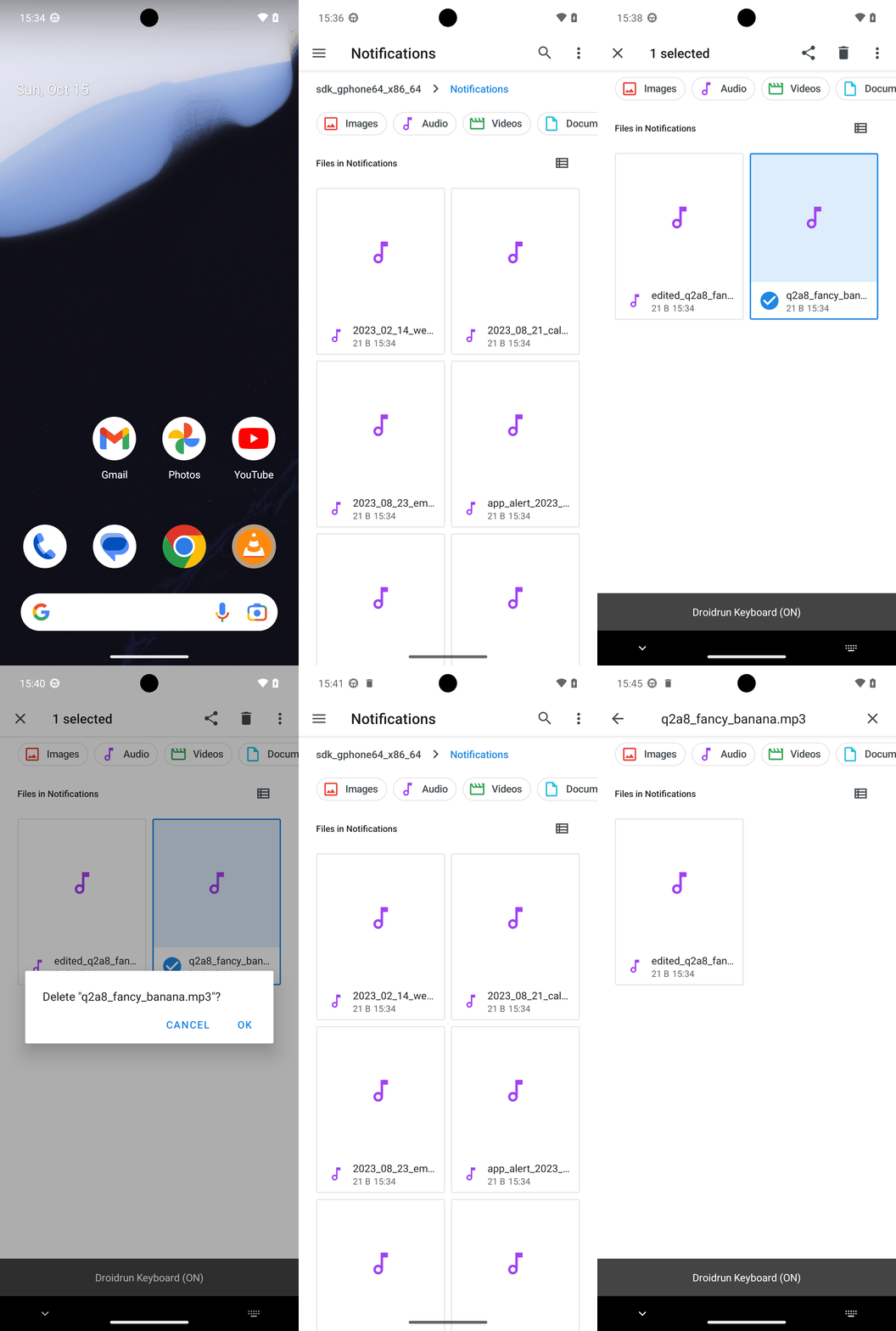
Goal: Delete the file q2a8_fancy_banana.mp3 from the Android filesystem located in the Notifications folder within the sdk_gphone_x86_64 storage area.
user: None
The current subgoal is "Open the Files app using open_app." This requires the `open_app` atomic action. The target app is "Files".
open_app(text="Files")
Opening the Files app.
Opening the Files app.
The current subgoal is to "Tap “Show roots” to open the navigation drawer." I need to find the UI element with the text "Show roots" and perform a click action on it. Based on the provided UI elements, element 16 is an ImageButton with the text "Show roots".
click(index=16)
Tapping the "Show roots" button to open the navigation drawer.
Tapping the "Show roots" button to open the navigation drawer.
The current subgoal is to tap "sdk_gphone64_x86_64". I need to find the corresponding clickable element in the UI and perform a click action on it. Element 21, a TextView, has the text "sdk_gphone64_x86_64".
click(index=21)
Tapping "sdk_gphone64_x86_64" to open internal storage.
Tapping "sdk_gphone64_x86_64" to open internal storage.
The current subgoal is to "Tap the 'Notifications' folder to open it." I need to find the UI element corresponding to "Notifications" and perform a click action on it. Based on the provided UI elements, element 38 is a TextView with the text "Notifications".
click(index=38)
Tapping the "Notifications" folder.
Tapping the "Notifications" folder.
The current subgoal is to "Tap the Search button in Files." I need to find the clickable element that corresponds to the "Search" button. Based on the provided UI elements, index 20 is a TextView with the text "Search".
click(index=20)
Tapping the "Search" button.
Tapping the "Search" button.
The current subgoal requires typing "q2a8_fancy_banana.mp3" into the "Search…" field and submitting the search. The "Search…" field is identified as element 7. After typing, a system_button action for "Enter" will submit the search.
type(text="q2a8_fancy_banana.mp3"index=7)
Typing "q2a8_fancy_banana.mp3" into the search field.
Typing "q2a8_fancy_banana.mp3" into the search field.
The current subgoal is to long-press the file card "q2a8_fancy_banana.mp3". I need to find the index of the element that represents this file. Based on the provided UI elements, element 23 is a TextView with the text "q2a8_fancy_banana.mp3". I will long-press this element.
long_press(index=23)
Long-pressing the file "q2a8_fancy_banana.mp3" to select it.
Long-pressing the file "q2a8_fancy_banana.mp3" to select it.
The current subgoal is to "Tap the Delete option in the action bar." I need to find the UI element with the text "Delete" and perform a click action on it. Based on the provided UI elements, index 28 is "TextView: com.google.android.documentsui:id/action_menu_delete, Delete".
click(index=28)
Tapping the "Delete" option in the action bar.
Tapping the "Delete" option in the action bar.
The current subgoal is to "Tap OK on the delete confirmation dialog." I need to find the "OK" button in the provided UI elements and perform a click action on it. The "OK" button is listed as index 5.
click(index=5)
Tapping the "OK" button on the delete confirmation dialog.
Tapping the "OK" button on the delete confirmation dialog.
The current subgoal is to "Long-press the q2a8_fancy_banana.mp3 card to select it." I need to identify the UI element that represents the "q2a8_fancy_banana.mp3 card" and perform a long_press action on it. From the provided UI elements, element 22 is a CardView with the text "q2a8_fancy_banana.mp3" as a child (element 23). Therefore, element 22 is the correct target for the long_press action.
long_press(index=22)
Long-pressing the q2a8_fancy_banana.mp3 card to select it.
Long-pressing the q2a8_fancy_banana.mp3 card to select it.
The current subgoal is to "Tap the Delete option in the action bar." I need to find the clickable element that says "Delete" and perform a click action on it. Based on the provided UI elements, index 28 is "TextView: com.google.android.documentsui:id/action_menu_delete, Delete".
click(index=28)
Tapping the "Delete" option in the action bar.
Tapping the "Delete" option in the action bar.
The current subgoal is to "Tap OK on the delete confirmation dialog to proceed." I need to find the "OK" button in the provided UI elements and perform a click action on it. The "OK" button is listed as index 5.
click(index=5)
Tapping the "OK" button on the delete confirmation dialog.
Tapping the "OK" button on the delete confirmation dialog.
The subgoal is to "Tap the Clear query (X) button". I need to find the clickable element that represents "Clear query" and perform a click action on it. Based on the provided UI elements, index 16 is "ImageView: "com.google.android.documentsui:id/search_close_btn", "Clear query"".
click(index=16)
Tapping the "Clear query" button to exit search.
Tapping the "Clear query" button to exit search.
The current subgoal explicitly states to "Tap the Back button". In the provided UI elements, element 5 is an "ImageButton" with the text "Back". This directly corresponds to the action and target specified. Therefore, I need to perform a `click` action on element 5.
click(index=5)
Tapping the Back button to exit the search UI.
Tapping the Back button to exit the search UI.
The current subgoal is to scroll down. I need to use the `swipe` action. The `RecyclerView` with `id/dir_list` (index 22) appears to be the main scrollable area. I will swipe from the middle of this area downwards to reveal more content.
swipe(coordinate=[540, 1800]coordinate2=[540, 600])
Swiping down in the Notifications folder to reveal additional files.
Swiping down in the Notifications folder to reveal additional files.
The current subgoal is to "Tap the Search button in Files." I need to find the UI element that corresponds to the "Search" button and perform a click action on it. Based on the provided UI elements, element 10 is a TextView with the text "Search".
click(index=10)
Tapping the "Search" button.
Tapping the "Search" button.
The current subgoal is to type "q2a8_fancy_banana.mp3" into the Search field and then submit the search. 1. **Atomic action 1:** `type` 2. **Target/Location 1:** The "Search…" field, which is element 7. 3. **Parameters 1:** text="q2a8_fancy_banana.mp3", index=7. 4. **Atomic action 2:** `system_button` to submit the search. 5. **Target/Location 2:** The "Enter" button. 6. **Parameters 2:** button="Enter".
type(text="q2a8_fancy_banana.mp3"index=7)
Typing "q2a8_fancy_banana.mp3" into the search field.
Typing "q2a8_fancy_banana.mp3" into the search field.
I deleted q2a8_fancy_banana.mp3 from the Notifications folder on storage "sdk_gphone64_x86_64" and verified via search that it no longer exists. Only edited_q2a8_fancy_banana.mp3 remains.
complete_goal(message="I deleted q2a8_fancy_banana.mp3 from the Notifications folder on storage "sdk_gphone64_x86_64" and verified via search that it no longer exists. Only edited_q2a8_fancy_banana.mp3 remains.")