
Back to benchmark
Expense Delete Single
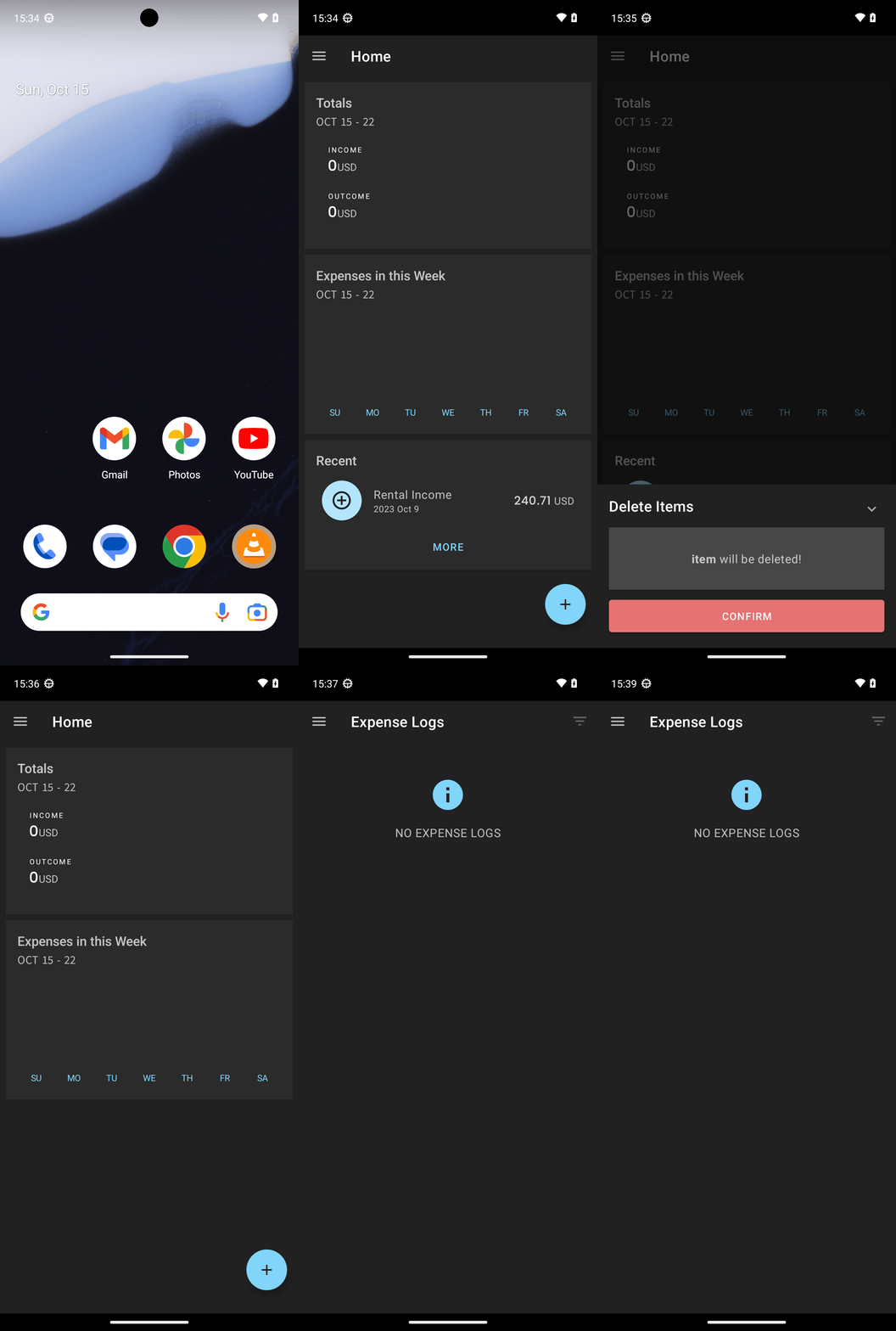
Goal: Delete the following expenses from pro expense: Rental Income.
Plan Input
Input
user:
Goal: Delete the following expenses from pro expense: Rental Income.
user: None
Task Thinking Step 1
Thoughts
The current subgoal explicitly states to "Open the Pro Expense app using the open_app action." Therefore, the atomic action required is `open_app`. The target app name is "Pro Expense". The parameter for the `open_app` action will be `text: "Pro Expense"`.
Code
open_app(text="Pro Expense")
Task Execution Result
Output
Opening the "Pro Expense" app.
Task End
Success reason
Opening the "Pro Expense" app.
Success
Task Thinking Step 2
Thoughts
The current subgoal is to tap the "Rental Income" item. I have identified the "Rental Income" TextView with index 24. I will use the `click` action with this index.
Code
click(index=24)
Task Execution Result
Output
Tapping the "Rental Income" item to open its details.
Task End
Success reason
Tapping the "Rental Income" item to open its details.
Success
Task Thinking Step 3
Thoughts
The current subgoal asks to "Tap the trash/delete icon in the Expense Detail". I need to find the element that represents the trash/delete icon. Based on the provided UI elements, element 7 is an ImageView with the resource ID "com.arduia.expense:id/btn_delete", which is clearly the delete button. I will perform a click action on this element.
Code
click(index=7)
Task Execution Result
Output
Tapping the delete icon for "Rental Income".
Task End
Success reason
Tapping the delete icon for "Rental Income".
Success
Task Thinking Step 4
Thoughts
The current subgoal is to "Tap the CONFIRM button". I need to find the "CONFIRM" button in the provided UI elements and use its index for the `click` action. The "CONFIRM" button is listed as index 8.
Code
click(index=8)
Task Execution Result
Output
Tapping the "CONFIRM" button to confirm the deletion of the item.
Task End
Success reason
Tapping the "CONFIRM" button to confirm the deletion of the item.
Success
Task Thinking Step 5
Thoughts
The current subgoal is to "Tap the hamburger/menu icon on the Home screen to open the navigation drawer." Based on the provided UI elements, element 5 is an "ImageButton" located at the top left corner (0, 128, 147, 275), which typically represents a hamburger menu icon. Therefore, I should click on this element.
Code
click(index=5)
Task Execution Result
Output
Tapping the ImageButton (hamburger menu icon) to open the navigation drawer.
Task End
Success reason
Tapping the ImageButton (hamburger menu icon) to open the navigation drawer.
Success
Task Thinking Step 6
Thoughts
The current subgoal is to tap "Expense Logs". I need to find the element with the text "Expense Logs" and perform a click action on it. Based on the provided UI elements, element 12, "CheckedTextView: com.arduia.expense:id/design_menu_item_text, "Expense Logs" - (84, 693, 651, 819)", matches the target.
Code
click(index=12)
Task Execution Result
Output
Tapping "Expense Logs" in the navigation drawer.
Task End
Success reason
Tapping "Expense Logs" in the navigation drawer.
Success
Plan Thinking
Thoughts
I deleted the expense named "Rental Income" in the Pro Expense app and verified in Expense Logs that no entries with that name remain.
Code
complete_goal(message="I deleted the expense named "Rental Income" in the Pro Expense app and verified in Expense Logs that no entries with that name remain.")
Plan Input
Input
user:
Goal: Delete the following expenses from pro expense: Rental Income.
user: None
Task Thinking Step 1
Thoughts
The current subgoal explicitly states to "Open the Pro Expense app using the open_app action." Therefore, the atomic action required is `open_app`. The target app name is "Pro Expense". The parameter for the `open_app` action will be `text: "Pro Expense"`.
Code
open_app(text="Pro Expense")
Task Execution Result
Output
Opening the "Pro Expense" app.
Task End
Success reason
Opening the "Pro Expense" app.
Success
Task Thinking Step 2
Thoughts
The current subgoal is to tap the "Rental Income" item. I have identified the "Rental Income" TextView with index 24. I will use the `click` action with this index.
Code
click(index=24)
Task Execution Result
Output
Tapping the "Rental Income" item to open its details.
Task End
Success reason
Tapping the "Rental Income" item to open its details.
Success
Task Thinking Step 3
Thoughts
The current subgoal asks to "Tap the trash/delete icon in the Expense Detail". I need to find the element that represents the trash/delete icon. Based on the provided UI elements, element 7 is an ImageView with the resource ID "com.arduia.expense:id/btn_delete", which is clearly the delete button. I will perform a click action on this element.
Code
click(index=7)
Task Execution Result
Output
Tapping the delete icon for "Rental Income".
Task End
Success reason
Tapping the delete icon for "Rental Income".
Success
Task Thinking Step 4
Thoughts
The current subgoal is to "Tap the CONFIRM button". I need to find the "CONFIRM" button in the provided UI elements and use its index for the `click` action. The "CONFIRM" button is listed as index 8.
Code
click(index=8)
Task Execution Result
Output
Tapping the "CONFIRM" button to confirm the deletion of the item.
Task End
Success reason
Tapping the "CONFIRM" button to confirm the deletion of the item.
Success
Task Thinking Step 5
Thoughts
The current subgoal is to "Tap the hamburger/menu icon on the Home screen to open the navigation drawer." Based on the provided UI elements, element 5 is an "ImageButton" located at the top left corner (0, 128, 147, 275), which typically represents a hamburger menu icon. Therefore, I should click on this element.
Code
click(index=5)
Task Execution Result
Output
Tapping the ImageButton (hamburger menu icon) to open the navigation drawer.
Task End
Success reason
Tapping the ImageButton (hamburger menu icon) to open the navigation drawer.
Success
Task Thinking Step 6
Thoughts
The current subgoal is to tap "Expense Logs". I need to find the element with the text "Expense Logs" and perform a click action on it. Based on the provided UI elements, element 12, "CheckedTextView: com.arduia.expense:id/design_menu_item_text, "Expense Logs" - (84, 693, 651, 819)", matches the target.
Code
click(index=12)
Task Execution Result
Output
Tapping "Expense Logs" in the navigation drawer.
Task End
Success reason
Tapping "Expense Logs" in the navigation drawer.
Success
Plan Thinking
Thoughts
I deleted the expense named "Rental Income" in the Pro Expense app and verified in Expense Logs that no entries with that name remain.
Code
complete_goal(message="I deleted the expense named "Rental Income" in the Pro Expense app and verified in Expense Logs that no entries with that name remain.")