
Expense Add Multiple
Goal: Add the following expenses into the pro expense:
Expense: Social Club Dues
amount_dollars: $67.41
category_name: Social
note: Monthly recurring
Expense: Legal Fees
amount_dollars: $10.14
category_name: Others
note: Monthly recurring
Expense: Stationery
amount_dollars: $118.93
category_name: Others
note: Remember to transfer funds
Goal: Add the following expenses into the pro expense: Expense: Social Club Dues amount_dollars: $67.41 category_name: Social note: Monthly recurring Expense: Legal Fees amount_dollars: $10.14 category_name: Others note: Monthly recurring Expense: Stationery amount_dollars: $118.93 category_name: Others note: Remember to transfer funds
user: None
The current subgoal explicitly states to "Open the Pro Expense app using open_app". This directly maps to the `open_app` action with the argument "Pro Expense".
open_app(text="Pro Expense")
Opening the Pro Expense app.
Opening the Pro Expense app.
The subgoal explicitly states to "Tap the + add button". I need to find the element that corresponds to a "+ add button" in the provided UI elements. Element 41, `ImageButton: "com.arduia.expense:id/fb_main_add", "fb_main_add" - (891, 2106, 1038, 2253)`, is a floating action button with a plus sign, which is a common UI pattern for adding new items. This matches the description.
click(index=41)
Tapping the floating action button to add a new expense.
Tapping the floating action button to add a new expense.
The current subgoal is to type "Social Club Dues" into the "Name" field. The action required is `type`. The target element is the "Name" field, which corresponds to index 12 in the provided UI elements. The text to be typed is "Social Club Dues".
type(text="Social Club Dues"index=12)
Typing "Social Club Dues" into the Name field.
Typing "Social Club Dues" into the Name field.
The current subgoal is "Tap the Amount field and enter 67.41." 1. **Action:** The first part is "Tap the Amount field", which translates to a `click` action. The second part is "enter 67.41", which translates to a `type` action. 2. **Target:** The target for both actions is the "Amount" field. 3. **Parameters:** For `click`, the index of the "Amount" field is needed. For `type`, the text "67.41" and the index of the "Amount" field are needed. From the UI elements, element 12 is `EditText: "com.arduia.expense:id/edt_amount", "Amount" - (63, 565, 1017, 720)`. This is the "Amount" field. First, I need to click on the Amount field. Then, I need to type "67.41" into the Amount field. Since the keyboard is already visible and the previous action was typing into the Name field, the Amount field might not be focused. So, I will click it first.
click(index=12)
Tapping the Amount field.
Tapping the Amount field.
The current subgoal is to type "67.41" into the "Amount" field. The `type` action is appropriate for this. The text to be typed is "67.41". The "Amount" field is identified by index 13, which is an EditText with the text "Amount". The device state also indicates that the 'Amount' field is the focused element and the keyboard is visible.
type(text="67.41"index=13)
Typing "67.41" into the "Amount" field.
Typing "67.41" into the "Amount" field.
The current subgoal is to "Tap the 'Social' category." I need to find the UI element with the text "Social" and perform a click action on it. In the provided clickable UI elements, element 22 is a TextView with the text "Social".
click(index=22)
Tapping the "Social" category.
Tapping the "Social" category.
The subgoal requires two actions: first, tapping the "Note" field, and then typing "Monthly recurring" into it. The UI element for the "Note" field is `25. EditText: "com.arduia.expense:id/edt_note", "Note"`. I will use the `type` action, which automatically focuses the field before typing.
type(text="Monthly recurring"index=25)
Typing "Monthly recurring" into the "Note" field.
Typing "Monthly recurring" into the "Note" field.
The current subgoal is to "Tap SAVE". I need to find the element with the text "SAVE" and perform a click action on it. Based on the provided UI elements, element 26 is a Button with the text "SAVE".
click(index=26)
Tapping the "SAVE" button.
Tapping the "SAVE" button.
The current subgoal is to tap the "+ add button". I need to find the element corresponding to this button in the provided UI elements. Element 41, `ImageButton: "com.arduia.expense:id/fb_main_add", "fb_main_add" - (891, 2106, 1038, 2253)`, clearly matches the description of a floating action button used for adding new items, and it visually appears as a "+" button in the screenshot.
click(index=41)
Tapping the + add button to open a new Expense Entry form.
Tapping the + add button to open a new Expense Entry form.
The current subgoal is to type "Legal Fees" into the "Name" field. The "Name" field is an EditText with index 12. The keyboard is already visible and the 'Name' field is focused. Therefore, I should use the `type` action with the text "Legal Fees" and the index of the "Name" field.
type(text="Legal Fees"index=12)
Typing "Legal Fees" into the "Name" field.
Typing "Legal Fees" into the "Name" field.
The current subgoal is to "Tap the Amount field and type 10.14." 1. **Action:** The action required is to `type`. 2. **Target:** The target element is the "Amount" field. From the device state, this is `EditText: "com.arduia.expense:id/edt_amount", "Amount"` which has index 12. 3. **Parameters:** The text to type is "10.14".
type(text="10.14"index=12)
Typing "10.14" into the "Amount" field.
Typing "10.14" into the "Amount" field.
The current subgoal requires me to horizontally scroll the category row to find and tap "Others". The category row is represented by the `RecyclerView` with `id/rv_category` (index 14). Since "Others" is not currently visible, I need to perform a horizontal swipe action. I will swipe from right to left to reveal more categories. I will choose coordinates within the bounds of the `RecyclerView` for the swipe action.
swipe(coordinate=[900, 822]coordinate2=[100, 822])
Swiping horizontally on the category row to reveal more categories.
Swiping horizontally on the category row to reveal more categories.
The subgoal requires two actions: first, to swipe the category row left again, and second, to tap "Others" or "Other". I have already performed a swipe in the previous step, so I need to perform another swipe to the left on the category row. The category row is `RecyclerView: "com.arduia.expense:id/rv_category"`. I will use coordinates within this element for the swipe.
swipe(coordinate=[900, 822]coordinate2=[100, 822])
Swiping horizontally on the category row to reveal more categories.
Swiping horizontally on the category row to reveal more categories.
The current subgoal is to "Tap the 'Others' category for 'Legal Fees'". I need to find the UI element corresponding to the "Others" category and perform a click action on it. Based on the provided UI elements, element 24 is a TextView with the text "Others".
click(index=24)
Tapping the "Others" category.
Tapping the "Others" category.
The subgoal requires me to "Tap the Note field and type "Monthly recurring"". 1. **Action:** The actions are "Tap" and "type". 2. **Target:** The target is the "Note field". 3. **Parameters:** The text to type is "Monthly recurring". From the UI elements, `EditText: "com.arduia.expense:id/edt_note", "Note"` with index 25 is the "Note" field. I will use this index for the `type` action.
type(text="Monthly recurring"index=25)
Tapping the Note field and typing "Monthly recurring".
Tapping the Note field and typing "Monthly recurring".
The current subgoal is to "Tap SAVE to add the 'Legal Fees' expense." I need to find the "SAVE" button in the UI elements and perform a click action on it. The "SAVE" button is listed as element 26.
click(index=26)
Tapping the "SAVE" button to add the "Legal Fees" expense.
Tapping the "SAVE" button to add the "Legal Fees" expense.
The current subgoal requires tapping the "+ add button". I will look for a clickable element that matches this description. Element 41, an ImageButton with resource ID `com.arduia.expense:id/fb_main_add` and text `fb_main_add`, is a plus sign button at the bottom right, which is the "add" button.
click(index=41)
Tapping the + add button to open a new Expense Entry form.
Tapping the + add button to open a new Expense Entry form.
The current subgoal is to type "Stationery" into the "Name" field. The "Name" field is an EditText element with index 12. The action required is `type`, the text is "Stationery", and the index is 12.
type(text="Stationery"index=12)
Typing "Stationery" into the "Name" field.
Typing "Stationery" into the "Name" field.
The current subgoal is "Tap the Amount field and type 118.93." 1. **Atomic Action:** The action required is "type". 2. **Target/Location:** The target is the "Amount field". 3. **Parameters:** The text to type is "118.93". The index of the "Amount" field is 12 (from `EditText: "com.arduia.expense:id/edt_amount", "Amount" - (63, 565, 1017, 720)`).
type(text="118.93"index=12)
Tapping the Amount field and typing "118.93".
Tapping the Amount field and typing "118.93".
The subgoal is to "Swipe the category row left to reveal more categories." The category row is identified as `RecyclerView: "com.arduia.expense:id/rv_category", "rv_category" - (21, 762, 1059, 882)`. I will perform a swipe action from right to left within the bounds of this element.
swipe(coordinate=[900, 822]coordinate2=[100, 822])
Swiping the category row left to reveal more categories.
Swiping the category row left to reveal more categories.
The current subgoal requires me to "Swipe the category row left again until "Others" is visible." I need to perform a `swipe` action. The category row is represented by the `RecyclerView` with ID `rv_category` and bounds `(21, 762, 1059, 882)`. To swipe left, I will use a starting coordinate on the right side of this row and an ending coordinate on the left side.
swipe(coordinate=[900, 822]coordinate2=[100, 822])
Swiping the category row left again to reveal more categories, specifically "Others".
Swiping the category row left again to reveal more categories, specifically "Others".
The current subgoal is to "Tap the 'Others' category." I need to find the UI element corresponding to "Others" and perform a click action on it. Based on the provided UI elements, element 24 is a TextView with the text "Others".
click(index=24)
Tapping the "Others" category.
Tapping the "Others" category.
The current subgoal is to "Tap the Note field and type 'Remember to transfer funds'". 1. **Atomic action:** The action required is `type`. 2. **Target/location:** The target is the "Note" field. 3. **Parameters:** The text to type is "Remember to transfer funds". The index of the "Note" field is 25.
type(text="Remember to transfer funds"index=25)
Tapping the "Note" field and typing "Remember to transfer funds".
Tapping the "Note" field and typing "Remember to transfer funds".
The current subgoal explicitly states to "Tap the SAVE button". I will locate the "SAVE" button in the provided UI elements and perform a click action on it. Element 26 is identified as "SAVE".
click(index=26)
Tapping the "SAVE" button to add the expense.
Tapping the "SAVE" button to add the expense.
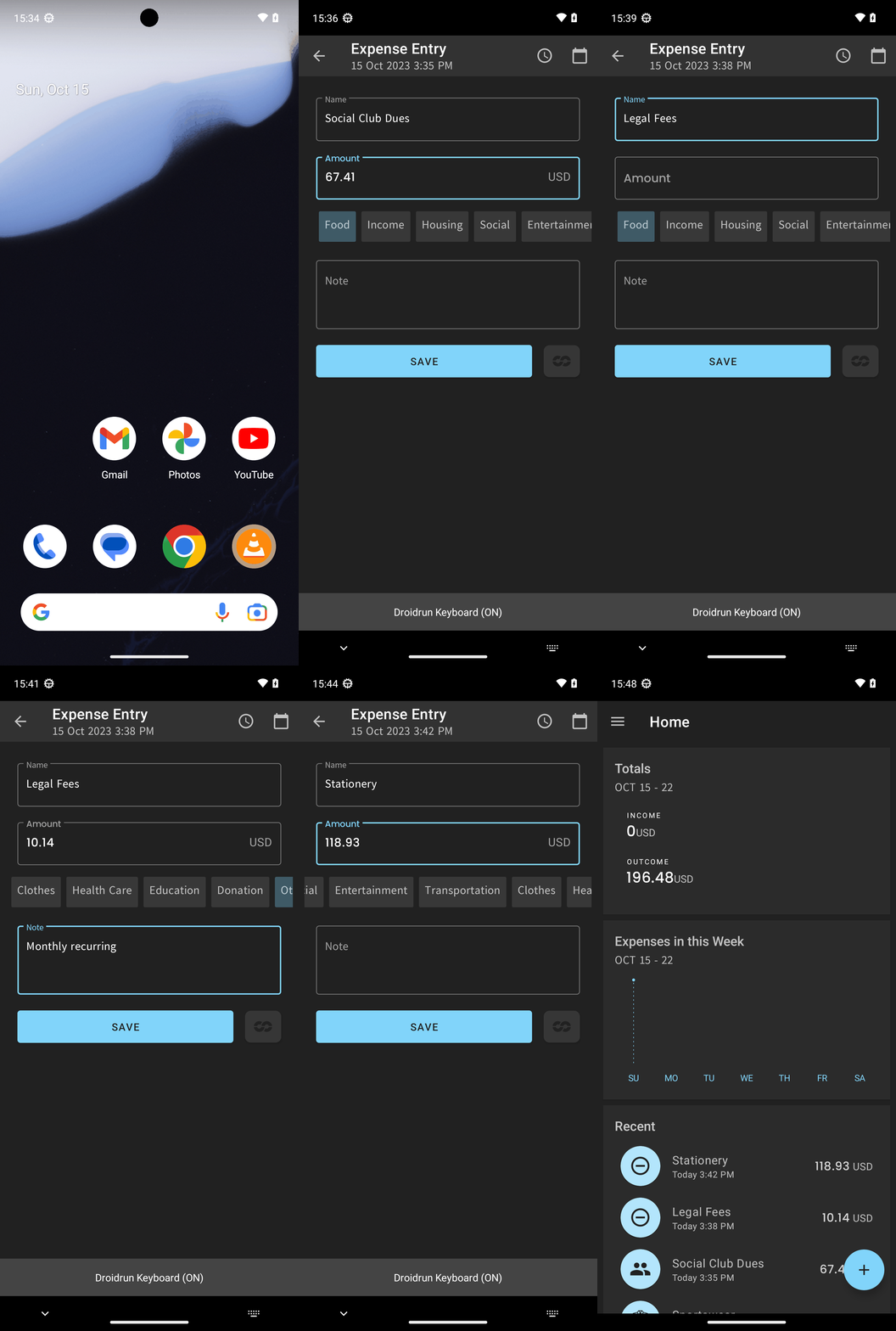
Added all requested expenses to Pro Expense and verified they appear in Recent:
- Social Club Dues — $67.41 — Category: Social — Note: Monthly recurring
- Legal Fees — $10.14 — Category: Others — Note: Monthly recurring
- Stationery — $118.93 — Category: Others — Note: Remember to transfer funds
complete_goal(message="Added all requested expenses to Pro Expense and verified they appear in Recent:
- Social Club Dues — $67.41 — Category: Social — Note: Monthly recurring
- Legal Fees — $10.14 — Category: Others — Note: Monthly recurring
- Stationery — $118.93 — Category: Others — Note: Remember to transfer funds")
Goal: Add the following expenses into the pro expense:
Expense: Social Club Dues
amount_dollars: $67.41
category_name: Social
note: Monthly recurring
Expense: Legal Fees
amount_dollars: $10.14
category_name: Others
note: Monthly recurring
Expense: Stationery
amount_dollars: $118.93
category_name: Others
note: Remember to transfer funds
user: None
The current subgoal explicitly states to "Open the Pro Expense app using open_app". This directly maps to the `open_app` action with the argument "Pro Expense".
open_app(text="Pro Expense")
Opening the Pro Expense app.
Opening the Pro Expense app.
The subgoal explicitly states to "Tap the + add button". I need to find the element that corresponds to a "+ add button" in the provided UI elements. Element 41, `ImageButton: "com.arduia.expense:id/fb_main_add", "fb_main_add" - (891, 2106, 1038, 2253)`, is a floating action button with a plus sign, which is a common UI pattern for adding new items. This matches the description.
click(index=41)
Tapping the floating action button to add a new expense.
Tapping the floating action button to add a new expense.
The current subgoal is to type "Social Club Dues" into the "Name" field. The action required is `type`. The target element is the "Name" field, which corresponds to index 12 in the provided UI elements. The text to be typed is "Social Club Dues".
type(text="Social Club Dues"index=12)
Typing "Social Club Dues" into the Name field.
Typing "Social Club Dues" into the Name field.
The current subgoal is "Tap the Amount field and enter 67.41." 1. **Action:** The first part is "Tap the Amount field", which translates to a `click` action. The second part is "enter 67.41", which translates to a `type` action. 2. **Target:** The target for both actions is the "Amount" field. 3. **Parameters:** For `click`, the index of the "Amount" field is needed. For `type`, the text "67.41" and the index of the "Amount" field are needed. From the UI elements, element 12 is `EditText: "com.arduia.expense:id/edt_amount", "Amount" - (63, 565, 1017, 720)`. This is the "Amount" field. First, I need to click on the Amount field. Then, I need to type "67.41" into the Amount field. Since the keyboard is already visible and the previous action was typing into the Name field, the Amount field might not be focused. So, I will click it first.
click(index=12)
Tapping the Amount field.
Tapping the Amount field.
The current subgoal is to type "67.41" into the "Amount" field. The `type` action is appropriate for this. The text to be typed is "67.41". The "Amount" field is identified by index 13, which is an EditText with the text "Amount". The device state also indicates that the 'Amount' field is the focused element and the keyboard is visible.
type(text="67.41"index=13)
Typing "67.41" into the "Amount" field.
Typing "67.41" into the "Amount" field.
The current subgoal is to "Tap the 'Social' category." I need to find the UI element with the text "Social" and perform a click action on it. In the provided clickable UI elements, element 22 is a TextView with the text "Social".
click(index=22)
Tapping the "Social" category.
Tapping the "Social" category.
The subgoal requires two actions: first, tapping the "Note" field, and then typing "Monthly recurring" into it. The UI element for the "Note" field is `25. EditText: "com.arduia.expense:id/edt_note", "Note"`. I will use the `type` action, which automatically focuses the field before typing.
type(text="Monthly recurring"index=25)
Typing "Monthly recurring" into the "Note" field.
Typing "Monthly recurring" into the "Note" field.
The current subgoal is to "Tap SAVE". I need to find the element with the text "SAVE" and perform a click action on it. Based on the provided UI elements, element 26 is a Button with the text "SAVE".
click(index=26)
Tapping the "SAVE" button.
Tapping the "SAVE" button.
The current subgoal is to tap the "+ add button". I need to find the element corresponding to this button in the provided UI elements. Element 41, `ImageButton: "com.arduia.expense:id/fb_main_add", "fb_main_add" - (891, 2106, 1038, 2253)`, clearly matches the description of a floating action button used for adding new items, and it visually appears as a "+" button in the screenshot.
click(index=41)
Tapping the + add button to open a new Expense Entry form.
Tapping the + add button to open a new Expense Entry form.
The current subgoal is to type "Legal Fees" into the "Name" field. The "Name" field is an EditText with index 12. The keyboard is already visible and the 'Name' field is focused. Therefore, I should use the `type` action with the text "Legal Fees" and the index of the "Name" field.
type(text="Legal Fees"index=12)
Typing "Legal Fees" into the "Name" field.
Typing "Legal Fees" into the "Name" field.
The current subgoal is to "Tap the Amount field and type 10.14." 1. **Action:** The action required is to `type`. 2. **Target:** The target element is the "Amount" field. From the device state, this is `EditText: "com.arduia.expense:id/edt_amount", "Amount"` which has index 12. 3. **Parameters:** The text to type is "10.14".
type(text="10.14"index=12)
Typing "10.14" into the "Amount" field.
Typing "10.14" into the "Amount" field.
The current subgoal requires me to horizontally scroll the category row to find and tap "Others". The category row is represented by the `RecyclerView` with `id/rv_category` (index 14). Since "Others" is not currently visible, I need to perform a horizontal swipe action. I will swipe from right to left to reveal more categories. I will choose coordinates within the bounds of the `RecyclerView` for the swipe action.
swipe(coordinate=[900, 822]coordinate2=[100, 822])
Swiping horizontally on the category row to reveal more categories.
Swiping horizontally on the category row to reveal more categories.
The subgoal requires two actions: first, to swipe the category row left again, and second, to tap "Others" or "Other". I have already performed a swipe in the previous step, so I need to perform another swipe to the left on the category row. The category row is `RecyclerView: "com.arduia.expense:id/rv_category"`. I will use coordinates within this element for the swipe.
swipe(coordinate=[900, 822]coordinate2=[100, 822])
Swiping horizontally on the category row to reveal more categories.
Swiping horizontally on the category row to reveal more categories.
The current subgoal is to "Tap the 'Others' category for 'Legal Fees'". I need to find the UI element corresponding to the "Others" category and perform a click action on it. Based on the provided UI elements, element 24 is a TextView with the text "Others".
click(index=24)
Tapping the "Others" category.
Tapping the "Others" category.
The subgoal requires me to "Tap the Note field and type "Monthly recurring"". 1. **Action:** The actions are "Tap" and "type". 2. **Target:** The target is the "Note field". 3. **Parameters:** The text to type is "Monthly recurring". From the UI elements, `EditText: "com.arduia.expense:id/edt_note", "Note"` with index 25 is the "Note" field. I will use this index for the `type` action.
type(text="Monthly recurring"index=25)
Tapping the Note field and typing "Monthly recurring".
Tapping the Note field and typing "Monthly recurring".
The current subgoal is to "Tap SAVE to add the 'Legal Fees' expense." I need to find the "SAVE" button in the UI elements and perform a click action on it. The "SAVE" button is listed as element 26.
click(index=26)
Tapping the "SAVE" button to add the "Legal Fees" expense.
Tapping the "SAVE" button to add the "Legal Fees" expense.
The current subgoal requires tapping the "+ add button". I will look for a clickable element that matches this description. Element 41, an ImageButton with resource ID `com.arduia.expense:id/fb_main_add` and text `fb_main_add`, is a plus sign button at the bottom right, which is the "add" button.
click(index=41)
Tapping the + add button to open a new Expense Entry form.
Tapping the + add button to open a new Expense Entry form.
The current subgoal is to type "Stationery" into the "Name" field. The "Name" field is an EditText element with index 12. The action required is `type`, the text is "Stationery", and the index is 12.
type(text="Stationery"index=12)
Typing "Stationery" into the "Name" field.
Typing "Stationery" into the "Name" field.
The current subgoal is "Tap the Amount field and type 118.93." 1. **Atomic Action:** The action required is "type". 2. **Target/Location:** The target is the "Amount field". 3. **Parameters:** The text to type is "118.93". The index of the "Amount" field is 12 (from `EditText: "com.arduia.expense:id/edt_amount", "Amount" - (63, 565, 1017, 720)`).
type(text="118.93"index=12)
Tapping the Amount field and typing "118.93".
Tapping the Amount field and typing "118.93".
The subgoal is to "Swipe the category row left to reveal more categories." The category row is identified as `RecyclerView: "com.arduia.expense:id/rv_category", "rv_category" - (21, 762, 1059, 882)`. I will perform a swipe action from right to left within the bounds of this element.
swipe(coordinate=[900, 822]coordinate2=[100, 822])
Swiping the category row left to reveal more categories.
Swiping the category row left to reveal more categories.
The current subgoal requires me to "Swipe the category row left again until "Others" is visible." I need to perform a `swipe` action. The category row is represented by the `RecyclerView` with ID `rv_category` and bounds `(21, 762, 1059, 882)`. To swipe left, I will use a starting coordinate on the right side of this row and an ending coordinate on the left side.
swipe(coordinate=[900, 822]coordinate2=[100, 822])
Swiping the category row left again to reveal more categories, specifically "Others".
Swiping the category row left again to reveal more categories, specifically "Others".
The current subgoal is to "Tap the 'Others' category." I need to find the UI element corresponding to "Others" and perform a click action on it. Based on the provided UI elements, element 24 is a TextView with the text "Others".
click(index=24)
Tapping the "Others" category.
Tapping the "Others" category.
The current subgoal is to "Tap the Note field and type 'Remember to transfer funds'". 1. **Atomic action:** The action required is `type`. 2. **Target/location:** The target is the "Note" field. 3. **Parameters:** The text to type is "Remember to transfer funds". The index of the "Note" field is 25.
type(text="Remember to transfer funds"index=25)
Tapping the "Note" field and typing "Remember to transfer funds".
Tapping the "Note" field and typing "Remember to transfer funds".
The current subgoal explicitly states to "Tap the SAVE button". I will locate the "SAVE" button in the provided UI elements and perform a click action on it. Element 26 is identified as "SAVE".
click(index=26)
Tapping the "SAVE" button to add the expense.
Tapping the "SAVE" button to add the expense.
Added all requested expenses to Pro Expense and verified they appear in Recent:
- Social Club Dues — $67.41 — Category: Social — Note: Monthly recurring
- Legal Fees — $10.14 — Category: Others — Note: Monthly recurring
- Stationery — $118.93 — Category: Others — Note: Remember to transfer funds
complete_goal(message="Added all requested expenses to Pro Expense and verified they appear in Recent:
- Social Club Dues — $67.41 — Category: Social — Note: Monthly recurring
- Legal Fees — $10.14 — Category: Others — Note: Monthly recurring
- Stationery — $118.93 — Category: Others — Note: Remember to transfer funds")