
Back to benchmark
Contacts Add Contact
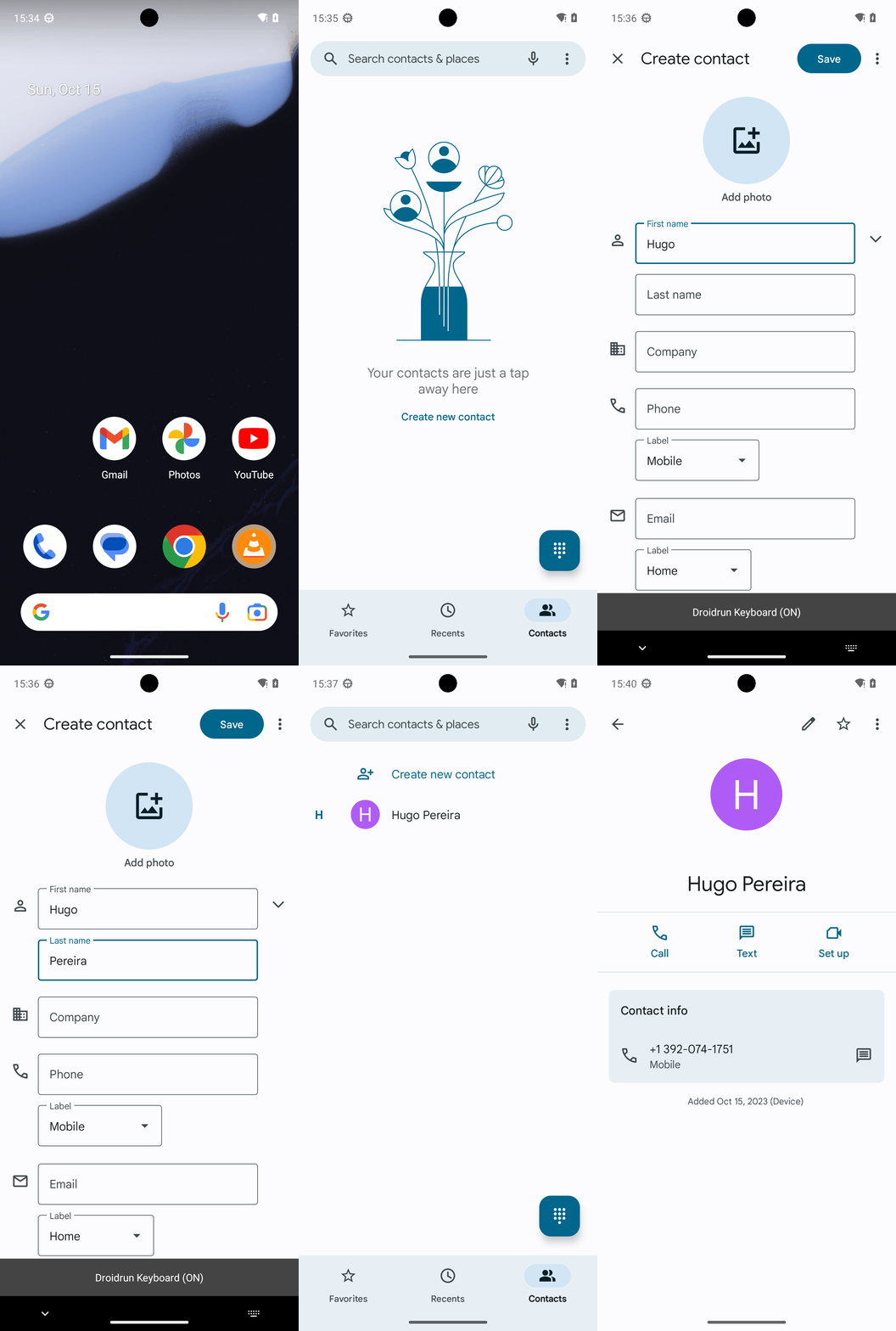
Goal: Create a new contact for Hugo Pereira. Their number is +13920741751.
Plan Input
Input
user:
Goal: Create a new contact for Hugo Pereira. Their number is +13920741751.
user: None
Task Thinking Step 1
Thoughts
The current subgoal is to "Open the Phone app from the home screen." The appropriate atomic action is `open_app`. The target app is "Phone".
Code
open_app(text="Phone")
Task Execution Result
Output
Opening the Phone app.
Task End
Success reason
Opening the Phone app.
Success
Task Thinking Step 2
Thoughts
The current subgoal is to "Tap the Contacts tab at the bottom right." I need to find the UI element that corresponds to "Contacts" and perform a click action on it. Looking at the provided UI elements, element 14 is "FrameLayout: "com.google.android.dialer:id/tab_contacts", "Contacts" - (720, 2127, 1080, 2337)". This element has the text "Contacts" and is located at the bottom right.
Code
click(index=14)
Task Execution Result
Output
Tapping the Contacts tab.
Task End
Success reason
Tapping the Contacts tab.
Success
Task Thinking Step 3
Thoughts
The current subgoal is to "Tap 'Create new contact'". I need to find the element with this exact text and perform a click action on it. Based on the provided UI elements, element 4 has the text "Create new contact".
Code
click(index=4)
Task Execution Result
Output
Tapping on the "Create new contact" button.
Task End
Success reason
Tapping on the "Create new contact" button.
Success
Task Thinking Step 4
Thoughts
The current subgoal is to "Tap the “First name” field and type: Hugo." I need to find the "First name" field in the UI elements and then use the `type` action. Element 11 is "EditText: "First name"". So the action will be `type("Hugo", 11)`.Code
type(text="Hugo"index=11)
Task Execution Result
Output
Type "Hugo" into the "First name" field.
Task End
Success reason
Type "Hugo" into the "First name" field.
Success
Task Thinking Step 5
Thoughts
The current subgoal is to "Tap the “Last name” field and type: Pereira." 1. **Action:** The action required is to `type` text into a field. 2. **Target/Location:** The target field is "Last name". 3. **Parameters:** The text to type is "Pereira". The index of the "Last name" field is 12.
Code
type(text="Pereira"index=12)
Task Execution Result
Output
Type "Pereira" into the "Last name" field.
Task End
Success reason
Type "Pereira" into the "Last name" field.
Success
Task Thinking Step 6
Thoughts
The current subgoal requires two actions: first, tapping the "Phone" field, and then typing the specified number into it. 1. **Atomic action required:** `click` to tap the field, then `type` to enter the text. 2. **Target/location specified:** The "Phone" field. 3. **Parameters needed:** - For `click`: The index of the "Phone" EditText, which is 16. - For `type`: The text "+13920741751" and the index of the "Phone" EditText, which is 16.
Code
type(text="+13920741751"index=16)
Task Execution Result
Output
Tap the "Phone" field and type "+13920741751" into it.
Task End
Success reason
Tap the "Phone" field and type "+13920741751" into it.
Success
Task Thinking Step 7
Thoughts
The current subgoal is to "Tap 'Save'". I need to find the clickable element with the text "Save" and perform a click action on it. Based on the provided UI elements, index 5 is a Button with the text "Save".
Code
click(index=5)
Task Execution Result
Output
Tapping the "Save" button.
Task End
Success reason
Tapping the "Save" button.
Success
Task Thinking Step 8
Thoughts
The current subgoal is to "Tap 'Hugo Pereira' in the Contacts list." I need to find the clickable element that contains the text "Hugo Pereira" and click it. Based on the provided UI elements, element 10, a TextView, has the text "Hugo Pereira" and is part of a clickable LinearLayout (element 8). Therefore, I should click element 8.
Code
click(index=8)
Task Execution Result
Output
Tapping the "Hugo Pereira" contact entry.
Task End
Success reason
Tapping the "Hugo Pereira" contact entry.
Success
Plan Thinking
Thoughts
I created a new contact named "Hugo Pereira" with the phone number +1 392-074-1751 (equivalent to +13920741751) and verified it was saved correctly.
Code
complete_goal(message="I created a new contact named "Hugo Pereira" with the phone number +1 392-074-1751 (equivalent to +13920741751) and verified it was saved correctly.")
Plan Input
Input
user:
Goal: Create a new contact for Hugo Pereira. Their number is +13920741751.
user: None
Task Thinking Step 1
Thoughts
The current subgoal is to "Open the Phone app from the home screen." The appropriate atomic action is `open_app`. The target app is "Phone".
Code
open_app(text="Phone")
Task Execution Result
Output
Opening the Phone app.
Task End
Success reason
Opening the Phone app.
Success
Task Thinking Step 2
Thoughts
The current subgoal is to "Tap the Contacts tab at the bottom right." I need to find the UI element that corresponds to "Contacts" and perform a click action on it. Looking at the provided UI elements, element 14 is "FrameLayout: "com.google.android.dialer:id/tab_contacts", "Contacts" - (720, 2127, 1080, 2337)". This element has the text "Contacts" and is located at the bottom right.
Code
click(index=14)
Task Execution Result
Output
Tapping the Contacts tab.
Task End
Success reason
Tapping the Contacts tab.
Success
Task Thinking Step 3
Thoughts
The current subgoal is to "Tap 'Create new contact'". I need to find the element with this exact text and perform a click action on it. Based on the provided UI elements, element 4 has the text "Create new contact".
Code
click(index=4)
Task Execution Result
Output
Tapping on the "Create new contact" button.
Task End
Success reason
Tapping on the "Create new contact" button.
Success
Task Thinking Step 4
Thoughts
The current subgoal is to "Tap the “First name” field and type: Hugo." I need to find the "First name" field in the UI elements and then use the `type` action. Element 11 is "EditText: "First name"". So the action will be `type("Hugo", 11)`.Code
type(text="Hugo"index=11)
Task Execution Result
Output
Type "Hugo" into the "First name" field.
Task End
Success reason
Type "Hugo" into the "First name" field.
Success
Task Thinking Step 5
Thoughts
The current subgoal is to "Tap the “Last name” field and type: Pereira." 1. **Action:** The action required is to `type` text into a field. 2. **Target/Location:** The target field is "Last name". 3. **Parameters:** The text to type is "Pereira". The index of the "Last name" field is 12.
Code
type(text="Pereira"index=12)
Task Execution Result
Output
Type "Pereira" into the "Last name" field.
Task End
Success reason
Type "Pereira" into the "Last name" field.
Success
Task Thinking Step 6
Thoughts
The current subgoal requires two actions: first, tapping the "Phone" field, and then typing the specified number into it. 1. **Atomic action required:** `click` to tap the field, then `type` to enter the text. 2. **Target/location specified:** The "Phone" field. 3. **Parameters needed:** - For `click`: The index of the "Phone" EditText, which is 16. - For `type`: The text "+13920741751" and the index of the "Phone" EditText, which is 16.
Code
type(text="+13920741751"index=16)
Task Execution Result
Output
Tap the "Phone" field and type "+13920741751" into it.
Task End
Success reason
Tap the "Phone" field and type "+13920741751" into it.
Success
Task Thinking Step 7
Thoughts
The current subgoal is to "Tap 'Save'". I need to find the clickable element with the text "Save" and perform a click action on it. Based on the provided UI elements, index 5 is a Button with the text "Save".
Code
click(index=5)
Task Execution Result
Output
Tapping the "Save" button.
Task End
Success reason
Tapping the "Save" button.
Success
Task Thinking Step 8
Thoughts
The current subgoal is to "Tap 'Hugo Pereira' in the Contacts list." I need to find the clickable element that contains the text "Hugo Pereira" and click it. Based on the provided UI elements, element 10, a TextView, has the text "Hugo Pereira" and is part of a clickable LinearLayout (element 8). Therefore, I should click element 8.
Code
click(index=8)
Task Execution Result
Output
Tapping the "Hugo Pereira" contact entry.
Task End
Success reason
Tapping the "Hugo Pereira" contact entry.
Success
Plan Thinking
Thoughts
I created a new contact named "Hugo Pereira" with the phone number +1 392-074-1751 (equivalent to +13920741751) and verified it was saved correctly.
Code
complete_goal(message="I created a new contact named "Hugo Pereira" with the phone number +1 392-074-1751 (equivalent to +13920741751) and verified it was saved correctly.")