
Back to benchmark
Clock Timer Entry
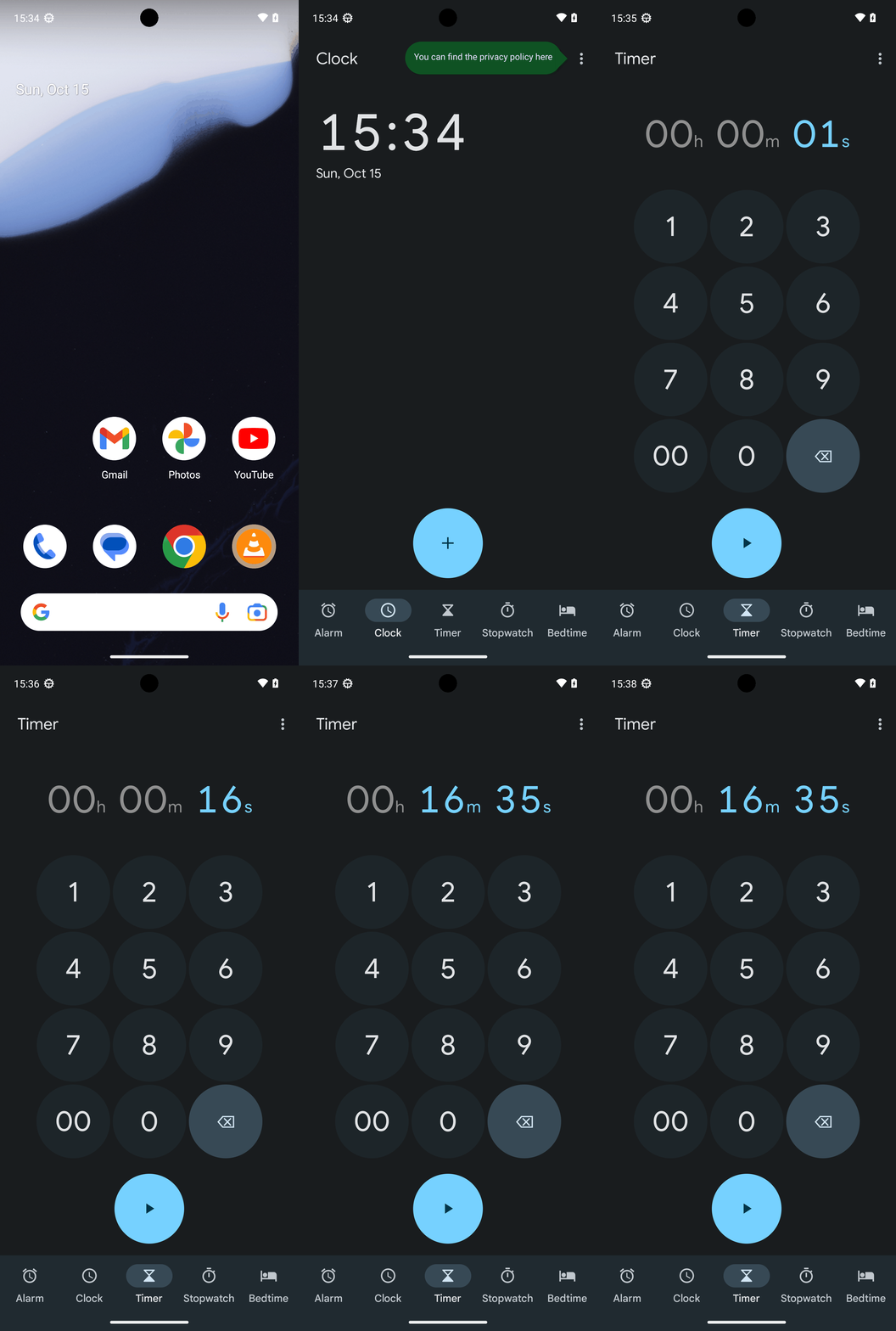
Goal: Create a timer with 0 hours, 16 minutes, and 35 seconds. Do not start the timer.
Plan Input
Input
user:
Goal: Create a timer with 0 hours, 16 minutes, and 35 seconds. Do not start the timer.
user: None
Task Thinking Step 1
Thoughts
The current subgoal explicitly states to "Open the Clock app using the open_app action." This directly translates to using the `open_app` atomic action with the text "Clock" as the argument.
Code
open_app(text="Clock")
Task Execution Result
Output
Opening the Clock app.
Task End
Success reason
Opening the Clock app.
Success
Task Thinking Step 2
Thoughts
The current subgoal is "Tap the Timer tab at the bottom." I need to find the UI element that corresponds to the "Timer" tab and perform a click action on it. From the provided UI elements, element 13 is "FrameLayout: "com.google.android.deskclock:id/tab_menu_timer", "Timer" - (432, 2127, 648, 2337)". This element has the text "Timer" and is located at the bottom of the screen.
Code
click(index=13)
Task Execution Result
Output
Clicking the "Timer" tab at the bottom of the screen.
Task End
Success reason
Clicking the "Timer" tab at the bottom of the screen.
Success
Task Thinking Step 3
Thoughts
The current subgoal requires tapping the digit '1'. I need to find the clickable element corresponding to the digit '1' and perform a click action on it. Based on the provided UI elements, element 6 is "Button: "com.google.android.deskclock:id/timer_setup_digit_1", "1"".
Code
click(index=6)
Task Execution Result
Output
Tapping the digit '1' button.
Task End
Success reason
Tapping the digit '1' button.
Success
Task Thinking Step 4
Thoughts
The current subgoal is to "Tap 6, then 3, then 5 to set the timer to 00h 16m 35s." The first action required is to tap the digit '6'. I need to find the index for the button with text "6". From the UI elements, "Button: "com.google.android.deskclock:id/timer_setup_digit_6", "6" - (683, 960, 949, 1226)" has index 11.
Code
click(index=11)
Task Execution Result
Output
Tapping the digit '6' button.
Task End
Success reason
Tapping the digit '6' button.
Success
Task Thinking Step 5
Thoughts
The current subgoal is to "Tap the digit 3." I need to find the clickable element corresponding to the digit '3' and perform a click action on it. Based on the provided UI elements, element 8 is a Button with the text "3".
Code
click(index=8)
Task Execution Result
Output
Tapping the digit '3' button.
Task End
Success reason
Tapping the digit '3' button.
Success
Task Thinking Step 6
Thoughts
The current subgoal is to "Tap the digit 5". I need to find the clickable element that represents the digit 5 and perform a click action on it. Based on the provided UI elements, element 10 is "Button: "com.google.android.deskclock:id/timer_setup_digit_5", "5"".
Code
click(index=10)
Task Execution Result
Output
Tapping the digit '5' button.
Task End
Success reason
Tapping the digit '5' button.
Success
Plan Thinking
Thoughts
I set up a timer for 0 hours, 16 minutes, and 35 seconds in the Clock app and left it not started (Start button visible).
Code
complete_goal(message="I set up a timer for 0 hours, 16 minutes, and 35 seconds in the Clock app and left it not started (Start button visible).")
Plan Input
Input
user:
Goal: Create a timer with 0 hours, 16 minutes, and 35 seconds. Do not start the timer.
user: None
Task Thinking Step 1
Thoughts
The current subgoal explicitly states to "Open the Clock app using the open_app action." This directly translates to using the `open_app` atomic action with the text "Clock" as the argument.
Code
open_app(text="Clock")
Task Execution Result
Output
Opening the Clock app.
Task End
Success reason
Opening the Clock app.
Success
Task Thinking Step 2
Thoughts
The current subgoal is "Tap the Timer tab at the bottom." I need to find the UI element that corresponds to the "Timer" tab and perform a click action on it. From the provided UI elements, element 13 is "FrameLayout: "com.google.android.deskclock:id/tab_menu_timer", "Timer" - (432, 2127, 648, 2337)". This element has the text "Timer" and is located at the bottom of the screen.
Code
click(index=13)
Task Execution Result
Output
Clicking the "Timer" tab at the bottom of the screen.
Task End
Success reason
Clicking the "Timer" tab at the bottom of the screen.
Success
Task Thinking Step 3
Thoughts
The current subgoal requires tapping the digit '1'. I need to find the clickable element corresponding to the digit '1' and perform a click action on it. Based on the provided UI elements, element 6 is "Button: "com.google.android.deskclock:id/timer_setup_digit_1", "1"".
Code
click(index=6)
Task Execution Result
Output
Tapping the digit '1' button.
Task End
Success reason
Tapping the digit '1' button.
Success
Task Thinking Step 4
Thoughts
The current subgoal is to "Tap 6, then 3, then 5 to set the timer to 00h 16m 35s." The first action required is to tap the digit '6'. I need to find the index for the button with text "6". From the UI elements, "Button: "com.google.android.deskclock:id/timer_setup_digit_6", "6" - (683, 960, 949, 1226)" has index 11.
Code
click(index=11)
Task Execution Result
Output
Tapping the digit '6' button.
Task End
Success reason
Tapping the digit '6' button.
Success
Task Thinking Step 5
Thoughts
The current subgoal is to "Tap the digit 3." I need to find the clickable element corresponding to the digit '3' and perform a click action on it. Based on the provided UI elements, element 8 is a Button with the text "3".
Code
click(index=8)
Task Execution Result
Output
Tapping the digit '3' button.
Task End
Success reason
Tapping the digit '3' button.
Success
Task Thinking Step 6
Thoughts
The current subgoal is to "Tap the digit 5". I need to find the clickable element that represents the digit 5 and perform a click action on it. Based on the provided UI elements, element 10 is "Button: "com.google.android.deskclock:id/timer_setup_digit_5", "5"".
Code
click(index=10)
Task Execution Result
Output
Tapping the digit '5' button.
Task End
Success reason
Tapping the digit '5' button.
Success
Plan Thinking
Thoughts
I set up a timer for 0 hours, 16 minutes, and 35 seconds in the Clock app and left it not started (Start button visible).
Code
complete_goal(message="I set up a timer for 0 hours, 16 minutes, and 35 seconds in the Clock app and left it not started (Start button visible).")