
Plan Input
Input
user:
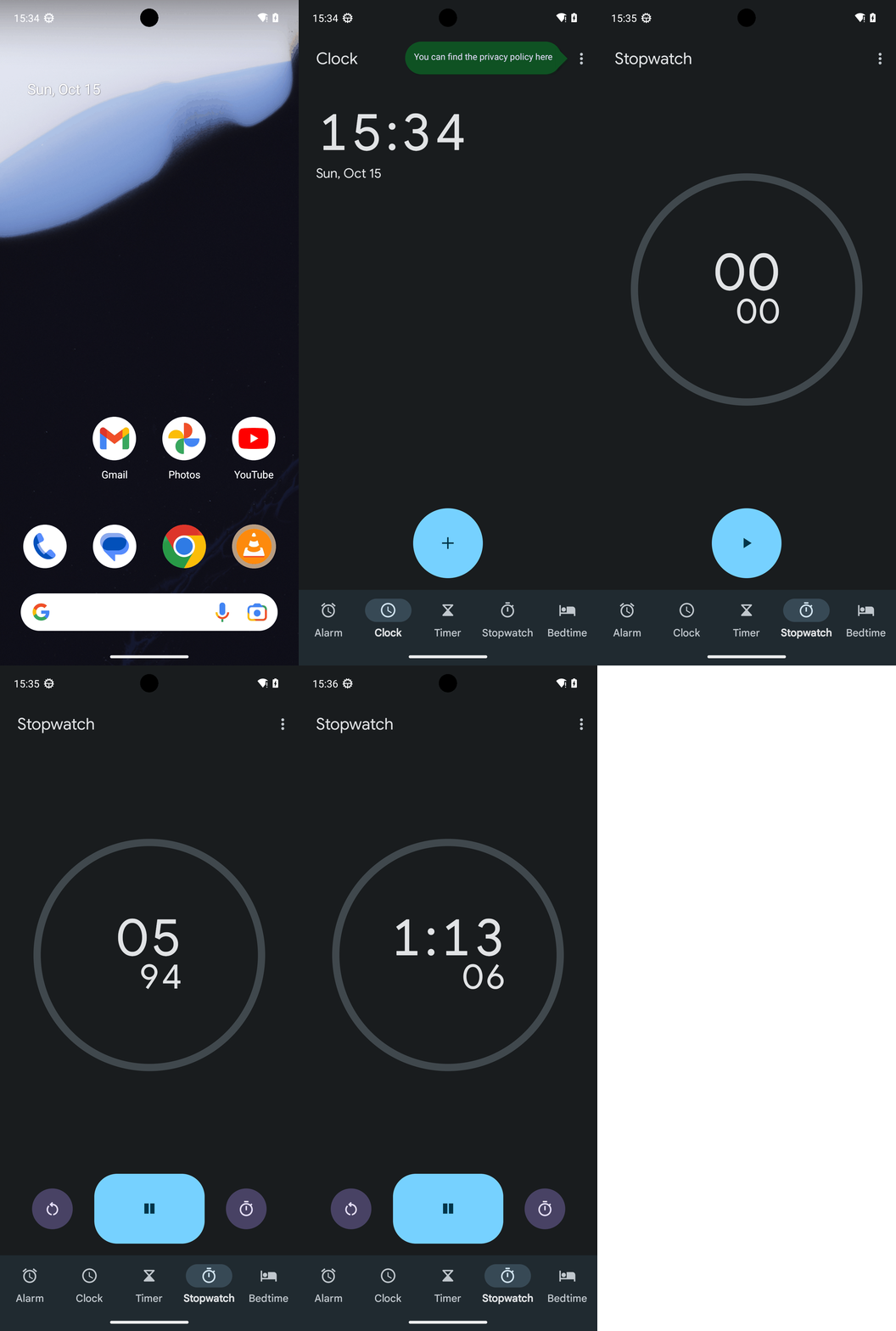
Goal: Run the stopwatch.
user: None
Task Thinking Step 1
Thoughts
The current subgoal is "Open the Clock app using open_app." 1. **Atomic action:** The action required is `open_app`. 2. **Target/location:** The target app is "Clock". 3. **Parameters:** The parameter for `open_app` is the app name, which is "Clock".
Code
open_app(text="Clock")
Task Execution Result
Output
Open the Clock app.
Task End
Success reason
Open the Clock app.
Success
Task Thinking Step 2
Thoughts
The current subgoal is to tap the "Stopwatch" tab. I need to find the UI element corresponding to "Stopwatch" and perform a click action on it. Based on the provided UI elements, element 14 is "FrameLayout: "com.google.android.deskclock:id/tab_menu_stopwatch", "Stopwatch"". Therefore, I will click on index 14.
Code
click(index=14)
Task Execution Result
Output
Tap the Stopwatch tab.
Task End
Success reason
Tap the Stopwatch tab.
Success
Task Thinking Step 3
Thoughts
The current subgoal is "Tap the Start button to run the stopwatch." I need to find the "Start" button in the UI elements and click it. Element 7 is a Button with the text "Start".
Code
click(index=7)
Task Execution Result
Output
Tap the Start button to run the stopwatch.
Task End
Success reason
Tap the Start button to run the stopwatch.
Success
Plan Thinking
Thoughts
I started the stopwatch in the Clock app and confirmed it is running.
Code
complete_goal(message="I started the stopwatch in the Clock app and confirmed it is running.")
Plan Input
Input
user:
Goal: Run the stopwatch.
user: None
Task Thinking Step 1
Thoughts
The current subgoal is "Open the Clock app using open_app." 1. **Atomic action:** The action required is `open_app`. 2. **Target/location:** The target app is "Clock". 3. **Parameters:** The parameter for `open_app` is the app name, which is "Clock".
Code
open_app(text="Clock")
Task Execution Result
Output
Open the Clock app.
Task End
Success reason
Open the Clock app.
Success
Task Thinking Step 2
Thoughts
The current subgoal is to tap the "Stopwatch" tab. I need to find the UI element corresponding to "Stopwatch" and perform a click action on it. Based on the provided UI elements, element 14 is "FrameLayout: "com.google.android.deskclock:id/tab_menu_stopwatch", "Stopwatch"". Therefore, I will click on index 14.
Code
click(index=14)
Task Execution Result
Output
Tap the Stopwatch tab.
Task End
Success reason
Tap the Stopwatch tab.
Success
Task Thinking Step 3
Thoughts
The current subgoal is "Tap the Start button to run the stopwatch." I need to find the "Start" button in the UI elements and click it. Element 7 is a Button with the text "Start".
Code
click(index=7)
Task Execution Result
Output
Tap the Start button to run the stopwatch.
Task End
Success reason
Tap the Start button to run the stopwatch.
Success
Plan Thinking
Thoughts
I started the stopwatch in the Clock app and confirmed it is running.
Code
complete_goal(message="I started the stopwatch in the Clock app and confirmed it is running.")