
Plan Input
Input
user:
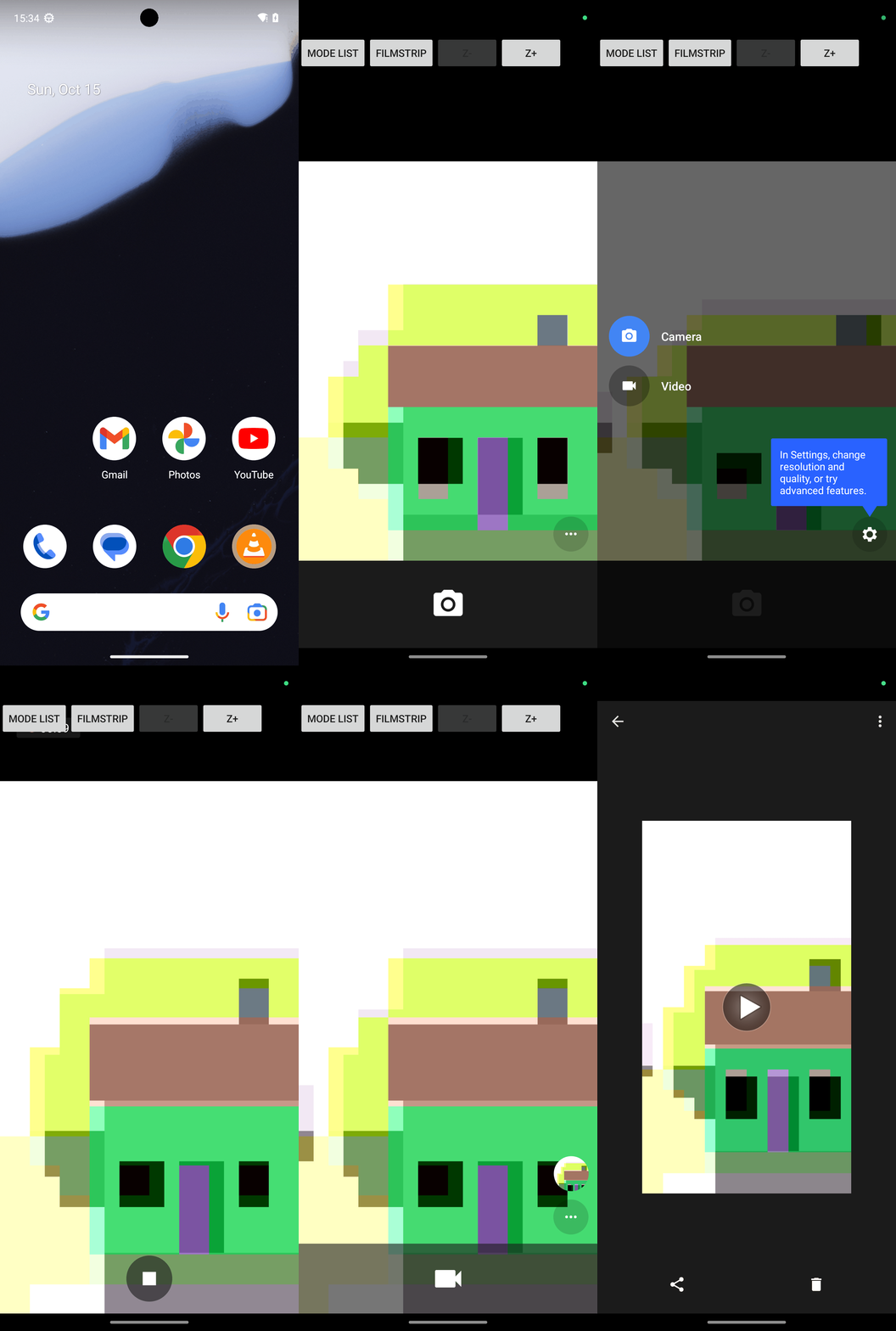
Goal: Take one video.
user: None
Task Thinking Step 1
Thoughts
The current subgoal explicitly states to "Open the Camera app using open_app." This requires the `open_app` action with the argument "Camera".
Code
open_app(text="Camera")
Task Execution Result
Output
Opening the Camera app.
Task End
Success reason
Opening the Camera app.
Success
Task Thinking Step 2
Thoughts
The current subgoal is to "Tap MODE LIST, then select Video mode." The first action is to "Tap MODE LIST". I will find the element with the text "MODE LIST" and click it. Based on the provided UI elements, element 6 is "Button: "com.android.camera2:id/accessibility_mode_toggle_button", "MODE LIST" - (0, 128, 248, 254)".
Code
click(index=6)
Task Execution Result
Output
Tapping the "MODE LIST" button to open the mode selection menu.
Task End
Success reason
Tapping the "MODE LIST" button to open the mode selection menu.
Success
Task Thinking Step 3
Thoughts
The current subgoal is "Next: Tap “Switch to Video Camera” to enter Video mode." I need to find the clickable element that corresponds to "Switch to Video Camera" and perform a click action on it. Based on the provided UI elements, element 5 is "FrameLayout: "Switch to Video Camera"".
Code
click(index=5)
Task Execution Result
Output
Tapping "Switch to Video Camera" to enter Video mode.
Task End
Success reason
Tapping "Switch to Video Camera" to enter Video mode.
Success
Task Thinking Step 4
Thoughts
The current subgoal is to "Tap the Shutter button to start recording." I need to find the element labeled "Shutter" and perform a click action on it. Based on the provided UI elements, element 5 is "ImageView: "com.android.camera2:id/shutter_button", "Shutter"".
Code
click(index=5)
Task Execution Result
Output
Tapping the Shutter button to start recording.
Task End
Success reason
Tapping the Shutter button to start recording.
Success
Task Thinking Step 5
Thoughts
The current subgoal is to "Tap the Shutter button to stop and save the recording." I need to find the "Shutter button" in the provided UI elements and perform a click action on it. Element 4 is "ImageView: "com.android.camera2:id/shutter_button", "Shutter"". This is the correct element.
Code
click(index=4)
Task Execution Result
Output
Tapping the Shutter button to stop the recording.
Task End
Success reason
Tapping the Shutter button to stop the recording.
Success
Task Thinking Step 6
Thoughts
The current subgoal explicitly states to "Tap FILMSTRIP (index 8)". This requires a 'click' action. The target element is identified by its index, which is 8.
Code
click(index=8)
Task Execution Result
Output
Tapping the FILMSTRIP button to open the gallery.
Task End
Success reason
Tapping the FILMSTRIP button to open the gallery.
Success
Plan Thinking
Thoughts
I recorded one video and confirmed it saved successfully in the Camera filmstrip as "Video taken on Oct 15, 2023 15:37:04".
Code
complete_goal(message="I recorded one video and confirmed it saved successfully in the Camera filmstrip as "Video taken on Oct 15, 2023 15:37:04".")
Plan Input
Input
user:
Goal: Take one video.
user: None
Task Thinking Step 1
Thoughts
The current subgoal explicitly states to "Open the Camera app using open_app." This requires the `open_app` action with the argument "Camera".
Code
open_app(text="Camera")
Task Execution Result
Output
Opening the Camera app.
Task End
Success reason
Opening the Camera app.
Success
Task Thinking Step 2
Thoughts
The current subgoal is to "Tap MODE LIST, then select Video mode." The first action is to "Tap MODE LIST". I will find the element with the text "MODE LIST" and click it. Based on the provided UI elements, element 6 is "Button: "com.android.camera2:id/accessibility_mode_toggle_button", "MODE LIST" - (0, 128, 248, 254)".
Code
click(index=6)
Task Execution Result
Output
Tapping the "MODE LIST" button to open the mode selection menu.
Task End
Success reason
Tapping the "MODE LIST" button to open the mode selection menu.
Success
Task Thinking Step 3
Thoughts
The current subgoal is "Next: Tap “Switch to Video Camera” to enter Video mode." I need to find the clickable element that corresponds to "Switch to Video Camera" and perform a click action on it. Based on the provided UI elements, element 5 is "FrameLayout: "Switch to Video Camera"".
Code
click(index=5)
Task Execution Result
Output
Tapping "Switch to Video Camera" to enter Video mode.
Task End
Success reason
Tapping "Switch to Video Camera" to enter Video mode.
Success
Task Thinking Step 4
Thoughts
The current subgoal is to "Tap the Shutter button to start recording." I need to find the element labeled "Shutter" and perform a click action on it. Based on the provided UI elements, element 5 is "ImageView: "com.android.camera2:id/shutter_button", "Shutter"".
Code
click(index=5)
Task Execution Result
Output
Tapping the Shutter button to start recording.
Task End
Success reason
Tapping the Shutter button to start recording.
Success
Task Thinking Step 5
Thoughts
The current subgoal is to "Tap the Shutter button to stop and save the recording." I need to find the "Shutter button" in the provided UI elements and perform a click action on it. Element 4 is "ImageView: "com.android.camera2:id/shutter_button", "Shutter"". This is the correct element.
Code
click(index=4)
Task Execution Result
Output
Tapping the Shutter button to stop the recording.
Task End
Success reason
Tapping the Shutter button to stop the recording.
Success
Task Thinking Step 6
Thoughts
The current subgoal explicitly states to "Tap FILMSTRIP (index 8)". This requires a 'click' action. The target element is identified by its index, which is 8.
Code
click(index=8)
Task Execution Result
Output
Tapping the FILMSTRIP button to open the gallery.
Task End
Success reason
Tapping the FILMSTRIP button to open the gallery.
Success
Plan Thinking
Thoughts
I recorded one video and confirmed it saved successfully in the Camera filmstrip as "Video taken on Oct 15, 2023 15:37:04".
Code
complete_goal(message="I recorded one video and confirmed it saved successfully in the Camera filmstrip as "Video taken on Oct 15, 2023 15:37:04".")