
Back to benchmark
Browser Maze
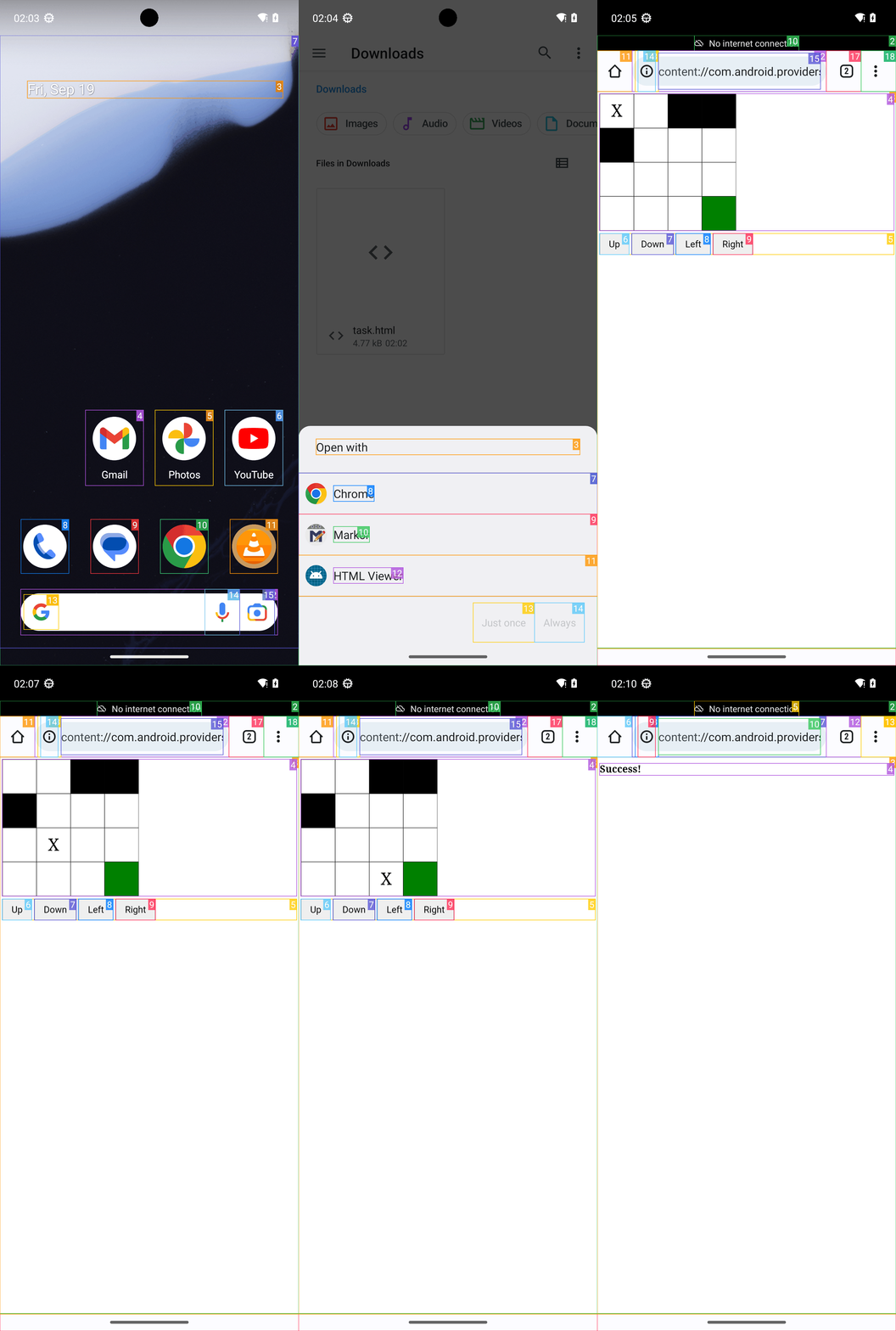
Goal: Open the file task.html in Downloads in the file manager; when prompted open it with Chrome. Then navigate the X to the bottom-right cell, by using the direction buttons.
Plan Input
Input
user:
Goal: Open the file task.html in Downloads in the file manager; when prompted open it with Chrome. Then navigate the X to the bottom-right cell, by using the direction buttons.
user: None
Task Thinking Step 1
Thoughts
The current subgoal is to open the Files app. The atomic action `open_app` is suitable for this. The target app name is "Files".
Code
open_app(text="Files")
Task Execution Result
Output
Open the "Files" app.
Task End
Success reason
Open the "Files" app.
Success
Task Thinking Step 2
Thoughts
The current subgoal is to "Tap the file named 'task.html' in Downloads." I need to find the UI element corresponding to "task.html" and perform a click action on it. Element 22 in the provided UI elements list has the text "task.html".
Code
click(index=22)
Task Execution Result
Output
Click the file named "task.html".
Task End
Success reason
Click the file named "task.html".
Success
Task Thinking Step 3
Thoughts
The current subgoal is to "Tap Chrome in the “Open with” dialog." I need to perform a `click` action. The target element is "Chrome". From the provided UI elements, "Chrome" is associated with index 8.
Code
click(index=8)
Task Execution Result
Output
Tap Chrome in the “Open with” dialog.
Task End
Success reason
Tap Chrome in the “Open with” dialog.
Success
Task Thinking Step 4
Thoughts
The current subgoal is to "Tap Just once". I need to find the element with the text "Just once" and perform a click action on it. Based on the provided UI elements, element 13 has the text "Just once".
Code
click(index=13)
Task Execution Result
Output
Click the "Just once" button.
Task End
Success reason
Click the "Just once" button.
Success
Task Thinking Step 5
Thoughts
The current subgoal is to "Tap Right once." I need to find the UI element with the text "Right" and perform a click action on it. Based on the provided UI elements, the "Right" button has index 9.
Code
click(index=9)
Task Execution Result
Output
Click the "Right" button.
Task End
Success reason
Click the "Right" button.
Success
Task Thinking Step 6
Thoughts
The current subgoal is to "Tap Down once." I need to find the "Down" button in the provided UI elements and click it. The "Down" button is listed with index 7.
Code
click(index=7)
Task Execution Result
Output
Click the "Down" button.
Task End
Success reason
Click the "Down" button.
Success
Task Thinking Step 7
Thoughts
The current subgoal is to "Tap Down again (second time)". I need to find the "Down" button and perform a click action on it. Based on the provided UI elements, the "Down" button is at index 7.
Code
click(index=7)
Task Execution Result
Output
Click the "Down" button.
Task End
Success reason
Click the "Down" button.
Success
Task Thinking Step 8
Thoughts
The current subgoal is to "Tap Down once". I need to locate the "Down" button in the provided UI elements and perform a click action on it. Element 7 is "Button: "Down"".
Code
click(index=7)
Task Execution Result
Output
Click the "Down" button.
Task End
Success reason
Click the "Down" button.
Success
Task Thinking Step 9
Thoughts
The current subgoal is to "Tap Right once." I need to find the "Right" button in the UI elements and perform a click action on it. Element 9 is a Button with the text "Right".
Code
click(index=9)
Task Execution Result
Output
Click the "Right" button.
Task End
Success reason
Click the "Right" button.
Success
Task Thinking Step 10
Thoughts
The current subgoal is to "Tap Right once". I need to find the element labeled "Right" and perform a click action on it. Based on the provided UI elements, the "Right" button has index 9.
Code
click(index=9)
Task Execution Result
Output
Click the "Right" button.
Task End
Success reason
Click the "Right" button.
Success
Plan Thinking
Thoughts
I opened task.html from Downloads via Files, selected Chrome when prompted, and used the on-page direction buttons to move the X to the bottom-right cell. The page shows “Success!” confirming completion.
Code
complete_goal(message="I opened task.html from Downloads via Files, selected Chrome when prompted, and used the on-page direction buttons to move the X to the bottom-right cell. The page shows “Success!” confirming completion.")
Plan Input
Input
user:
Goal: Open the file task.html in Downloads in the file manager; when prompted open it with Chrome. Then navigate the X to the bottom-right cell, by using the direction buttons.
user: None
Task Thinking Step 1
Thoughts
The current subgoal is to open the Files app. The atomic action `open_app` is suitable for this. The target app name is "Files".
Code
open_app(text="Files")
Task Execution Result
Output
Open the "Files" app.
Task End
Success reason
Open the "Files" app.
Success
Task Thinking Step 2
Thoughts
The current subgoal is to "Tap the file named 'task.html' in Downloads." I need to find the UI element corresponding to "task.html" and perform a click action on it. Element 22 in the provided UI elements list has the text "task.html".
Code
click(index=22)
Task Execution Result
Output
Click the file named "task.html".
Task End
Success reason
Click the file named "task.html".
Success
Task Thinking Step 3
Thoughts
The current subgoal is to "Tap Chrome in the “Open with” dialog." I need to perform a `click` action. The target element is "Chrome". From the provided UI elements, "Chrome" is associated with index 8.
Code
click(index=8)
Task Execution Result
Output
Tap Chrome in the “Open with” dialog.
Task End
Success reason
Tap Chrome in the “Open with” dialog.
Success
Task Thinking Step 4
Thoughts
The current subgoal is to "Tap Just once". I need to find the element with the text "Just once" and perform a click action on it. Based on the provided UI elements, element 13 has the text "Just once".
Code
click(index=13)
Task Execution Result
Output
Click the "Just once" button.
Task End
Success reason
Click the "Just once" button.
Success
Task Thinking Step 5
Thoughts
The current subgoal is to "Tap Right once." I need to find the UI element with the text "Right" and perform a click action on it. Based on the provided UI elements, the "Right" button has index 9.
Code
click(index=9)
Task Execution Result
Output
Click the "Right" button.
Task End
Success reason
Click the "Right" button.
Success
Task Thinking Step 6
Thoughts
The current subgoal is to "Tap Down once." I need to find the "Down" button in the provided UI elements and click it. The "Down" button is listed with index 7.
Code
click(index=7)
Task Execution Result
Output
Click the "Down" button.
Task End
Success reason
Click the "Down" button.
Success
Task Thinking Step 7
Thoughts
The current subgoal is to "Tap Down again (second time)". I need to find the "Down" button and perform a click action on it. Based on the provided UI elements, the "Down" button is at index 7.
Code
click(index=7)
Task Execution Result
Output
Click the "Down" button.
Task End
Success reason
Click the "Down" button.
Success
Task Thinking Step 8
Thoughts
The current subgoal is to "Tap Down once". I need to locate the "Down" button in the provided UI elements and perform a click action on it. Element 7 is "Button: "Down"".
Code
click(index=7)
Task Execution Result
Output
Click the "Down" button.
Task End
Success reason
Click the "Down" button.
Success
Task Thinking Step 9
Thoughts
The current subgoal is to "Tap Right once." I need to find the "Right" button in the UI elements and perform a click action on it. Element 9 is a Button with the text "Right".
Code
click(index=9)
Task Execution Result
Output
Click the "Right" button.
Task End
Success reason
Click the "Right" button.
Success
Task Thinking Step 10
Thoughts
The current subgoal is to "Tap Right once". I need to find the element labeled "Right" and perform a click action on it. Based on the provided UI elements, the "Right" button has index 9.
Code
click(index=9)
Task Execution Result
Output
Click the "Right" button.
Task End
Success reason
Click the "Right" button.
Success
Plan Thinking
Thoughts
I opened task.html from Downloads via Files, selected Chrome when prompted, and used the on-page direction buttons to move the X to the bottom-right cell. The page shows “Success!” confirming completion.
Code
complete_goal(message="I opened task.html from Downloads via Files, selected Chrome when prompted, and used the on-page direction buttons to move the X to the bottom-right cell. The page shows “Success!” confirming completion.")