
Audio Recorder Record Audio With File Name
Goal: Record an audio clip and save it with name "presentation_fGwr.m4a" using Audio Recorder app.
Goal: Record an audio clip and save it with name "presentation_fGwr.m4a" using Audio Recorder app.
user: None
The current subgoal explicitly states to "Open the 'Audio Recorder' app using open_app." This requires the `open_app` action with the app name "Audio Recorder" as the argument.
open_app(text="Audio Recorder")
Open the "Audio Recorder" app.
Open the "Audio Recorder" app.
The current subgoal is to "Tap “Get started”". I need to find the clickable element with the text "Get started" and perform a click action on it. Based on the provided UI elements, element 6 is a button with the text "Get started".
click(index=6)
Click the "Get started" button.
Click the "Get started" button.
The current subgoal is to "Tap “Apply” to finish setup." I need to locate the "Apply" button in the provided UI elements and perform a click action on it. Element 35 is identified as "Button: "com.dimowner.audiorecorder:id/btn_apply", "Apply"".
click(index=35)
Click the "Apply" button.
Click the "Apply" button.
The current subgoal is to "Tap the center Record button to start recording." I need to find the element that represents the record button. Based on the provided UI elements, element 8, "ImageButton: 'com.dimowner.audiorecorder:id/btn_record', 'Recording: %s' - (429, 2074, 650, 2295)", is clearly the record button. I will perform a click action on this element.
click(index=8)
Click the record button to start recording.
Click the record button to start recording.
The subgoal is to "Tap the Stop button to end the recording." I need to identify the stop button from the provided UI elements. Element 10 is described as "btn_record_stop", which is the stop button. I will perform a click action on this element.
click(index=10)
Click the stop button to end the recording.
Click the stop button to end the recording.
The current subgoal is to "Tap the “Save” button to save the recording." I need to find the "Save" button in the provided UI elements and perform a click action on it. The "Save" button is listed as index 6.
click(index=6)
Tap the "Save" button.
Tap the "Save" button.
The current subgoal is to tap the "records list" button. I need to find the element in the UI that matches "records list" and then perform a click action on it. Based on the provided UI elements, element 15, "ImageButton: 'com.dimowner.audiorecorder:id/btn_records_list', 'btn_records_list'", is the target.
click(index=15)
Tap the "records list" button to open the recordings list.
Tap the "records list" button to open the recordings list.
The current subgoal is to tap the three-dot "more" button for the "presentation_fGwr" item. I need to find the element that matches this description. Element 10 is an "ImageButton" with resource ID "com.dimowner.audiorecorder:id/list_item_more" and text "list_item_more", which is typically represented by a three-dot icon. This button is associated with the "presentation_fGwr" item (element 6). So, I will click on element 10.
click(index=10)
Tap the three-dot "more" button for the "presentation_fGwr" item.
Tap the three-dot "more" button for the "presentation_fGwr" item.
The current subgoal is to "Tap 'Information' to view details." I need to find the clickable element with the text "Information" and perform a click action. Based on the provided UI elements, element 6 is a LinearLayout containing a TextView with the text "Information".
click(index=6)
Tap the "Information" option to view details.
Tap the "Information" option to view details.
I recorded an audio clip using the Audio Recorder app and saved it as "presentation_fGwr.m4a". Verified on the Information screen: file location is /storage/emulated/0/Android/data/com.dimowner.audiorecorder/files/Music/records/presentation_fGwr.m4a, format m4a, duration 00:38, size 0.45 Mb.
complete_goal(message="I recorded an audio clip using the Audio Recorder app and saved it as "presentation_fGwr.m4a". Verified on the Information screen: file location is /storage/emulated/0/Android/data/com.dimowner.audiorecorder/files/Music/records/presentation_fGwr.m4a, format m4a, duration 00:38, size 0.45 Mb.")
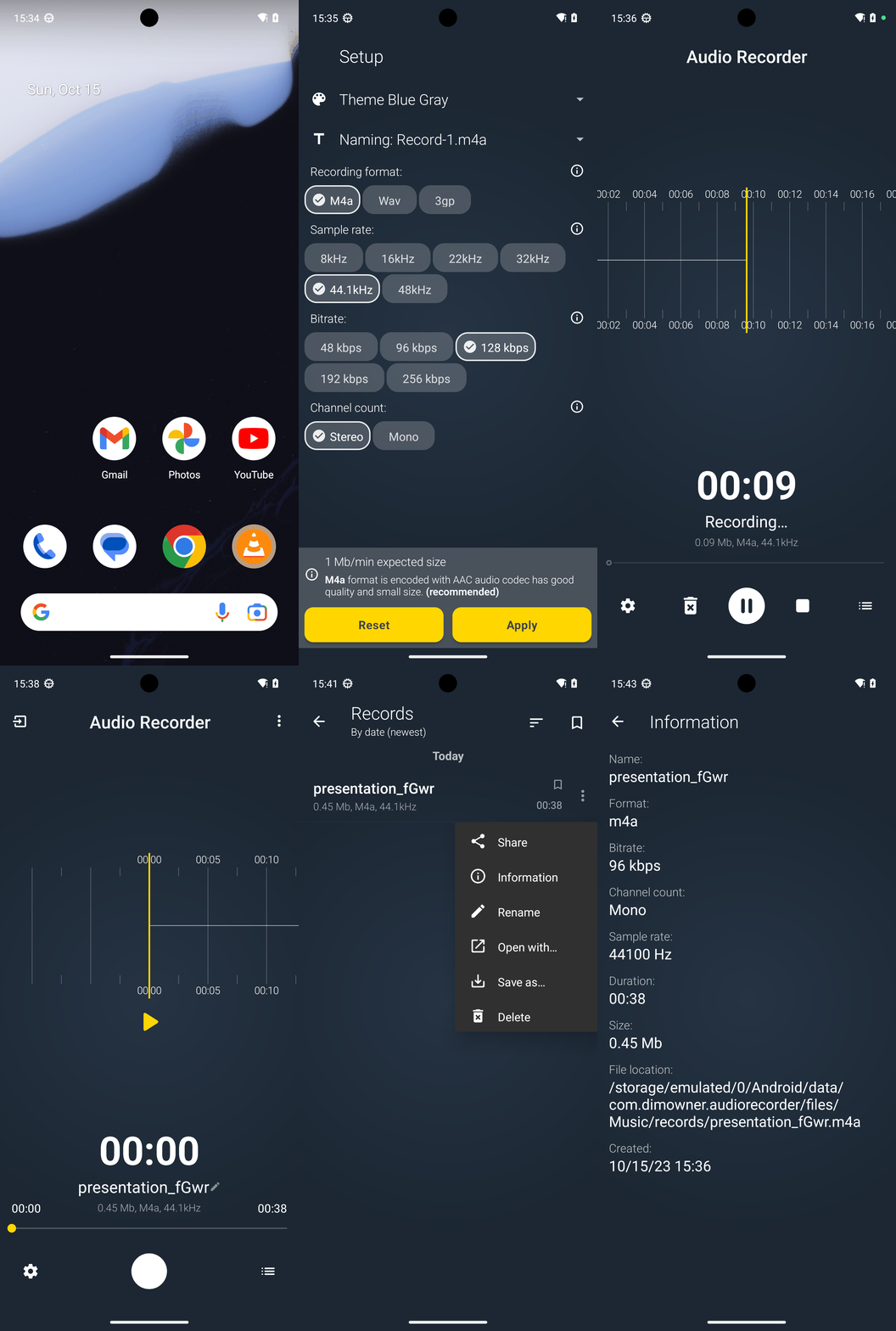
Goal: Record an audio clip and save it with name "presentation_fGwr.m4a" using Audio Recorder app.
user: None
The current subgoal explicitly states to "Open the 'Audio Recorder' app using open_app." This requires the `open_app` action with the app name "Audio Recorder" as the argument.
open_app(text="Audio Recorder")
Open the "Audio Recorder" app.
Open the "Audio Recorder" app.
The current subgoal is to "Tap “Get started”". I need to find the clickable element with the text "Get started" and perform a click action on it. Based on the provided UI elements, element 6 is a button with the text "Get started".
click(index=6)
Click the "Get started" button.
Click the "Get started" button.
The current subgoal is to "Tap “Apply” to finish setup." I need to locate the "Apply" button in the provided UI elements and perform a click action on it. Element 35 is identified as "Button: "com.dimowner.audiorecorder:id/btn_apply", "Apply"".
click(index=35)
Click the "Apply" button.
Click the "Apply" button.
The current subgoal is to "Tap the center Record button to start recording." I need to find the element that represents the record button. Based on the provided UI elements, element 8, "ImageButton: 'com.dimowner.audiorecorder:id/btn_record', 'Recording: %s' - (429, 2074, 650, 2295)", is clearly the record button. I will perform a click action on this element.
click(index=8)
Click the record button to start recording.
Click the record button to start recording.
The subgoal is to "Tap the Stop button to end the recording." I need to identify the stop button from the provided UI elements. Element 10 is described as "btn_record_stop", which is the stop button. I will perform a click action on this element.
click(index=10)
Click the stop button to end the recording.
Click the stop button to end the recording.
The current subgoal is to "Tap the “Save” button to save the recording." I need to find the "Save" button in the provided UI elements and perform a click action on it. The "Save" button is listed as index 6.
click(index=6)
Tap the "Save" button.
Tap the "Save" button.
The current subgoal is to tap the "records list" button. I need to find the element in the UI that matches "records list" and then perform a click action on it. Based on the provided UI elements, element 15, "ImageButton: 'com.dimowner.audiorecorder:id/btn_records_list', 'btn_records_list'", is the target.
click(index=15)
Tap the "records list" button to open the recordings list.
Tap the "records list" button to open the recordings list.
The current subgoal is to tap the three-dot "more" button for the "presentation_fGwr" item. I need to find the element that matches this description. Element 10 is an "ImageButton" with resource ID "com.dimowner.audiorecorder:id/list_item_more" and text "list_item_more", which is typically represented by a three-dot icon. This button is associated with the "presentation_fGwr" item (element 6). So, I will click on element 10.
click(index=10)
Tap the three-dot "more" button for the "presentation_fGwr" item.
Tap the three-dot "more" button for the "presentation_fGwr" item.
The current subgoal is to "Tap 'Information' to view details." I need to find the clickable element with the text "Information" and perform a click action. Based on the provided UI elements, element 6 is a LinearLayout containing a TextView with the text "Information".
click(index=6)
Tap the "Information" option to view details.
Tap the "Information" option to view details.
I recorded an audio clip using the Audio Recorder app and saved it as "presentation_fGwr.m4a". Verified on the Information screen: file location is /storage/emulated/0/Android/data/com.dimowner.audiorecorder/files/Music/records/presentation_fGwr.m4a, format m4a, duration 00:38, size 0.45 Mb.
complete_goal(message="I recorded an audio clip using the Audio Recorder app and saved it as "presentation_fGwr.m4a". Verified on the Information screen: file location is /storage/emulated/0/Android/data/com.dimowner.audiorecorder/files/Music/records/presentation_fGwr.m4a, format m4a, duration 00:38, size 0.45 Mb.")